




Publishing your images

Step one: Choose a license
If you already have your own website hosting your images and you'd like to put others on notice that they can use and share your images, start by choosing a license for your work.
Choose a license for your images

Step two: Copy the code
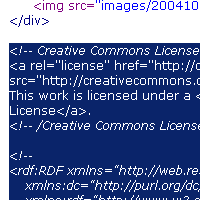
On the "Mark your content" page of the license process, copy the code provided by highlighting it with your mouse and hitting ctrl-c (command-c on a Mac).
Step three: Paste code into your site
The specifics of the last step will depend on how you edit your website. Most desktop website tools like Dreamweaver, Frontpage, or GoLive offer a "code view" that lets you see the code that makes up your page. Near the end of the page you are hosting images, before you see </body></html>, paste in the code copied in the previous step by clicking the page and hitting ctrl-v (command-v on a Mac).
If you use custom photo gallery software to display your images, try pasting the code into the "footer" file in your site, or the section of the gallery that controls what the bottom of pages look like.
