| title | Summary of Common Java Concurrency Interview Questions (Part 1) | ||||||||||||||
|---|---|---|---|---|---|---|---|---|---|---|---|---|---|---|---|
| category | Java | ||||||||||||||
| tag |
|
||||||||||||||
| head |
|
A process is the execution of a program and is the basic unit for the system to run programs; hence, a process is dynamic. When the system runs a program, it is a process from creation, execution, to termination.
In Java, when we start the main function, we are actually starting a JVM process, and the thread where the main function resides is a thread within this process, also known as the main thread.
As shown in the image below, we can clearly see the current processes running on Windows by checking the task manager (the execution of .exe files).

A thread is similar to a process but is a smaller unit of execution than a process. A process can generate multiple threads during its execution. Unlike processes, multiple threads of the same type share the heap and method area resources of the process, but each thread has its own program counter, Java virtual machine stack, and native method stack. Thus, creating a thread or switching between threads imposes a much lower burden on the system than processes, which is why threads are also referred to as lightweight processes.
Java programs are inherently multithreaded; we can use JMX to see what threads a typical Java program has, as illustrated in the code below.
public class MultiThread {
	public static void main(String[] args) {
		// Get the Java thread management MXBean
		ThreadMXBean threadMXBean = ManagementFactory.getThreadMXBean();
		// No need to get synchronized monitor and synchronizer information, just get thread and thread stack information
		ThreadInfo[] threadInfos = threadMXBean.dumpAllThreads(false, false);
		// Traverse thread information and only print thread ID and thread name information
		for (ThreadInfo threadInfo : threadInfos) {
			System.out.println("[" + threadInfo.getThreadId() + "] " + threadInfo.getThreadName());
		}
	}
}
The output of the above program is as follows (the content may vary; do not worry too much about the function of each thread below; just know that the main thread executes the main method):
[5] Attach Listener // Add Listener
[4] Signal Dispatcher // Thread that dispatches signals to the JVM
[3] Finalizer // Thread that calls the finalize method of an object
[2] Reference Handler // Thread that cleans up references
[1] main // Main thread, program entry point
From the output, we can see that: The execution of a Java program involves the simultaneous operation of the main thread and several other threads.
Before JDK 1.2, Java threads were implemented using green threads, which are a type of user-level thread. This means that the JVM simulated multithreading without relying on the operating system. Due to some limitations of green threads compared to native threads (e.g., green threads cannot directly use operating system features like asynchronous I/O, and can only run on one kernel thread without utilizing multiple cores), from JDK 1.2 onwards, Java threads were changed to be implemented based on native threads, meaning that the JVM directly uses the operating system's native kernel-level threads to implement Java threads, with the operating system kernel managing thread scheduling.
We mentioned user threads and kernel threads earlier, and considering that many readers might not be familiar with the differences between them, here is a brief introduction:
- User Thread: A thread managed and scheduled by user-space programs, running in user space (specifically meant for application use).
- Kernel Thread: A thread managed and scheduled by the operating system kernel, running in kernel space (which only kernel programs can access).
To summarize briefly, here are the differences and characteristics of user threads and kernel threads: User threads have low creation and switching costs but cannot utilize multiple cores. Kernel-level threads have high creation and switching costs but can utilize multiple cores.
In short, the relationship between Java threads and operating system threads is: The essence of current Java threads is essentially operating system threads.
Thread models are the relationships between user threads and kernel threads. The three common thread models are:
- One-to-One (one user thread corresponds to one kernel thread)
- Many-to-One (multiple user threads map to one kernel thread)
- Many-to-Many (multiple user threads map to multiple kernel threads)
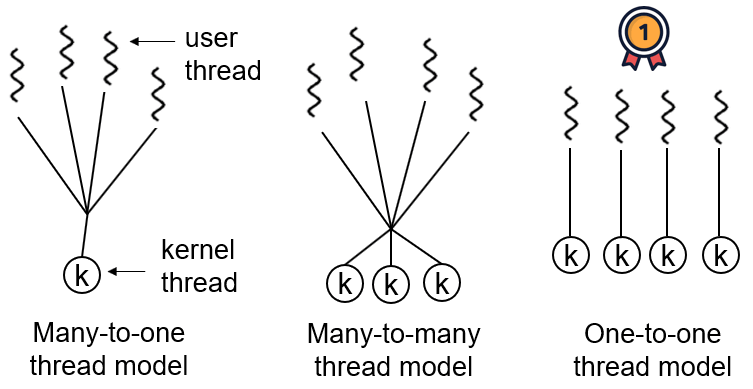
In mainstream operating systems like Windows and Linux, Java threads employ a one-to-one thread model, meaning one Java thread corresponds to one system kernel thread. The Solaris system is an exception (as it natively supports a many-to-many threading model), with HotSpot VM supporting both many-to-many and one-to-one threading on Solaris. For specific details, refer to R's answer: Is the thread model in the JVM user-level?.
⭐️Please briefly describe the relationship, differences, and advantages/disadvantages of threads and processes.
The image below shows the Java memory area, and from this image, we can discuss the relationship between threads and processes from the perspective of the JVM.
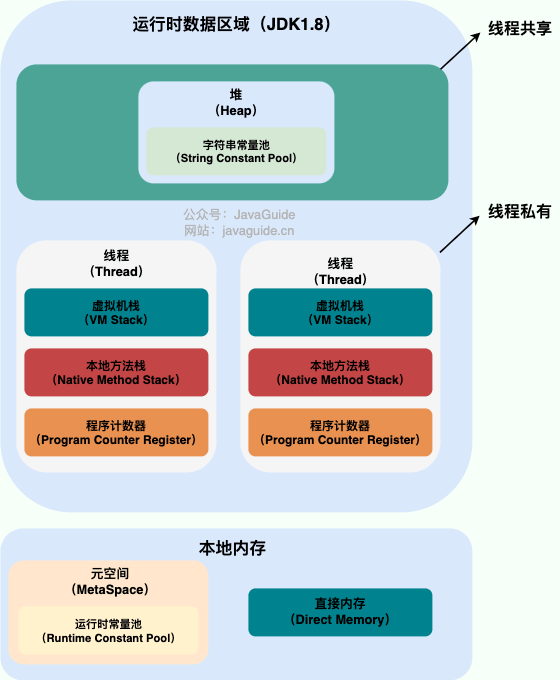
From the image, we can see that a process can have multiple threads, and those threads share the heap and method area (meta space after JDK 1.8) resources of the process. However, each thread has its own program counter, Java virtual machine stack, and native method stack.
Summary: Threads are smaller units of execution created from a process. The biggest difference between threads and processes is that processes are generally independent, whereas threads may not be, because threads within the same process can significantly affect each other. Thread execution has a low overhead but is not conducive to resource management and protection; the opposite is true for processes.
Now let's explore an extended content of this knowledge!
Consider this question: why are the program counter, Java virtual machine stack, and native method stack thread-private? Why are the heap and method area thread-shared?
The program counter mainly has two functions:
- The bytecode interpreter uses the program counter to read instructions sequentially, thereby controlling the flow of code: sequential execution, selection, loop, and exception handling.
- In a multithreaded scenario, the program counter is used to record the position of the currently executing thread, so when the thread is switched back, it knows where the thread last executed.
It's important to note that if a native method is executed, the program counter records an undefined address; only when executing Java code does the program counter record the address of the next instruction.
Therefore, the program counter is private primarily to restore to the correct execution position after a thread switch.
- Java Virtual Machine Stack: Each Java method creates a frame before execution to store local variable tables, operand stacks, references from constant pools, etc. The process from method call to execution completion corresponds to the entry and exit of a stack frame in the Java virtual machine stack.
- Native Method Stack: Functions similarly to the virtual machine stack, but the difference is: The virtual machine stack serves Java method execution (i.e., bytecode), while the native method stack serves native methods used by the virtual machine. In the HotSpot virtual machine, it merges with the Java virtual machine stack.
Thus, to ensure that local variables within a thread are not accessed by other threads, both the virtual machine stack and native method stack are thread-private.
The heap and method area are resources shared by all threads, with the heap being the largest contiguous memory block in the process, mainly used for storing newly created objects (almost all objects are allocated memory here), while the method area is primarily used to store information about loaded classes, constants, static variables, and just-in-time compiled code.
Generally speaking, there are many ways to create threads, such as inheriting from the Thread class, implementing the Runnable interface, implementing the Callable interface, using thread pools, and using the CompletableFuture class, among others.
However, none of these methods truly create a thread. More accurately, they are all ways of using multithreading in Java.
Strictly speaking, there is only one way in Java to create a thread, which is to call new Thread().start(). Regardless of the method, it ultimately depends on new Thread().start().
For a detailed analysis of this issue, you can refer to this article: Everyone says that Java has three ways to create threads! The shocking deception in concurrent programming!.
Java threads can only be in one of the following six different states at a designated moment in their execution lifecycle:
- NEW: Initial state, the thread has been created but has not been called
start(). - RUNNABLE: Running state, the thread has been called
start()and is waiting to run. - BLOCKED: Blocked state, needs to wait for the lock to be released.
- WAITING: Waiting state, indicating that this thread needs to wait for another thread to perform a specific action (notification or interruption).
- TIME_WAITING: Timeout waiting state, can return after a specified time instead of waiting indefinitely like WAITING.
- TERMINATED: Termination state, indicating that the thread has finished running.
Thread states are not fixed at a single state during their lifecycle but switch between different states as the code executes.
Java thread state transition diagram (Image source: Corrections | Three Errors about Thread States in "The Art of Concurrent Programming"):
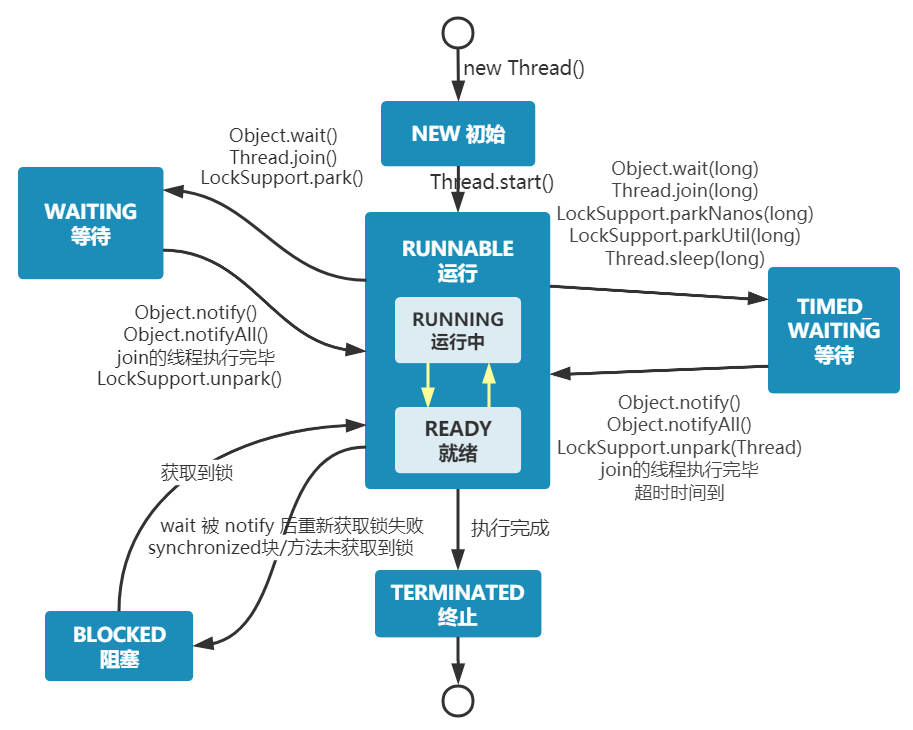
From the image, we see that after a thread is created, it enters the NEW state. After calling the start() method, it begins running and is in the READY state. Once a runnable thread gets a CPU time slice, it enters the RUNNING state.
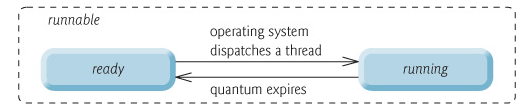
At the operating system level, threads have READY and RUNNING states; at the JVM level, only the RUNNABLE state can be seen (Image source: HowToDoInJava:Java Thread Life Cycle and Thread States), so the Java system generally refers to these two states collectively as RUNNABLE state.
Why doesn’t the JVM distinguish these two states? (Excerpt from: Why does Java Threading have a sixth state? - Dawell's Answer) Current time-sharing multi-tasking OS architectures typically employ time slice preemptive round-robin scheduling, allowing a thread to run on the CPU for a maximum of a short duration (e.g., 10-20ms, meaning about 0.01 seconds). After this time slice, the thread must return to the scheduling queue's end for re-scheduling (back to READY state). Because context switching occurs so rapidly, distinguishing these two states becomes meaningless.
- When a thread executes the
wait()method, it enters the WAITING state. A thread in the waiting state requires notification from another thread to return to the RUNNABLE state. - The TIMED_WAITING state adds a timeout limit to the waiting state; for example, calls to
sleep(long millis)orwait(long millis)can put the thread into the TIMED_WAITING state. After the timeout, the thread will return to RUNNABLE state. - When a thread enters
synchronizedmethods/blocks or callswaitand then re-enterssynchronizedmethods/blocks but the lock is occupied by other threads, it will enter the BLOCKED state. - After executing the
run()method, the thread will enter the TERMINATED state.
Related reading: Do you really understand the various states of a thread?.
During execution, threads will have their own execution conditions and states (also known as contexts), such as the program counter and stack information mentioned earlier. The thread will exit the CPU-occupied state under the following circumstances:
- Proactively relinquishing CPU, for example, by calling
sleep(),wait(), etc. - Time slice expiration, as the operating system must prevent a thread or process from monopolizing the CPU for too long, starving other threads or processes.
- Triggering a blocking type of system interrupt, such as requesting IO, causing the thread to be blocked.
- Termination or exit from execution.
The first three cases lead to a thread switch; context switching means saving the current thread's context so that it can be restored the next time the thread occupies the CPU while loading the context of the next thread to occupy the CPU. This is referred to as context switching.
Context switching is a basic function of modern operating systems, and since it requires saving and recovering information each time, it occupies CPU, memory, and other system resources, leading to some efficiency loss. Frequent switches can result in overall low efficiency.
Similarities: Both can pause thread execution.
Differences:
- The
sleep()method doesn't release locks, whereas thewait()method does. wait()is generally used for inter-thread communication, whilesleep()is typically used to pause execution.- After calling the
wait()method, the thread doesn't wake up automatically; another thread must callnotify()ornotifyAll()on the same object. Thesleep()method, after its execution ends, will make the thread wake up automatically or it can also timeout usingwait(long timeout). sleep()is a static native method of theThreadclass, whilewait()is a native method of theObjectclass. Why is this designed that way? The next question will address this.
wait() allows a thread that has acquired an object lock to wait automatically, releasing the lock it currently holds. Each object (Object) possesses an object lock, meaning to release an object lock and enter the WAITING state, manipulation on the corresponding object (Object) rather than the current thread (Thread) is necessary.
Similar question: Why is the sleep() method defined in Thread?
Because sleep() allows the current thread to pause execution without involving the object class and does not require acquiring an object lock.
This is another classic Java multithreading interview question that is often posed in interviews. It seems simple, but many people struggle to answer!
When you instantiate a Thread, the thread enters a new state. Calling start() will initiate a thread and place it into the ready state, where it can begin running once time is allocated. start() executes the necessary preparations and then automatically executes the content of the run() method; this constitutes real multithreaded work. However, calling run() directly treats it as a normal method executing in the main thread, not running in a separate thread, meaning this does not constitute multithreading work.
Summary: It is only by calling the start() method that a thread is initiated and enters the ready state; directly executing run() will not execute it in a multithreaded manner.
- Concurrency: Two or more jobs are executed within the same time period.
- Parallelism: Two or more jobs are executed at the same instant.
The key point is: whether the execution is simultaneous.
- Synchronous: After a call is made, it cannot return until the result is obtained, waiting continuously.
- Asynchronous: After the call is made, it does not wait for the result to return, directly returning the call.
Describing it overall:
- From a computer's low-level perspective: Threads can be compared to lightweight processes, being the smallest unit of program execution; the cost for switching and scheduling between threads is significantly lower than that for processes. Additionally, in the era of multi-core CPUs, multiple threads can run simultaneously, which reduces the overhead of thread context switching.
- From the perspective of contemporary internet development trends: Current systems often require millions or even tens of millions of concurrent volumes, and multithreaded concurrent programming is fundamental to developing high-concurrency systems, leveraging multithreading mechanisms can significantly improve the overall concurrency capability and performance of the system.
Digging deeper into the computer's low-level architecture:
- Single-core era: In the single-core era, multithreading primarily improves the efficiency of CPU and IO system usage within a single process. Suppose only one Java process runs; if there is only one thread in the process requesting IO, this thread will be blocked by IO, thereby blocking the entire process. CPU and IO resources run one at a time, leading to an overall system efficiency of around 50%. With multithreading, if one thread blocks due to IO, other threads can continue to utilize the CPU, enhancing overall efficiency.
- Multi-core era: In the multi-core era, multithreading is mainly used to leverage the capabilities of multi-core CPUs. For instance, if we need to compute a complex task with a single thread, it will only utilize one CPU core, regardless of how many cores the system has. Creating multiple threads allows these threads to be mapped to multiple CPU cores effectively, resulting in a significant increase in task execution efficiency provided there is no resource competition among threads, roughly equating to (execution time in single core/number of CPU cores).
A single-core CPU does support Java multithreading. The operating system allocates CPU time to different threads via time slice rotation. Although a single-core CPU can only execute one task at a time, rapid switching between multiple threads gives the impression to the user that several tasks are progressing simultaneously.
Here’s a brief mention of the thread scheduling methods used in Java.
Operating systems primarily manage multithreaded execution through two types of thread scheduling:
- Preemptive Scheduling: The operating system decides when to pause the currently executing thread and switch to another thread. This switch is typically triggered by system clock interrupts (time-slice rotation) or other high-priority events (like the completion of I/O operations). This method incurs context-switching costs but offers better fairness and CPU resource utilization, avoiding blockage.
- Cooperative Scheduling: The thread actively notifies the system to switch to another thread after execution completion. This method can reduce context-switching performance overhead but has poorer fairness and is prone to blockage.
Java employs preemptive scheduling. That is, the JVM doesn't manage thread scheduling itself, but delegates it to the operating system. The operating system typically schedules thread execution based on thread priority and time slice, with high-priority threads usually getting a greater opportunity for CPU time.
The efficiency of simultaneously running multiple threads on a single-core CPU depends on the type of threads and the nature of the tasks. Generally, there are two types of threads:
- CPU-intensive: These threads primarily engage in computation and logical processing, requiring a substantial amount of CPU resources.
- I/O-intensive: These threads primarily perform input/output operations, such as file reading/writing and network communication, requiring waiting for the I/O device's response without consuming much CPU resources.
On a single-core CPU, only one thread can run at any given moment, and other threads must wait for the CPU time slice allocation. If the thread is CPU-intensive, running multiple threads will lead to frequent context switching, increasing the system overhead and reducing efficiency. However, if the thread is I/O-intensive, running multiple threads can utilize CPU during I/O waits, thereby improving efficiency.
Thus, for single-core CPUs, if tasks are CPU-intensive, then creating many threads may hinder efficiency; conversely, if tasks are I/O-intensive, then creating more threads may enhance efficiency. Of course, "many" should be appropriate and not exceed the system's tolerable limit.
The goal of concurrent programming is to enhance program execution efficiency and hence speed up the program, but concurrency may not always lead to improved speed. There are many potential issues arising from concurrent programming, such as: memory leaks, deadlocks, thread unsafeness, etc.
Thread safety and unsafety refer to whether accessing the same data in a multithreaded environment can ensure its correctness and consistency.
- Thread safety means that in a multithreaded environment, no matter how many threads access the same data simultaneously, the correctness and consistency of this data can still be maintained.
- Thread unsafety indicates that in a multithreaded environment, simultaneous access by multiple threads may lead to data chaos, errors, or loss.
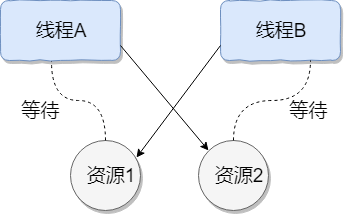
Thread deadlock describes a situation where multiple threads are simultaneously blocked, each waiting for a resource to be freed. Since threads remain indefinitely blocked, the program cannot terminate normally.
As shown in the image below, thread A holds resource 2, while thread B holds resource 1; they both simultaneously seek to acquire each other's resources, leading to mutual waiting and the creation of a deadlock state.
Here’s an example to illustrate thread deadlock, where the code simulates the deadlock scenario depicted above (code sourced from "Concurrent Programming in Practice"):
public class DeadLockDemo {
    private static Object resource1 = new Object(); // Resource 1
    private static Object resource2 = new Object(); // Resource 2

    public static void main(String[] args) {
        new Thread(() -> {
            synchronized (resource1) {
                System.out.println(Thread.currentThread() + " get resource1");
                try {
                    Thread.sleep(1000);
                } catch (InterruptedException e) {
                    e.printStackTrace();
                }
                System.out.println(Thread.currentThread() + " waiting get resource2");
                synchronized (resource2) {
                    System.out.println(Thread.currentThread() + " get resource2");
                }
            }
        }, "Thread 1").start();

        new Thread(() -> {
            synchronized (resource2) {
                System.out.println(Thread.currentThread() + " get resource2");
                try {
                    Thread.sleep(1000);
                } catch (InterruptedException e) {
                    e.printStackTrace();
                }
                System.out.println(Thread.currentThread() + " waiting get resource1");
                synchronized (resource1) {
                    System.out.println(Thread.currentThread() + " get resource1");
                }
            }
        }, "Thread 2").start();
    }
}
Output
Thread[Thread 1,5,main] get resource1
Thread[Thread 2,5,main] get resource2
Thread[Thread 1,5,main] waiting get resource2
Thread[Thread 2,5,main] waiting get resource1
Thread A acquires the monitor lock on resource1 via synchronized (resource1), then sleeps for 1 second using Thread.sleep(1000); to allow thread B to execute and acquire the monitor lock on resource2. Upon waking, both threads attempt to acquire each other's resources, and they fall into a mutual wait state, resulting in a deadlock.
The above example meets the four essential conditions for deadlock:
- Mutual Exclusion Condition: Each resource may only be occupied by one thread at any time.
- Hold and Wait Condition: A thread that is blocked waiting for a resource holds on to resources it has already acquired.
- No Preemption Condition: Resources acquired by a thread cannot be forcibly taken away; they can only be released by the thread holding them after completing their task.
- Circular Wait Condition: A circular wait condition exists where a set of threads forms a circular chain, each waiting for a resource held by another thread in the chain.
- Use commands like
jmap,jstack, etc., to view the JVM’s thread stack and heap memory status. If deadlock exists, the output ofjstacktypically contains the phraseFound one Java-level deadlock:, followed by information about the threads involved in the deadlock. Additionally, tools liketop,df,free, etc., can be used in practical projects to observe the basic situation of the operating system; a deadlock may lead to excessive consumption of CPU, memory, and other resources. - Utilize tools such as VisualVM and JConsole for troubleshooting.
Here’s an example demonstration using JConsole.
First, navigate to the JDK's bin directory, find jconsole, and double-click to open it.
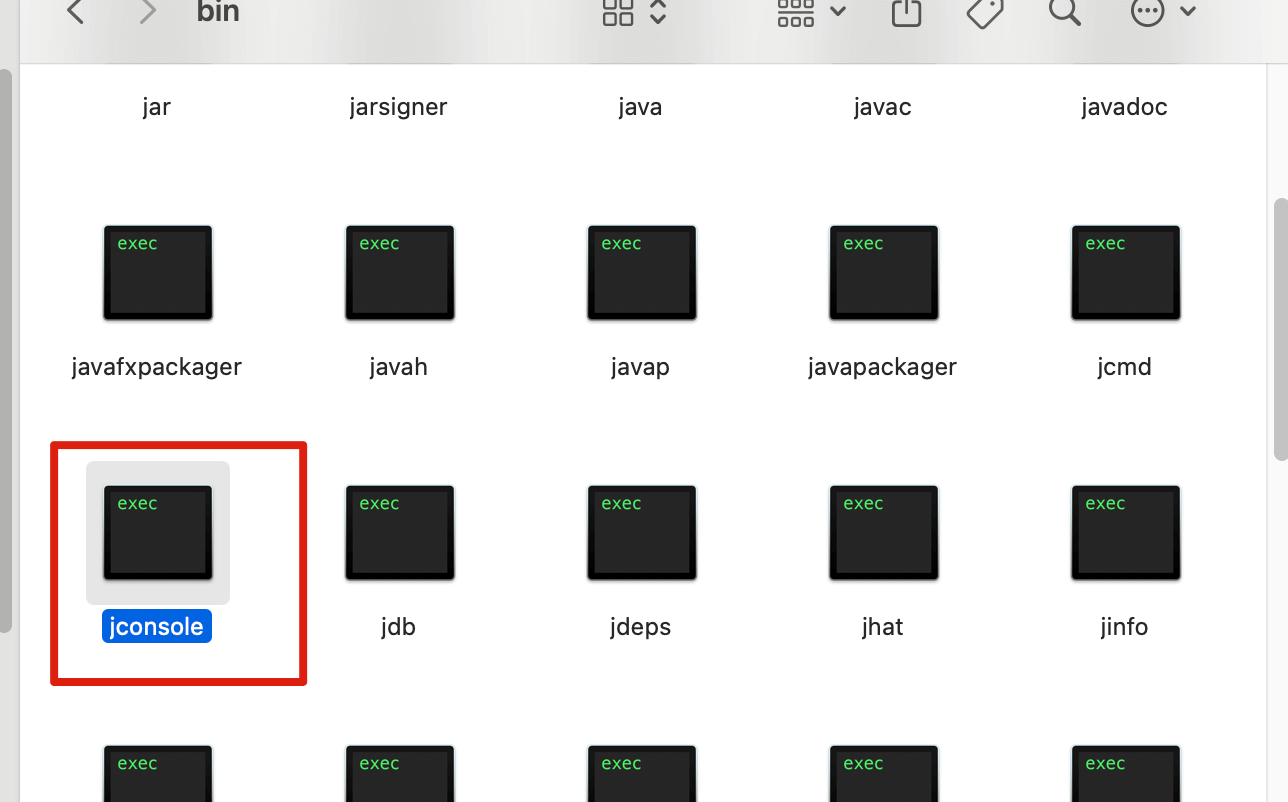
For macOS users, you can check the JDK installation directory using /usr/libexec/java_home -V, then use open . + folder address to access it. For example, my local JDK path is:
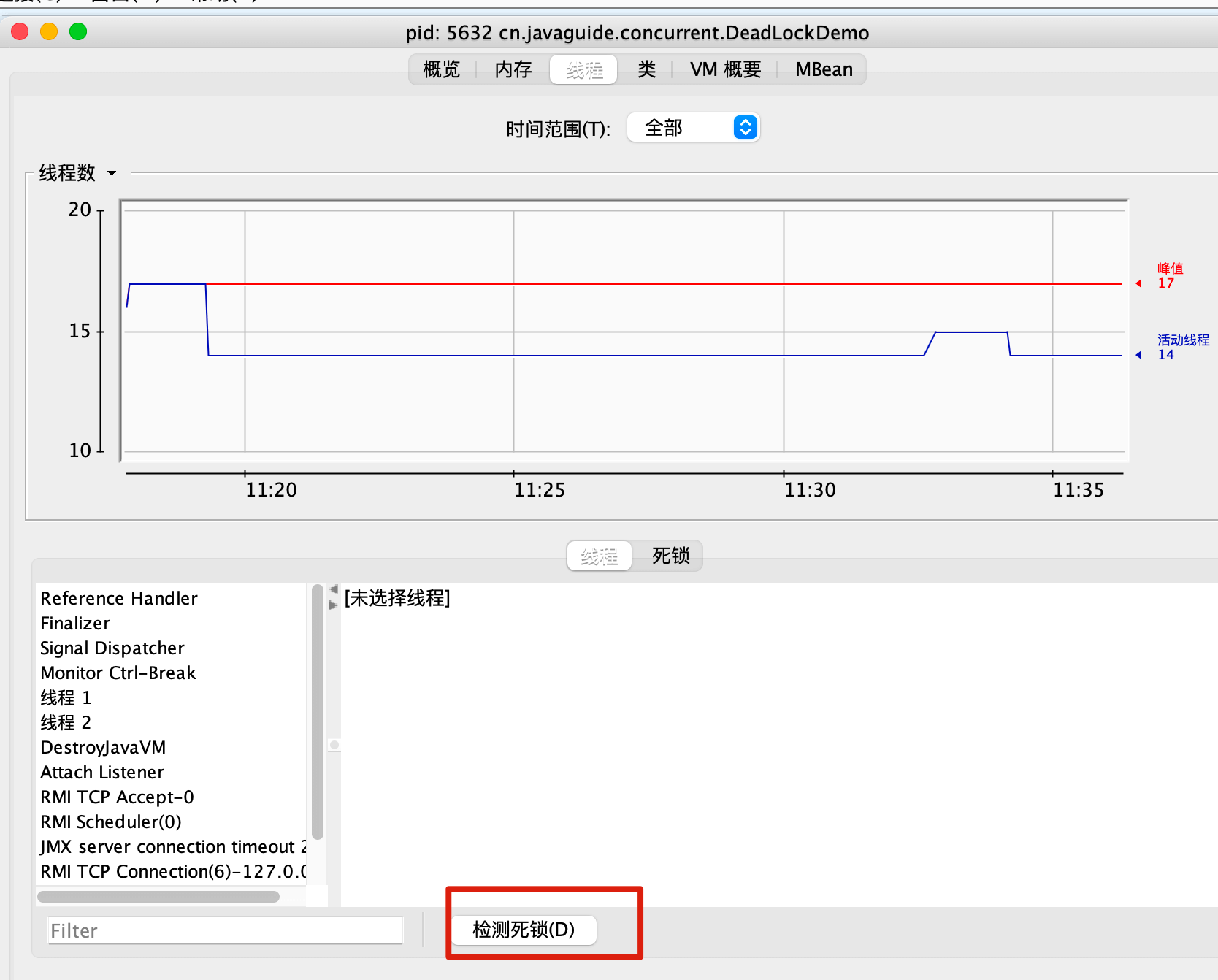
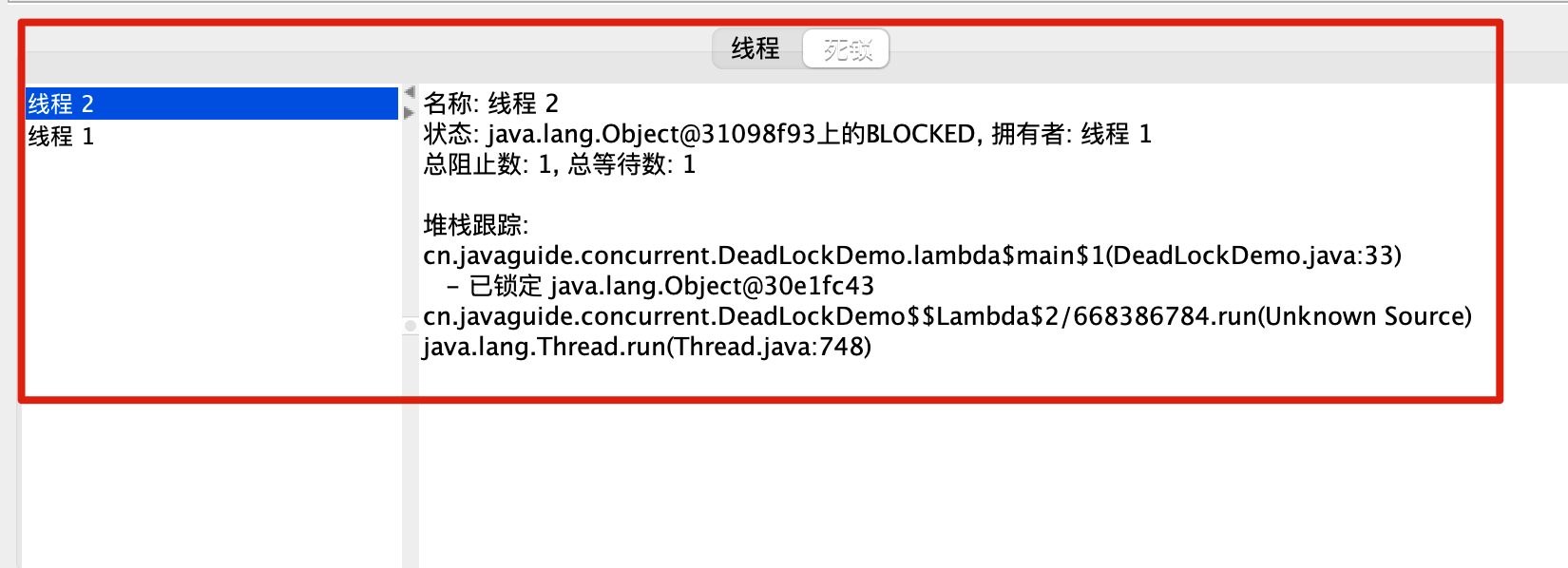
open . /Users/guide/Library/Java/JavaVirtualMachines/corretto-1.8.0_252/Contents/HomeAfter opening jconsole, connect to the corresponding program, go to the thread interface, and select to detect deadlocks!
How to prevent deadlock? By breaking the necessary conditions for deadlock:
- Break the Hold and Wait Condition: Request all resources at once.
- Break the No Preemption Condition: A thread holding some resources should release them when it cannot request additional resources.
- Break the Circular Wait Condition: Prevent deadlock by acquiring resources in a specific order; request resources in a predetermined order and release in reverse order.
How to avoid deadlock?
Avoiding deadlock involves calculating and evaluating resource allocation using algorithms (like the banker’s algorithm) to ensure a safe state.
Safe State means that the system can allocate resources according to a certain sequence of thread advancement (P1, P2, P3……Pn) to satisfy each thread's maximum resource demand, ensuring every thread can complete smoothly. The sequence
<P1, P2, P3.....Pn>is termed a safe sequence.
We can modify the code for thread 2 as follows to avoid deadlock.
new Thread(() -> {
            synchronized (resource1) {
                System.out.println(Thread.currentThread() + " get resource1");
                try {
                    Thread.sleep(1000);
                } catch (InterruptedException e) {
                    e.printStackTrace();
                }
                System.out.println(Thread.currentThread() + " waiting get resource2");
                synchronized (resource2) {
                    System.out.println(Thread.currentThread() + " get resource2");
                }
            }
        }, "Thread 2").start();
Output:
Thread[Thread 1,5,main] get resource1
Thread[Thread 1,5,main] waiting get resource2
Thread[Thread 1,5,main] get resource2
Thread[Thread 2,5,main] get resource1
Thread[Thread 2,5,main] waiting get resource2
Thread[Thread 2,5,main] get resource2

Process finished with exit code 0
We analyze why the code above avoids deadlock?
Thread 1 first acquires the monitor lock on resource1; at this point, thread 2 cannot acquire it. Thread 1 then attempts to acquire the monitor lock on resource2, which it successfully obtains, after which thread 1 releases its locks on resource1 and resource2. Thread 2 can now proceed to execute. Thus, the cycle of waiting is broken, and deadlock is avoided.
Virtual threads were formally released in Java 21, representing a significant update. I wrote an article summarizing common questions about virtual threads: Common Questions About Virtual Threads, which includes the following questions:
- What are virtual threads?
- How are virtual threads related to platform threads?
- What are the pros and cons of virtual threads?
- How to create virtual threads?
- What are the underlying principles of virtual threads?