---
title: Overview of Java 9 New Features
category: Java
tag:
- New Features in Java
---
**Java 9** was released on September 21, 2017. As a new version released three and a half years after Java 8, Java 9 brought many significant changes. The most important change is the introduction of the Java Platform Module System, along with other features such as collections, `Stream`, and more.
You can download the JDK version you need at [Archived OpenJDK General-Availability Releases](http://jdk.java.net/archive/)! The official documentation for new features is available at: .
**Overview (Selected Highlights)**:
- [JEP 222: Java Command-Line Tools](https://openjdk.java.net/jeps/222)
- [JEP 261: Modular System](https://openjdk.java.net/jeps/261)
- [JEP 248: G1 Becomes the Default Garbage Collector](https://openjdk.java.net/jeps/248)
- [JEP 193: Variable Handles](https://openjdk.java.net/jeps/193)
- [JEP 254: String Storage Structure Optimization](https://openjdk.java.net/jeps/254)
## JShell
JShell is a new utility added in Java 9. It provides a real-time command-line interactive tool for Java, similar to Python.
You can directly input expressions in JShell and view their execution results.
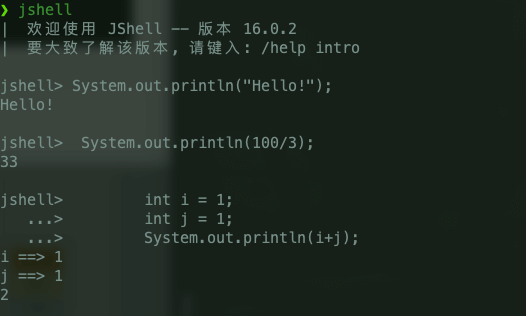
**What benefits does JShell bring us?**
1. It lowers the barrier for outputting the first line of Java's "Hello World!" and enhances the learning enthusiasm of beginners.
1. It is more efficient than an IDE when handling simple logic or validating small problems (not intended to replace an IDE; for complex logic verification, an IDE is more suitable. Both are complementary).
1. …
**How does JShell's code differ from ordinary compilable code?**
1. Once a statement is input, JShell immediately returns the execution result without requiring an editor, compiler, or interpreter.
1. JShell supports the re-declaration of variables, with the latter declaration overriding the former.
1. JShell supports standalone expressions, such as a simple addition operation `1 + 1`.
1. …
## Modular System
The module system is part of the [Jigsaw Project](https://openjdk.java.net/projects/jigsaw/) and introduces modular development practices into the Java platform, allowing for better code reusability!
**What is the module system?** The official definition is:
> A uniquely named, reusable group of related packages, as well as resources (such as images and XML files) and a module descriptor.
In simple terms, you can think of a module as a uniquely named, reusable group of packages, resources, and a module descriptor file (`module-info.java`).
Any JAR file can be upgraded to a module by adding a module descriptor file (`module-info.java`).
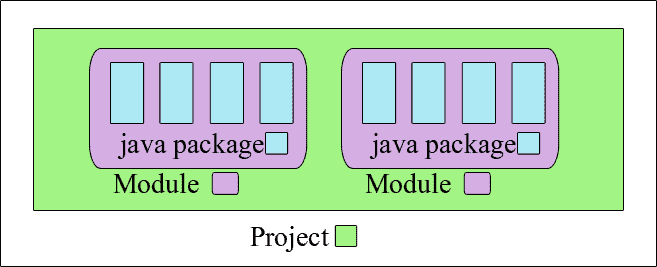
After the introduction of the module system, the JDK was reorganized into 94 modules. Java applications can create custom runtime images that include only the JDK modules they depend on using the new **[jlink](http://openjdk.java.net/jeps/282) tool** (Jlink is a new command-line tool released with Java 9 that allows developers to create their own lightweight, customized JRE for modular Java applications), which can greatly reduce the size of the Java runtime environment.
We can precisely control which classes can be exposed for external use and which classes can only be used internally with the `exports` keyword.
```java
module my.module {
//exports public members of specified packages
exports com.my.package.name;
}
module my.module {
//exports…to restrict the accessibility of members
export com.my.package.name to com.specific.package;
}
```
To learn more about Java 9's modular system, you can refer to the following articles:
- [“Project Jigsaw: Module System Quick-Start Guide”](https://openjdk.java.net/projects/jigsaw/quick-start)
- [“Java 9 Modules: Part 1”](https://stacktraceguru.com/java9/module-introduction)
- Java 9 Revealed (2. Modular System) [here](http://www.cnblogs.com/IcanFixIt/p/6947763.html)
## G1 Becomes the Default Garbage Collector
In Java 8, the default garbage collector was Parallel Scavenge (for young generation) + Parallel Old (for old generation). In Java 9, the CMS garbage collector was deprecated, and **G1 (Garbage-First Garbage Collector)** became the default garbage collector.
G1 was introduced in Java 7 and became the default garbage collector after outstanding performance in two versions.
## Quick Creation of Immutable Collections
Factory methods such as `List.of()`, `Set.of()`, `Map.of()`, and `Map.ofEntries()` were added to create immutable collections (somewhat inspired by Guava):
```java
List.of("Java", "C++");
Set.of("Java", "C++");
Map.of("Java", 1, "C++", 2);
```
Collections created using `of()` are immutable and cannot be modified (e.g., adding, removing, replacing, sorting, etc.), otherwise a `java.lang.UnsupportedOperationException` will be thrown.
## String Storage Structure Optimization
In versions prior to Java 9, `String` was stored using `char[]`. After Java 9, the implementation of `String` changed to use `byte[]` to store strings, saving space.
```java
public final class String implements java.io.Serializable, Comparable, CharSequence {
// @Stable annotation indicates that the variable can be modified at most once, known as "stable".
@Stable
private final byte[] value;
}
```
## Private Methods in Interfaces
Java 9 allows private methods in interfaces. This makes the usage of interfaces more flexible, akin to a simplified abstract class.
```java
public interface MyInterface {
private void methodPrivate(){
}
}
```
## Enhanced try-with-resources
Before Java 9, we could only declare variables within the `try-with-resources` block:
```java
try (Scanner scanner = new Scanner(new File("testRead.txt"));
PrintWriter writer = new PrintWriter(new File("testWrite.txt"))) {
// omitted
}
```
After Java 9, `effectively-final` variables can be used in `try-with-resources` statements.
```java
final Scanner scanner = new Scanner(new File("testRead.txt"));
PrintWriter writer = new PrintWriter(new File("testWrite.txt"))
try (scanner; writer) {
// omitted
}
```
**What is an effectively-final variable?** In simple terms, it is a variable that is not declared as `final` but has not changed since its initialization.
As demonstrated in the code above, even though the `writer` variable was not explicitly declared as `final`, it will not change after it is first assigned a value, thus it is an effectively-final variable.
## Enhancements in Stream & Optional
New methods such as `ofNullable()`, `dropWhile()`, `takeWhile()`, and an overloaded version of the `iterate()` method have been added to `Stream`.
The `ofNullable()` method in Java 9 allows us to create a single-element `Stream` that may contain a non-null element or an empty `Stream`. In Java 8, it was not possible to create an empty `Stream`.
```java
Stream stringStream = Stream.ofNullable("Java");
System.out.println(stringStream.count());// 1
Stream nullStream = Stream.ofNullable(null);
System.out.println(nullStream.count());//0
```
The `takeWhile()` method can sequentially retrieve elements from a `Stream` that meet a condition, stopping when the condition is no longer satisfied.
```java
List integerList = List.of(11, 33, 66, 8, 9, 13);
integerList.stream().takeWhile(x -> x < 50).forEach(System.out::println);// 11 33
```
The `dropWhile()` method has the opposite effect of `takeWhile()`.
```java
List integerList2 = List.of(11, 33, 66, 8, 9, 13);
integerList2.stream().dropWhile(x -> x < 50).forEach(System.out::println);// 66 8 9 13
```
The new overloaded method of `iterate()` provides a `Predicate` parameter (a condition) to determine when to stop iterating.
```java
public static Stream iterate(final T seed, final UnaryOperator f) {
}
// The newly added overloaded method
public static Stream iterate(T seed, Predicate hasNext, UnaryOperator next) {
}
```
The usage comparison between the two methods is as follows; the new `iterate()` overloaded method is more flexible.
```java
// Using the original iterate() method to output numbers 1~10
Stream.iterate(1, i -> i + 1).limit(10).forEach(System.out::println);
// Using the new iterate() overloaded method to output numbers 1~10
Stream.iterate(1, i -> i <= 10, i -> i + 1).forEach(System.out::println);
```
The `Optional` class has new methods `ifPresentOrElse()`, `or()`, and `stream()`.
The `ifPresentOrElse()` method takes two parameters, `Consumer` and `Runnable`. If the `Optional` is non-empty, it calls the `Consumer` parameter; if it is empty, it calls the `Runnable` parameter.
```java
public void ifPresentOrElse(Consumer action, Runnable emptyAction)
Optional