| title | Best Practices for Java Thread Pools | |
|---|---|---|
| category | Java | |
| tag |
|
Let me summarize what I know about things to pay attention to when using thread pools; it seems there are no dedicated articles on this topic online.
Thread pools must be explicitly declared using the ThreadPoolExecutor constructor. Avoid using the Executors class to create thread pools to mitigate OOM risk.
The drawbacks of the thread pool objects returned by Executors are as follows (which will be detailed later):
FixedThreadPoolandSingleThreadExecutor: These use the blocking queueLinkedBlockingQueue, which has a default and maximum length ofInteger.MAX_VALUE, effectively making it an unbounded queue that can accumulate a large number of requests, leading to OOM.CachedThreadPool: This uses the synchronous queueSynchronousQueue, which allows a maximum number of threads up toInteger.MAX_VALUE, potentially creating a large number of threads and causing OOM.ScheduledThreadPoolandSingleThreadScheduledExecutor: These employ an unbounded delayed blocking queueDelayedWorkQueue, with a maximum length ofInteger.MAX_VALUE, which can also lead to a build-up of many requests and result in OOM.
In simple terms: Use bounded queues to control the number of threads created.
In addition to avoiding OOM, the reasons not to use the two convenient thread pools provided by Executors include:
- In practical use, it’s necessary to manually configure the thread pool parameters according to the machine's performance and the business context, such as core thread count, task queues, and saturation strategies.
- We should explicitly name our thread pools, which helps in identifying issues.
You can use certain tools, like the Actuator component in Spring Boot, to check the status of the thread pool.
Furthermore, we can utilize the relevant APIs of ThreadPoolExecutor for simple monitoring. As shown in the image below, ThreadPoolExecutor offers methods to obtain the current thread count, active thread count, completed task count, and the number of tasks in the queue.
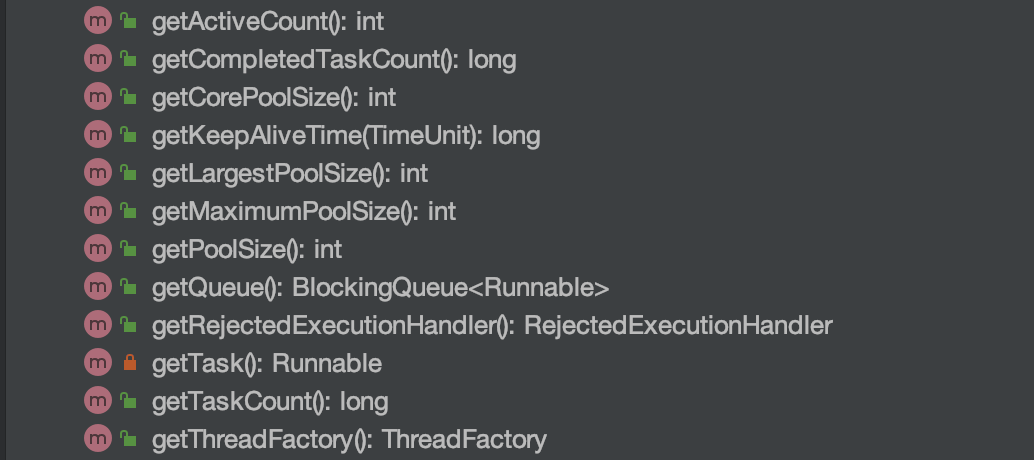
Here is a simple demo. printThreadPoolStatus() will print the thread count, active thread count, completed task count, and the task count in the queue every second.
/**
 * Print the status of the thread pool
 *
 * @param threadPool Thread pool object
 */
public static void printThreadPoolStatus(ThreadPoolExecutor threadPool) {
    ScheduledExecutorService scheduledExecutorService = new ScheduledThreadPoolExecutor(1, createThreadFactory("print-images/thread-pool-status", false));
    scheduledExecutorService.scheduleAtFixedRate(() -> {
        log.info("=========================");
        log.info("ThreadPool Size: [{}]", threadPool.getPoolSize());
        log.info("Active Threads: {}", threadPool.getActiveCount());
        log.info("Number of Tasks : {}", threadPool.getCompletedTaskCount());
        log.info("Number of Tasks in Queue: {}", threadPool.getQueue().size());
        log.info("=========================");
    }, 0, 1, TimeUnit.SECONDS);
}Many people encounter a question in actual projects: Should I define a separate thread pool for each business need, or define a common thread pool?
Generally, it is advisable for different businesses to use different thread pools. When configuring the thread pool, parameters should be tailored to the current business context, as different businesses have varying concurrency levels and resource usage, with a focus on optimizing performance bottlenecks relevant to each business.
Let’s look at a real incident case! (This case is sourced from: “An Online Incident Due to Improper Use of Thread Pool”, an intriguing case)
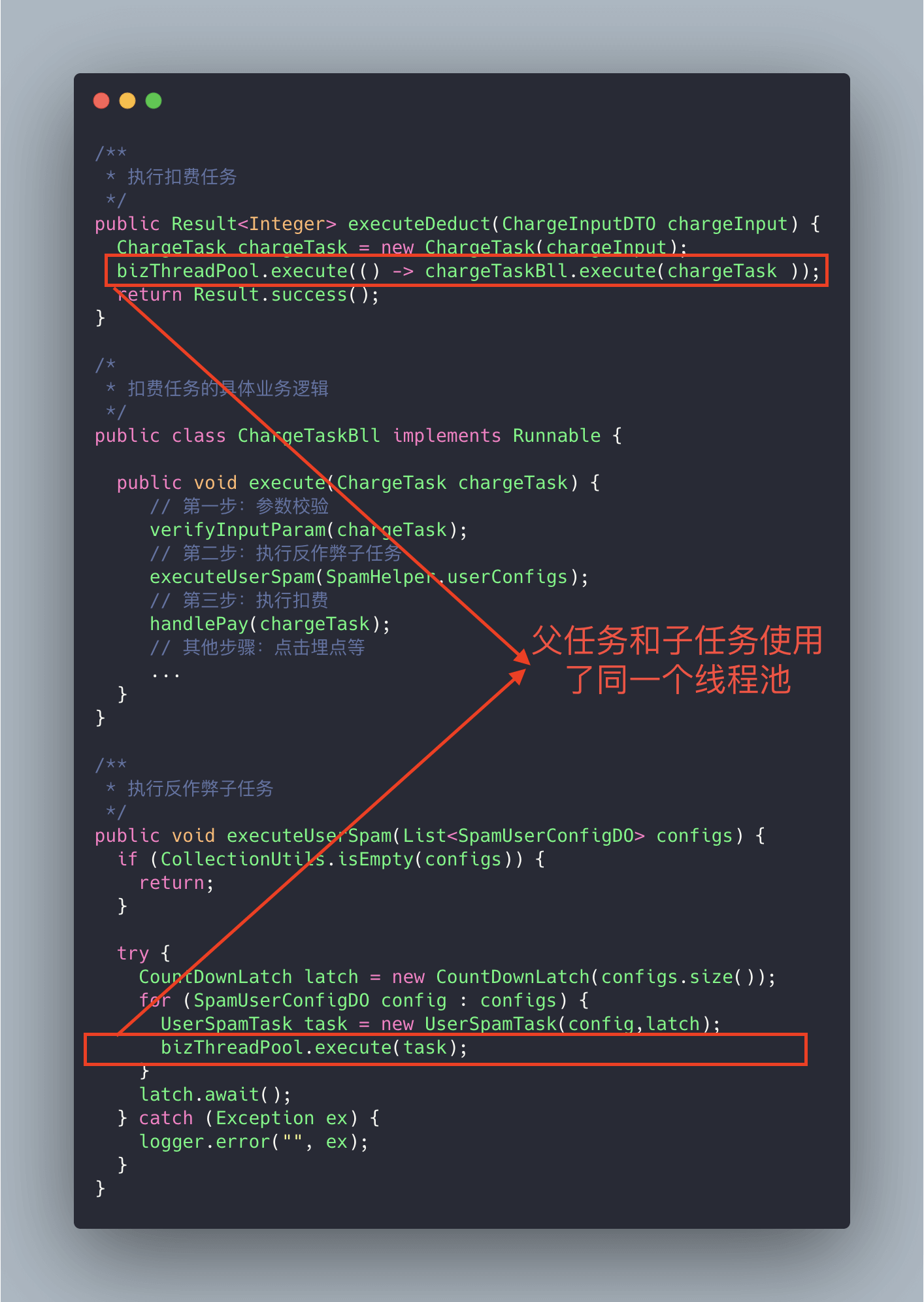
The code above might have a deadlock situation. Why? Let's illustrate it with a diagram.
Imagine this extreme scenario: suppose our thread pool's core thread count is n, and there are n parent tasks (billing tasks), each with two child tasks (sub-tasks under the billing tasks), one of which is complete while the other is queued. Since the parent task has maxed out the thread pool's core threads, the sub-task can’t execute normally because it lacks thread resources, getting blocked in the queue. The parent task waits for the sub-task to finish, and the sub-task, in turn, waits for the parent task to free up thread pool resources, resulting in "deadlock."
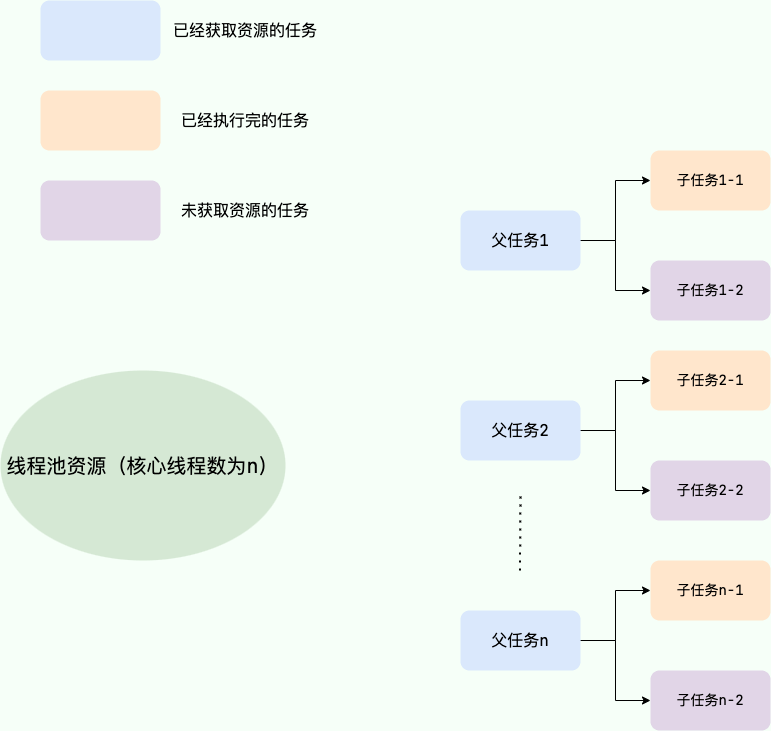
The solution is simple: just add a dedicated thread pool for executing sub-tasks.
When initializing a thread pool, it’s important to explicitly name it (set the thread pool name prefix), which helps in pinpointing issues.
By default, the threads created are named something like pool-1-thread-n, which lacks business meaning and does not aid in troubleshooting.
There are usually two ways to name threads in a thread pool:
1. Use Guava's ThreadFactoryBuilder
ThreadFactory threadFactory = new ThreadFactoryBuilder()
                        .setNameFormat(threadNamePrefix + "-%d")
                        .setDaemon(true).build();
ExecutorService threadPool = new ThreadPoolExecutor(corePoolSize, maximumPoolSize, keepAliveTime, TimeUnit.MINUTES, workQueue, threadFactory);
2. Implement ThreadFactory yourself.
import java.util.concurrent.ThreadFactory;
import java.util.concurrent.atomic.AtomicInteger;

/**
 * Thread factory that sets the thread name, which helps us locate issues.
 */
public final class NamingThreadFactory implements ThreadFactory {

    private final AtomicInteger threadNum = new AtomicInteger();
    private final String name;

    /**
     * Creates a thread pool production factory with a name
     */
    public NamingThreadFactory(String name) {
        this.name = name;
    }

    @Override
    public Thread newThread(Runnable r) {
        Thread t = new Thread(r);
        t.setName(name + " [#" + threadNum.incrementAndGet() + "]");
        return t;
    }
}When it comes to configuring thread pool parameters, Meituan's clever methods leave a lasting impression on me (which will be discussed later)!
Let’s first look at the commonly recommended practices for configuring thread pool parameters in various books and blogs.
Many people might think it’s better to over-configure the thread pool! I think this is clearly a problem. Just like we often see in life: having more people doesn’t always mean tasks will be completed more efficiently; it introduces greater communication overhead. If a task only requires 3 people, bringing in 6 won’t increase efficiency! The impact of having too many threads is analogous to allocating too many people; in a multithreading context, it primarily increases the context switch cost. If you're unclear about context switching, please refer to my explanation below.
Context Switching:
In multithreading programming, the number of threads usually exceeds the number of CPU cores, and each CPU core can only be used by one thread at a time. In order to ensure all threads effectively get executed, the CPU adopts a strategy that allocates time slots for each thread in a round-robin manner. When a thread's time slice runs out, it goes back to the ready state to let another thread use the core. This process constitutes a context switch. In summary: before the current task switches to another task, it first saves its state so that it can resume correctly when it switches back. The process of saving to reloading an old task is a context switch.
Context switching typically has high computational costs, requiring significant CPU time. With dozens to hundreds of switches a second, each of them consumes time at the nanosecond level. Thus, context switching can consume enormous CPU time in a system and is often one of the most time-consuming operations for an operating system.
Compared to other operating systems, Linux has many advantages, including low time costs for context switches and mode switches.
Just like humans working together in the real world, we can be sure that an oversized or undersized thread pool presents its own problems; an appropriate size is best.
- If the thread pool number is too small, when there are many tasks/requests needing processing at the same time, many requests/tasks may queue up waiting to execute, potentially leading to full queues where tasks/requests cannot be handled, or jamming up tasks leading to OOM. Clearly, this is problematic, as the CPU is not utilized adequately.
- If the thread count is too large, many threads may be contending for CPU resources simultaneously, leading to extensive context switching, which increases task execution time, affecting overall execution efficiency.
A simple and widely applicable formula is:
- CPU Intensive Tasks (N): These tasks primarily consume CPU resources, and the thread count should be set to N (the number of CPU cores). Since these tasks are bottlenecked by CPU computing power, a thread count equal to the core count maximizes CPU utilization. Having too many threads can lead to contention and switching overhead.
- I/O Intensive Tasks (M * N): These tasks spend most of their time processing I/O interactions and do not occupy the CPU while waiting for I/O. To fully utilize CPU resources, the thread count should be set to M * N, where N is the number of CPU cores, and M is a multiplier greater than 1, typically suggested as 2 depending on I/O wait times and task characteristics; testing and monitoring is crucial to find the optimal balance.
The "N+1" recommendation for CPU-intensive tasks is no longer advised for the following reasons:
- "N+1" was initially meant to reserve threads for handling sudden pauses, but in practice, it still occupies CPU cores during operations like page faults.
- In CPU-intensive scenarios, the CPU remains the bottleneck, and reserving threads doesn't increase CPU capacity; it might aggravate contention.
How to determine if a task is CPU or I/O intensive?
CPU-intensive tasks are those that utilize CPU computing power, like sorting large amounts of data in memory. Any task involving network reading or file reading is I/O intensive; in these cases, the CPU computation time is minimal compared to the time spent waiting for I/O to complete, with most time spent waiting for I/O operations to finish.
🌈 To expand (see: issue#1737):
A more precise method to calculate the thread count should be: Optimal Thread Count = N (CPU Cores) * (1 + WT (Thread Wait Time) / ST (Thread Compute Time)), where WT (Thread Wait Time) = Total Thread Runtime - ST (Thread Compute Time).
The larger the proportion of thread wait time, the more threads are needed. The larger the proportion of thread compute time, the fewer threads are needed.
We can use JDK's built-in tool VisualVM to find the ratio of WT/ST.
For CPU-intensive tasks, the WT/ST ratio is close to or equals 0, therefore, the thread count can be set to N (CPU Cores) * (1 + 0) = N, which is similar to the earlier suggestion of N (CPU Cores) + 1.
Under I/O-intensive tasks, almost all time is spent on thread waiting, theoretically allowing the thread count to be set to 2N (the ratio of WT/ST should be substantial, which is why selecting 2N aims to avoid creating too many threads).
Note: The formulas mentioned above are for reference; practical projects may not directly set thread pool parameters based on formulas, as different business contexts have varying requirements, and actual online operations should be dynamically adjusted based on the project's live running conditions. The dynamic configuration of thread pool parameters introduced by Meituan is an excellent and practical solution!
The technical team at Meituan describes the approach and methods for customizable thread pool parameter configuration in their article “Java Thread Pool Implementation Principles and Practices in Meituan's Business”.
The Meituan team focuses primarily on customizing core parameters of the thread pool. These three core parameters are:
corePoolSize: The core thread count defines the minimum number of threads that can run simultaneously.maximumPoolSize: When the number of tasks in the queue reaches the queue capacity, the currently running threads can go up to the maximum thread count.workQueue: When a new task arrives, it first checks if the current running thread count has reached the core thread count; if it has, the new task will be stored in the queue.
Why these three parameters?
In my article “A Beginner's Guide to Understanding Thread Pool”, I stated that these three parameters are the most important ones for ThreadPoolExecutor and essentially determine how the thread pool processes tasks.
How to support dynamic parameter configuration? Look at the methods provided by ThreadPoolExecutor below.
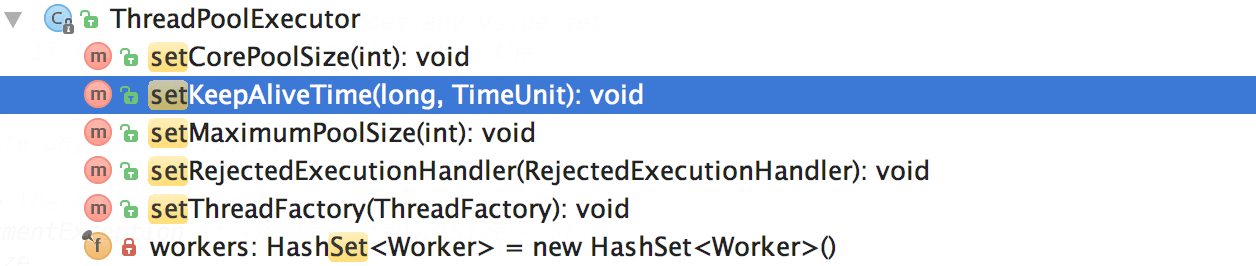
It’s particularly important to note corePoolSize. While the program is running, if we call setCorePoolSize() method, the thread pool first checks if the current working thread count exceeds corePoolSize. If it does, it will reclaim working threads.
Also, as can be seen above, there is no method for dynamically specifying the queue length; Meituan's approach is to create a custom queue called ResizableCapacityLinkedBlockingQueue (which effectively removes the final modifier from the capacity field of LinkedBlockingQueue to make it variable).
The resulting dynamic modification of thread pool parameters is shown below.👏👏👏
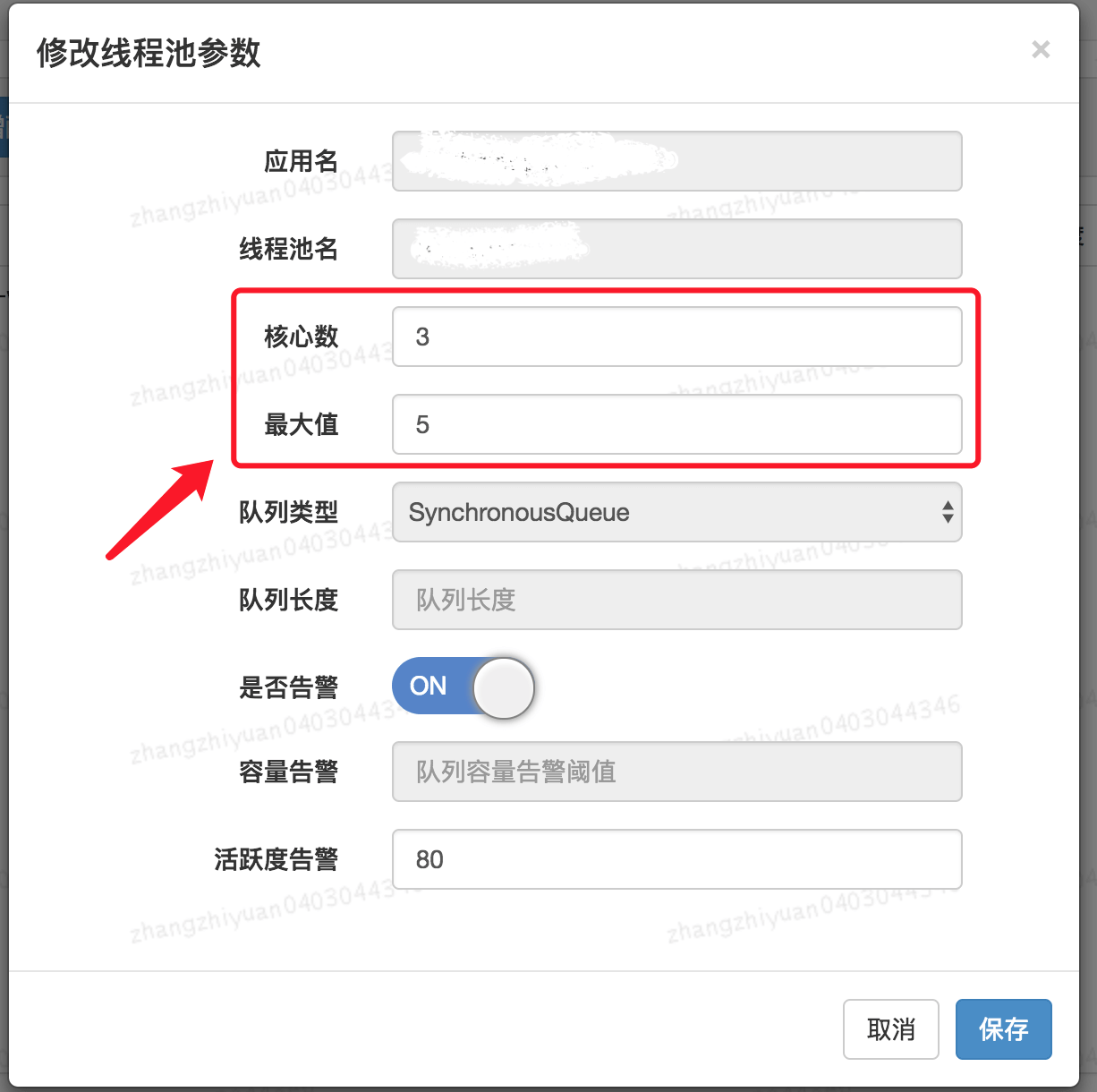
If you would like to achieve this effect in your project as well, you can leverage existing open-source projects:
- Hippo4j: An asynchronous thread pool framework that supports dynamic changes, monitoring, and alerting for thread pools without modifying code, it supports multiple usage modes and aims to enhance system operational reliability.
- Dynamic TP: A lightweight dynamic thread pool with built-in monitoring and alert features, integrating third-party middleware thread pool management, compatible with mainstream configuration centers (already supports Nacos, Apollo, Zookeeper, Consul, Etcd, and can be customized through SPI).
When the thread pool is no longer needed, it should be explicitly shut down to release thread resources.
The thread pool provides two shutdown methods:
shutdown(): Shuts down the thread pool, changing its state toSHUTDOWN. The thread pool will no longer accept new tasks, but existing tasks in the queue will be completed.shutdownNow(): Shuts down the thread pool, changing its state toSTOP. The thread pool will stop currently running tasks, cease handling queued tasks, and return a list of tasks waiting to execute.
After calling shutdownNow and shutdown, it does not mean that the thread pool has completed its shutdown operations; it only asynchronously notifies the thread pool to handle the shutdown. To wait synchronously until the thread pool has completely shut down before proceeding, the awaitTermination method must be invoked to wait.
When calling awaitTermination(), a reasonable timeout should be set to avoid potential performance issues from the program blocking for long durations. Additionally, as tasks in the thread pool may be canceled or thrown exceptions, exception handling must be implemented while using awaitTermination(). The awaitTermination() method may throw an InterruptedException that should be caught and handled to prevent program crashes or failure to exit normally.
// ...
// Shut down the thread pool
executor.shutdown();
try {
    // Wait for the thread pool to shut down, timeout of 5 minutes
    if (!executor.awaitTermination(5, TimeUnit.MINUTES)) {
        // Log if waiting times out
        System.err.println("The thread pool did not shut down completely within 5 minutes");
    }
} catch (InterruptedException e) {
    // Exception handling
}The primary goal of thread pools is to enhance task execution efficiency, eliminating the performance overhead caused by frequently creating and destroying threads. If long-running tasks are submitted to the thread pool for execution, it may result in threads in the pool being occupied for extended periods, making it unable to respond promptly to other tasks, potentially causing the thread pool to crash or the program to hang.
Therefore, when using thread pools, we should avoid submitting long-running tasks to them whenever possible. For relatively time-consuming operations, such as network requests or file I/O, using other asynchronous mechanisms, like CompletableFuture, is advisable to avoid blocking threads in the pool.
Thread pools can be reused, so avoid frequently creating new thread pools, such as creating a dedicated thread pool for each user request.
@GetMapping("wrong")
public String wrong() throws InterruptedException {
    // Custom thread pool
    ThreadPoolExecutor executor = new ThreadPoolExecutor(5, 10, 1L, TimeUnit.SECONDS, new ArrayBlockingQueue<>(100), new ThreadPoolExecutor.CallerRunsPolicy());

    // Handle task
    executor.execute(() -> {
      // ......
    });
    return "OK";
}
This issue arises from a lack of understanding of thread pools. There is a need to strengthen foundational knowledge about thread pools.
When using Spring's internal thread pool, it’s essential to manually define it with appropriate settings; otherwise, it can lead to production issues (like a thread being created per request).
@Configuration
@EnableAsync
public class ThreadPoolExecutorConfig {

    @Bean(name="threadPoolExecutor")
    public Executor threadPoolExecutor(){
        ThreadPoolTaskExecutor threadPoolExecutor = new ThreadPoolTaskExecutor();
        int processNum = Runtime.getRuntime().availableProcessors(); // Returns the number of available processors
        int corePoolSize = (int) (processNum / (1 - 0.2));
        int maxPoolSize = (int) (processNum / (1 - 0.5));
        threadPoolExecutor.setCorePoolSize(corePoolSize); // Core pool size
        threadPoolExecutor.setMaxPoolSize(maxPoolSize); // Max thread count
        threadPoolExecutor.setQueueCapacity(maxPoolSize * 1000); // Queue length
        threadPoolExecutor.setThreadPriority(Thread.MAX_PRIORITY);
        threadPoolExecutor.setDaemon(false);
        threadPoolExecutor.setKeepAliveSeconds(300); // Thread idle time
        threadPoolExecutor.setThreadNamePrefix("test-Executor-"); // Thread name prefix
        return threadPoolExecutor;
    }
}Using thread pools together with ThreadLocal can lead to threads obtaining old values or dirty data. This happens because thread pools reuse thread objects; static attributes of classes bound to thread objects, which include ThreadLocal variables, are also reused, causing a thread to potentially access ThreadLocal values from other threads.
Don't assume that not explicitly using thread pools in your code means there are none; common web servers like Tomcat also utilize thread pools to enhance concurrency and have improved their native Java thread pooling.
Of course, you could configure Tomcat to process tasks using a single thread. However, this would not be appropriate, resulting in a serious impact on task processing speed.
server.tomcat.max-threads=1A recommended solution for addressing the aforementioned issues is to use Alibaba's open-source TransmittableThreadLocal (TTL). The TransmittableThreadLocal class extends and enhances JDK's built-in InheritableThreadLocal, providing value transfer for ThreadLocal when using thread pools or other thread-recycling components, effectively solving the context propagation issue during asynchronous executions.
TransmittableThreadLocal project address: https://github.com/alibaba/transmittable-thread-local.