| title | Detailed Explanation of Java Thread Pool | |
|---|---|---|
| category | Java | |
| tag |
|
The pool technology is something everyone is familiar with, such as thread pools, database connection pools, HTTP connection pools, etc., all of which are applications of this concept. The main idea of pooling technology is to reduce the overhead of acquiring resources each time and to improve the utilization of resources.
In this article, I will elaborate on the basic concepts and core principles of thread pools.
As the name suggests, a thread pool is a resource pool that manages a series of threads, providing a way to limit and manage thread resources. Each thread pool also maintains some basic statistical information, such as the number of completed tasks.
Here is a summary of the benefits of using thread pools derived from the book "Java Concurrency in Practice":
- Reduced resource consumption. Reducing the overhead caused by thread creation and destruction by reusing already created threads.
- Improved response speed. When tasks arrive, they can be executed immediately without waiting for thread creation.
- Improved manageability of threads. Threads are a scarce resource; if created unlimitedly, they will not only consume system resources but also decrease system stability. Using a thread pool allows for unified allocation, tuning, and monitoring.
Thread pools are generally used to execute multiple unrelated time-consuming tasks. Without multithreading, tasks are executed sequentially; using a thread pool allows multiple unrelated tasks to be executed simultaneously.
The Executor framework was introduced in Java 5. Using Executor to start threads is better than using the start method of Thread, as it is more manageable and efficient (using thread pools saves overhead). A key point is that it helps avoid the "this escape" problem.
"This escape" refers to the scenario where other threads hold references to the object before the constructor returns, which may cause confusing errors when methods of the not fully constructed object are called.
The Executor framework not only includes management of thread pools, but also provides thread factories, queues, and rejection policies, making concurrent programming simpler.
The structure of the Executor framework mainly consists of three parts:
1. Task (Runnable / Callable)
The tasks to be executed need to implement the Runnable interface or the Callable interface. Implementations of Runnable or Callable can be executed by ThreadPoolExecutor or ScheduledThreadPoolExecutor.
2. Task execution (Executor)
As shown in the diagram below, it includes the core interface of the task execution mechanism, Executor, and the ExecutorService interface that inherits from the Executor interface. The two key classes, ThreadPoolExecutor and ScheduledThreadPoolExecutor, implement the ExecutorService interface.
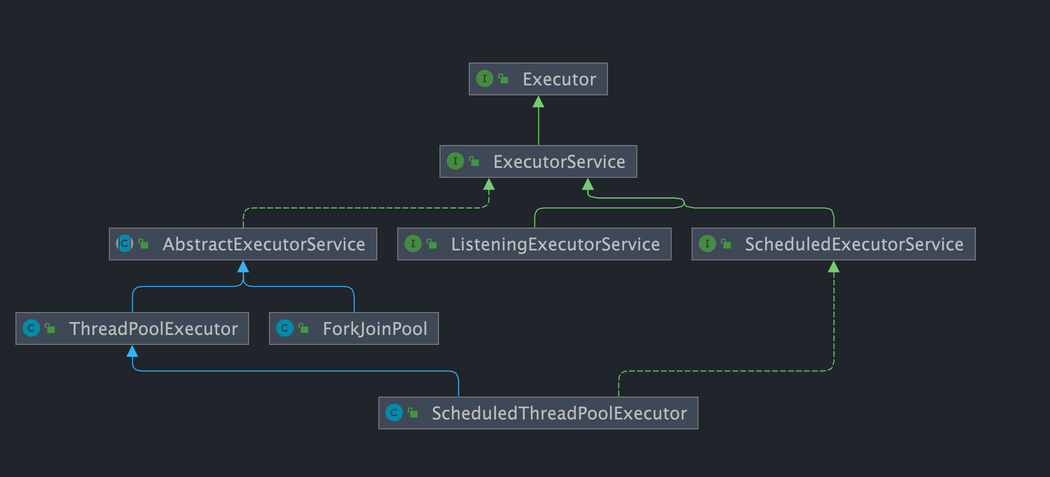
While many underlying class relationships are mentioned here, in practice, we need to pay more attention to the ThreadPoolExecutor class, which is frequently used when working with thread pools.
Note: By examining the source code of ScheduledThreadPoolExecutor, we find that it actually inherits from ThreadPoolExecutor and implements ScheduledExecutorService, while ScheduledExecutorService implements ExecutorService, as shown in the class relationship diagram provided above.
Description of the ThreadPoolExecutor class:
//AbstractExecutorService implements ExecutorService interface
public class ThreadPoolExecutor extends AbstractExecutorService
Description of the ScheduledThreadPoolExecutor class:
//ScheduledExecutorService inherits ExecutorService interface
public class ScheduledThreadPoolExecutor
        extends ThreadPoolExecutor
        implements ScheduledExecutorService
3. Asynchronous calculation results (Future)
Both the Future interface and its implementation class FutureTask represent the results of asynchronous calculations.
When we submit implementations of the Runnable interface or Callable interface to ThreadPoolExecutor or ScheduledThreadPoolExecutor for execution, (calling the submit() method will return a FutureTask object).
Illustration of using the Executor framework:

- The main thread first needs to create a task object that implements
RunnableorCallable. - The completed object that implements
Runnable/Callableis submitted directly to theExecutorServicefor execution:ExecutorService.execute(Runnable command); alternatively, you can submit theRunnableobject or theCallableobject toExecutorServicefor execution (ExecutorService.submit(Runnable task)orExecutorService.submit(Callable <T> task)). - If executing
ExecutorService.submit(...),ExecutorServicewill return an object that implements theFutureinterface (as mentioned earlier, there is a difference betweenexecute()andsubmit():submit()will return aFutureTaskobject). SinceFutureTaskimplementsRunnable, we can also createFutureTaskand submit it directly toExecutorService. - Finally, the main thread can execute the
FutureTask.get()method to wait for the task execution to complete. The main thread can also executeFutureTask.cancel(boolean mayInterruptIfRunning)to cancel the execution of this task.
The thread pool implementation class ThreadPoolExecutor is the core class of the Executor framework.
The ThreadPoolExecutor class provides four constructors. Let's look at the longest one; the other three are based on this constructor (the other constructors essentially provide default parameters, such as the default rejection strategy).
    /**
     * Creates a new ThreadPoolExecutor with the given initial parameters.
     */
    public ThreadPoolExecutor(int corePoolSize,//the core number of threads in the pool
                              int maximumPoolSize,//the maximum number of threads in the pool
                              long keepAliveTime,//the maximum time a surplus idle thread can survive when the number of threads exceeds the core number
                              TimeUnit unit,//time unit
                              BlockingQueue<Runnable> workQueue,//task queue used to store waiting tasks
                              ThreadFactory threadFactory,//thread factory used to create threads, generally the default is fine
                              RejectedExecutionHandler handler//rejection policy, we can customize the strategy to handle tasks when submitted tasks are too many and cannot be processed in time
                               ) {
        if (corePoolSize < 0 ||
            maximumPoolSize <= 0 ||
            maximumPoolSize < corePoolSize ||
            keepAliveTime < 0)
            throw new IllegalArgumentException();
        if (workQueue == null || threadFactory == null || handler == null)
            throw new NullPointerException();
        this.corePoolSize = corePoolSize;
        this.maximumPoolSize = maximumPoolSize;
        this.workQueue = workQueue;
        this.keepAliveTime = unit.toNanos(keepAliveTime);
        this.threadFactory = threadFactory;
        this.handler = handler;
    }
The following parameters are very important and you will definitely use them during your use of the thread pool, so be sure to remember them.
The three most important parameters of ThreadPoolExecutor:
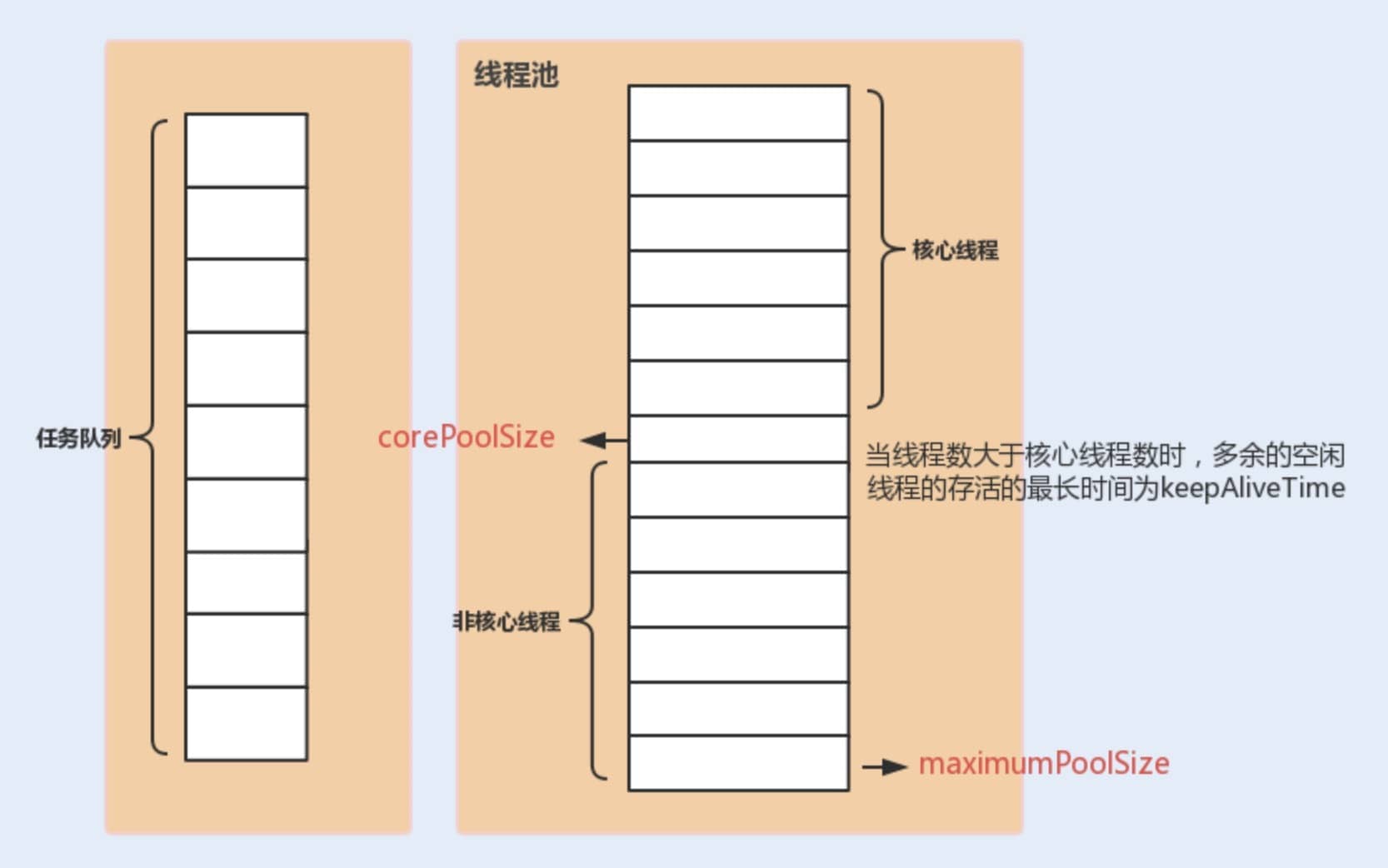
corePoolSize: The maximum number of threads that can run simultaneously when the task queue does not reach capacity.maximumPoolSize: When the number of tasks in the queue reaches its capacity, the current number of threads that can run simultaneously increases to the maximum number of threads.workQueue: When a new task arrives, it first checks whether the current running thread count has reached the core thread count. If it has, the new task will be stored in the queue.
Other common parameters of ThreadPoolExecutor:
keepAliveTime: When the number of threads in the pool exceedscorePoolSize, if no new tasks are submitted, the surplus idle threads will not be destroyed immediately, but will wait until the wait time exceedskeepAliveTimebefore being reclaimed and destroyed.unit: The time unit for thekeepAliveTimeparameter.threadFactory: Will be used when the executor creates new threads.handler: Rejection policy (which will be introduced in detail later).
The following diagram can enhance your understanding of the relationship between various parameters in the thread pool (image source: "Java Performance Optimization in Practice"):
Definition of ThreadPoolExecutor Rejection Policies:
When the number of currently running threads reaches the maximum thread quantity and the queue is also full of tasks, ThreadPoolExecutor defines several strategies:
ThreadPoolExecutor.AbortPolicy: ThrowsRejectedExecutionExceptionto refuse processing new tasks.ThreadPoolExecutor.CallerRunsPolicy: The caller's thread runs the rejected task, meaning the task is run directly in the thread that calledexecute(). If the executor is shut down, this task will be discarded. Therefore, this strategy will slow down the speed of submitting new tasks, affecting the overall performance of the program. If your application can withstand this delay and you require every task request to be executed, you can choose this strategy.ThreadPoolExecutor.DiscardPolicy: Does not process new tasks, directly discarding them.ThreadPoolExecutor.DiscardOldestPolicy: This strategy will discard the oldest unprocessed task request.
For example:
Spring, through ThreadPoolTaskExecutor, or when we directly create a thread pool using the ThreadPoolExecutor constructor, if we do not specify the RejectedExecutionHandler rejection policy to configure the thread pool, the default will use AbortPolicy. Under this rejection policy, if the queue is full, ThreadPoolExecutor will throw a RejectedExecutionException exception to refuse new tasks, meaning you will lose the processing of this task. If you do not want to lose tasks, you can use CallerRunsPolicy. Unlike other strategies, CallerRunsPolicy does not discard tasks or throw exceptions; instead, it falls back the tasks to the caller and executes them using the caller's thread.
public static class CallerRunsPolicy implements RejectedExecutionHandler {

        public CallerRunsPolicy() { }

        public void rejectedExecution(Runnable r, ThreadPoolExecutor e) {
            if (!e.isShutdown()) {
                // Execute in the main thread instead of in the thread pool's thread
                r.run();
            }
        }
}In Java, there are mainly two ways to create thread pools:
Method 1: Directly creating through the ThreadPoolExecutor constructor (Recommended)
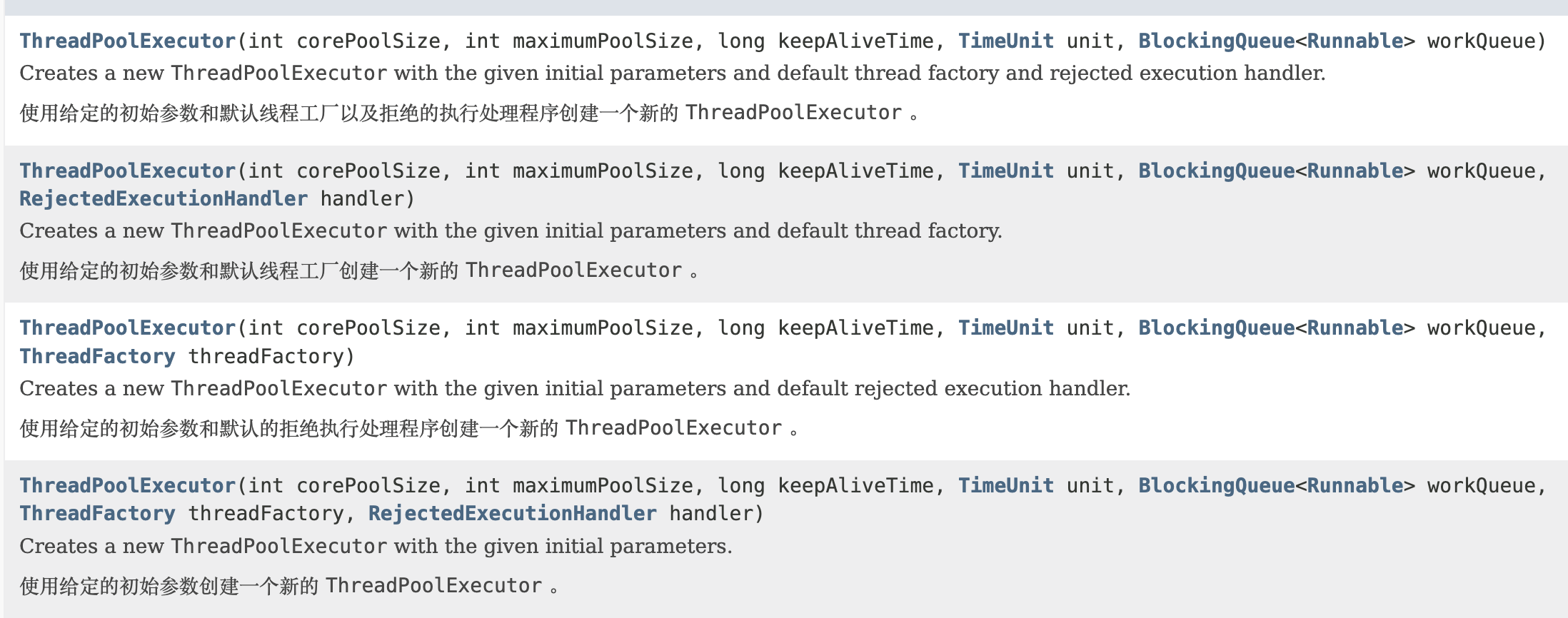
This is the most recommended method because it allows developers to explicitly specify the core parameters of the thread pool, enabling finer control over the behavior of the thread pool, thus avoiding the risk of resource exhaustion.
Method 2: Creating through the Executors utility class (Not recommended for production environments)
The methods provided by the Executors utility class to create thread pools are shown in the diagram below:
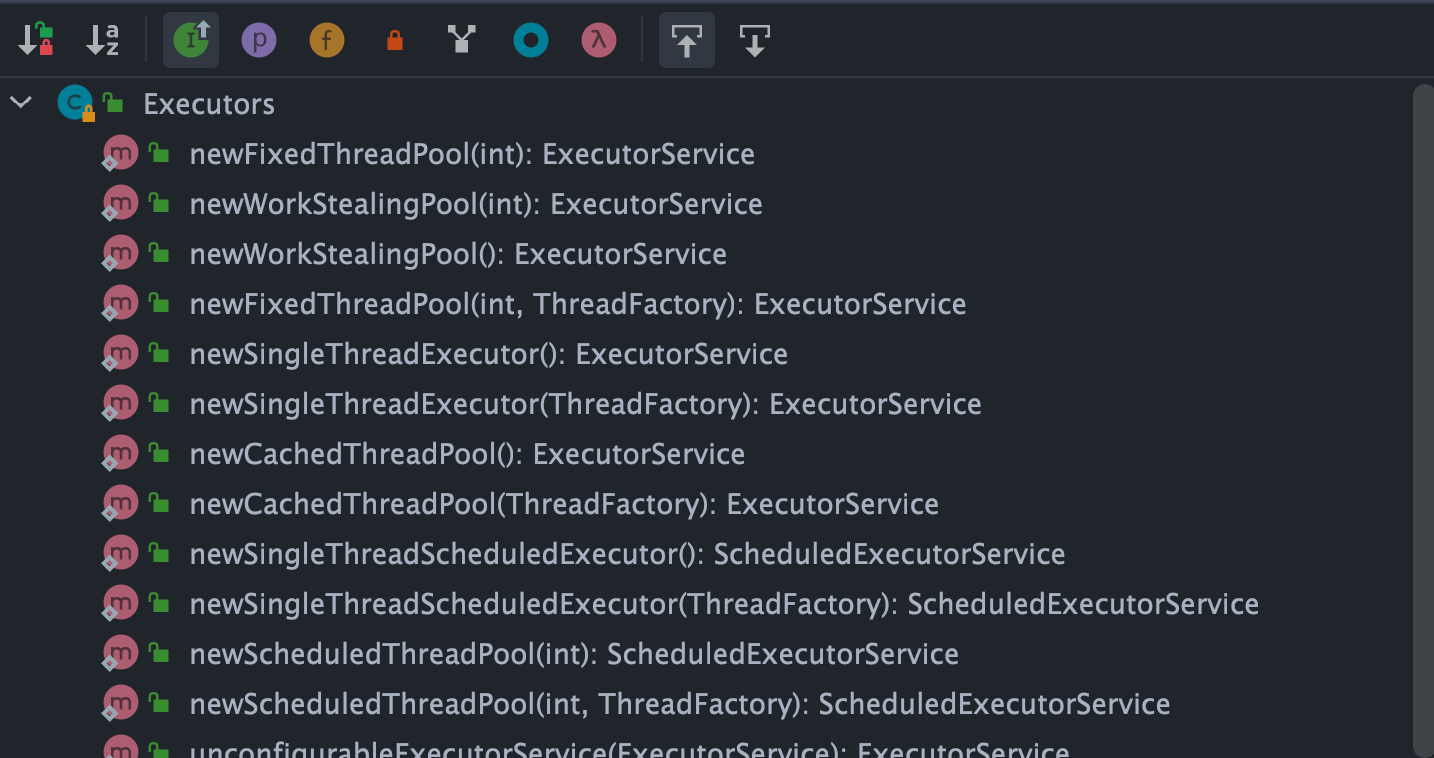
As can be seen, the Executors utility class can create various types of thread pools, including:
FixedThreadPool: A thread pool with a fixed number of threads. The number of threads in this thread pool always remains the same. When a new task is submitted and there are idle threads, it executes immediately. If not, new tasks will be temporarily held in a task queue until threads become available to process tasks from the queue.SingleThreadExecutor: A thread pool with only one thread. If more than one task is submitted to this thread pool, the tasks will be saved in a task queue and executed in the order they were submitted as threads become idle.CachedThreadPool: A thread pool that can dynamically adjust the number of threads based on actual conditions. The number of threads in this thread pool is uncertain, but if there are idle threads available for reuse, it will prioritize using them. If all threads are busy and new tasks are submitted, new threads will be created to handle the tasks. All threads will return to the pool for reuse after completing their current tasks.ScheduledThreadPool: A thread pool that runs tasks after a given delay or executes tasks periodically.
The "Alibaba Java Development Manual" mandates that thread pools should not be created using the Executors utility but rather through the ThreadPoolExecutor constructor. This practice makes it clearer for developers regarding the operational rules of the thread pool and mitigates the risk of resource exhaustion.
The drawbacks of using Executors to return thread pool objects are as follows (which will be detailed later):
FixedThreadPoolandSingleThreadExecutor: Use the blocking queueLinkedBlockingQueue, with a maximum length ofInteger.MAX_VALUE, considered unbounded; tasks may pile up significantly, leading to OOM.CachedThreadPool: Uses the synchronous queueSynchronousQueue, with the allowed number of threads beingInteger.MAX_VALUE, which may create too many threads if task numbers rise rapidly, leading to OOM.ScheduledThreadPoolandSingleThreadScheduledExecutor: Use an unbounded delay blocking queueDelayedWorkQueue, with a maximum length ofInteger.MAX_VALUE, which may lead to excessive task pile-up and cause OOM.
public static ExecutorService newFixedThreadPool(int nThreads) {
    // LinkedBlockingQueue's default length is Integer.MAX_VALUE, considered unbounded
    return new ThreadPoolExecutor(nThreads, nThreads, 0L, TimeUnit.MILLISECONDS, new LinkedBlockingQueue<Runnable>());
}

public static ExecutorService newSingleThreadExecutor() {
    // LinkedBlockingQueue's default length is Integer.MAX_VALUE, considered unbounded
    return new FinalizableDelegatedExecutorService(new ThreadPoolExecutor(1, 1, 0L, TimeUnit.MILLISECONDS, new LinkedBlockingQueue<Runnable>()));
}

// SynchronousQueue with no capacity, max threads is Integer.MAX_VALUE
public static ExecutorService newCachedThreadPool() {
    return new ThreadPoolExecutor(0, Integer.MAX_VALUE, 60L, TimeUnit.SECONDS, new SynchronousQueue<Runnable>());
}

// DelayedWorkQueue (Delay blocking queue)
public static ScheduledExecutorService newScheduledThreadPool(int corePoolSize) {
    return new ScheduledThreadPoolExecutor(corePoolSize);
}

public ScheduledThreadPoolExecutor(int corePoolSize) {
    super(corePoolSize, Integer.MAX_VALUE, 0, NANOSECONDS, new DelayedWorkQueue());
}When new tasks arrive, it first checks whether the current running thread count has reached the core thread count. If it has, the new task will be stored in the queue.
Different thread pools use different blocking queues, and we can analyze this in conjunction with built-in thread pools.
- The
LinkedBlockingQueuewith a capacity ofInteger.MAX_VALUE(an unbounded queue): used byFixedThreadPoolandSingleThreadExecutor.FixedThreadPoolcan create a maximum of core thread number threads (core and max number of threads are equal), whileSingleThreadExecutorcan only create one thread (both core and maximum thread numbers are 1), so their task queue will never fill up. SynchronousQueue(synchronous queue): used byCachedThreadPool.SynchronousQueuehas no capacity and does not store elements, ensuring that if there are available threads, they will handle submitted tasks; otherwise, a new thread will be created to process the task. Thus, the maximum thread count forCachedThreadPoolisInteger.MAX_VALUE, meaning the thread count can potentially expand indefinitely, which may lead to OOM.DelayedWorkQueue(delay blocking queue): used byScheduledThreadPoolandSingleThreadScheduledExecutor. The internal elements ofDelayedWorkQueueare sorted not by the insertion time but by the length of the delay, utilizing a heap data structure to guarantee that each dequeued task is the one with the earliest execution time in the queue. When full,DelayedWorkQueueautomatically expands its original capacity by 1/2, meaning it will never block, with a maximum expansion ofInteger.MAX_VALUE, so it can create at maximum the number of core threads.
We previously explained the Executor framework and the ThreadPoolExecutor class; let's now practically review the above content by writing a small demo to illustrate ThreadPoolExecutor.
First, we create an implementation of the Runnable interface (it can also be a Callable interface, and we will later introduce the differences between the two).
MyRunnable.java
import java.util.Date;

/**
 * This is a simple Runnable class that takes approximately 5 seconds to execute its task.
 * @author shuang.kou
 */
public class MyRunnable implements Runnable {

    private String command;

    public MyRunnable(String s) {
        this.command = s;
    }

    @Override
    public void run() {
        System.out.println(Thread.currentThread().getName() + " Start. Time = " + new Date());
        processCommand();
        System.out.println(Thread.currentThread().getName() + " End. Time = " + new Date());
    }

    private void processCommand() {
        try {
            Thread.sleep(5000);
        } catch (InterruptedException e) {
            e.printStackTrace();
        }
    }

    @Override
    public String toString() {
        return this.command;
    }
}
Next, we write a test program, where we use the method recommended by Alibaba to create the thread pool with custom parameters through ThreadPoolExecutor.
ThreadPoolExecutorDemo.java
import java.util.concurrent.ArrayBlockingQueue;
import java.util.concurrent.ThreadPoolExecutor;
import java.util.concurrent.TimeUnit;

public class ThreadPoolExecutorDemo {

    private static final int CORE_POOL_SIZE = 5;
    private static final int MAX_POOL_SIZE = 10;
    private static final int QUEUE_CAPACITY = 100;
    private static final Long KEEP_ALIVE_TIME = 1L;

    public static void main(String[] args) {

        // Creating thread pool using the method recommended by Alibaba
        // Customizing by ThreadPoolExecutor constructor
        ThreadPoolExecutor executor = new ThreadPoolExecutor(
                CORE_POOL_SIZE,
                MAX_POOL_SIZE,
                KEEP_ALIVE_TIME,
                TimeUnit.SECONDS,
                new ArrayBlockingQueue<>(QUEUE_CAPACITY),
                new ThreadPoolExecutor.CallerRunsPolicy());

        for (int i = 0; i < 10; i++) {
            // Create a WorkerThread object (WorkerThread class implements Runnable interface)
            Runnable worker = new MyRunnable("" + i);
            // Execute Runnable
            executor.execute(worker);
        }
        // Terminate the thread pool
        executor.shutdown();
        while (!executor.isTerminated()) {
        }
        System.out.println("Finished all threads");
    }
}
We can see that in the code above, we specified:
corePoolSize: Core thread count is 5.maximumPoolSize: Maximum thread count is 10.keepAliveTime: Wait time is 1L.unit: Waiting time unit is TimeUnit.SECONDS.workQueue: Task queue isArrayBlockingQueuewith a capacity of 100.handler: Rejection policy isCallerRunsPolicy.
Output Structure:
pool-1-thread-3 Start. Time = Sun Apr 12 11:14:37 CST 2020
pool-1-thread-5 Start. Time = Sun Apr 12 11:14:37 CST 2020
pool-1-thread-2 Start. Time = Sun Apr 12 11:14:37 CST 2020
pool-1-thread-1 Start. Time = Sun Apr 12 11:14:37 CST 2020
pool-1-thread-4 Start. Time = Sun Apr 12 11:14:37 CST 2020
pool-1-thread-3 End. Time = Sun Apr 12 11:14:42 CST 2020
pool-1-thread-4 End. Time = Sun Apr 12 11:14:42 CST 2020
pool-1-thread-1 End. Time = Sun Apr 12 11:14:42 CST 2020
pool-1-thread-5 End. Time = Sun Apr 12 11:14:42 CST 2020
pool-1-thread-1 Start. Time = Sun Apr 12 11:14:42 CST 2020
pool-1-thread-2 End. Time = Sun Apr 12 11:14:42 CST 2020
pool-1-thread-5 Start. Time = Sun Apr 12 11:14:42 CST 2020
pool-1-thread-4 Start. Time = Sun Apr 12 11:14:42 CST 2020
pool-1-thread-3 Start. Time = Sun Apr 12 11:14:42 CST 2020
pool-1-thread-2 Start. Time = Sun Apr 12 11:14:42 CST 2020
pool-1-thread-1 End. Time = Sun Apr 12 11:14:47 CST 2020
pool-1-thread-4 End. Time = Sun Apr 12 11:14:47 CST 2020
pool-1-thread-5 End. Time = Sun Apr 12 11:14:47 CST 2020
pool-1-thread-3 End. Time = Sun Apr 12 11:14:47 CST 2020
pool-1-thread-2 End. Time = Sun Apr 12 11:14:47 CST 2020
Finished all threads  // This message will only be displayed after all tasks are executed since the while loop will exit when executor.isTerminated() returns true, which happens only after shutdown() is called and all submitted tasks finish.
Based on the output of our code, we can see that the thread pool will first execute 5 tasks, and whenever a task is completed, it will go for new tasks to execute. Please take a moment to analyze how this works based on the explanations above (independent reflection for a while).
Now, let's analyze the output to understand the thread pool principle.
To understand the principle of the thread pool, we first need to analyze the execute method. In the example code, we use executor.execute(worker) to submit a task to the thread pool.
This method is very important; let's take a look at its source code:
   // Holds the running state of the thread pool (runState) and the count of active threads in the pool (workerCount)
   private final AtomicInteger ctl = new AtomicInteger(ctlOf(RUNNING, 0));

    private static int workerCountOf(int c) {
        return c & CAPACITY;
    }
    // Task queue
    private final BlockingQueue<Runnable> workQueue;

    public void execute(Runnable command) {
        // If task is null, throw exception.
        if (command == null)
            throw new NullPointerException();
        // ctl holds the current state of the thread pool
        int c = ctl.get();

        // The following involves 3 steps of operation
        // 1. First check if the count of executing tasks is less than corePoolSize
        // If it is, it will create a new thread through addWorker(command, true) and add the task to that thread; then, start the thread to execute the task.
        if (workerCountOf(c) < corePoolSize) {
            if (addWorker(command, true))
                return;
            c = ctl.get();
        }
        // 2. If the count of executing tasks is greater than or equal to corePoolSize, it indicates failure to create new threads.
        // By checking isRunning method on thread pool status, and if the pool is in RUNNING state and the queue can accept tasks, the task will be added to the queue.
        if (isRunning(c) && workQueue.offer(command)) {
            int recheck = ctl.get();
            // Recheck the thread pool state; if it's not RUNNING, remove the task from the queue and try checking if all threads have completed execution, handling rejection strategy as well.
            if (!isRunning(recheck) && remove(command))
                reject(command);
            // If the current count of working threads is 0, create a new thread to execute.
            else if (workerCountOf(recheck) == 0)
                addWorker(null, false);
        }
        // 3. Call addWorker(command, false) to create a new thread, add the task to that thread, and start the thread to execute.
        // Passing false means to check whether the current thread count is less than maxPoolSize when adding threads.
        // If addWorker(command, false) fails, invoke reject() to execute the corresponding rejection policy.
        else if (!addWorker(command, false))
            reject(command);
    }
Let's simply analyze the entire process (the logic is simplified for ease of understanding):
- If the currently running thread count is less than the core thread count, it creates a new thread to execute the task.
- If the current running thread count is equal to or greater than the core thread count but less than the maximum thread count, the task is added to the task queue for waiting execution.
- If it fails to add the task to the queue (the queue is full), but the current running thread count is less than the maximum thread count, a new thread will be created to execute the task.
- If the current running thread count has reached the maximum thread count, creating a new thread will exceed the maximum thread count for running threads, leading to the current task being rejected, causing the rejection strategy to call
RejectedExecutionHandler.rejectedExecution().
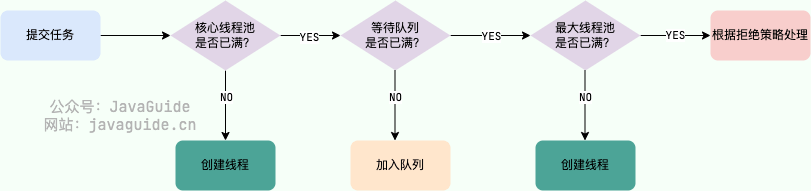
In the execute method, the addWorker method is called multiple times. The addWorker method is primarily used to create new working threads, returning true if successful; otherwise, it returns false.
    // Global lock, essential for concurrent operations
    private final ReentrantLock mainLock = new ReentrantLock();
    // Tracks the largest size of the thread pool, only accessible under the global lock mainLock
    private int largestPoolSize;
    // Set of working threads, stores all working threads (active) in the thread pool, only accessible under the global lock mainLock
    private final HashSet<Worker> workers = new HashSet<>();
    // To get the thread pool state
    private static int runStateOf(int c)     { return c & ~CAPACITY; }
    // Checks if thread pool is in Running state
    private static boolean isRunning(int c) {
        return c < SHUTDOWN;
    }

    /**
     * Adds a new worker thread to the thread pool
     * @param firstTask The task to be executed
     * @param core If true, use the pool's core size; if false, use the maximum size
     * @return True if added successfully; false otherwise
     */
    private boolean addWorker(Runnable firstTask, boolean core) {
        retry:
        for (;;) {
            // These two lines are to get the thread pool status
            int c = ctl.get();
            int rs = runStateOf(c);

            // Check if it is needed to check if the queue is empty.
            if (rs >= SHUTDOWN &&
                ! (rs == SHUTDOWN &&
                   firstTask == null &&
                   ! workQueue.isEmpty()))
                return false;

            for (;;) {
                // Get the number of working threads in the pool
                int wc = workerCountOf(c);
                // If core is false, the queue is also full, making the pool size become maximumPoolSize
                if (wc >= CAPACITY ||
                    wc >= (core ? corePoolSize : maximumPoolSize))
                    return false;
                // Atomic operation will increment the work count by 1
                if (compareAndIncrementWorkerCount(c))
                    break retry;
                // If the thread status changes, rerun the above operations
                c = ctl.get();
                if (runStateOf(c) != rs)
                    continue retry;
                // else CAS failed due to workerCount change; retry inner loop
            }
        }
        // Mark the success of the worker thread's startup
        boolean workerStarted = false;
        // Mark the success of the worker thread creation
        boolean workerAdded = false;
        Worker w = null;
        try {
            w = new Worker(firstTask);
            final Thread t = w.thread;
            if (t != null) {
                // Lock
                final ReentrantLock mainLock = this.mainLock;
                mainLock.lock();
                try {
                    // Get the thread pool state
                    int rs = runStateOf(ctl.get());
                   // If the pool state is still RUNNING and the thread is alive, add the working thread to the workers collection
                  //(rs=SHUTDOWN && firstTask == null) Needs to be added to the workers collection and start a new Worker if the pool status is less than STOP and the incoming task instance firstTask is null
                   // firstTask == null indicates a new thread creation without executing a task
                    if (rs < SHUTDOWN ||
                        (rs == SHUTDOWN && firstTask == null)) {
                        if (t.isAlive()) // precheck that t is startable
                            throw new IllegalThreadStateException();
                        workers.add(w);
                       // Update the maximum number of working threads currently
                        int s = workers.size();
                        if (s > largestPoolSize)
                            largestPoolSize = s;
                      // Whether the worker thread started successfully
                        workerAdded = true;
                    }
                } finally {
                    // Unlock
                    mainLock.unlock();
                }
                // If added successfully, invoke thread t's Thread#start() to start the actual thread instance
                if (workerAdded) {
                    t.start();
                  // Mark the worker as started
                    workerStarted = true;
                }
            }
        } finally {
           // If it fails to start, remove the corresponding Worker from the working threads
            if (! workerStarted)
                addWorkerFailed(w);
        }
        return workerStarted;
    }
For more in-depth analysis of thread pool source code, it is recommended to check this article: Hardcore: Analysis of JUC Thread Pool ThreadPoolExecutor Implementation Principle from Source Code.
Now, back to the example code—it should be straightforward to understand its principles now, right?
If you still don't understand, that's alright, you can refer to my analysis:
In the code, we simulated 10 tasks, where the configured core thread count is 5 and the waiting queue capacity is 100. Thus, only a maximum of 5 tasks can be executed simultaneously, while the remaining 5 will be placed in the waiting queue. If any of the current 5 tasks are completed, the thread pool will pick up new tasks to execute.
Runnable has existed since Java 1.0, but Callable was introduced in Java 1.5 to handle use cases that Runnable does not support. The Runnable interface does not return results or throw checked exceptions, whereas the Callable interface can. Therefore, if a task does not need to return results or throw exceptions, it is recommended to use the Runnable interface, as it makes the code cleaner.
The Executors utility class can convert Runnable objects into Callable objects (Executors.callable(Runnable task) or Executors.callable(Runnable task, Object result)).
Runnable.java
@FunctionalInterface
public interface Runnable {
   /**
    * Executed by the thread, with no return value and no exceptions allowed
    */
    public abstract void run();
}
Callable.java
@FunctionalInterface
public interface Callable<V> {
    /**
     * Computes a result, or throws an exception if unable to do so.
     * @return The computed result
     * @throws Exception if unable to compute the result
     */
    V call() throws Exception;
}
execute() and submit() are two methods for submitting tasks to a thread pool, and they have some differences:
- Return values:
execute()is used for submitting tasks that do not require return values and is typically used for executingRunnabletasks, with no way to determine whether a task was successfully executed by the thread pool. Thesubmit()method is used for submitting tasks requiring return values. It can submitRunnableorCallabletasks. Thesubmit()method returns aFutureobject, which allows you to determine whether the task executed successfully and to retrieve the task's return value (get()method will block the current thread until the task is complete, andget(long timeout, TimeUnit unit)adds a timeout—if the task has not completed within thetimeoutperiod, it throws ajava.util.concurrent.TimeoutException). - Exception handling: With the
submit()method, you can handle exceptions thrown during the task execution through theFutureobject, whereas when using theexecute()method, exception handling needs to be performed through a customThreadFactory(setting anUncaughtExceptionHandlerobject when creating the thread in the thread factory to handle exceptions) or in theafterExecute()method ofThreadPoolExecutor.
Example 1: Using the get() method to retrieve a return value.
// This is just to demonstrate usage; it's recommended to use the ThreadPoolExecutor constructor to create thread pools.
ExecutorService executorService = Executors.newFixedThreadPool(3);

Future<String> submit = executorService.submit(() -> {
    try {
        Thread.sleep(5000L);
    } catch (InterruptedException e) {
        e.printStackTrace();
    }
    return "abc";
});

String s = submit.get();
System.out.println(s);
executorService.shutdown();
Output:
abc
Example 2: Using the get(long timeout, TimeUnit unit) method to retrieve a return value.
ExecutorService executorService = Executors.newFixedThreadPool(3);

Future<String> submit = executorService.submit(() -> {
    try {
        Thread.sleep(5000L);
    } catch (InterruptedException e) {
        e.printStackTrace();
    }
    return "abc";
});

String s = submit.get(3, TimeUnit.SECONDS);
System.out.println(s);
executorService.shutdown();
Output:
Exception in thread "main" java.util.concurrent.TimeoutException
  at java.util.concurrent.FutureTask.get(FutureTask.java:205)
shutdown(): Shuts down the thread pool, changing the pool status toSHUTDOWN. The thread pool will no longer accept new tasks, but the tasks in the queue will finish execution.shutdownNow(): Shuts down the thread pool, changing the pool status toSTOP. The thread pool will terminate currently running tasks and stop processing queued tasks, returning a list of tasks that were waiting to be executed.
isShutdown: Returns true aftershutdown()method is called.isTerminated: Returns true aftershutdown()method is called, and all submitted tasks have completed.
FixedThreadPool is known as a reusable fixed thread number thread pool. Let's look at the relevant implementation through the source code in the Executors class:
   /**
     * Creates a thread pool with a fixed number of reusable threads
     */
    public static ExecutorService newFixedThreadPool(int nThreads, ThreadFactory threadFactory) {
        return new ThreadPoolExecutor(nThreads, nThreads,
                                      0L, TimeUnit.MILLISECONDS,
                                      new LinkedBlockingQueue<Runnable>(),
                                      threadFactory);
    }
There is another implementation method of FixedThreadPool, similar to the above, which will not be elaborated here:
    public static ExecutorService newFixedThreadPool(int nThreads) {
        return new ThreadPoolExecutor(nThreads, nThreads,
                                      0L, TimeUnit.MILLISECONDS,
                                      new LinkedBlockingQueue<Runnable>());
    }
From the above source code, we can see that the newly created FixedThreadPool has both corePoolSize and maximumPoolSize set to nThreads, which is the value we provide when using it.
Even if the maximumPoolSize is larger than corePoolSize, at most only corePoolSize threads will be created. This is because FixedThreadPool uses a LinkedBlockingQueue with a capacity of Integer.MAX_VALUE (an unbounded queue), and the queue will never fill up.
The execute() method running illustration of FixedThreadPool (the image source: "Java Concurrency in Practice"):

Description of the above image:
- If the number of currently running threads is less than
corePoolSize, create new threads to execute the tasks if a new task arrives; - Once the current number of running threads reaches
corePoolSize, additional tasks will be added to theLinkedBlockingQueue; - After the threads in the thread pool finish their tasks, they will continuously fetch tasks from the
LinkedBlockingQueueto execute.
FixedThreadPool uses an unbounded queue LinkedBlockingQueue (with a queue capacity of Integer.MAX_VALUE) as the working queue of the thread pool; this brings the following impacts to the thread pool:
- After the thread count in the thread pool reaches
corePoolSize, new tasks will wait in the unbounded queue; hence, the number of threads in the thread pool will not exceedcorePoolSize. - Since an unbounded queue is used,
maximumPoolSizebecomes an ineffective parameter since the queue will never be full. Thus, it can be seen from the source code of creatingFixedThreadPoolthat itscorePoolSizeandmaximumPoolSizeare set to the same value. - Due to points 1 and 2, using an unbounded queue makes
keepAliveTimean ineffective parameter. - A running
FixedThreadPool(without callingshutdown()orshutdownNow()) will not reject tasks, potentially leading to OOM (OutOfMemoryError) when there are many tasks.
SingleThreadExecutor is a thread pool with only one thread. Let's look at the implementation of SingleThreadExecutor:
   /**
     * Returns a thread pool with only one thread
     */
    public static ExecutorService newSingleThreadExecutor(ThreadFactory threadFactory) {
        return new FinalizableDelegatedExecutorService
            (new ThreadPoolExecutor(1, 1,
                                    0L, TimeUnit.MILLISECONDS,
                                    new LinkedBlockingQueue<Runnable>(),
                                    threadFactory));
    }
public static ExecutorService newSingleThreadExecutor() {
return new FinalizableDelegatedExecutorService
(new ThreadPoolExecutor(1, 1,
0L, TimeUnit.MILLISECONDS,
new LinkedBlockingQueue<Runnable>()));
}From the above source code, we can see that the newly created SingleThreadExecutor has both corePoolSize and maximumPoolSize set to 1, whereas other parameters are the same as FixedThreadPool.
The running illustration of SingleThreadExecutor (the image source: "Java Concurrency in Practice"):

Description of the above image:
- If the number of currently running threads is less than
corePoolSize, a new thread will be created to execute the task; - Once there is a running thread in the current thread pool, tasks will be added to the
LinkedBlockingQueue; - Once the thread finishes the current task, it will continuously fetch tasks from the
LinkedBlockingQueueto execute.
SingleThreadExecutor, like FixedThreadPool, also uses an unbounded queue LinkedBlockingQueue (with a queue capacity of Integer.MAX_VALUE) as its working queue. Using an unbounded queue has impacts on the thread pool, similar to those of FixedThreadPool, meaning it could lead to OOM.
CachedThreadPool is a thread pool that creates new threads as needed. Let’s investigate the implementation of CachedThreadPool:
    /**
     * Creates a thread pool where new threads are created as needed, but will reuse previously constructed threads if they are available.
     */
    public static ExecutorService newCachedThreadPool(ThreadFactory threadFactory) {
        return new ThreadPoolExecutor(0, Integer.MAX_VALUE,
                                      60L, TimeUnit.SECONDS,
                                      new SynchronousQueue<Runnable>(),
                                      threadFactory);
    }
public static ExecutorService newCachedThreadPool() {
return new ThreadPoolExecutor(0, Integer.MAX_VALUE,
60L, TimeUnit.SECONDS,
new SynchronousQueue<Runnable>());
}The corePoolSize of CachedThreadPool is set to zero (0), and the maximumPoolSize is set to Integer.MAX_VALUE, which is unbounded. This means that if the submission speed of tasks from the main thread exceeds the processing speed of threads in the maximumPool, CachedThreadPool will constantly create new threads, potentially exhausting CPU and memory resources.
The execution illustration of the CachedThreadPool's execute() method (the image source: "Java Concurrency in Practice"):

Description of the above image:
- First, execute
SynchronousQueue.offer(Runnable task)to submit the task to the task queue. If there are idle threads in themaximumPoolexecutingSynchronousQueue.poll(keepAliveTime, TimeUnit.NANOSECONDS), the main thread’s offer operation will successfully pair with the poll operation of the idle thread, transferring the task to the idle thread for execution, thus completing theexecute()method. If not, it proceeds to the next step. - If the initial
maximumPoolis empty or if there are no idle threads in it, the offer operation will fail. In this case,CachedThreadPoolwill create a new thread to execute the task, and theexecutemethod will complete.
CachedThreadPool uses SynchronousQueue, allowing for up to Integer.MAX_VALUE threads, which may lead to an excessive number of created threads, resulting in OOM.
ScheduledThreadPool is designed to run tasks after a specified delay or to execute tasks periodically. This will not generally be used in practical projects, and it is not recommended; it's sufficient to have a basic understanding.
public static ScheduledExecutorService newScheduledThreadPool(int corePoolSize) {
    return new ScheduledThreadPoolExecutor(corePoolSize);
}
public ScheduledThreadPoolExecutor(int corePoolSize) {
    super(corePoolSize, Integer.MAX_VALUE, 0, NANOSECONDS,
          new DelayedWorkQueue());
}
ScheduledThreadPool is created through ScheduledThreadPoolExecutor and utilizes a DelayedWorkQueue (delay blocking queue) as its task queue.
The internal elements of DelayedWorkQueue are not sorted by the insertion time but by the length of the delay, employing a heap data structure to ensure every dequeued task is the one currently able to execute sooner in the queue. When full, DelayedWorkQueue will automatically enlarge its original capacity by half, meaning it will never block, with a maximum expansion of Integer.MAX_VALUE, thus it can create at most the core thread count.
ScheduledThreadPoolExecutor inherits from ThreadPoolExecutor, so creating ScheduledThreadExecutor fundamentally creates a ThreadPoolExecutor thread pool, though with differing parameters.
public class ScheduledThreadPoolExecutor
        extends ThreadPoolExecutor
implements ScheduledExecutorService- Timer is sensitive to changes in system clock, while
ScheduledThreadPoolExecutoris not. - Timer has only one executing thread, therefore long-running tasks may delay others.
ScheduledThreadPoolExecutorcan configure any number of threads. Additionally, if you wish (via providing aThreadFactory), you can fully control the threads being created. - In
TimerTask, runtime exceptions terminate a thread, causing theTimerto hang, thus halting scheduled tasks from executing.ScheduledThreadExecutorcatches runtime exceptions and allows you to handle them if needed (by overridingafterExecutemethod ofThreadPoolExecutor). Exception-throwing tasks will be canceled, but others will continue running.
For more detailed information on scheduled tasks, you can refer to the article: Java Scheduled Tasks Explained.
The article Best Practices for Java Thread Pools summarizes important considerations when using thread pools, which can be useful before implementing thread pools in practice.