| title | Summary of Basic Knowledge of Databases | |
|---|---|---|
| category | Database | |
| tag |
|
The foundation of database knowledge is essential to understand and remember. Although this part consists only of theoretical knowledge, it is very important as it is the basis for learning MySQL databases later on. PS: Due to the involvement of many conceptual contents in this section, references have been taken from the corresponding introductions in Wikipedia and Baidu Encyclopedia.
- Database: A database (abbreviated as DB) is a collection of information, or more specifically, a database is a collection of data managed by a database management system.
- Database Management System: A database management system (abbreviated as DBMS) is a large software that manipulates and manages databases, commonly used to create, use, and maintain databases.
- Database System: A database system (abbreviated as DBS) typically consists of software, databases, and a database administrator (DBA).
- Database Administrator: The database administrator (abbreviated as DBA) is responsible for the overall management and control of the database system.
What are tuples, keys, candidate keys, primary keys, foreign keys, primary attributes, and non-primary attributes?
- Tuple: A tuple is a fundamental concept in relational databases. A relation is a table, and each row (i.e., each record in the database) is a tuple, while each column is an attribute. In a two-dimensional table, tuples are also referred to as rows.
- Key: A key is an attribute that can uniquely identify an entity, corresponding to a column in a table.
- Candidate Key: If a certain attribute or group of attributes in a relation can uniquely identify a tuple, and no subset can do so, this group of attributes is called a candidate key. For example, in the student entity, the "student ID" uniquely differentiates student entities. Assuming that the combination of the attributes "name" and "class" is sufficient to distinguish student entities, both {student ID} and {name, class} are candidate keys.
- Primary Key: A primary key is a key selected from the candidate keys. An entity set can have only one primary key but may have multiple candidate keys.
- Foreign Key: A foreign key is an attribute in one relation that is a primary key in another relation.
- Primary Attribute: Attributes that appear in the candidate keys are called primary attributes. For instance, in the relation worker (employee ID, ID number, name, gender, department), both employee ID and ID number can uniquely identify this relation, so they are both candidate keys. Employee ID and ID number are primary attributes. If the primary key is a set of attributes, then all attributes in that set are primary attributes.
- Non-primary Attribute: Attributes not included in any candidate keys are called non-primary attributes. For instance, in the relation student (student ID, name, age, gender, class), if the primary key is "student ID," then "name," "age," "gender," and "class" are all considered non-primary attributes.
When working on a project, it's important to try drawing an ER diagram to clarify database design. This is often a question asked by interviewers when discussing your projects.
ER Diagram stands for Entity Relationship Diagram, which provides a method to represent entity types, attributes, and relationships.
An ER diagram consists of the following three elements:
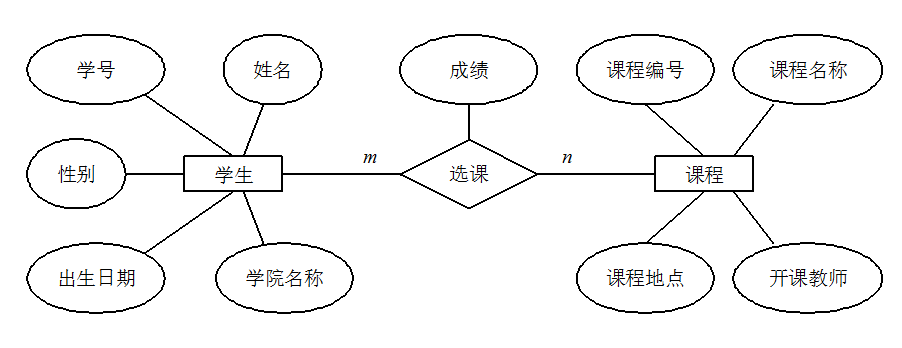
- Entity: Typically represents real-world business objects; logical objects can also be used. For instance, in a campus management system, entities may include students, teachers, courses, classes, etc. In an ER diagram, entities are represented by rectangular boxes.
- Attributes: Attributes describe the elements that make up the entity. In product design, they can be understood as fields. In an ER diagram, attributes are represented by oval shapes.
- Relationships: Relationships denote the connections between entities and are represented by diamonds in the ER diagram. These relationships can reflect not only business associations but also the quantity correspondence between entities using numbers. For example, a class may have multiple students, which illustrates a relationship between entities.
The following diagram is an ER diagram for student course selection, where each student can select multiple courses, and the same course can be selected by multiple students, making this a many-to-many (M:N) relationship. Additionally, there are two other types of relationships between entities: one-to-one (1:1) and one-to-many (1:N).
There are three types of database normalization:
- 1NF (First Normal Form): Attributes cannot be further divided.
- 2NF (Second Normal Form): Building on 1NF, it eliminates partial functional dependencies of non-primary attributes regarding keys.
- 3NF (Third Normal Form): 3NF, based on 2NF, eliminates transitive functional dependencies of non-primary attributes regarding keys.
Attributes (corresponding to fields in the table) cannot be further divided, meaning this field can only contain a single value and cannot be broken down into multiple other fields. 1NF is the most basic requirement for all relational databases, implying that tables created in a relational database must satisfy the first normal form.
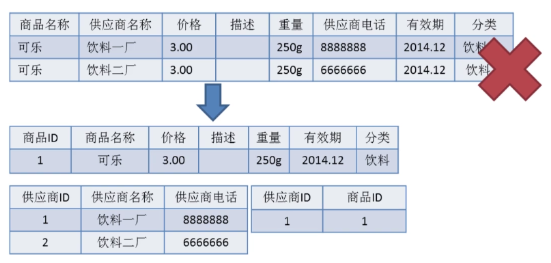
2NF builds on 1NF by eliminating partial functional dependencies of non-primary attributes on keys. The diagram below demonstrates the transition from the first normal form to the second normal form. The second normal form adds a column based on the first normal form, designated as the primary key, where non-primary attributes depend on the primary key.
Some important concepts:
- Functional Dependency: In a table, if the value of attribute (or set of attributes) X determines the value of attribute Y, then Y is said to be functionally dependent on X, denoted as X → Y.
- Partial Functional Dependency: If X → Y, and there exists a proper subset X0 of X such that X0 → Y, then Y is partially functionally dependent on X. For instance, in the table of basic student information R (student ID, ID number, name), the student ID attribute is unique; thus, in relation R, (student ID, ID number) → (name), (student ID) → (name), and (ID number) → (name) hold; therefore, the name is partially functionally dependent on (student ID, ID number).
- Full Functional Dependency: If a non-primary attribute data item depends on the entire key in a relation, it is called full functional dependency. For instance, in the basic student information table R (student ID, class, name), assuming there are identical student IDs across different classes but they cannot be the same within the class, in relation R, (student ID, class) → (name) holds, but (student ID) → (name) and (class) → (name) do not hold; therefore, name is fully functionally dependent on (student ID, class).
- Transitive Functional Dependency: In relation schema R(U), let X, Y, Z be different subsets of U. If X determines Y, Y determines Z, and neither Y include X nor X includes Y, and (X ∪ Y) ∩ Z = empty set, Z is said to be transitively functionally dependent on X. Transitive functional dependency can lead to data redundancy and anomalies. The subsets Y and Z of transitive functional dependency often belong to the same entity, so they can be merged into a single table. For instance, in relation R (student ID, name, department name, department head), student ID → department name, and department name → department head, creating a transitive functional dependency of the non-primary attribute department head concerning student ID.
3NF builds on 2NF by eliminating transitive functional dependencies of non-primary attributes regarding keys. A database design that meets the requirements of 3NF essentially resolves the issues of excessive data redundancy, insertion anomalies, modification anomalies, and deletion anomalies. For instance, in relation R (student ID, name, department name, department head), student ID → department name and department name → department head create a transitive functional dependency of the non-primary attribute department head regarding student ID, making this table design not comply with 3NF’s requirements.
- Primary Key: A primary key uniquely identifies a tuple, cannot be duplicated, and is not allowed to be null. A table can have only one primary key.
- Foreign Key: A foreign key is used to establish relationships with other tables. A foreign key is a primary key from another table and can have duplicates or null values. A table can have multiple foreign keys.
Regarding foreign keys and cascading updates, the Alibaba development manual states:
Mandatory: Do not use foreign keys and cascading operations; all foreign key concepts must be resolved at the application layer.
Explanation: For example, in the relationship between students and grades, if the student_id in the student table is a primary key, then the student_id in the grades table is a foreign key. If the student_id in the student table is updated and triggers the update of student_id in the grades table, this is a cascading update. Foreign keys and cascading updates are suitable for low concurrency in standalone scenarios, but they are not suitable for distributed or high-concurrency clusters; cascading updates involve strong blocking, posing a risk of database update storms; foreign keys affect the insertion speed of the database.
Why should foreign keys not be used? Most people might answer as follows:
- Increased Complexity: a. Every DELETE or UPDATE must consider foreign key constraints, making development painful and testing data cumbersome; b. The master-slave relationship of foreign keys is fixed. If the requirements change and the database no longer needs this field to be associated with other tables, it can cause many issues.
- Additional Work: The database must maintain foreign keys, requiring additional operations when performing insertions, deletions, or updates involving foreign key fields to ensure data consistency and correctness, consuming database resources. If handled at the application level, database pressure can be alleviated.
- Not Friendly for Sharding: Foreign keys cannot be effective in sharded database scenarios.
- …
I personally feel that the above answers are not particularly comprehensive; they only address a common issue with foreign keys. In reality, we know that foreign keys also have many advantages, such as:
- Ensuring data consistency and integrity in the database.
- Facilitating cascading operations and reducing programmatic code.
- …
Therefore, it is essential not to dismiss the concept of foreign keys altogether. As they exist for a reason, if the system does not involve database sharding and the concurrency is not very high, using foreign keys should still be considered.
A stored procedure can be viewed as a collection of SQL statements complemented by logical control statements. Stored procedures are quite useful in complex business scenarios. For example, often when we complete an operation, we might need to write a long series of SQL statements; in such cases, we can create a stored procedure, making it easier for future calls. Once a stored procedure is debugged and complete, it can run reliably, and utilizing stored procedures is generally faster than executing pure SQL statements, as stored procedures are pre-compiled.
Stored procedures are not widely used in internet companies, as they can be difficult to debug and extend, lack portability, and consume database resources.
The Alibaba Java development manual mandates the prohibition of stored procedures.

drop(delete data):drop table table_name, directly deletes the table itself and is used when removing a table.truncate(empty data):truncate table table_name, only deletes the data within the table, and when inserting data again, the auto-incrementing ID starts from 1 again; it's used when clearing data from a table.delete(delete data):delete from table_name where column_name=value, deletes data from a specific row without awhereclause, similar to the effect oftruncate table table_name.
Both truncate and delete (without a where clause), as well as drop, will delete data from the tables. However, truncate and delete only remove data without deleting the table structure (definition), while executing the drop statement deletes the table structure as well, meaning the table does not exist after executing drop.
truncate and drop are classified as DDL (Data Definition Language) statements, which take effect immediately, and the original data is not placed in the rollback segment, meaning operations cannot be rolled back, and triggers are not invoked. Conversely, the delete statement is a DML (Data Manipulation Language) statement, where the operation is placed in the rollback segment and only takes effect after the transaction is committed.
Differences between DML and DDL statements:
- DML stands for Data Manipulation Language, which refers to operations on records in database tables, mainly involving inserting, updating, deleting, and querying table records. These operations are the most frequently used by developers in day-to-day tasks.
- DDL stands for Data Definition Language, which refers to operations for creating, deleting, and modifying objects within the database. The main difference from DML is that DML pertains only to operations within table data without modifying anything related to table definitions or structures, nor does it involve other objects. DDL statements are generally more utilized by database administrators (DBAs) and are infrequently used by regular developers.
Additionally, since select does not destroy tables, in some contexts, select is distinctly classified as Data Query Language (DQL).
Generally, the performance order is: drop > truncate > delete (although I have not verified this empirically).
- The
deletecommand generates databasebinloglogs during execution, which requires time to record logs but has the advantage of facilitating data rollback recovery. - The
truncatecommand does not generate database logs during execution, making it faster thandelete. Moreover, it also resets the table's auto-incrementing value and restores indexes to their initial size. - The
dropcommand wholly releases the space occupied by the table.
Tips: You should focus more on the usage scenario rather than execution efficiency.
- Requirement Analysis: Analyze user requirements, including data, functionality, and performance needs.
- Conceptual Structure Design: Primarily use the E-R model for design, which includes drawing the E-R diagram.
- Logical Structure Design: Transform the E-R diagram into tables, implementing the conversion from the E-R model to the relational model.
- Physical Structure Design: Choose the appropriate storage structures and access paths for the designed database.
- Database Implementation: Involves programming, testing, and trial runs.
- Operation and Maintenance of the Database: Regular operation of the system and daily maintenance of the database.