| title | Overview of Java 11 New Features | |
|---|---|---|
| category | Java | |
| tag |
|
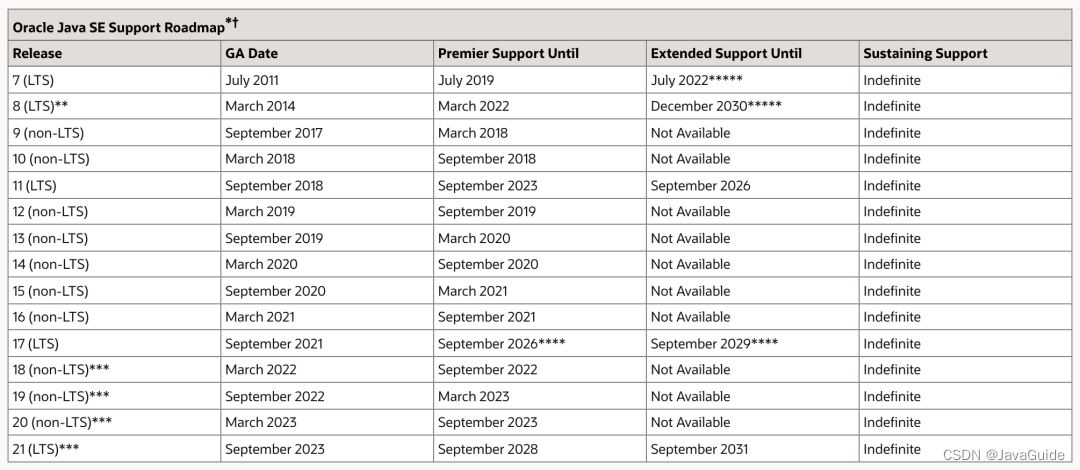
Java 11 was officially released on September 25, 2018, and it is a significant version! The biggest difference between Java 11 and Java 9, which was released in September 2017, and Java 10, released in March 2018, is: in terms of Long-Term Support, Oracle has stated that it will provide strong support for Java 11, which will last until September 2026. This is the first long-term version supported after Java 8.
The following image is the timeline of Oracle JDK support provided by Oracle.
Overview (Selected Highlights):
- JEP 321: Standardization of HTTP Client
- JEP 333: ZGC (Scalable Low-Latency Garbage Collector)
- JEP 323: Local Variable Syntax for Lambda Parameters
- JEP 330: Launch Single-File Source Code Programs
Java 11 standardizes the Http Client API introduced in Java 9 and updated in Java 10. While it was incubated in the first two versions, the Http Client has been almost completely rewritten and now fully supports asynchronous non-blocking operations.
Moreover, in Java 11, the package name of Http Client has changed from jdk.incubator.http to java.net.http, and this API provides non-blocking request and response semantics through CompletableFuture. It is also very simple to use, as shown below:
var request = HttpRequest.newBuilder()
    .uri(URI.create("https://javastack.cn"))
    .GET()
    .build();
var client = HttpClient.newHttpClient();

// Synchronous
HttpResponse<String> response = client.send(request, HttpResponse.BodyHandlers.ofString());
System.out.println(response.body());

// Asynchronous
client.sendAsync(request, HttpResponse.BodyHandlers.ofString())
    .thenApply(HttpResponse::body)
.thenAccept(System.out::println);Java 11 introduces a series of string handling methods:
// Check if the string is empty
" ".isBlank(); // true
// Trim whitespace from both ends of the string
" Java ".strip(); // "Java"
// Trim whitespace from the start of the string
" Java ".stripLeading();   // "Java "
// Trim whitespace from the end of the string
" Java ".stripTrailing();  // " Java"
// Repeat the string a specified number of times
"Java".repeat(3);             // "JavaJavaJava"
// Return a collection of strings split by line terminators
"A\nB\nC".lines().count();    // 3
"A\nB\nC".lines().collect(Collectors.toList());The new isEmpty() method has been added to determine if the specified Optional object is empty.
var op = Optional.empty();
System.out.println(op.isEmpty()); // Check if the specified Optional object is empty
ZGC stands for Z Garbage Collector, which is a scalable, low-latency garbage collector.
ZGC is designed to meet the following goals:
- GC pause times do not exceed 10ms
- Handles small heaps of a few hundred MB and large heaps of several TB
- Application throughput does not drop more than 15% (compared to G1 garbage collection algorithm)
- Facilitates the introduction of new GC features based on this and lays the foundation for optimizing colored pointers and load barriers
- Currently only supports Linux/x64 platforms
ZGC is currently in the experimental stage and only supports Linux/x64 platforms.
Similar to ParNew and G1 in CMS, ZGC also uses a mark-copy algorithm, but ZGC has made significant improvements to this algorithm.
With ZGC, the occurrence of Stop The World situations will be less!
For more details, see: Exploring and Practicing the Next Generation Garbage Collector ZGC
Starting from Java 10, local variable type inference was introduced as a key feature. Type inference allows using the keyword var as the type of local variables instead of the actual type, with the compiler inferring the type based on the value assigned to the variable.
In Java 10, there were several restrictions on the var keyword:
- It can only be used for local variables
- It must be initialized at the time of declaration
- Cannot be used as method parameters
- Cannot be used in Lambda expressions
Java 11 allows developers to use var for parameter declaration in Lambda expressions.
// The two are equivalent
Consumer<String> consumer = (var i) -> System.out.println(i);
Consumer<String> consumer = (String i) -> System.out.println(i);This means we can run single-file Java source code. This feature allows the Java interpreter to execute Java source code directly. The source code is compiled in memory and executed by the interpreter without the need to generate a .class file on disk. The only constraint is that all related classes must be defined in the same Java file.
This is particularly useful for Java beginners and those who want to try simple programs, and it can be used together with jshell. It enhances the ability to write script programs in Java to a certain extent.
- New Garbage Collector Epsilon: A completely passive GC implementation that uses limited memory resources to minimize memory usage and memory throughput latency.
- Low Overhead Heap Profiling: Java 11 provides a low-overhead method for Java heap allocation sampling, allowing access to information about Java objects allocated on the heap and enabling access to heap information via JVMTI.
- TLS 1.3 Protocol: Java 11 includes the implementation of the Transport Layer Security (TLS) 1.3 specification (RFC 8446), replacing previous versions that included TLS, including TLS 1.2, while improving other TLS features such as OCSP stapling extension (RFC 6066, RFC 6961), session hash, and extended master secret (RFC 7627), with significant enhancements in security and performance.
- Java Flight Recorder: The Flight Recorder was previously an analysis tool in the commercial version of the JDK, but in Java 11, its code has been included in the open codebase, allowing everyone to use this feature.
- ……
- JDK 11 Release Notes: https://www.oracle.com/java/technologies/javase/11-relnote-issues.html
- Java 11 – Features and Comparison: https://www.geeksforgeeks.org/java-11-features-and-comparison/