#jquery-toolbar This is a SVG based jQuery toolbar widget. No CSS is used here!!!

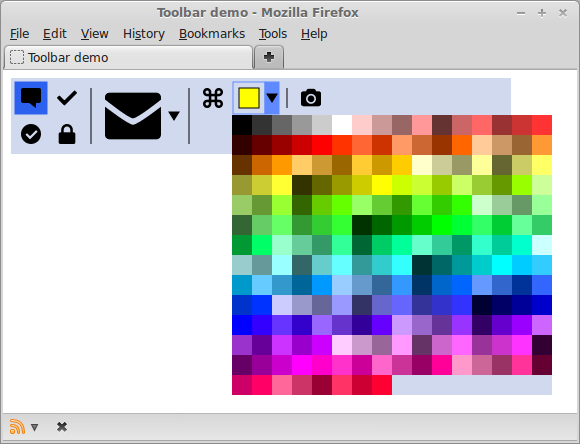


##Options
- paperWidth: width of the toolbar in px (default: 500),
- paperHeight: height of the toolbar in px (default: 40),
- buttonSpace: space between buttons in px (default: 4),
- menuPadding: padding inside menu in px (default: 4),
- iconPadding: padding inside button in px (default: 6),
- colors: object with definition of item background colors,
- menu: array of menu item configurations.
###Menu item configuration
- icon: URI of the image, or function(paper, item) that returns Raphael object,
- width: width of the menu item in px,
- height: height of the menu item in px,
- click: click event handler. First parameter of event handler function is a item object.
- id: id of the item,
- group: id of the group. Only one item in the group can be selected.
- submenu: array of submenu items, or string value 'color' which causes a color picker submenu to be generated.
- propagateClickFromSubmenu: click events on submenu items are propagated to this parent item. Second parameter of event handler function in this case is a submenu item on which click event is triggered.
- copyIconFromSubmenu: automatically clone a icon from first selected item in submenu. Icon is changed in case of click event on submenu item.
- selected: item is selected,
- selectable: item can be selected. Items that belong to a group are automatically selectable.
- data: container for user-defined data.
###Special menu item strings
- br: defines end of current row,
- col: defines end of current column. It can be only used in top toolbar menu.
- sep: draws separator line between two buttons in a row.
##Methods
- getItem(id): gets the item object with specified id.
- clickItem(item): executes click handler on provided item object.
#References
- jQuery - http://jquery.com/
- jQuery UI - http://jqueryui.com/
- Raphael - http://raphaeljs.com/
- Underscore - http://underscorejs.org/
- Demo page uses icons from http://designmodo.com/