
One character, many glyph variations
Group: CSSWG
Shortname: css-fonts
Title: CSS Fonts Module
Level: 3
Status: ED
Work Status: Testing
TR: https://www.w3.org/TR/css-fonts-3/
ED: https://drafts.csswg.org/css-fonts/
Editor: John Daggett, Invited Expert, @nattokirai, w3cid 41498
Editor: Myles C. Maxfield, Apple Inc., mmaxfield@apple.com, w3cid 77180
Abstract: This CSS3 module describes how font properties are specified and how font resources are loaded dynamically.  The contents of this specification are a consolidation of content previously divided into CSS3 Fonts and CSS3 Web Fonts modules. The description of font load events was moved into the CSS3 Font Load Events module.
Previous Version: https://www.w3.org/TR/2013/CR-css-fonts-3-20131003/
Previous Version: https://www.w3.org/TR/2013/WD-css-fonts-3-20130711/
!Issues List: Tracker
!Issues List: Bugzilla
Test Suite: http://test.csswg.org/suites/css3-fonts/nightly-unstable/
At Risk: fallback handling for text decoration in superscript/subscript variant glyphs ('font-variant-position'), 'font-language-override' property
Ignored Terms: font-relative lengths, document language, sub, sup, ident, atkeyword, number, , domstring, invalidaccesserror
body {
	font-family: Helvetica;
	font-weight: bold;
}
Font resources may be installed locally on the system on which a user
agent is running or downloadable. For local font resources descriptive
information can be obtained directly from the font resource. For
downloadable font resources (sometimes referred to as web fonts), the
descriptive information is included with the reference to the font
resource.
Families of fonts typically don't contain a single face for each
possible variation of font properties. The CSS font selection mechanism
describes how to match a given set of CSS font properties to a single
font face.
One character, many glyph variations

Letterforms with and without serifs

Similar groupings for Japanese typefaces

Variations with diacritic marks
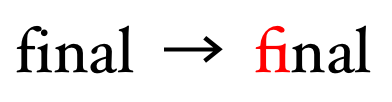
Ligature example

Required Arabic ligature

Weight and width variations within a single font family
Name: font-family Value: [ <This property specifies a prioritized list of font family names or generic family names. A font family defines a set of faces that vary in weight, width or slope. CSS uses the combination of a family name with other style attributes to select an individual face. Using this selection mechanism, rather than selecting a face via the style name as is often done in design applications, allows some degree of regularity in textual display when fallback occurs. Note: Designers should note that the CSS definition of font attributes used for selection are explicitly not intended to define a font taxonomy. A type designer's idea of a family may often extend to a set of faces that vary along axes other than just the standard axes of weight, width and slope. A family may extend to include both a set of serif faces and a set of sans-serif faces or vary along axes that are unique to that family. The CSS font selection mechanism merely provides a way to determine the “closest” substitute when substitution is necessary. Unlike other CSS properties, component values are a comma-separated list indicating alternatives. A user agent iterates through the list of family names until it matches an available font that contains a glyph for the character to be rendered. This allows for differences in available fonts across platforms and for differences in the range of characters supported by individual fonts. A font family name only specifies a name given to a set of font faces, it does not specify an individual face. For example, given the availability of the fonts below, Futura would match but Futura Medium would not:> | < > ]# Initial: depends on user agent Applies to: all elements Inherited: yes Percentages: n/a Computed value: as specified Animatable: no

Family and individual face names
body {
		font-family: Helvetica, Verdana, sans-serif;
}
If Helvetica is available it will be used when rendering. If
neither Helvetica nor Verdana is present, then the user-agent-defined
sans serif font will be used.
font-family: Red/Black, sans-serif;
font-family: "Lucida" Grande, sans-serif;
font-family: Ahem!, sans-serif;
font-family: test@foo, sans-serif;
font-family: #POUND, sans-serif;
font-family: Hawaii 5-0, sans-serif;
If a sequence of identifiers is given as a font family name, the computed value is the name converted to a string by joining all the identifiers in the sequence by single spaces. To avoid mistakes in escaping, it is recommended to quote font family names that contain white space, digits, or punctuation characters other than hyphens:
body { font-family: "New Century Schoolbook", serif }

<BODY STYLE="font-family: '21st Century', fantasy">
Font family names that happen to be the same as a keyword
value (''inherit'', ''serif'', ''sans-serif'', ''monospace'', ''fantasy'', and
''cursive'') must be quoted to prevent confusion with the keywords with
the same names. The keywords ''initial'' and ''default'' are reserved for
future use and must also be quoted when used as font names. UAs must
not consider these keywords as matching the <family-name>
type.
The precise way a set of fonts are grouped into font families
varies depending upon the platform font management API's. The
Windows GDI API only allows four faces to be grouped into a family
while the DirectWrite API and API's on OSX and other platforms support
font families with a variety of weights, widths and slopes (see Appendix A for more details).
Some font formats allow fonts to carry multiple localizations
of the family name. User agents must recognize and correctly
match all of these names independent of the underlying platform
localization, system API used or document encoding:

Localized family names
<generic-family> = serif | sans-serif | cursive | fantasy | monospace

Sample serif fonts

Sample sans-serif fonts
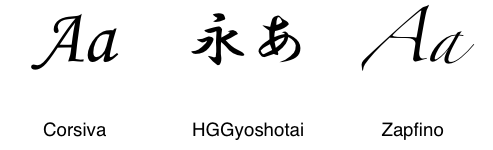
Sample cursive fonts

Sample fantasy fonts

Sample monospace fonts
Name: font-weight
Value: normal | bold | bolder | lighter | 100 | 200 | 300 | 400 | 500 | 600 | 700 | 800 | 900
Initial: normal
Applies to: all elements
Inherited: yes
Percentages: n/a
Computed value: numeric weight value (see description)
Animatable: as font weight
The 'font-weight' property specifies the weight of glyphs in the font, their degree of blackness or stroke thickness. Values have the following meanings:

Weight mappings for a font family with 400, 700 and 900 weight faces

Weight mappings for a font family with 300 and 600 weight faces
| Inherited value | bolder | lighter |
|---|---|---|
| 100 | 400 | 100 |
| 200 | 400 | 100 |
| 300 | 400 | 100 |
| 400 | 700 | 100 |
| 500 | 700 | 100 |
| 600 | 900 | 400 |
| 700 | 900 | 400 |
| 800 | 900 | 700 |
| 900 | 900 | 700 |
Name: font-stretch
Value: normal | ultra-condensed | extra-condensed | condensed | semi-condensed | semi-expanded | expanded | extra-expanded | ultra-expanded
Initial: normal
Applies to: all elements
Inherited: yes
Percentages: n/a
Computed value: as specified
Animatable: as font stretch
The 'font-stretch' property selects a normal, condensed, or expanded face from a font family. Absolute keyword values have the following ordering, from narrowest to widest:

Width mappings for a font family with condensed, normal and expanded width faces
Animation of font stretch: Font stretch is interpolated in discrete steps. The interpolation happens as though the ordered values are equally spaced real numbers. The interpolation result is rounded to the nearest value, with values exactly halfway between two values rounded towards the later value in the list above.
Name: font-style
Value: normal | italic | oblique
Initial: normal
Applies to: all elements
Inherited: yes
Percentages: n/a
Computed value: as specifed
Animatable: no
The 'font-style' property allows italic or oblique faces to be selected. Italic forms are generally cursive in nature while oblique faces are typically sloped versions of the regular face. Oblique faces can be simulated by artificially sloping the glyphs of the regular face. Compare the artificially sloped renderings of Palatino "a" and Baskerville "N" in grey with the actual italic versions:

Artificial sloping versus real italics
Name: font-size Value: <This property indicates the desired height of glyphs from the font. For scalable fonts, the font-size is a scale factor applied to the EM unit of the font. (Note that certain glyphs may bleed outside their EM box.) For non-scalable fonts, the font-size is converted into absolute units and matched against the declared font-size of the font, using the same absolute coordinate space for both of the matched values. Values have the following meanings:> | < > | < > Initial: medium Applies to: all elements Inherited: yes Percentages: refer to parent element's font size Computed value: absolute length Animatable: as length
xx-small | x-small | small | medium | large | x-large | xx-large
larger | smallerFor example, if the parent element has a font size of ''medium'', a value of ''larger'' will make the font size of the current element be ''large''. If the parent element's size is not close to a table entry, the user agent is free to interpolate between table entries or round off to the closest one. The user agent may have to extrapolate table values if the numerical value goes beyond the keywords.
<| xx-small
| x-small
| small
| medium
| large
| x-large
| xx-large
|
|
scaling factor
| 3/5
| 3/4
| 8/9
| 1
| 6/5
| 3/2
| 2/1
| 3/1
| HTML headings
| h6
|
| h5
| h4
| h3
| h2
| h1
|
| HTML font sizes
| 1
|
| 2
| 3
| 4
| 5
| 6
| 7
| |
|---|
p { font-size: 12pt; }
blockquote { font-size: larger }
em { font-size: 150% }
em { font-size: 1.5em }
Name: font-size-adjust Value: none | <For any given font size, the apparent size and legibility of text varies across fonts. For scripts such as Latin or Cyrillic that distinguish between upper and lowercase letters, the relative height of lowercase letters compared to their uppercase counterparts is a determining factor of legibility. This is commonly referred to as the aspect value. Precisely defined, it is equal to the x-height of a font divided by the font size. In situations where font fallback occurs, fallback fonts may not share the same aspect value as the desired font family and will thus appear less readable. The 'font-size-adjust' property is a way to preserve the readability of text when font fallback occurs. It does this by adjusting the font-size so that the x-height is the same regardless of the font used.> Initial: none Applies to: all elements Inherited: yes Percentages: n/a Computed value: as specified Animatable: as number
	p {
		font-family: Verdana, Futura, Times;
	}

	<p>Lorem ipsum dolor sit amet, ...</p>
Verdana has a relatively high aspect value, lowercase letters are relatively tall compared to uppercase
letters, so at small sizes text appears legible. Times has a lower aspect value and so if fallback occurs,
the text will be less legible at small sizes than Verdana.

Text with and without the use of 'font-size-adjust'
c = ( a / a' ) swhere:
		s  =  font-size value
		a  =  aspect value as specified by the 'font-size-adjust' property
		a' =  aspect value of actual font
		c  =  adjusted font-size to use
This value applies to any font that is selected but in typical usage it should be based on the aspect value of the first font in the font-family list. If this is specified accurately, the (a/a') term in the formula above is effectively 1 for the first font and no adjustment occurs. If the value is specified inaccurately, text rendered using the first font in the family list will display differently in older user agents that don't support 'font-size-adjust'.
ex and ch but does not affect the size of
em units. Since numeric values of 'line-height'
refer to the computed size of 'font-size',
'font-size-adjust' does not affect the used value of 'line-height'.
Note: In CSS, authors often specify 'line-height'
as a multiple of the 'font-size'. Since the 'font-size-adjust'
property affects the used value of 'font-size', authors should take
care setting the line height when 'font-size-adjust' is used. Setting
the line height too tightly can result in overlapping lines of text
in this situation.
Authors can calculate the
aspect value for a given font by comparing spans with the same content but
different 'font-size-adjust' properties. If the same font-size is used, the spans will match when the 'font-size-adjust'
value is accurate for the given font.
	p {
		font-family: Futura;
		font-size: 500px;
	}

	span {
		border: solid 1px red;
	}

	.adjust {
		font-size-adjust: 0.5;
	}

	<p><span>b</span><span class="adjust">b</span></p>

Futura with an aspect value of 0.5
Name: font Value: [ [ <<'font-style'>> || <The 'font' property is, except as described below, a shorthand property for setting 'font-style', 'font-variant', 'font-weight', 'font-stretch', 'font-size', 'line-height', and 'font-family' at the same place in the stylesheet. Values for the 'font-variant' property may also be included, but only those supported in CSS 2.1; none of the 'font-variant' values added in this specification can be used in the 'font' shorthand:> || <<'font-weight'>> || <<'font-stretch'>> ]? Value: <<'font-size'>> [ / <<'line-height'>> ]? <<'font-family'>> ] Value: | caption | icon | menu | message-box | small-caption | status-bar
<font-variant-css21> = [ normal | small-caps ]Additionally, it is a shorthand for 'font-size-adjust', 'font-kerning', and 'font-language-override', but as these cannot be specified in the syntax, it merely resets these to their initial values. The syntax of this property is based on a traditional typographical shorthand notation to set multiple properties related to fonts.
	p { font: 12pt/14pt sans-serif }
	p { font: 80% sans-serif }
	p { font: x-large/110% "new century schoolbook", serif }
	p { font: bold italic large Palatino, serif }
	p { font: normal small-caps 120%/120% fantasy }
	p { font: condensed oblique 12pt "Helvetica Neue", serif; }
In the second rule, the font size percentage value (''80%'') refers
to the computed 'font-size' of the parent element. In the third rule, the line
height percentage (''110%'') refers to the font size of the element
itself.
The first three rules do not specify the 'font-variant'
and 'font-weight' explicitly, so these properties
receive their initial values (''font-variant/normal''). Notice that the font family
name "new century schoolbook", which contains spaces, is enclosed in
quotes. The fourth rule sets the
'font-weight' to ''bold'', the
'font-style' to ''italic'', and implicitly sets
'font-variant' to ''font-variant/normal''.
The fifth rule sets the 'font-variant' (''small-caps''),
the 'font-size' (120% of the parent's font size),
the 'line-height' (120% of the font size)
and the 'font-family' (''fantasy'').
It follows that the keyword ''font-style/normal'' applies to the two
remaining properties: 'font-style' and 'font-weight'.
The sixth rule sets the 'font-style', 'font-stretch', 'font-size', and 'font-family',
the other font properties being set to their initial values.
p {
	font: 80% sans-serif;   /* for older user agents */
	font: condensed 80% sans-serif;
}
The following values refer to system fonts:
font: menu;        /* use the font settings for system menus */
font: large menu;  /* use a font family named "menu" */
	button { font: 300 italic 1.3em/1.7em "FB Armada", sans-serif }
	button p { font: menu }
	button p em { font-weight: bolder }
If the font used for dropdown menus on a particular system
happened to be, for example, 9-point Charcoal, with a weight of 600, then P
elements that were descendants of BUTTON would be displayed as if
this rule were in effect:
button p { font: 600 9pt Charcoal }
Because the 'font' shorthand resets to its initial value
any property not explicitly given a value, this has the same effect as
this declaration:
	button p {
		font-style: normal;
		font-variant: normal;
		font-weight: 600;
		font-size: 9pt;
		line-height: normal;
		font-family: Charcoal
	}
Name: font-synthesis
Value: none | [ weight || style ]
Initial: weight style
Applies to: all elements
Inherited: yes
Percentages: n/a
Computed value: as specified
Animatable: no
This property controls whether user agents are allowed to synthesize bold or oblique font faces when a font family lacks bold or italic faces.
*:lang(ar) { font-synthesis: none; }
font_face_rule
	: FONT_FACE_SYM S* '{' S* descriptor_declaration? [ ';' S* descriptor_declaration? ]* '}' S*
	;

descriptor_declaration
	: property ':' S* expr
	;
The following new definitions are introduced:
-    -|\\0{0,4}2d(\r\n|[ \t\r\n\f])?
F    f|\\0{0,4}(46|66)(\r\n|[ \t\r\n\f])?
The following new token is introduced:
@{F}{O}{N}{T}{-}{F}{A}{C}{E} {return FONT_FACE_SYM;}
Each ''@font-face''
rule specifies a value for every font descriptor, either implicitly or
explicitly. Those not given explicit values in the rule take the initial
value listed with each descriptor in this specification. These
descriptors apply solely within the context of the ''@font-face'' rule in
which they are defined, and do not apply to document language elements.
There is no notion of which elements the descriptors apply to or whether
the values are inherited by child elements. When a given descriptor occurs
multiple times in a given ''@font-face'' rule, only the last
descriptor declaration is used and all prior declarations for that
descriptor are ignored.
	@font-face {
		font-family: Gentium;
		src: url(http://example.com/fonts/Gentium.woff);
	}

	p { font-family: Gentium, serif; }
The user agent will download Gentium and use it when rendering text
within paragraph elements. If for some reason the site serving the font
is unavailable, the default serif font will be used.
Name: font-family For: @font-face Value: <This descriptor defines the font family name that will be used in all CSS font family name matching. It is required for the ''@font-face'' rule to be valid. It overrides the font family names contained in the underlying font data. If the font family name is the same as a font family available in a given user's environment, it effectively hides the underlying font for documents that use the stylesheet. This permits a web author to freely choose font-family names without worrying about conflicts with font family names present in a given user's environment. Likewise, platform substitutions for a given font family name must not be used.> Initial: n/a (required)
Name: src For: @font-face Value: [ <This descriptor specifies the resource containing font data. It is required for the ''@font-face'' rule to be valid. Its value is a prioritized, comma-separated list of external references or locally-installed font face names. When a font is needed the user agent iterates over the set of references listed, using the first one it can successfully activate. Fonts containing invalid data or local font faces that are not found are ignored and the user agent loads the next font in the list. As with other URLs in CSS, the URL may be relative, in which case it is resolved relative to the location of the style sheet containing the ''@font-face'' rule. In the case of SVG fonts, the URL points to an element within a document containing SVG font definitions. If the element reference is omitted, a reference to the first defined font is implied. Similarly, font container formats that can contain more than one font must load one and only one of the fonts for a given ''@font-face'' rule. Fragment identifiers are used to indicate which font to load. If a container format lacks a defined fragment identifier scheme, implementations should use a simple 1-based indexing scheme (e.g. "font-collection#1" for the first font, "font-collection#2" for the second font).> format(< >#)? | local(< >) ]# Initial: n/a (required)
src: url(fonts/simple.woff);   /* load simple.woff relative to stylesheet location */
src: url(/fonts/simple.woff);  /* load simple.woff from absolute location */
src: url(fonts.svg#simple);    /* load SVG font with id "simple" */
External references consist of a URL, followed by an optional hint describing the format of the font resource referenced by that URL. The format hint contains a comma-separated list of format strings that denote well-known font formats. Conformant user agents must skip downloading a font resource if the format hints indicate only unsupported or unknown font formats. If no format hints are supplied, the user agent should download the font resource.
/* load WOFF font if possible, otherwise use OpenType font */
@font-face {
	font-family: bodytext;
	src: url(ideal-sans-serif.woff) format("woff"),
			 url(basic-sans-serif.ttf) format("opentype");
}
Format strings defined by this specification:
| String | Font Format | Common extensions |
|---|---|---|
| "woff" | WOFF (Web Open Font Format) | .woff |
| "truetype" | TrueType | .ttf |
| "opentype" | OpenType | .ttf, .otf |
| "embedded-opentype" | Embedded OpenType | .eot |
| "svg" | SVG Font | .svg, .svgz |
/* regular face of Gentium */
@font-face {
	font-family: MyGentium;
	src: local(Gentium),    /* use locally available Gentium */
	     url(Gentium.woff); /* otherwise, download it */
}
For OpenType and TrueType fonts, this string is used to match only
the Postscript name or the full font name in the name table of locally
available fonts. Which type of name is used varies by platform and
font, so authors should include both of these names to assure proper
matching across platforms. Platform substitutions for a given font
name must not be used.
/* bold face of Gentium */
@font-face {
	font-family: MyGentium;
	src: local(Gentium Bold),    /* full font name */
			 local(Gentium-Bold),    /* Postscript name */
			 url(GentiumBold.woff);  /* otherwise, download it */
	font-weight: bold;
}
Just as an ''@font-face'' rule specifies the characteristics of a single font
within a family, the unique name used with ''local()'' specifies a single
font, not an entire font family. Defined in terms of
OpenType font data, the Postscript name is found in the font's
name table,
in the name record with nameID = 6 (see
[[!OPENTYPE]] for more details). The Postscript name is the commonly
used key for all fonts on OSX and for Postscript CFF fonts under
Windows. The full font name (nameID = 4) is used as a unique key for
fonts with TrueType glyphs on Windows.
For OpenType fonts with multiple localizations of the full font name, the US
English version is used (language ID = 0x409 for Windows and language ID = 0 for Macintosh)
or the first localization
when a US English full font name is not available (the OpenType
specification recommends that all fonts
minimally include US English names). User agents that also match
other full font names, e.g. matching the Dutch name when the current
system locale is set to Dutch, are considered non-conformant. This is
done not to prefer English but to avoid matching inconsistencies across
font versions and OS localizations, since font style names (e.g. "Bold")
are frequently localized into many languages and the set of
localizations available varies widely across platform and font version.
User agents that match a concatenation of family name (nameID = 1) with
style name (nameID = 2) are considered non-conformant.
This also allows for referencing faces that belong to larger
families that cannot otherwise be referenced.
	@font-face {
		font-family: Headline;
		src: local(Futura-Medium),
				 url(fonts.svg#MyGeometricModern) format("svg");
	}
Create an alias for local Japanese fonts on different platforms:
	@font-face {
		font-family: jpgothic;
		src: local(HiraKakuPro-W3), local(Meiryo), local(IPAPGothic);
	}
Reference a font face that cannot be matched within a larger family:
	@font-face {
		font-family: Hoefler Text Ornaments;
		/* has the same font properties as Hoefler Text Regular */
		src: local(HoeflerText-Ornaments);
	}
Since localized fullnames never match, a document with the header
style rules below would always render using the default serif font, regardless
whether a particular system locale parameter is set to Finnish or not:
	@font-face {
		font-family: SectionHeader;
		src: local("Arial Lihavoitu");  /* Finnish fullname for Arial Bold, should fail */
		font-weight: bold;
	}

	h2 { font-family: SectionHeader, serif; }
A conformant user agent would never load the font 'gentium.eot' in the
example below, since it is included in the first definition of the 'src' descriptor
which is overridden by the second definition in the same ''@font-face'' rule:
	@font-face {
		font-family: MainText;
		src: url(gentium.eot);                     /* for use with older user agents */
		src: local("Gentium"), url(gentium.woff);  /* Overrides src definition */
	}
Name: font-style
For: @font-face
Value: normal | italic | oblique
Initial: normal
Name: font-weight
For: @font-face
Value: normal | bold | 100 | 200 | 300 | 400 | 500 | 600 | 700 | 800 | 900
Initial: normal
Name: font-stretch
For: @font-face
Value: normal | ultra-condensed | extra-condensed | condensed | semi-condensed | semi-expanded | expanded | extra-expanded | ultra-expanded
Initial: normal
These descriptors define the characteristics of a font face and are used in the process of matching styles to specific faces. For a font family defined with several ''@font-face'' rules, user agents can either download all faces in the family or use these descriptors to selectively download font faces that match actual styles used in document. The values for these descriptors are the same as those for the corresponding font properties except that relative keywords are not allowed, ''bolder'' and ''lighter''. If these descriptors are omitted, initial values are assumed. The value for these font face style attributes is used in place of the style implied by the underlying font data. This allows authors to combine faces in flexible combinations, even in situations where the original font data was arranged differently. User agents that implement synthetic bolding and obliquing must only apply synthetic styling in cases where the font descriptors imply this is needed, rather than based on the style attributes implied by the font data.
	@font-face {
		font-family: BaskervilleSimple;
		src: url(baskerville-regular.woff);
	}
Unstyled text would display using the regular face defined in the
''@font-face'' rule:


	@font-face {
		font-family: BaskervilleFull;
		src: url(baskerville-regular.woff);
	}

	@font-face {
		font-family: BaskervilleFull;
		src: url(baskerville-italic.woff);
		font-style: italic;
	}
The second ''@font-face'' rule defines the font resource
baskerville-italic.woff to have style attributes of
normal weight, normal stretch and italic style. When displaying italic
text, the user agent will use this font, since it's the closest
match for italic text. Thus, the text will display using glyphs
designed by a type designer rather than using synthetically obliqued
glyphs from the regular face:

Name: unicode-range For: @font-face Value: <This descriptor defines the set of Unicode codepoints that may be supported by the font face for which it is declared. The descriptor value is a comma-delimited list of Unicode range (<># Initial: U+0-10FFFF
	@font-face {
		font-family: BBCBengali;
		src: url(fonts/BBCBengali.woff) format("woff");
		unicode-range: U+00-FF, U+980-9FF;
	}
	@font-face {
		font-family: STIXGeneral;
		src: local(STIXGeneral), url(/stixfonts/STIXGeneral.otf);
		unicode-range: U+000-49F, U+2000-27FF, U+2900-2BFF, U+1D400-1D7FF;
	}
	@font-face {
		font-family: JapaneseWithGentium;
		src: local(MSMincho);
		/* no range specified, defaults to entire range */
	}

	@font-face {
		font-family: JapaneseWithGentium;
		src: url(../fonts/Gentium.woff);
		unicode-range: U+0-2FF;
	}
	/* fallback font - size: 4.5MB */
	@font-face {
		font-family: DroidSans;
		src: url(DroidSansFallback.woff);
		/* no range specified, defaults to entire range */
	}

	/* Japanese glyphs - size: 1.2MB */
	@font-face {
		font-family: DroidSans;
		src: url(DroidSansJapanese.woff);
		unicode-range: U+3000-9FFF, U+ff??;
	}

	/* Latin, Greek, Cyrillic along with some
		 punctuation and symbols - size: 190KB */
	@font-face {
		font-family: DroidSans;
		src: url(DroidSans.woff);
		unicode-range: U+000-5FF, U+1e00-1fff, U+2000-2300;
	}
For simple Latin text, only the font for Latin characters is downloaded:
	body { font-family: DroidSans; }

	<p>This is that</p>
In this case the user agent first checks the unicode-range for the
font containing Latin characters (DroidSans.woff). Since all the
characters above are in the range U+0-5FF, the user agent downloads the
font and renders the text with that font.
Next, consider text that makes use of an arrow character (⇨):
<p>This ⇨ that<p>The user agent again first checks the unicode-range of the font containing Latin characters. Since U+2000-2300 includes the arrow code point (U+21E8), the user agent downloads the font. For this character however the Latin font does not have a matching glyph, so the effective unicode-range used for font matching excludes this code point. Next, the user agent evaluates the Japanese font. The unicode-range for the Japanese font, U+3000-9FFF and U+ff??, does not include U+21E8, so the user agent does not download the Japanese font. Next the fallback font is considered. The ''@font-face'' rule for the fallback font does not define unicode-range so its value defaults to the range of all Unicode code points. The fallback font is downloaded and used to render the arrow character.
Name: font-variant For: @font-face Value: normal | none | Value: [ Value: <> || < > || < > || < > || Value: stylistic(< >) || historical-forms || styleset(< >#) || Value: character-variant(< >#) || swash(< >) || ornaments(< >) || Value: annotation(< >) || [ small-caps | all-small-caps | petite-caps | all-petite-caps | unicase | titling-caps ] || Value: < > || < > || < > || ordinal || slashed-zero || Value: < > || < > || ruby Value: ] Initial: normal
Name: font-feature-settings For: @font-face Value: normal | <These descriptors define initial settings that apply when the font defined by an ''@font-face'' rule is rendered. They do not affect font selection. Values are identical to those defined for the corresponding 'font-variant' and 'font-feature-settings' properties. When multiple font feature descriptors or properties are used, the cumulative effect on text rendering is detailed in [[#font-feature-resolution]]. In cases where specific values define synthesized fallback for certain 'font-variant' subproperties, the same synthesized fallback applies when used within those values are used with the 'font-variant' descriptor.># Initial: normal
@font-face {
	font-family: GeometricModern;
	src: url(font.woff);
}

p {
	/* font will be downloaded for pages with p elements */
	font-family: GeometricModern, sans-serif;
}

h2 {
	/* font may be downloaded for pages with h2 elements, even if Futura is available locally */
	font-family: Futura, GeometricModern, sans-serif;
}
In cases where textual content is loaded before downloadable fonts
are available, user agents may render text as it would be rendered if
downloadable font resources are not available or they may render text
transparently with fallback fonts to avoid a flash of text using a
fallback font. In cases where the font download fails user agents must
display text, simply leaving transparent text is considered
non-conformant behavior. Authors are advised to use fallback fonts in
their font lists that closely match the metrics of the
downloadable fonts to avoid large page reflows where possible.
Access-Control-Allow-Origin
HTTP header. For other schemes, no explicit mechanism to allow
cross-origin loading, beyond what is permitted by the
potentially CORS-enabled fetch
method, is defined or required.
http://example.com/page.html and all URL's link to valid
font resources supported by the user agent.
Fonts defined with the 'src' descriptor values below will be loaded:
	/* same origin (i.e. domain, scheme, port match document) */
	src: url(fonts/simple.woff);

	/* data url's with no redirects are treated as same origin */
	src: url("data:application/font-woff;base64,...");

	/* cross origin, different domain */
	/* Access-Control-Allow-Origin response header set to '*' */
	src: url(http://another.example.com/fonts/simple.woff);
Fonts defined with the 'src' descriptor values below will fail to load:
	/* cross origin, different scheme */
	/* no Access-Control-xxx headers in response */
	src: url(https://example.com/fonts/simple.woff);

	/* cross origin, different domain */
	/* no Access-Control-xxx headers in response */
	src: url(http://another.example.com/fonts/simple.woff);
	:lang(ja) { font: 900 14pt/16pt "Heisei Mincho W9", serif; }
	*:lang(zh-Hant-TW) { font: 800 14pt/16.5pt "Li Sung", serif; }
This selects any element that has the given language--
Japanese or Traditional Chinese as used in Taiwan--
and uses the appropriate font.



Name: font-kerning
Value: auto | normal | none
Initial: auto
Inherited: yes
Percentages: n/a
Computed value: as specified
Kerning is the contextual adjustment of inter-glyph spacing. This property controls metric kerning, kerning that utilizes adjustment data contained in the font.
kern feature is enabled (for vertical
text runs the vkrn feature is enabled instead). User agents
must also support fonts that only support kerning via data contained in a
kern font table, as detailed in the OpenType
specification. If the 'letter-spacing' property is defined, kerning
adjustments are considered part of the default spacing and letter
spacing adjustments are made after kerning has been applied.
When set to ''font-kerning/auto'', user agents can determine whether to apply
kerning or not based on a number of factors: text size, script, or
other factors that influence text processing speed. Authors who want
proper kerning should use ''font-kerning/normal'' to explicitly enable kerning. Likewise,
some authors may prefer to disable kerning in situations where performance
is more important than precise appearance. However, in well-designed
modern implementations the use of kerning generally does not have a
large impact on text rendering speed.
Name: font-variant-ligatures Value: normal | none | <Ligatures and contextual forms are ways of combining glyphs to produce more harmonized forms.> | < > | < > | < > Initial: normal Inherited: yes Computed value: as specified
<common-lig-values>        = common-ligatures | no-common-ligatures
<discretionary-lig-values> = discretionary-ligatures | no-discretionary-ligatures
<historical-lig-values>    = historical-ligatures | no-historical-ligatures
<contextual-alt-values>    = contextual | no-contextual
Individual values have the following meanings:
liga, clig). For OpenType fonts,
common ligatures are enabled by default.

liga, clig).
dlig). Which ligatures
are discretionary or optional is decided by the type designer, so authors will need to refer to
the documentation of a given font to understand which ligatures are considered discretionary.

dlig).
hlig).

hlig).
calt). Although
not strictly a ligature feature, like ligatures this feature is commonly used to harmonize
the shapes of glyphs with the surrounding context. For OpenType fonts, this feature is
on by default.

calt).
rlig).
Name: font-variant-position
Value: normal | sub | super
Initial: normal
Inherited: yes
This property is used to enable typographic subscript and superscript glyphs. These are alternate glyphs designed within the same em-box as default glyphs and are intended to be laid out on the same baseline as the default glyphs, with no resizing or repositioning of the baseline. They are explicitly designed to match the surrounding text and to be more readable without affecting the line height.

Subscript glyphs (top) vs. typical synthesized subscripts (bottom)
subs).
sups).

Superscript alternate glyph (left), synthesized superscript glyphs (middle), and incorrect mixture of the two (right)
sub element:
	sub {
		vertical-align: sub;
		font-size: smaller;
		line-height: normal;
	}
Using font-variant-position to specify typographic subscripts in a way
that will still show subscripts in older user agents:
	@supports ( font-variant-position: sub ) {

		sub {
			vertical-align: baseline;
			font-size: 100%;
			line-height: inherit;
			font-variant-position: sub;
		}

	}
User agents that support the 'font-variant-position' property will
select a subscript variant glyph and render this without adjusting the
baseline or font-size. Older user agents will ignore the
'font-variant-position' property definition and use the standard
defaults for subscripts.
Name: font-variant-caps
Value: normal | small-caps | all-small-caps | petite-caps | all-petite-caps | unicase | titling-caps
Initial: normal
Inherited: yes
This property allows the selection of alternate glyphs used for small or petite capitals or for titling. These glyphs are specifically designed to blend well with the surrounding normal glyphs, to maintain the weight and readability which suffers when text is simply resized to fit this purpose. Individual values have the following meanings:
smcp).
Small-caps glyphs typically use the form of uppercase letters but are reduced to the size of lowercase letters.

c2sc, smcp).
pcap).
c2pc, pcap).
unic).
titl). Uppercase
letter glyphs are often designed for use with lowercase letters. When used in all uppercase titling sequences
they can appear too strong. Titling capitals are designed specifically for this situation.
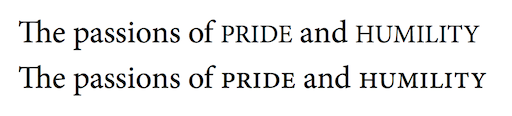
Synthetic vs. real small-caps
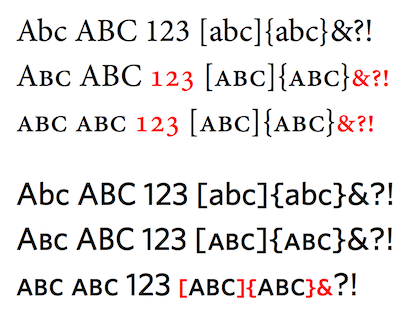
Caseless characters with small-caps, all-small-caps enabled
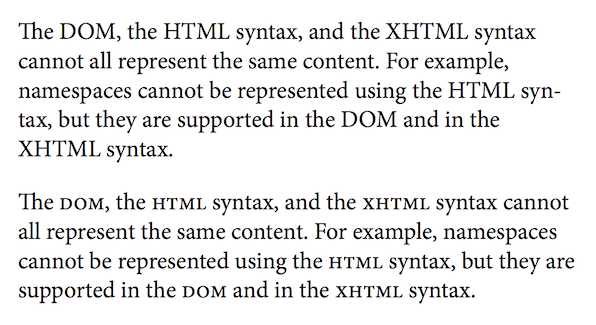
Using small capitals to improve readability in acronym-laden text
	blockquote            { font-style: italic; }
	blockquote:first-line { font-variant: small-caps; }

	<blockquote>I'll be honor-bound to slap them like a haddock.</blockquote>
Name: font-variant-numeric Value: normal | [ <Specifies control over numerical forms. The example below shows how some of these values can be combined to influence the rendering of tabular data with fonts that support these features. Within normal paragraph text, proportional numbers are used while tabular numbers are used so that columns of numbers line up properly:> || < > || < > || ordinal || slashed-zero ] Initial: normal Inherited: yes

Using number styles
<numeric-figure-values>   = lining-nums | oldstyle-nums
<numeric-spacing-values>  = proportional-nums | tabular-nums
<numeric-fraction-values> = diagonal-fractions | stacked-fractions
Individual values have the following meanings:
lnum).
onum).
pnum).
tnum).
frac).

afrc).

ordn).

zero).

	sup { font-variant-position: super; }
	x<sup>2</sup>
For ordinals, the variant property is applied to the entire ordinal number rather than
just to the suffix (or to the containing paragraph):
	.ordinal { font-variant-numeric: ordinal; }
	<span class="ordinal">17th</span>
In this case only the "th" will appear in ordinal form, the
digits will remain unchanged. Depending upon the typographic
traditions used in a given language, ordinal forms may differ from
superscript forms. In Italian, for example, ordinal forms sometimes
include an underline in the ordinal design.
.amount { font-variant-numeric: oldstyle-nums diagonal-fractions; }
<h4>Steak marinade:</h4>
<ul>
<li><span class="amount">2</span> tbsp olive oil</li>
<li><span class="amount">1</span> tbsp lemon juice</li>
<li><span class="amount">1</span> tbsp soy sauce</li>
<li><span class="amount">1 1/2</span> tbsp dry minced onion</li>
<li><span class="amount">2 1/2</span> tsp italian seasoning</li>
<li>Salt & pepper</li>
</ul>
<p>Mix the meat with the marinade and let it sit covered in the refrigerator
for a few hours or overnight.</p>
Note that the fraction feature is only applied to values not the entire paragraph.
Fonts often implement this feature using contextual rules based on the use of the slash ('/')
character. As such, it's not suitable for use as a paragraph-level style.
Name: font-variant-alternates Value: normal | Value: [ Value: stylistic(<For any given character, fonts can provide a variety of alternate glyphs in addition to the default glyph for that character. This property provides control over the selection of these alternate glyphs. For many of the property values listed below, several different alternate glyphs are available. How many alternates are available and what they represent is font-specific, so these are each marked font specific in the value definitions below. Because the nature of these alternates is font-specific, the ''@font-feature-values'' rule is used to define values for a specific font family or set of families that associate a font-specific numeric <>) || historical-forms || styleset(< >#) || Value: character-variant(< >#) || swash(< >) || ornaments(< >) || Value: annotation(< >) Value: ] Initial: normal Inherited: yes
@font-feature-values Noble Script { @swash { swishy: 1; flowing: 2; } }

p {
	font-family: Noble Script;
	font-variant-alternates: swash(flowing); /* use swash alternate #2 */
}
When a particular <
/* these two style rules are effectively the same */
p { font-variant-alternates: swash(unknown-value); } /* not a defined value, ignored */
p { font-variant-alternates: normal; }
This allows values to be defined and used for a given set of font
families but ignored if fallback occurs, since the font family name
would be different. If a given value is outside the range supported by
a given font, the value is ignored. These values never apply to
generic font families.
Individual values have the following meanings:
hist).

salt <> ).

ss<>
OpenType currently defines ss01 through ss20).

cv<>
OpenType currently defines cv01 through cv99).
swsh <>, cswh <> ).

ornm <> ).
Some fonts may offer ornament glyphs as alternates for a wide collection of characters; however, displaying arbitrary
characters (e.g., alphanumerics) as ornaments is poor practice as it distorts the semantics of the data. Font designers
are encouraged to encode all ornaments (except those explicitly encoded in the Unicode Dingbats blocks, etc.) as
alternates for the bullet character (U+2022) to allow authors to select the desired glyph using ''ornaments''.

nalt <> ).

	@font-feature-values Jupiter Sans {
		@swash {
			delicate: 1;
			flowing: 2;
		}
	}

	h2 { font-family: Jupiter Sans, sans-serif; }

	/* show the second swash variant in h2 headings */
	h2:first-letter { font-variant-alternates: swash(flowing); }

	<h2>Quick</h2>
When Jupiter Sans is present, the second alternate swash alternate will
be displayed. When not present, no swash character will be shown, since the
specific named value "flowing" is only defined for the Jupiter Sans family.
The @-mark indicates the name of the property value for which a named value
can be used. The name "flowing" is chosen by the author. The index that
represents ech alternate is defined within a given font's data.
font_feature_values_rule
	: FONT_FEATURE_VALUES_SYM S* font_family_name_list S*
		'{' S* feature_value_block? [ S* feature_value_block? ]* '}' S*
	;

font_family_name_list
	: font_family_name [ S* ',' S* font_family_name ]*
	;

font_family_name
	: STRING | [ IDENT [ S* IDENT ]* ]
	;

feature_value_block
	: feature_type S*
		'{' S* feature_value_definition? [ S* ';' S* feature_value_definition? ]* '}' S*
	;

feature_type:
	ATKEYWORD
	;

feature_value_definition
	: IDENT S* ':' S* NUMBER [ S* NUMBER ]*
	;
The following new token is introduced:
@{F}{O}{N}{T}{-}{F}{E}{A}{T}{U}{R}{E}{-}{V}{A}{L}{U}{E}{S} {return FONT_FEATURE_VALUES_SYM;}
Feature value blocks are handled as
at-rules,
they consist of everything up to the next block or
semi-colon, whichever comes first.
The font family list is a comma-delimited list of
font family names that match the definition of <family-name>
for the 'font-family' property.
This means that only named font families are allowed, rules that
include generic or system fonts in the list of font families are
syntax errors. However, if a user agent defines a generic font to be a
specific named font (e.g. Helvetica), the settings associated with
that family name will be used. If syntax errors occur within the font
family list, the entire rule must be ignored.
Within feature value blocks,
the feature type is "@"" followed by the
name of one of the font specific property values
of 'font-variant-alternates' (e.g. swash). The
identifiers used within feature value definitions define <feature-value-name>s
and follow the rules of
CSS user identifiers and are case-sensitive. They are unique only for
a given set of font families and feature type.
The same identifier used with a different feature type
is treated as a separate and distinct value. If the same identifier is defined
mulitple times for a given feature type and font family,
the last defined value is used. Values associated
with a given identifier are <feature-index>es and are limited to integer values 0 or greater.
When syntax errors occur within a feature value
definition, such as invalid identifiers or values, the entire feature value
definition must be omitted, just as syntax errors in
style declarations are handled. When the feature type
is invalid, the entire associated
feature value block must be ignored.
	@font-feature-values Bongo {
		@swash { ornate: 1; }
		annotation { boxed: 4; } /* should be @annotation! */
		@swash { double-loops: 1; flowing: -1; } /* negative value */
		@ornaments ; /* incomplete definition */
		@styleset { double-W: 14; sharp-terminals: 16 1 } /* missing ; */
		redrum  /* random editing mistake */
	}
The example above is equivalent to:
	@font-feature-values Bongo {
		@swash { ornate: 1; }
		@swash { double-loops: 1; }
		@styleset { double-W: 14; sharp-terminals: 16 1; }
	}
	site.css:

		@font-feature-values Mercury Serif {
			@styleset {
				stacked-g: 3; /* "two-storey" versions of g, a */
				stacked-a: 4;
			}
		}

	page.css:

		@font-feature-values Mercury Serif {
			@styleset {
				geometric-m: 7; /* alternate version of m */
			}
		}

		body {
			font-family: Mercury Serif, serif;

			/* enable both the use of stacked g and alternate m */
			font-variant-alternates: styleset(stacked-g, geometric-m);
		}
	@font-feature-values Taisho Gothic {
		@annotation { boxed: 1; circled: 4; }
	}

	@font-feature-values Otaru Kisa {
		@annotation { circled: 1; black-boxed: 3; }
	}

	h3.title {
		/* circled form defined for both fonts */
		font-family: Taisho Gothic, Otaru Kisa;
		font-variant: annotation(circled);
	}
ss01 through ss99.
However, the OpenType standard only officially defines
ss01 through ss20.
For OpenType fonts, values greater than 99 or equal to 0 do not
generate a syntax error when parsed but enable no OpenType features.
@font-feature-values Mars Serif {
	@styleset {
		alt-g: 1;        /* implies ss01 = 1 */
		curly-quotes: 3; /* implies ss03 = 1 */
		code: 4 5;       /* implies ss04 = 1, ss05 = 1 */
	}

	@styleset {
		dumb: 125;        /* >99, ignored */
	}

	@swash {
		swishy: 3 5;     /* more than 1 value for swash, syntax error */
	}
}

p.codeblock {
	/* implies ss03 = 1, ss04 = 1, ss05 = 1 */
	font-variant-alternates: styleset(curly-quotes, code);
}
For character-variant, a single value between 1 and 99 indicates
the enabling of OpenType feature cv01 through
cv99. For OpenType fonts, values greater than
99 or equal to 0 are ignored but do not generate a syntax error when parsed
but enable no OpenType features. When two values are listed, the first
value indicates the feature used and the second the value passed for
that feature. If more than two values are assigned to a given name, a
syntax error occurs and the entire
feature value definition is
ignored.
@font-feature-values MM Greek {
	@character-variant { alpha-2: 1 2; }   /* implies cv01 = 2 */
	@character-variant { beta-3: 2 3; }    /* implies cv02 = 3 */
	@character-variant { epsilon: 5 3 6; } /* more than 2 values, syntax error, definition ignored */
	@character-variant { gamma: 12; }      /* implies cv12 = 1 */
	@character-variant { zeta:   20 3; }   /* implies cv20 = 3 */
	@character-variant { zeta-2: 20 2; }   /* implies cv20 = 2 */
	@character-variant { silly: 105; }     /* >99, ignored */
	@character-variant { dumb: 323 3; }    /* >99, ignored */
}

#title {
	/* use the third alternate beta, first alternate gamma */
	font-variant-alternates: character-variant(beta-3, gamma);
}

p {
	/* zeta-2 follows zeta, implies cv20 = 2  */
	font-variant-alternates: character-variant(zeta, zeta-2);
}

.special {
	/* zeta follows zeta-2, implies cv20 = 3  */
	font-variant-alternates: character-variant(zeta-2, zeta);
}

Byzantine seal text displayed with character variants
	@font-feature-values Athena Ruby {
		@character-variant {
			leo-B: 2 1;
			leo-M: 13 3;
			leo-alt-N: 14 1;
			leo-N: 14 2;
			leo-T: 20 1;
			leo-U: 21 2;
			leo-alt-U: 21 4;
		}
	}

	p {
		font-variant: discretionary-ligatures,
									character-variant(leo-B, leo-M, leo-N, leo-T, leo-U);
	}

	span.alt-N {
		font-variant-alternates: character-variant(leo-alt-N);
	}

	span.alt-U {
		font-variant-alternates: character-variant(leo-alt-U);
	}

	<p>ENO....UP͞RSTU<span class="alt-U">U</span>͞<span class="alt-U">U</span>ΚΑΙTỤẠG̣IUPNS</p>

	<p>LEON|ΚΑΙCONSTA|NTI<span class="alt-N">N</span>OS..|STOIBAṢ.|LIṢROM|AIO<span class="alt-N">N</span></p>
Name: font-variant-east-asian Value: normal | [ <Allows control of glyph substitution and sizing in East Asian text.> || < > || ruby ] Initial: normal Inherited: yes
<east-asian-variant-values> = jis78 | jis83 | jis90 | jis04 | simplified | traditional
<east-asian-width-values>   = full-width | proportional-width
Individual values have the following meanings:
jp78).

jp83).
jp90).
jp04).
The various JIS variants reflect the glyph forms defined in different
Japanese national standards. Fonts generally include glyphs defined by the
most recent national standard but it's sometimes necessary to use older
variants, to match signage for example.
smpl).
trad).
The ''simplified'' and ''traditional'' values allow control over the
glyph forms for characters which have been simplified over time but
for which the older, traditional form is still used in some
contexts. The exact set of characters and glyph forms will vary
to some degree by context for which a given font was designed.

fwid).
pwid).

ruby).
Since ruby text is generally smaller than the associated body
text, font designers can design special glyphs for use with ruby
that are more readable than scaled down versions of the default
glyphs. Only glyph selection is affected, there is no
associated font scaling or other change that affects line layout.
The red ruby text below is shown with default glyphs (top) and
with ruby variant glyphs (bottom). Note the slight difference
in stroke thickness.

Name: font-variant Value: normal | none | Value: [ Value: <The 'font-variant' property is a shorthand for all 'font-variant-*' subproperties. The value normal resets all subproperties of 'font-variant' to their inital value. The none value sets 'font-variant-ligatures' to ''font-variant-ligatures/none'' and resets all other font feature properties to their initial value. Like other shorthands, using 'font-variant' resets unspecified 'font-variant' subproperties to their initial values. It does not reset the values of either 'font-language-override' or 'font-feature-settings'.> || < > || < > || < > || Value: stylistic(< >) || historical-forms || styleset(< >#) || Value: character-variant(< >#) || swash(< >) || ornaments(< >) || Value: annotation(< >) || [ small-caps | all-small-caps | petite-caps | all-petite-caps | unicase | titling-caps ] || Value: < > || < > || < > || ordinal || slashed-zero || Value: < > || < > || ruby Value: ]
Name: font-feature-settings Value: normal | <This property provides low-level control over OpenType font features. It is intended as a way of providing access to font features that are not widely used but are needed for a particular use case. Authors should generally use 'font-variant' and its related subproperties whenever possible and only use this property for special cases where its use is the only way of accessing a particular infrequently used font feature.># Initial: normal Inherited: yes
/* enable small caps and use second swash alternate */
font-feature-settings: "smcp", "swsh" 2;
A value of normal means that no change in glyph selection or positioning occurs due to this property. Feature tag values have the following syntax:
<feature-tag-value> = <The <> [ < > | on | off ]?
kern feature with fonts that contain
kerning data in the form of a "kern" table but lack
kern feature support in the "GPOS" table.
Note: In general, authors should use the 'font-kerning' property to
explicitly enable or disable kerning since this property always affects
fonts with either type of kerning data.
If present, a value indicates an index used for glyph selection.
An <font-feature-settings: "dlig" 1; /* dlig=1 enable discretionary ligatures */ font-feature-settings: "smcp" on; /* smcp=1 enable small caps */ font-feature-settings: "c2sc"; /* c2sc=1 enable caps to small caps */ font-feature-settings: "liga" off; /* liga=0 no common ligatures */ font-feature-settings: "tnum", "hist"; /* tnum=1, hist=1 enable tabular numbers and historical forms */ font-feature-settings: "tnum" "hist"; /* invalid, need a comma-delimited list */ font-feature-settings: "silly" off; /* invalid, tag too long */ font-feature-settings: "PKRN"; /* PKRN=1 enable custom feature */ font-feature-settings: dlig; /* invalid, tag must be a string */
	body { font-feature-settings: "hwid"; /* Half-width OpenType feature */ }

	<p>毎日カレー食べてるのに、飽きない</p>
Name: font-language-override Value: normal | <Normally, authors can control the use of language-specific glyph substitutions and positioning by setting the content language of an element, as described in [[#language-specific-support]]:> Initial: normal Inherited: yes
<!-- Display text using S'gaw Karen specific features -->
<p lang="ksw">...</p>
In some cases, authors may need to specify a language system that differs from the content language, for example due to the need to mimic another language's typographic traditions. The 'font-language-override' property allows authors to explicitly specify the language system of the font, overriding the language system implied by the content language. Values have the following meanings:
	<body lang="tr">

	<h4>Madde 9</h4>
	<p>Hiç kimse keyfi olarak tutuklanamaz, alıkonulanamaz veya sürülemez.</p>
Here the user agent uses the value of the lang attribute when rendering text and
appropriately renders this text without "fi" ligatures. There is no need
to use the 'font-language-override' property.
However, a given font may lack support for a specific language. In this
situation authors may need to use the typographic conventions of a related language
that are supported by that font:
	<body lang="mk">     <!-- Macedonian lang code -->

	body { font-language-override: "SRB"; /* Serbian OpenType language tag */ }

	<h4>Члeн 9</h4>
	<p>Никoj чoвeк нeмa дa бидe пoдлoжeн нa прoизвoлнo aпсeњe, притвoр или прoгoнувaњe.</p>
The Macedonian text here will be rendered using Serbian typographic conventions, with the
assumption that the font specified supports Serbian.
rlig, liga, clig, calt),
along with localized forms (OpenType feature: locl),
and features required for proper display of composed characters and marks
(OpenType features: ccmp, mark, mkmk). These features
must always be enabled, even when the value of the
'font-variant' and
'font-feature-settings' properties is
''font-variant/normal''.
Individual features are only disabled when explicitly overridden by the author, as when
'font-variant-ligatures' is set to ''no-common-ligatures''.
For handling complex scripts such as
Arabic,
Mongolian or
Devanagari
additional features are required. For upright text within vertical text runs, vertical
alternates (OpenType feature: vert) must be enabled.
	body {
		font-variant-numeric: proportional-nums;
	}

	table.prices td {
		font-variant-numeric: tabular-nums;
	}
	@font-face {
		font-family: MainText;
		src: url(http://example.com/font.woff);
		font-variant: oldstyle-nums proportional-nums styleset(1,3);
	}

	body {
		font-family: MainText, Helvetica;
	}

	table.prices td {
		font-variant-numeric: tabular-nums;
	}
In this case, old-style numerals will be used throughout but only
where the font "MainText" is used. Just as in the previous example,
tabular values will be used in price tables since ''tabular-nums''
appears in a general style rule and its use is mutually exclusive with
''proportional-nums''. Stylistic alternate sets will only be used where
MainText is used.
	@font-face {
		font-family: BodyText;
		src: local("HiraMaruPro-W4");
		font-variant: proportional-width;
		font-feature-settings: "ital"; /* Latin italics within CJK text feature */
	}

	body { font-family: BodyText, serif; }
If available, a Japanese font "Hiragino Maru Gothic" will be used. When text
rendering occurs, Japanese kana will be proportionally spaced and Latin text will
be italicised. Text rendered with the fallback serif font will use default
rendering properties.
	@font-face {
		font-family: main;
		src: url(fonts/ffmeta.woff) format("woff");
		font-variant: discretionary-ligatures;
	}

	body         { font-family: main, Helvetica; }
	span.special { font-variant-ligatures: no-discretionary-ligatures; }
Suppose one adds a rule using 'font-feature-settings' to enable discretionary ligatures:
	body         { font-family: main, Helvetica; }
	span         { font-feature-settings: "dlig"; }
	span.special { font-variant-ligatures: no-discretionary-ligatures; }
In this case, discretionary ligatures will be rendered within spans of class "special".
This is because both the 'font-feature-settings' and 'font-variant-ligatures' properties
apply to these spans. Although the ''no-discretionary ligatures'' setting of 'font-variant-ligatures'
effectively disables the OpenType dlig feature, because the 'font-feature-settings'
is resolved after that, the ''dlig'' value reenables discretionary ligatures.
interface CSSFontFaceRule : CSSRule {
	attribute CSSOMString family;
	attribute CSSOMString src;
	attribute CSSOMString style;
	attribute CSSOMString weight;
	attribute CSSOMString stretch;
	attribute CSSOMString unicodeRange;
	attribute CSSOMString variant;
	attribute CSSOMString featureSettings;
};
The DOM Level 2 Style specification [[DOM-LEVEL-2-STYLE]] defined a different variant of this rule. This definition supercedes that one.
partial interface CSSRule {
	const unsigned short FONT_FEATURE_VALUES_RULE = 14;
};
The CSSFontFeatureValuesRule interface represents a ''@font-feature-values'' rule.
interface CSSFontFeatureValuesRule : CSSRule {
	attribute CSSOMString fontFamily;
	readonly attribute CSSFontFeatureValuesMap annotation;
	readonly attribute CSSFontFeatureValuesMap ornaments;
	readonly attribute CSSFontFeatureValuesMap stylistic;
	readonly attribute CSSFontFeatureValuesMap swash;
	readonly attribute CSSFontFeatureValuesMap characterVariant;
	readonly attribute CSSFontFeatureValuesMap styleset;
};

[MapClass(CSSOMString, sequence<unsigned long>)]
interface CSSFontFeatureValuesMap {
	void set(CSSOMString featureValueName,
	         (unsigned long or sequence<unsigned long>) values);
};
kern feature