> are given,
the second value represents an explicit fallback alignment.
- Block Containers:
-
The alignment container is the block container’s content box.
The alignment subject is the entire contents of the block.
The 'align-content' property applies along the block axis,
but if a <content-distribution> is specified
the fallback alignment is used instead.
The 'justify-content' property does not apply to and has no effect on block containers.
All values other than ''justify-content/auto'' force the block container to establish a new formatting context.
For table cells, the behavior of the ''justify-content/auto'' depends on the computed value of 'vertical-align':
''top'' makes it behave as ''start'',
''middle'' makes it behave as ''center'',
''bottom'' makes it behave as ''end'',
and all other values make it behave as ''baseline''.
''justify-content/auto'' otherwise behaves as ''start''.
- Multicol Layout:
-
The alignment container is the multi-column element’s content box.
The alignment subject is the column boxes, as a unit.
The 'align-content' property applies along the block axis,
but if a <content-distribution> is specified
the fallback alignment is used instead.
The 'justify-content' property does not apply to and has no effect on multi-column elements.
''justify-content/auto'' behaves as ''start''.
- Flex Containers:
-
''justify-content/auto'' computes to ''stretch''.
The alignment container is the flex container’s content box.
For 'justify-content', the alignment subject is the flex items in each flex line;
for 'align-content', the alignment subject is the flex lines.
The 'align-content' property applies along the cross axis.
The 'justify-content' property applies along the main axis,
but ''stretch'' behaves as ''start''.
See [[!CSS3-FLEXBOX]] for details.
- Grid Containers:
-
''justify-content/auto'' computes to ''start'', and ''stretch'' behaves like ''start''.
The alignment container is the grid container’s content box.
The alignment subject is the bounds of the grid.
Need to dfn a better term for this in Grid.
The 'align-content' property applies along the block (column) axis.
The 'justify-content' property applies along the inline (row) axis.
In both properties, if a <content-distribution> is specified,
the fallback alignment is used instead.
Baseline Content-Alignment
The content of boxes participating in row-like layout contexts (shared alignment contexts)
can be baseline-aligned to each other.
This effectively increases the padding on the box
to align the alignment baseline of its contents
with that of other baseline-aligned boxes in its group.
The set of boxes that participate in baseline content-alignment
depends on the layout model:
- Table Cells:
-
A table cell participates in first (last) baseline content-alignment
in either its row or column (whichever matches its inline axis)
if its computed 'align-content' is ''baseline'' (''last-baseline'').
- Flex Items:
-
A flex item participates in first (last) baseline content-alignment
in its flex line if
its computed 'align-content' is ''baseline'' (''last-baseline'')
and its computed 'align-self' is ''stretch'' or ''start'' (''end'').
- Grid Items:
-
A grid item participates in first (last) baseline content-alignment
in either its row or column (whichever matches its inline axis)
if its computed 'align-content' is ''baseline'' (''last-baseline''),
and its computed 'align-self' or 'justify-self' (whichever affects its block axis) is ''stretch'' or ''start'' (''end'').
If a box spans multiple shared alignment contexts,
it participates in first (last) baseline content-alignment
within its start-most (end-most) shared alignment context along that axis.
When a box participates in first (last) baseline content-alignment
its alignment subject is aligned to the start (end) edge of its alignment container
and the minimum necessary extra space is added between its start (end) edge and the alignment subject
to match its alignment baseline in that axis up to that of its baseline-sharing group.
This increases the intrinsic size of the box.
Self-Alignment: Aligning the Box within its Parent
The 'justify-self' and 'align-self' properties control alignment of the box within its containing block.
Inline/Main-Axis Alignment: the 'justify-self' property
	Name: justify-self
	Value: auto | ''stretch'' | <> | [ <> && <>? ]
	Initial: auto
	Applies to: block-level boxes, absolutely-positioned boxes, and grid items
	Inherited: no
	Percentages: n/a
	Media: visual
	Computed value: specified value
	Animatable: no
Justifies the box within its parent along the inline/row/main axis:
the box's outer edges are aligned within its alignment container
as described by its alignment value.
The auto keyword computes to
''stretch'' on absolutely-positioned elements,
and to the computed value of 'justify-items' on the parent
(minus any ''legacy'' keywords) on all other boxes.
- Block-level Boxes:
-
The 'justify-self' property applies along its containing block's inline axis.
The alignment container is the block's containing block
except that for block-level elements that establish a block formatting context
and are placed next to a float,
the alignment container is reduced by the space taken up by the float.
(Note: This is the legacy behavior of HTML
align.)
The alignment subject is the block's margin box.
The default overflow alignment is ''safe''.
In terms of CSS2.1 block-level formatting [[!CSS21]],
the rules for "over-constrained" computations in section 10.3.3
are ignored in favor of alignment as specified here
and the used value of the offset properties are not adjusted to correct for the over-constraint.
The ''stretch'' value is equivalent to ''start'' on block-level boxes.
This property does not apply to floats.
- Absolutely-positioned Boxes:
-
The 'justify-self' property applies along its containing block's inline axis.
When neither margin in this dimension is ''margin/auto''
and neither offset property in this dimension is ''top/auto'',
values other than ''stretch'' cause non-replaced absolutely-positioned boxes
to use shrink-to-fit sizing for calculating ''width/auto'' measures,
and 'justify-self' dictates alignment as follows:
The alignment container is the box's containing block
as modified by the offset properties ('top'/'right'/'bottom'/'left').
The alignment subject is the box's margin box.
The default overflow alignment is ''safe''.
In terms of CSS2.1 formatting [[!CSS21]],
the rules for "over-constrained" computations in section 10.3.7
are ignored in favor of alignment as specified here
and the used value of the offset properties are not adjusted to correct for the over-constraint.
The ''stretch'' keyword is equivalent to ''start'' on replaced absolutely-positioned boxes.
(This is because CSS 2.1 does not stretch replaced elements to fit into fixed offsets.)
- Table Cells:
-
This property does not apply to table cells,
because their position and size is fully constrained by table layout.
- Flex Items:
-
This property does not apply to flex items,
because there is more than one item in the main axis.
See 'flex' for stretching and 'justify-content' for main-axis alignment. [[!CSS3-FLEXBOX]]
- Grid Items:
-
The 'justify-self' property applies along the grid's row axis.
The alignment container is the grid cell.
The alignment subject is the grid item’s margin box.
The default overflow alignment is ''true''.
Should we make ''stretch'' actually work on block-level/abspos replaced boxes?
To maintain legacy compat, this requires adding a new value (named ''normal''?)
which has the current behavior of stretching non-replaced boxes and start-aligning replaced ones.
The effect of these rules is that an auto-sized block-level table,
for example, can be aligned while still having side margins.
If the table's max-content size is narrower than its containing block,
then it is shrink-wrapped to that size and aligned as specified.
If the table's max-content size is wider, then it fills its containing block,
and the margins provide appropriate spacing from the containing block edges.
Block/Cross-Axis Alignment: the 'align-self' property
	Name: align-self
	Value: auto | ''stretch'' | <> | [ <> && <>? ]
	Initial: auto
	Applies to: block-level boxes
	Inherited: no
	Percentages: n/a
	Media: visual
	Computed value: specified value
	Animatable: no
Aligns the box within its parent along the block/column/cross axis:
the box's outer edges are aligned within its alignment container
as described by its alignment value.
The auto keyword computes to
''stretch'' on absolutely-positioned elements,
and to the computed value of 'align-items' on the parent
(minus any ''legacy'' keywords) on all other boxes.
- Block-level Boxes:
-
The 'align-self' property does not apply to block-level boxes
(including floats),
because there is more than one item in the block axis.
- Absolutely-positioned Boxes:
-
The 'justify-self' property applies along its containing block's inline axis.
When neither margin in this dimension is ''margin/auto''
and neither offset property in this dimension is ''top/auto'',
values other than ''stretch'' cause non-replaced absolutely-positioned boxes
to use shrink-to-fit sizing for calculating ''width/auto'' measures,
and 'align-self' dictates alignment as follows:
The alignment container is the box's containing block
as modified by the offset properties ('top'/'right'/'bottom'/'left').
The alignment subject is the box's margin box.
The default overflow alignment is ''safe''.
In terms of CSS2.1 formatting [[!CSS21]],
the rules for "over-constrained" computations in section 10.6.4
are ignored in favor of alignment as specified here
and the used value of the offset properties are not adjusted to correct for the over-constraint.
The ''stretch'' keyword is equivalent to ''start'' on replaced absolutely-positioned boxes.
(This is because CSS 2.1 does not stretch replaced elements to fit into fixed offsets.)
- Table Cells:
-
This property does not apply to table cells,
because their position and size is fully constrained by table layout.
- Flex Items:
-
The 'align-self' property applies along the flexbox's cross axis.
The alignment container is the flex line the item is in.
The alignment subject is the flex item’s margin box.
The default overflow alignment is ''true''.
See [[!CSS3-FLEXBOX]] for details.
- Grid Items:
-
The 'align-self' property applies along the grid's column axis.
The alignment container is the grid cell.
The alignment subject is the grid item’s margin box.
The default overflow alignment is ''true''.
Baseline Self-Alignment
Boxes participating in row-like layout contexts (shared alignment contexts)
can be baseline-aligned to each other.
This effectively increases the margins on the box
to align its alignment baseline
with other baseline-aligned boxes in its group.
The set of boxes that participate in baseline self-alignment
depends on the layout model:
- Flex Items:
-
A flex item participates in first (last) baseline self-alignment in its flex line
if its computed 'align-self' is ''baseline'' (''last-baseline'').
See [[!CSS3-FLEXBOX]] for details.
- Grid Items:
-
A grid item participates in first (last) baseline content-alignment
in either its row or column (whichever matches its inline axis)
if its 'justify-self' or 'align-self' property (whichever matches its inline axis)
computes to ''baseline'' (''last-baseline'').
If a box spans multiple shared alignment contexts,
it participates in first (last) baseline self-alignment
within its start-most (end-most) shared alignment context along that axis.
When a box participates in first (last) baseline self-alignment
its alignment subject is aligned to the start (end) edge of its alignment container
and the minimum necessary extra space is added between its start (end) edge and the alignment container
to match its alignment baseline in that axis up to that of its baseline-sharing group.
This may increase the intrinsic size contribution of the alignment subject.
Default Alignment
The 'align-items' and 'justify-items' properties set the default 'align-self' and 'justify-self' behavior of the items contained by the element.
Inline/Main-Axis Alignment: the 'justify-items' property
	Name: justify-items
	Value: auto | ''stretch'' | <> | [ <> && <>? ] | [ legacy && [ ''left'' | ''right'' | ''center'' ] ]
	Initial: auto
	Applies to: block containers, flex containers, and grid containers
	Inherited: no
	Percentages: n/a
	Media: visual
	Computed value: specified value
	Animatable: no
This property specifies the default 'justify-self' for all of the boxes
(including anonymous boxes)
participating in this box's formatting context.
Values have the following meanings:
- auto
-
If the inherited value of ''justify-items'' includes the ''legacy'' keyword,
''justify-items/auto'' computes to the the inherited value.
Otherwise, ''justify-items/auto'' computes to:
- ''stretch'' for flex containers and grid containers
- ''start'' for everything else
- legacy
-
This keyword causes the value to effectively inherit into descendants.
It can only be combined with the ''center'', ''left'', and ''right'' positions.
The alignment keyword, but not the ''legacy'' keyword, is passed to 'justify-self'.
It exists to implement the legacy alignment behavior of HTML's
<center> element and align attribute.
Other values have no special handling and are merely passed to 'justify-self'.
Block/Cross-Axis Alignment: the 'align-items' property
	Name: align-items
	Value: auto | ''stretch'' | <> | [ <> && <>? ]
	Initial: auto
	Applies to: block-level elements
	Inherited: no
	Percentages: n/a
	Media: visual
	Computed value: specified value
	Animatable: no
This property specifies the default 'align-self' for all of the boxes
(including anonymous boxes)
participating in this box's formatting context.
Values have the following meanings:
- auto
-
Computes to:
- ''stretch'' for flex containers and grid containers
- ''start'' for everything else
Other values have no special handling and are merely passed to 'align-self'.
Determining the Baseline of a Box
The first baselines (and last baselines) of a box
for a given axis
are a set of baselines (alphabetic, central, etc.)
nominally associated with the first (last) line of text within the box.
The alignment baseline is one of these,
usually the dominant baseline of the alignment container.
(See 'alignment-baseline'.)
Note that boxes might not have baselines in a particular axis.
The first and last baselines of a box
are determined differently based on the layout model, as follows:
- block containers
-
The first (last) inline-axis baselines of a block container
are generated from the dominant baseline of the first (last) in-flow line box in the block container,
or are taken from the first (last) in-flow block-level child in the block container that contributes a set of baselines,
whichever comes first (last).
If there is no such line box or child,
then the block container has no baselines.
For the purposes of finding the baselines,
in-flow boxes with a scrolling mechanisms (see the 'overflow' property)
must be considered as if scrolled to their origin (final) position.
A block container has no block-axis baselines.
- tables
-
The first (last) inline-axis baselines of a table box are
the baselines of its first (last) row.
When finding the baselines of an inline-block,
any baselines contributed by table boxes must be skipped.
(This quirk is a legacy behavior from [[CSS21]].)
The block-axis baselines of a table box are the baselines of its first (last) column.
- table rows
-
If any cells in the row participate in ''baseline'' (''last-baseline'') alignment along the row axis,
the first (last) inline-axis baselines of the row
are generated from their shared alignment baseline
and the row's first available font,
after alignment has been performed.
Otherwise, the first (last) inline-axis baselines of the row
are synthesized from the lowest and highest content edges of the cells in the row.
[[!CSS21]]
A table row has no block-axis baselines.
- table columns
-
If any cells in the column participate in ''baseline'' (''last-baseline'') alignment
along the column axis (by having a writing mode perpendicular to that of the table),
the first (last) block-axis baselines of the column
are generated from their shared alignment baseline
and the column's first available font,
after alignment has been performed.
Otherwise, the the first (last) inline-axis baselines of the row
are synthesized from the extreme content edges of the cells in the row.
[[!CSS21]]
A table column has no inline-axis baselines.
- flex containers
-
See Flex Baselines in [[!CSS3-FLEXBOX]].
- grid containers
-
See Grid Baselines in [[!CSS3-GRID-LAYOUT]].
To generate baselines for a box from a single baseline,
use the baseline table from the font settings and first available font of that box.
To synthesize baselines from a rectangle (or two parallel lines),
synthesize the alphabetic baseline from the lower line
and the central baseline by averaging the positions of the upper and lower lines.
Note: The forthcoming Inline Layout Module will define synthesis rules for baselines other than alphabetic and central.
Maybe these things are wrong?
CSS 2.1 is really weird about baseline alignment.
We're still working on handling multiple baseline types (alphabetc, central, etc.)
and rows with multiple baseline-sharing groups (e.g. contains both first and last-aligned cells, or contains opposing writing modes).
Consider this section to be Under Construction.

Changes
Changes since the previous Working Draft include:
-
Added ''last-baseline'' keyword.
-
Improved details of baseline alignment.
Acknowledgments
Special thanks goes to Markus Mielke, Alex Mogilevsky, and the
participants in the CSSWG's March 2008 F2F alignment discussions.
 content within element
(effectively adjusts padding)
content within element
(effectively adjusts padding)
 element within parent
(effectively adjusts margins)
element within parent
(effectively adjusts margins)
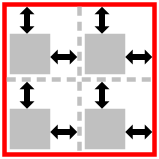 items inside element
(controls child items’ ''align/justify-self: auto'')
items inside element
(controls child items’ ''align/justify-self: auto'')