Shortname: css-inline
Level: 3
Status: ED
Group: csswg
TR: http://www.w3.org/TR/css-inline/
ED: http://dev.w3.org/csswg/css-inline/
Previous version: http://www.w3.org/TR/2002/WD-css3-linebox-20020515/
!Issues list: CSS3 Line Layout issues in Bugzilla
Editor: Dave Cramer, Hachette Livre, dauwhe@gmail.com
Editor: Elika J. Etemad, Invited Expert, http://fantasai.inkedblade.net/contact
Editor: Steve Zilles, Adobe, szilles@adobe.com
Abstract: The CSS formatting model provides for a flow of elements and text inside of a container to be wrapped into lines.  The formatting of elements and text within a line, its positioning in the inline progression direction, and the breaking of lines are described in [[CSS3TEXT]].  This module describes the positioning in the block progression direction both of elements and text within lines and of the lines themselves.  This positioning is often relative to a baseline.  It also describes special features for formatting of first lines and drop caps.  It extends on the model in [[CSS2]].
Ignored Terms: guru, ji, line-height-shift-adjustment, text-script, after, before
Line box, Line stacking and Content height
This section describes inline boxes formatting, how lines are stacked
together and a mechanism to adjust the content height of inline elements. Two
terms: inline-progression dimension and block-progression dimension are used
frequently in the section and are defined as follows
The inline-progression
dimension is a length in the direction of the inline-progression of a box.
For an horizontal layout flow it can be perceived as related to the the width of
the box. However for a vertical layout flow it will be related to the height of
the box. The term inline-progression dimension is the neutral way to express
that dimension independently of the layout flow.
The block-progression dimension is a length in the direction of the
block-progression of a box. For an horizontal layout flow it can be perceived as
related to the height of the box. However for a vertical layout flow it will be
related to the width of the box. The term block-progression dimension is the
neutral way to express that dimension independently of the layout flow.
Inline formatting context
In an inline formatting context, boxes are laid out in the inline-progression
direction, one after
the other, following the block-progression within the containing block. Borders,
padding and inline-progression margins are respected between these boxes. The boxes may be aligned
within the inline-progression in different ways: their under-edges or
over-edges may be aligned, or the
baselines of text within them may be aligned. The rectangular area that contains
the boxes that form a line is called a line box.
The inline-progression dimension ('width' in horizontal flow) of a line box is
determined by its containing block. The block-progression dimension ('height' in
horizontal flow) of a line box is determined by the rules given
in the section on
line height
calculations. A line box is generally tall (relative) enough for all of the boxes it
contains. However, it may be taller than the tallest box it contains (if, for
example, boxes are aligned so that baselines line up). The alignment of boxes
within a line box is determined by the
baseline alignment properties.
In general, when several inline boxes cannot fit within a single line box,
they are distributed among two or more block-progression stacked line boxes. The
exact wrapping of inline boxes at the line ending edge is determined by several
text related property categories such as line-breaking, word-breaking, text
wrapping and white-space management. Thus, a
paragraph is a stack of line boxes.
Line boxes are stacked together in the block-progression direction
without any separation. The block-progression dimension of the line box
is determined by the contents of the line box (including the root inline
box) and the 'line-box-contain' property.
A containing block defines a root inline box which wraps all the
inline children of the block element, including the anonymous inline boxes.
It inherits inheritable properties from the parent block
box (like 'line-height'), while non-inherited
properties have their default values. The root inline box establishes a
baseline for vertical alignment and may affect the height of the line
boxes.
Although margins, borders, and padding of non-replaced elements do not enter
into inline box block-progression dimension calculation (and thus the line box
calculation), they are still rendered around inline boxes. This means that if
the block-progression dimension of a line box is shorter than the
outer edges of
the boxes it contains, backgrounds and colors of padding and borders may "bleed"
into adjacent line boxes. However, in this case, some user agents may use the
line box to "clip" the border and padding areas (i.e., not render them).
Inline-progression: Line Box wrapping
In general, the start edge of a line box touches the start edge of its
containing block and the end edge touches the end edge of its containing block.
However, floating boxes may come between the containing block edge and the line
box edge. Thus, although line boxes in the same inline formatting context
generally have the same inline-progression dimension (that of the
containing block), they may vary if available inline-progression space
is reduced due to
floats. Line boxes in the same inline formatting context may vary in
block-progression dimension.
When the total inline-progression dimension of the inline boxes on a line is less than the
inline-progression dimension of
the line box containing them, their inline-progression distribution within the line box
is determined by the
'text-align' property. If that
property has the value ''justify'', the user agent may stretch the inline boxes as
well.
When line-breaking opportunities are available within inline boxes and are
not pre-empted by the white-space properties, the inline boxes located at the
ending edge of the line box may be split into several boxes and these boxes
distributed across several line boxes. When an inline box is split, margins, borders, and padding have no visual
effect where the split occurs (or at any split, when they are several). Formatting of margins, borders, and padding may
not be fully defined if the split occurs within a bidirectional embedding.
Here is an example of inline box construction. The following paragraph
(created by the HTML block-level element P) contains anonymous text
interspersed with the elements EM and STRONG:
The P element generates a block box that contains five inline boxes, three
of which are anonymous:
Anonymous: "Several"
EM: "emphasized words"
Anonymous: "appear"
STRONG: "in this"
Anonymous: "sentence, dear."
To format the paragraph, the user agent flows the five boxes into line
boxes. In this example, the box generated for the P element establishes the
containing block for the line boxes. If the containing block is sufficiently
wide (relative) , all the inline boxes will fit into a single line box:
Several emphasized words appear
in this sentence, dear.
If not, the inline boxes will be split up and distributed across several
line boxes. The previous paragraph might be split as follows:
Several emphasized
words appear in this
sentence, dear.
or like this:
Several emphasizedwords appear in this
sentence, dear.
In the previous example, the EM box was split into two EM boxes (call them
"split1" and "split2"). Margins, borders, padding, or text decorations have no
visible effect after split1 or before split2.
Consider the following example:
<!DOCTYPE HTML PUBLIC "-//W3C//DTD HTML 4.0//EN">
<HTML>
  <HEAD>
    <TITLE>Example of inline flow on several lines</TITLE>
    <STYLE type="text/css">
      EM {
        padding: 2px;
        margin: 1em;
        border-width: medium;
        border-style: dashed;
        line-height: 2.4em;
      }
    </STYLE>
  </HEAD>
  <BODY>
    <P>Several <EM>emphasized words</EM> appear here.</P>
  </BODY>
</HTML>
Depending on the width of the P, the boxes may be distributed as follows:
The margin is inserted before "emphasized" and after "words".
The padding is inserted before, above, and below "emphasized" and after,
above, and below "words". A dashed border is rendered on three sides in each
case.
Block-progression dimensions: the
'text-height' property
Each inline box has a block-progression dimension which is derived from the
following parameters: the 'text-height' and 'font-size' properties for
non-replaced elements, the height or the width for replaced elements (depending
on the text flow being horizontal or vertical respectively) and the stacked
block-progression dimension for inline-block elements (identical to what is done
for block-level elements).
The block-progression dimension determines the position of the padding,
border and margin for the element but does not necessarily determine the line
stacking progression as this is also affected by the 'line-box-contain'
property.
Name:
text-height
Value:
auto | font-size | text-size | max-size | <number>
Initial:
auto
Applies to:
inline elements and parents of element with display:ruby-text
Inherited:
yes
Percentages:
N/A
Media:
visual
Computed value:
specified value (except for initial and inherit)
The 'text-height' property determine the block-progression dimension of the
text content area of an inline box (non-replaced elements) . Possible values:
auto
The block-progression dimension is based either on the em square determined
by the computed element font-size property value or the cell-height (ascender + descender)
related to the computed element font-size as chosen by the user agent.
font-size
The block-progression dimension is based on the em square as determined by
the computed element font-size.
text-size
The block-progression dimension is based on the cell-height (ascender +
descender) related to the computed element font-size.
max-size
The block-progression dimension is based on the maximum extents toward the
over-edge and under-edge of the box obtained by considering all children
elements located on the same line, ruby annotations (elements with 'display:ruby-text')
and baseline shifted elements.
<number>
The block progression dimension is based on <number> times the em square as
determined by the computed font-size.
When more than one font-size is used (this could happen when glyphs are found
in different fonts), it is recommended that the largest font-size provides the em square and the cell-height.
Although the 'text-height' property does not apply directly to block
elements, it applies to their anonymous children inline boxes (if any).
For replaced elements, the block-progression dimension is determined by the
outer edges (i.e. margin edge).
Block progression positioning and spacing
Line height adjustment: the
'line-height' property
The 'line-height' property controls the amount of leading space
which is added over and under an inline box (including the root inline box)
to determine the extended block-progression dimension of the inline box.
The value of the 'line-box-contain' property determines how the
block-progression dimension and the extended block-progression dimension
affect the height of the line box.
The sum of the possible leading space and the block-progression dimension is called the extended block-progression dimension.
That extended value is not used for border, margin and padding placement but is used for vertical alignment (relative) and line box block-progression dimension.
The leading
for an inline non-replaced element
is defined as the difference between the block-progression dimension as
determined by the 'text-height' property and the computed value
of
'line-height'. Half the leading is
called the
half-leading, each half-leading is
located over and under the element.
The 'line-height' value
will specify the exact extended block-progression dimension of each box
generated by the element.
(Depending on the value of 'line-box-contain', the extended block-progression dimension may be ignored.)
(For inline
replaced
elements, both the block-progression dimension and the extended
block-progression dimension of the box are given by the
outer edges (i.e. margin edge).)
Anonymous inline boxes use the 'text-height' and
'line-height' property values specified for their parent.
Depending on the
value of the 'line-stacking-strategy', the 'line-height' value may provide a
minimum or exact extended block-progression dimension for each generated inline box and
the line boxes. How the leading space is distributed between the over-edge and
the under-edge of inline elements within the line box depends on their
vertical-align property value.
[LDB: I don't understand this paragraph.]
Empty inline elements generate empty inline boxes, but these boxes still have
a line height, and thus may influence the line box block-progression dimension,
as if the empty box contained an infinitely narrow letter.
A inline box which otherwise would influence the line box extended
progression dimension may be removed from the computation by using a special
value of the line-height property: ''none''.
Values for this property have the following meanings:
normal
Tells user agents to set the
computed
value to a "reasonable" value based on the font size of the element. The
value has the same meaning as <number>. We recommend a
computed value for ''normal'' between 1.0 to 1.2. The user agent may allow the
<number> to vary depending on the metrics of the font(s) being used.
The
computed value of the property is this number multiplied by the element's
font size. Negative values are illegal. However, the number, not the
computed
value, is inherited.
The
computed value of the property is this percentage multiplied by the
element's computed font size. Negative values are illegal.
none
For inline-level elements, the element does not influence the extended
block-progression dimension of the line. The computed value is the
specified value (''none''). For block-level elements, equivalent to ''normal''
(and the computed value is ''normal'').
This definition should be briefer, and should
refer to the next section.
Example(s):
The three rules in the example below have the same resultant line height:
DIV { line-height: 1.2; font-size: 10pt }     /* number */
DIV { line-height: 1.2em; font-size: 10pt }   /* length */
DIV { line-height: 120%; font-size: 10pt }    /* percentage */
When an element contains text that is rendered in more than one font, user
agents should determine the
'line-height' value according to
the largest font size (when appropriate).
Note that replaced elements have a
'font-size' and a
'line-height' property, even if
they are not used directly to determine the extended block-progression dimension of the box: ''em'' and ''ex''
values are relative to values of 'font-size' and percentage values for
'vertical-align' are relative
to values of the extended block-progression dimension. [LDB: The second part of this sentence is a significant change from CSS2, and also doesn't mauke senes in the context of the sentence.]
When the
'line-height' value is less than
the font size, the final inline box extended block-progression dimension will be less than the font size and
the rendered glyphs will "bleed" outside the box. If such a box touches the edge
of a line box, the rendered glyphs will also "bleed" into the adjacent line box.
specified value (except for ''inherit'' and ''initial'')
This property enumerates which aspects of the elements in a line box
contribute to the height height of that line box.
block
The extended block progression dimension of the root inline box
must fit within the line box.
inline
The extended block progression dimension of all non-replaced
inline boxes whose 'line-height' is not ''none'' in the line box must fit within the line box.
font
The block progression dimension of all non-replaced inline boxes in
the line whose 'line-height' is not ''none'' that directly (i.e., within
the box but not within one of its descendants) contain non-removed text
must fit within the line box, where non-removed text is any characters
not removed based on the values of the 'white-space'. [LDB: This isn't quite right. What about zwnj,
etc.?
glyphs
The block progression dimension of all the glyph bounding boxes of
glyphs in the line box must fit within the line box.
replaced
The margin box of all replaced elements within the line
must fit within the line box.
inline-box
The margin-box of all non-replaced inline elements in the line whose
'line-height' is not ''none'' must fit within the line box. Should this split into inline-border and
inline-margin?
If the property has no value for all elements within a line, then the line
box has 0 height, and the line within the anonymous inline established by the
block that coincides with the line block is the baseline of that anonymous
inline block (or should it be determined by the 'vertical-align' property of
the block?). [This is arbitrary. Does anyone have better
ideas?]
Note that the CSS2 model is equivalent to 'block inline
replaced' but the backwards-compatible HTML model is similar to (but not
exactly) 'font replaced' [1].
Concerns: * How does this work with the cascade? * What
about determining the visual size of inline boxes?
[1] I believe the differences are restricted to the first
line of LI elements, the last line of LI, DD, and DT elements, and issues
concerning whitespace around images. [DB]
The height of each line box is established as follows (we describe the
case for horizontal flow, but vertical
flow is analogous). First align all the boxes on the line relative to each
other according to the rules for 'vertical-align'. The line box must satisfy all of
the following constraints:
For each box on the line that has ''font'' in its
value of 'line-box-contain', the line box must be
high enough to contain the top and bottom of that box's text.
For each box that has ''inline'' in 'line-box-contain', the top of the line
box must be at least as high as the top of the box's text plus the box's half-leading. The bottom of the line box must
be at least as low as the bottom of the text plus the half-leading.
For each box that has ''inline-box'' in 'line-box-contain',
the top of the line box must be at least as high as the margin-top of this
box. The bottom of the line box must be at least as low as the margin-bottom.
For each replaced box that has ''replaced'' in its 'line-box-contain', the line box must
contain the margin-top and margin-bottom of this box. [The value ''replaced'' is not strictly needed. ''Inline-box'' also
does the job, except that it is not automatically restricted to replaced
elements.]
For each box that has ''glyphs'' in 'line-box-contain',
the top of the line box must be at least as high as the top of each glyph in
the box (excluding those in child elements). The bottom of the line box must
be at least as low as the bottom of each glyph in the box (excluding child
elements).
If the enclosing block for this line has
''block'' in 'line-box-contain', then the top of the line box
must be at least as high as the text top plus the half-leading of an
anonymous inline element and the bottom of
the line box as low as the text bottom plus the half leading. This must hold
whether or not this line actually contains such an element.
Thus ''block'' can be used to set an overall minimum line
height (viz. the value of 'line-height' of the element itself) for all lines
in an element, independent of the actual contents of each line. In
particular, setting 'line-box-contain' to just ''block'' and no other values
will ensure that all lines are the same height, at the possible risk of some
tall inline elements overlapping with lines above or below.
The half-leading of a box is defined as half
the computed value of 'line-height' minus half the computed value of
'font-size', i.e., (line-height - font-size)/2.
The top of the text is the top of the em-box of a
box's nominal font, whether or not there actually is any letter that tall.
Replaced elements, for example, have no text, but still have a nominal font
and are thus a text top. The rules above refer to the position of the text
top after the box has been aligned with 'vertical-align'.
Old, remove this:
Line stacking is the mechanism by which a line box is determined for each
line in a block and then these lines are stacked in the block-progression
direction resolving any spacing constraints between adjacent lines. The
line-stacking strategy covers both the determination of the block-progression
dimension (height in horizontal flow) of a line box and the rules for spacing
line boxes.
All line stacking strategies make use of the properties: 'font-size',
'text-height' and 'line-height'.
The line stacking properties are made of the following properties:
The 'line-stacking-strategy' property determines the overall stacking
method,
The 'line-stacking-ruby' property determines how elements with
'display=ruby' are stacked,
The 'line-stacking-shift' property determines how elements which are
baseline-shifted are stacked,
Finally the 'line-stacking' property is a short-hand for the previous
properties.
This property determines the line stacking strategy for stacked line boxes
within a containing block element. The term stack-height is used in the
context of this property description to indicate the block-progression dimension
for the line boxes. Possible values:
inline-line-height
The stack-height is the smallest value that contains the extended
block-progression dimension of all the inline elements on that line when those
elements are properly aligned. Since the line spacing information is already
included in the computation of the line box, these line boxes are simply stacked
adjacent to one another in the formatted block to which they belong. The
'line-height' property value is taken into account for both the inline elements
and the block elements. For inline elements, it defines the extended
block-progression dimension. For block elements, it defines the
minimum extended block-progression dimension.
block-line-height
The stack-height is determined by the block element computed 'line-height' property
value. The 'line-height' property value is ignored for inline elements. For
alignment purpose, this case is similar to the
minimum extended block-progression dimension case (strut model).
This is the only line-stacking strategy that may cause inline boxes within the line
to bleed over and under the line box because the line box is not constrained by its inline boxes.
If the block computed 'line-height' is ''none'', the stack-height is determined as if
'line-height: normal'.
max-height
The stack-height is the smallest value that contains the
block-progression dimension of all the inline elements on that line when those
elements are properly aligned. The 'line-height' property value is taken into
account only for the block elements and it defines the
minimum extended block-progression dimension.
grid-height
The stack-height is the smallest multiple of the block element 'line-height'
computed value that can contain the block-progression of all the inline
elements on that line when those elements are properly aligned. The
'line-height' property value is ignored for inline elements. If the block
computed 'line-height' is ''none'', the stack-height is determined as if
'line-height: normal'.
When the line-stack strategy dictates that the inline element line-height be
ignored, this means that for those elements only their block-progression
dimensions are considered for the stack-height, not their extended
block-progression dimensions.
Note. XSL has a similar property with the same name which
use different but equivalent values: 'line-height' instead of
''inline-line-height'', ''font-height'' instead of ''block-line-height''. It also uses
''max-height''. The value ''grid-height'' is new to the CSS3 property.
This property determines the line stacking method for block elements
containing ruby annotation elements (element with 'display: ruby-text' or
'display: ruby-text-container'). In all cases the ruby base elements (elements
with 'display: ruby-base' or display: ruby-base-container') are considered for
line stacking. Possible values:
exclude-ruby
The ruby annotation elements are ignored for line stacking.
include-ruby
The ruby annotation elements are considered for line stacking.
This property is ignored in two cases:
The element text-height property is set to ''max-size''.
The line stacking strategy is set to ''block-line-height''.
Baseline alignment describes the alignment of textual content and based on
information contained in font tables associated with font resources.
Additional descriptions for these font tables are provided in thea href="http://www.w3.org/Style/Group/css3-src/css3-fonts/Overview.html">CSS3
Fonts module.
Baseline information
provided by fonts
The glyphs of a given script are positioned so that a particular point on
each glyph, the alignment-point, is aligned with the alignment-points of
the other glyphs in that script. The glyphs of different scripts are typically
aligned at different points on the glyph. For example, Western
glyphs are aligned on the bottoms of the capital letters, certain Indic
glyphs (including glyphs from the Devanagari, Gurmukhi and Bengali scripts)
are aligned at the top of a horizontal stroke near the top of the glyphs and
East Asian glyphs are aligned either at the bottom or center of the EM box of
the glyph. Within a script and within a line of text having a single
font-size, the sequence of alignment-points defines, in the
inline-progression-direction, a geometric line called a baseline.
Western and most other alphabetic and syllabic glyphs are aligned to an
"alphabetic" baseline, the above Indic glyphs are aligned to a "hanging"
baseline and the East Asian glyphs are aligned to an "ideographic" baseline.
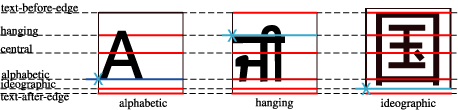
This figure shows the vertical position of the alignment-point for
alphabetic and many syllabic scripts, illustrated by a Roman "A"; for certain
Indic scripts, illustrated by a Gurmukhi syllable “ji”; and for ideographic
scripts, illustrated by the ideographic glyph meaning "country". The thin
black rectangle around the ideographic glyph illustrates the EM box for that
glyph and shows the typical positioning of the "black marks" of the glyph
within the EM box.
A baseline-table specifies the position of one or more baselines in
the design space coordinate system. The function of the baseline table is to
facilitate the alignment of different scripts with respect to each other when
they are mixed on the same text line. Because the desired relative alignments
may depend on which script is dominant in a line (or block), there may be a
different baseline table for each script. In addition, different alignment
positions are needed for horizontal and vertical writing modes. Therefore,
the font may have a set of baseline tables: typically, one or more for
horizontal writing-modes and zero or more for vertical writing-modes.
Examples of horizontal and vertical baseline positions. The thin lined box
in each example is the "EM box". For the Latin glyphs, only the EM box of the
first glyph is shown. Example 1 shows typical Latin text written
horizontally. This text is positioned relative to the alphabetic baseline,
shown in blue. Example 2 shows a typical ideographic glyph positioned on the
horizontal ideographic baseline. Note that the EM Box is positioned
differently for these two cases. Examples 3 and 4 show the same set of
baselines used in vertical writing. The Latin text, example 3, is shown with
a glyph-orientation of 90 degrees which is typical for proportionally space
Latin glyphs in vertical writing. Even though the ideographic glyph in
Example 4 is positioned on the vertical ideographic baseline, because it is
centered in the EM box, all glyphs with the same EM Box are centered,
vertically, with respect to one another.
The font tables for a font include font characteristics for the individual
glyphs in the font. CSS assumes that the font tables include, for each glyph
in the font, one width value, one alignment-baseline and one alignment-point
for the horizontal writing-modes. If vertical writing-modes are supported,
then each glyph must have another width value, alignment-baseline and
alignment-point for the vertical writing-modes. (Even though it is specified
as a width, for vertical writing-modes the width is used in the vertical
direction.)
The script to which a glyph belongs determines an alignment-baseline to
which the glyph is to be aligned. The position of this baseline in the design
space coordinate system determines the default block-progression direction
position of the alignment-point. The inline-progression direction position of
the alignment-point is on the start-edge of the glyph.
This figure shows glyphs from three different scripts, each with its EM
box and within the EM box, the baseline table applicable to that glyph. The
alignment-point of each glyph is shown by an "X" on the start edge of the EM
box and by making alignment-baseline blue. The baseline-table of the parent
element of the characters that mapped to these glyphs is shown as a set of
dashed lines.
Baseline
identifiers
The baseline alignment properties control the alignment of child element
with respect to their parent. The positions of these baselines are
illustrated in the following figure:
This figure shows samples of Gurmukhi (a hanging Indic script), Latin and
ideographic scripts together with most of the baselines defined below. The
thin line around the ideographic glyphs symbolizes the EM box in which these
glyphs are centered. In this figure, the position of the "text-over-edge"
and "text-under-edge" baselines is computed assuming that the "alphabetic"
baseline is the dominant-baseline. The "central" baseline has been omitted
from the figure, but it lies halfway between the "text-over-edge" and
"text-under-edge" baselines, just about where the "math" baseline is shown.
The baseline-identifiers below are used in this specification. Some of
these are determined by baseline-tables contained in a font as described in
the section describing the baseline information
provided by fonts. Others are computed from other font characteristics as
described below. Whether determined by the font or computed, a derived
baseline-table is constructed with positions of each of the baselines below.
alphabetic
This identifies the baseline used by most alphabetic and syllabic scripts.
These include, but are not limited to, many Western, Southern Indic,
Southeast Asian (non-ideographic) scripts.
ideographic
This identifies the baseline used by ideographic scripts. For historical
reasons, this baseline is at the bottom of the ideographic EM box and not in
the center of the ideographic EM box. See the "central" baseline. The
ideographic scripts include Chinese, Japanese, Korean, and Vietnamese Chu
Nom.
hanging
This identifies the baseline used by certain Indic scripts. These scripts
include Devanagari, Gurmukhi and Bengali.
mathematical
This identifies the baseline used by mathematical symbols.
central
This identifies a computed baseline that is at the center of the EM box.
This baseline lies halfway between the text-over-edge and text-under-edge
baselines.
Note. For ideographic fonts, this baseline is often used to
align the glyphs; it is an alternative to the ideographic baseline.
middle
This identifies a baseline that is offset from the alphabetic baseline in
the shift-direction by 1/2 the value of the x-height font
characteristic. The position of this baseline may be obtained from the font
data or, for fonts that have a font characteristic for "x-height", it may be
computed using 1/2 the "x-height". Lacking either of these pieces of
information, the position of this baseline may be approximated by the
"central" baseline.
text-over-edge
This identifies the over-edge of the EM box. The position of this
baseline may be specified in the baseline-table or it may be calculated.
Note. The position of this baseline is normally around or at
the top of the ascenders, but it may not encompass all accents that can
appear above a glyph. For fonts with ascenders, the value of the "ascent"
font characteristic is used. For ideographic fonts, the position of this
baseline is normally 1 EM in the shift-direction from the
"ideographic" baseline. However, some ideographic fonts have a reduced width
in the inline-progression-direction to allow tighter setting. When such a
font, designed only for vertical writing-modes, is used in a horizontal
writing-mode, the "text-over-edge" baseline may be less than 1 EM from the
text-under-edge.
text-under-edge
This identifies the under-edge of the EM box. The position of this
baseline may be specified in the baseline-table or it may be calculated.
Note. For fonts with descenders, the position of this
baseline is normally around or at the bottom of the descenders. For these
fonts the value of the "descent" font characteristic is used. For ideographic
fonts, the position of this baseline is normally at the "ideographic"
baseline.
There are, in addition, two computed baselines that are only defined for line
boxes: over-edge and under-edge. For each line box, there is a
dominant-baseline, a baseline-table and a baseline-table font-size which are
those of the nearest block-level ancestor element and are applied to its root
inline box. Depending on the 'line-stacking-strategy' being used, the line
stacking progression (also called stack-height) can be different from the line
block-progression dimension. The over-edge and under-edge baselines are
always based on the block-progression dimension and are in fact part of its
determination.
For an inline element, the extended inline box includes
the maximum extent of their static or relative positioned children located in
the same line box and may include leading specified by their line-height
value. Depending on the line-stacking-strategy value, the extended line box may
have a different block-progression dimension. For replaced elements the margin
extents are always added.
The following text explains the interaction between
the line-stacking-strategy and the various baseline alignment parameters.
For 'line-stacking-strategy: inline-line-height', all 'line-height' values
(set for both inline elements and ancestor block element) participate on
the evaluation of the line block-progression dimension. The position of the
dominant-baseline on the start edge of the line box is determined after all
vertical (relative) alignments have been performed on the line. The extended
inline boxes of all inline elements include the leading introduced by their
line-height value.
For 'line-stacking-strategy: block-line-height', the ancestor block
'line-height' value participates on the evaluation of the line
block-progression dimension. The inline element line-height values are ignored. The
position of the dominant-baseline on the start edge of the line box is
determined by using a virtual zero-width inline box with the block font and
line height properties located on the start edge of the line box. The extended
inline boxes of all inline elements do not include any extra leading.
For 'line-stacking-strategy: max-height' and 'line-stacking-strategy:
grid-height', only the ancestor block 'line-height' value participates on the
evaluation of the line block-progression dimension. The inline element
line-height values are ignored. The position of the dominant-baseline on the
start edge of the line box is determined after all vertical (relative)
alignments have been performed on the line. The extended inline boxes of all
inline elements do not include any extra leading.
The "over-edge" and "under-edge" baselines are
defined as follows.
over-edge
The offset of the "over-edge" baseline of the line from the
dominant-baseline of the line is determined by ignoring all extended inline boxes
whose alignment-baseline is either "over-edge" or "under-edge". For the
"over-edge", extents are measured from the dominant-baseline in the
direction toward the top (relative) of the extended inline box. The "over-edge" baseline
offset is set to the maximum extent of the "over-edges" of the extended inline boxes of the remaining areas. If all the
extended inline
boxes in a line box are aligned either to the "over-edge" or to the "under-edge",
then use the offset of the "text-over-edge" baseline of the line as the
offset of the "over-edge" baseline of the line.
under-edge
The offset of the "under-edge" baseline of the line from the
dominant-baseline of the line is determined by ignoring all extended inline boxes
whose alignment-baseline is under-edge. For the "under-edge",
extents are measured from the dominant-baseline in the direction toward the
bottom (relative) of the extended inline box. The "under-edge" baseline offset is
set to the negative of the maximum of (1) the maximum extent of the
"under-edges" of the remaining extended inline boxes and (2) the
maximum height of the extended inline boxes that are ignored
minus the offset of the "over-edge" baseline of the line.
Note. If all the extended inline boxes in a line box are aligned to
the "under-edge" then the specification for the "over-edge" will set the
"over-edge" baseline to coincide with the "text-under-baseline" of the
line. Then, case (2) above will determine an offset to the "bottom-edge"
baseline that will align the "over-edge" of the box with the greatest
height to its allocation-rectangle to "over-edge" baseline.
Note. The above specifications for "over-edge" and
"under-edge" have the following three properties: (1) all extended inline boxes
are below the "over-edge", (2) all extended inline boxes are above the "under-edge", and (3)
the distance between the "over-edge" and the "under-edge" cannot be
decreased without violating (1) or (2). The specified placement of the
"over-edge" and "under-edge" is not the only way that (1)-(3) can be
satisfied, but it is the only way they can be satisfied with the smallest
possible offset to the "over-edge".
For the purpose of over-edge and under-edge baseline
computation, inline boxes include the maximum extent of their static or
relative positioned children located in the same line box. Maximum alignment
extents are measured by including the half leading extent in the appropriate
direction for non replaced elements and by using the margin extents for
replaced elements.
Examples showing "over-edge" and "under-edge" alignment:
The rectangles with lines or arrows are images with an intrinsic size as
shown. The rectangles with no arrows represent images that receive the
default, dominant baseline, alignment. The alignment of the other rectangles
is at the furthest point from the arrow head (which is in the middle when
there are two arrowheads). Examples 1 and 2 show the "over-edge" alignment
is determined by the tallest non-"over-edge" aligned objects: in example 1
this is the default aligned, arrowhead free rectangular image and in example
2 this is the double headed arrow rectangle. Examples 3 and 4 show defaulting
to the "text-over-edge" when all the boxes have either "over-edge" or
"under-edge" alignment. In example 3, the images with "over-edge" alignment
has a taller member than do the "under-edge" aligned images. In example 4,
the tallest image is in the "under-edge" aligned set. Example 5 is a
repetition of example 2 with largest image being an "under-edge" aligned
image.
There are also four baselines that are defined only for horizontal
writing-modes.
top
This baseline is the same as the "over-edge" baseline in a horizontal
writing-mode and is undefined in a vertical writing mode.
text-top
This baseline is the same as the "text-over-edge" baseline in a
horizontal writing-mode and is undefined in a vertical writing mode.
bottom
This baseline is the same as the "under-edge" baseline in a horizontal
writing-mode and is undefined in a vertical writing mode.
text-bottom
This baseline is the same as the "text-under-edge" baseline in a
horizontal writing-mode and is undefined in a vertical writing mode.
Overview
of the baseline alignment process
The alignment of an element with respect to its parent is determined by
three things: the scaled-baseline-table of the parent and the
alignment-baseline and alignment-point of the element being aligned. Prior to
alignment, the scaled-baseline-table of the parent may be shifted. The
property specifications below provide the information necessary to align the
parent and child elements.
There are four properties that control alignment of elements to the above
set of baselines: 'dominant-baseline', 'alignment-baseline', 'baseline-shift' and
'alignment-adjust'. These properties are
all independent and are designed so that typically only the specification of
one of the properties is needed to achieve a particular alignment goal.
The primary baseline alignment property is the 'dominant-baseline' property. This
property sets the scaled-baseline-table as a compound value with the
three following components:
The dominant-baseline-identifier component is the default 'alignment-baseline' to be used when
aligning two inline areas.
The baseline-table component specifies the positions of the baselines in
the font design space coordinates. The baseline-table acts something like a
musical staff; it defines particular points along the
block-progression-direction to which glyphs and inline elements can be
aligned.
The baseline-table 'font-size'
component is used to scale the
positions of the baselines in that baseline table. In a
scaled-baseline-table, the positions of the baselines can be adjusted by
multiplying the design-space coordinate values by the baseline-table
font-size.
Because the value of thea href="/TR/REC-CSS2/fonts.html#font-family-prop">'font-family' property is a list of fonts, to
insure a consistent choice of baseline-table we define the nominal
font in a font list as the first font in the list for which a glyph data
is available. This is the first that could contain a glyph for each character
encountered. (For this definition, glyph data is assumed to be present if a
font substitution is made or if the font is synthesized.) This definition
insures a content independent determination of the font and baseline table
that is to be used.
For convenience, the specification will sometimes refer to the baseline
identified by the dominant-baseline-identifier component of the
"dominant-baseline" property as the "dominant baseline" (in an abuse of
terminology).
The model also assumes that each glyph has an 'alignment-baseline' value which
specifies the baseline with which the glyph is to be aligned. (The
'alignment-baseline' is called the "Baseline Tag" in the OpenType
baseline-table description.) The initial value of the 'alignment-baseline'
property uses the baseline identifier associated with the given glyph.
Alternate values for 'alignment-baseline' can be useful for glyphs such as a
"*" which are ambiguous with respect to script membership.
The model assumes that the font from which the glyph is drawn also has a
baseline table, the font baseline-table. This
baseline table has offsets in units-per-em from the (0,0) point to each of
the baselines the font knows about. In particular, it has the offset from the
glyph's (0,0) point to the baseline identified by the 'alignment-baseline'.
The offset values in the baseline-table are in "design units" which means
fractional units of the EM. CSS calls thesea href="/TR/REC-CSS2/fonts.html#descdef-units-per-em">"units-per-em". Thus,
the current 'font-size' is used to determine the actual
offset from the dominant baseline to the alternate baselines.
The glyph is aligned so that its baseline identified by its
'alignment-baseline' is aligned with the baseline with the same name from the
dominant baseline-table.
The offset from the dominant baseline of the parent to the baseline
identified by the 'alignment-baseline' is computed using the dominant
baseline-table and dominant baseline-table font-size. The font baseline-table
and font-size applicable to the glyph are used to compute the offset from the
identified baseline to the (0,0) point of the glyph. This second offset is
subtracted from the first offset to get the position of the (0,0) point in
the shift direction. Both offsets are computed by multiplying the baseline
value from the baseline-table times the appropriate font-size value.
If the 'alignment-baseline' identifies the dominant baseline, then the
first offset is zero and the glyph is aligned with the dominant baseline;
otherwise, the glyph is aligned with the chosen alternate baseline.
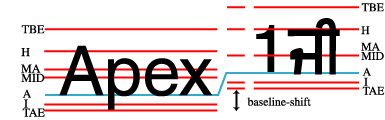
The third baseline alignment property is the 'baseline-shift' property. Like the
properties other than the "dominant-baseline" property, this property does
not change the baseline-table or the baseline-table font-size. It does shift
the whole baseline table of the parent element so that when an inner inline
element is aligned to one of the parents baselines, the position of the inner
inline element is shifted.
The fourth alignment property is the 'alignment-adjust' property. This
property is primarily used for replaced elements. The "alignment-adjust"
property allows the author to assign where, on the start-edge of the object,
the alignment point for that element lies.
For alignment purposes, the margins are added to the replaced elements
dimensions.
In addition to the following definition of these properties, an
informative appendix: B provides usage examples
of these properties.
Dominant
baseline: the 'dominant-baseline' property
inline-level and inline-block elements (but see prose)
Inherited:
no
Percentages:
N/A
Media:
visual
Computed value:
specified value (except for initial and inherit)
The 'dominant-baseline' property is used to
determine or re-determine a scaled-baseline-table. A scaled-baseline-table is
a compound value with three components:
a baseline-identifier for the dominant baseline; it can be qualified as
the “dominant baseline-identifier” (or “dominant baseline” in short); the
baseline-identifier is basically an 'alignment-baseline' value.
a derived baseline-table which contains definition for additional
baseline-identifiers related to various scripts,
and a baseline-table font-size.
Note: Although the 'dominant-baseline' property only
applies to inline-level and inline-block element, setting it on the block
ancestor of an inline element will influence the behavior of that inline
element.
Some values of the property re-determine all three values; other only
reestablish the baseline-table font-size. Values for the property have the
following meaning:
auto
If this property occurs on a block or inline-block element, then the user
agent behavior depends on the value of the 'text-script' property. If the value of the
'text-script'
property is ''auto'', the ''auto'' value is equivalent to ''alphabetic'' for
horizontal 'writing-mode' values and ''central'' for
vertical 'writing-mode' values. If the value of the
'text-script' property is other than ''auto'', the ''auto'' value is equivalent to
''use-script''.
Otherwise, if this property occurs on an inline-level element, then the
baseline-identifier and the baseline-table components remain the same as
those of the parent element. The baseline-table font-size also remains the
same as the parent's one, unless the computed 'baseline-shift' value actually
shifts the baseline; then the baseline-table font-size is set to the value of
the 'font-size' property on this element. If there is no parent element, the
dominant-baseline components are set as for the block elements.
use-script
The dominant baseline-identifier is set using the computed value of the
'text-script' property. If the 'text-script' is
set to ''auto'', the dominant script established by that property is used (see the
description of
'text-script' in the CSS3 text module for more details). The
'writing-mode'
value, whether horizontal or vertical is used to select the baseline-table
that correspond to that baseline-identifier. The baseline-table font-size
component is set to the value of the 'font-size' property on this element.
no-change
The dominant baseline-identifier, the baseline-table and the
baseline-table font-size remain the same as that of the parent.
reset-size
The dominant baseline-identifier and the baseline table remain the same,
but the baseline-table font-size is changed to the value of thea href="/TR/REC-CSS2/fonts.html#font-size-props">'font-size' property on this element. This
re-scales the baseline table for the current 'font-size'.
alphabetic
The dominant baseline-identifier is set to the ''alphabetic'' baseline, the
derived baseline-table is constructed using the ''alphabetic'' baseline-table
in the nominal font, and the baseline-table font-size is changed to the value
of the 'font-size' property on this element. (The ''alphabetic'' baseline is
the standard baseline for Roman scripts.)
hanging
The dominant baseline-identifier is set to the ''hanging'' baseline, the
derived baseline- table is constructed using the ''hanging'' baseline-table in
the nominal font, and the baseline-table font-size is changed to the value of
the 'font-size' property on this element.
ideographic
The dominant baseline-identifier is set to the ''ideographic'' baseline,
the derived baseline- table is constructed using the ''ideographic''
baseline-table in the nominal font, and the baseline-table font-size is
changed to the value of the 'font-size' property on this element.
mathematical
The dominant baseline-identifier is set to the ''mathematical'' baseline,
the derived baseline- table is constructed using the ''mathematical''
baseline-table in the nominal font, and the baseline-table font-size is
changed to the value of the 'font-size' property on this element.
central
The dominant baseline-identifier is set to be ''central''. The derived
baseline-table is constructed from the defined baselines in a baseline-table
in the nominal font. That font baseline-table is chosen using the following
priority order of baseline-table names: ''ideographic'', ''alphabetic'',
''hanging'' and ''mathematical''. The baseline-table is changed to the value of
the 'font-size' property on this element.
middle
The dominant baseline-identifier is set to be ''middle''. The derived
baseline-table is constructed from the defined baselines in a baseline-table
in the nominal font. That font baseline-table is chosen using the following
priority order of baseline-table names: ''alphabetic'', ''ideographic'',
''hanging'' and ''mathematical''. The baseline-table is changed to the value of
the 'font-size' property on this element.
text-under-edge
The dominant baseline-identifier is set to be ''text-under-edge''. The
derived baseline-table is constructed from the defined baselines in a
baseline-table in the nominal font. That font baseline-table is chosen using
the following priority order of baseline-table names: ''alphabetic'',
''ideographic'', ''hanging'' and ''mathematical''. The baseline-table is changed to
the value of the 'font-size' property on this element.
text-over-edge
The dominant baseline-identifier is set to be ''text-over-edge''. The
derived baseline-table is constructed from the defined baselines in a
baseline-table in the nominal font. That font baseline-table is chosen using
the following priority order of baseline-table names: ''alphabetic'',
''ideographic'', ''hanging'' and ''mathematical''. The baseline-table is changed to
the value of the 'font-size' property on this element.
Note: Computed baselines do not (necessarily) choose a
defining baseline table from the nominal font. The expected baseline-tables
that a font would have are those that correspond to the defined baselines.
The catch is that the positions of the defined baselines -- the ''hanging'',
''alphabetic'', ''mathematical'' and ''ideographic'' baselines -- can be specified
differently for different choices of which of these baselines is dominant.
That is, the absolute value of the offset of an alphabetic baseline from the
ideographic baseline in ideographic text may be different from the offset of
the ideographic baseline from the alphabetic baseline in alphabetic text.
Therefore, it matters which baseline-table from the nominal font is used for
the defined baselines.
If there is no baseline-table in the nominal font or if the baseline-table
lacks an entry for the desired baseline, then the user agent may use
heuristics to determine the position of the desired baseline.
Aligning the
alignment point of an element: the
'alignment-baseline' property
This property specifies how an inline-level element is aligned with
respect to its parent. That is, to which of the parent's baselines the
alignment point of this element is aligned. Unlike the 'dominant-baseline'
property the 'alignment-baseline' property has no effect on its children
dominant-baselines.
Note: The 'alignment-adjust'
property specifies how
the alignment point is determined and defaults to the baseline with the same
name as the computed value of the alignment-baseline property.
Except for ''use-script'', all baseline values refer to the respective
baseline-identifier components of the dominant-baseline of the parent, and
glyphs within the element are aligned similarly to the element itself. The
description for ''use-script'' covers these points specifically. The property
values have the following meanings:
baseline
The alignment-point of the element being aligned is aligned with the
dominant baseline of the parent.
use-script
If the element 'text-script' property value is ''auto'', the alignment
point of each glyph is aligned with the parent baseline-identifier of the script to
which the glyph belongs. If the element 'text-script' property value is other than ''auto'', the
alignment point of each glyph is aligned with the parent baseline-identifier of
the script specified by the 'text-script'
property. The parent baseline-identifier position is determined by using the
baseline information appropriate to the determined script within the parent
dominant-baseline set.
over-edge
The alignment point of the box is aligned with the over-edge baseline
of the line box.
text-over-edge
The alignment-point of the element being aligned is aligned with the
''text-over-edge'' baseline of the parent.
under-edge
The alignment point of the box is aligned with the under-edge baseline
of the line box.
text-under-edge
The alignment-point of the element being aligned is aligned with the
''text-under-edge'' baseline of the parent.
central
The alignment point of the box is aligned with the ''central'' baseline of
the parent.
middle
The alignment point of the box is aligned with the ''middle'' baseline of
the parent.
ideographic
The alignment-point of the element being aligned is aligned with the
''ideographic'' baseline of the parent.
alphabetic
The alignment-point of the element being aligned is aligned with the
alphabetic baseline of the parent.
hanging
The alignment-point of the element being aligned is aligned with the
hanging baseline of the parent.
mathematical
The alignment-point of the element being aligned is aligned with the
mathematical baseline of the parent.
The values: over-edge, text-over-edge, under-edge and text-under-edge
all work relatively to the writing-mode property values. For example
over-edge means 'top' in an horizontal writing mode and 'right' in a
vertical writing mode.
Note. The reason why ''baseline'' is the initial value
instead of ''use-script'' (called ''auto'' in the similar XSL property) has to do
with the fact that most fonts today are designed with an alignment point
located at the ''alphabetic'' level, even for glyphs belonging to non Latin
scripts. User agents have to deal with that constraint, and therefore they
use the ''baseline'' value as initial.
Setting the
alignment point: the 'alignment-adjust' property
The 'alignment-adjust' property allows more
precise alignment of elements, such as graphics, that do not have a
baseline-table or lack the desired baseline in their baseline-table. With the
'alignment-adjust' property, the position
of the baseline identified by the 'alignment-baseline' can be explicitly
determined. It also determines precisely the alignment point for each glyph
within a textual element. The user agent should use heuristics to determine
the position of a non existing baseline for a given element.
Values for the property have the following meaning:
auto
For each glyph corresponding to textual information within the element,
the alignment-point is the intersection of the start-edge of the glyph box
and the block-progression-direction position of the alignment point from the
font. Padding, border or margin do not affect that alignment point. The
alignment point of the inline-level element itself is at the intersection of
the start-edge of the first inline box and the baseline identified by the
'alignment-baseline' property if this
baseline exists in the baseline-table for the element dominant-baseline. If
that specific baseline does not exist, the user agent may use heuristics to
determine where that missing baseline would be. For other inline box content
like images, the user agent will use heuristics to determine the position of
the alignment point. For example when the resulting baseline is ''alphabetic''
or ''ideographic'', it is expected that the alignment point will be at the
intersection of the start-edge and the under-edge of the inline box,
including its respective margin. If the resulting baseline is ''hanging'', the
intersection of the start-edge and the over-edge of the inline box,
including its respective margin should be used instead.
When the
'alignment-baseline' property is set to either under-edge or over-edge,
the 'alignment-adjust: auto' value is equivalent to under-edge or
over-edge respectively.
baseline
The alignment point is at the intersection of the start-edge of the
element and the dominant-baseline of the element.
over-edge
The alignment point is at the intersection of the start-edge of the
element and the over-edge of the extended inline box of the element. This may
include or not the line-height of the element, depending on the
line-stacking-strategy.
text-over-edge
The alignment point is at the intersection of the start-edge of the
element and the ''text-over-edge'' baseline of the
element.
central
The alignment point is at the intersection of the start-edge of the
element and the ''central'' baseline of the element.
middle
The alignment point is at the intersection of the start-edge of the
element and the ''middle'' baseline of the element.
under-edge
The alignment point is at the intersection of the start-edge of the
element and the under-edge of the extended inline box of the element. This may
include or not the line-height of the element, depending on the
line-stacking-strategy.
text-under-edge
The alignment point is at the intersection of the start-edge of the
element and the ''text-under-edge'' baseline of the
element.
ideographic
The alignment point is at the intersection of the start-edge of the
element and the ''ideographic'' baseline of the element.
alphabetic
The alignment point is at the intersection of the start-edge of the
element and the ''alphabetic'' baseline of the element.
hanging
The alignment point is at the intersection of the start-edge of the
element and the ''hanging'' baseline of the element.
mathematical
The alignment point is at the intersection of the start-edge of the
element and the ''mathematical'' baseline of the element.
<percentage>
The computed value of the property is this percentage multiplied by the
computed 'line-height' of the element. The alignment point is on the
start-edge of the inline box. Its position along the start-edge relative to
the intersection of the dominant-baseline and the start-edge is offset by the
computed value. The offset is opposite to the shift-direction (positive
value) or in the shift-direction (negative value). A value of ''0%'' makes the
dominant-baseline the alignment point.
<length>
The alignment-point is on the start-edge of the inline box. Its position
along the start-edge relative to the intersection of the dominant-baseline
and the start-edge is offset by the <length> value. The offset is
opposite to the shift-direction (positive value) or in the shift-direction
(negative value). A value of ''0cm'' makes the dominant-baseline the alignment
point.
Repositioning
the dominant baseline: the 'baseline-shift' property
Name:
baseline-shift
Value:
baseline | sub | super |a href="/TR/REC-CSS2/syndata.html#percentage-units"><percentage> |a href="/TR/REC-CSS2/syndata.html#length-units"><length>
Initial:
baseline
Applies to:
inline-level elements
Inherited:
no
Percentages:
refers to the 'line-height' of the parent element
Media:
visual
Computed value:
see text
The 'baseline-shift' property allows
repositioning of the dominant-baseline relative to the dominant-baseline. The
shifted object might be a sub- or superscript. Within the shifted element,
the whole baseline table is offset; not just a single baseline. For sub- and
superscript, the amount of offset is determined from the nominal font of the
parent.
Values for the property have the following meaning:
baseline
There is no baseline shift; the dominant baseline remains in its original
position.
sub
The dominant baseline is shifted to the default position for subscripts.
The offset for this position is determined by the font data for the parent
nominal font as adjusted by the dominant baseline-table font-size of the
parent element. If there is no applicable font data the User Agent may use
heuristics to determine the offset.
super
The dominant baseline is shifted to the default position for
superscripts. The offset for this position is determined by the font data for
the parent nominal font as adjusted by the dominant baseline-table font-size
of the parent element. If there is no applicable font data the User Agent may
use heuristics to determine the offset.
<percentage>
The computed value of the property is this percentage multiplied by the
computed 'line-height' of the parent element. The dominant-baseline is
shifted in the shift-direction (positive value) or opposite to the
shift-direction (negative value) of the parent area by the computed value. A
value of ''0%'' is equivalent to ''baseline''.
<length>
The dominant-baseline is shifted in the shift-direction (positive value)
or opposite to the shift-direction (negative value) of the parent area by the
<length> value. A value of ''0cm'' is equivalent to ''baseline''.
Note. Although it may seem that 'baseline-shift' and
'alignment-adjust' properties are doing
the same thing, there are important differences. For 'alignment-adjust'
the percentage values refer to the 'line-height' of the element being
aligned. For 'baseline-shift the percentage values refer to the 'line-height'
of the parent element. Similarly, it is the ''sub'' and ''super'' offsets of the
parent that are used to align the shifted baseline rather than the ''sub'' and
''super'' offsets of the element being positioned. To ensure a consistent sub-
or superscript position, it makes more sense to use the parent as the
reference rather than the subscript element which may have a changed
"line-height" due to "font-size" changes in the sub- or superscript
element.
Using the "alignment-adjust" property is more suitable for positioning
elements, such as graphics, that have no internal textual structure. Using
the "baseline-shift" property is intended for sub- and superscripts where the
positioned element may itself be textual. The baseline-shift provides a way
to define a specific baseline offset other than the named offsets that are
defined relative to the dominant-baseline. In addition, having
"baseline-shift" makes it easier for a tool to generate the relevant
properties; many formatting programs already have a notion of baseline shift.
Vertical
alignment: the 'vertical-align' shorthand baseline
alignment property
Name:
vertical-align
Value:
auto | baseline | sub | super | top | text-top | central |
middle | bottom | text-bottom |a href="/TR/REC-CSS2/syndata.html#percentage-units"><percentage> |a href="/TR/REC-CSS2/syndata.html#length-units"><length>
Initial:
not defined for shorthand properties
Applies to:
inline-level and table-cell elements
Inherited:
no
Percentages:
refers to the 'line-height' of the element itself
Media:
visual
Computed value:
see individual properties
This property affects the vertical positioning of the inline boxes generated
by an inline-level element inside a line box. The following values only have
meaning with respect to a parent inline-level element, or to a parent
block-level element, if that element generatesa href="/TR/REC-CSS2/visuren.html#anonymous">anonymous inline boxes; they
have no effect if no such parent exists.
Note. Values of this property have slightly different
meanings in the context of tables. Please consult the section ona href="/TR/REC-CSS2/tables.html#height-layout">table height algorithms for
details.
auto
Align the dominant baseline of the parent box with the equivalent, or
heuristically reconstructed, baseline of the element inline box. If the element doesn't have
a baseline, align the bottom of the inline box, including its margin with the
parent's dominant baseline. If there is no parent or if there is a change of
flow orientation between this element and its parent, the dominant baseline
is set to ''alphabetic'' for horizontal flow and ''central'' for vertical flow.
baseline
Align the ''alphabetic'' baseline of the element with the ''alphabetic'' baseline
of the parent element. If the inline element doesn't have an ''alphabetic'' baseline, align
the bottom of the box, including its margin for replaced elements, with the
parent's ''alphabetic'' baseline. The dominant baseline is set to ''alphabetic''
if there is no parent or if there is a flow orientation change between this
element and its parent, otherwise it is set to ''no-change''.
central
Align the ''central'' baseline of the inline element with the central baseline
of the parent.
middle
Align the ''middle'' baseline of the inline element with the middle baseline of the parent.
sub
Lower the baseline of the box to the proper position for subscripts of
the parent's box. (This value has no effect on the font size of the element's
text.)
super
Raise the baseline of the box to the proper position for superscripts of
the parent's box. (This value has no effect on the font size of the element's
text.)
text-top
Align the top of the box with the over-edge of the parent element's
font.
text-bottom
Align the bottom of the box with the under-edge of the parent element's
font.
Raise (positive value) or lower (negative value) the box by this distance
(a percentage of the computed 'line-height' of the element). The
value ''0%'' means the same as ''baseline''.
Raise (positive value) or lower (negative value) the box by this
distance. The value ''0cm'' means the same as ''baseline''.
The remaining values refer to the line box in which the generated box
appears:
top
Align the over edge of the extended inline box with the over-edge of the line box.
bottom
Align the under edge of the extended inline box with the under-edge of the line box.
The 'vertical-align' property values affect the baseline alignment
properties for which it is a shorthand in the following manner:
vertical-align value
alignment-baseline
alignment-adjust
baseline-shift
dominant-baseline
auto
baseline
auto
baseline
auto
baseline
alphabetic
auto
baseline
auto
sub
baseline
auto
sub
auto
super
baseline
auto
super
auto
top
over-edge
auto
baseline
auto
text-top
text-over-edge
auto
baseline
auto
central
central
auto
baseline
auto
middle
middle
auto
baseline
auto
bottom
under-edge
auto
baseline
auto
text-bottom
text-under-edge
auto
baseline
auto
<percentage>
baseline
<percentage>
baseline
auto
<length>
baseline
<length>
baseline
auto
Inline box
alignment: the 'inline-box-align' property
Name:
inline-box-align
Value:
initial | last |a href="/TR/REC-CSS2/syndata.html#percentage-units"><integer>
Initial:
last
Applies to:
inline-block-level elements
Inherited:
no
Percentages:
N/A
Media:
visual
Computed value:
specified value (except for initial and inherit)
The 'inline-box-align' property determines
which line of a multi-line inline block aligns with the previous and next
inline elements within a line. The alignment strategy for the inline block
itself (i.e. the definition of it alignment point and which parent baseline
should be used for the alignment) is determined by the inline block element
baseline alignment properties applicable to the line being used for the
alignment. This property has no effect for single line inline block. Possible
values:
initial
Use the initial line of the inline block element for alignment purpose.
last
Use the last line of the inline block element for alignment purpose.
<integer>
Use nth line (as determined by the integer value) of the inline block
element for alignment purpose.
Initial Lines and Initial Letters
Initial Lines
Initial lines of block elements such as paragraphs are often displayed differently than subsequent lines. Initial line may be set in small caps, all caps, or even different fonts. The ::first-line pseudo-element allows authors to control the presentation of these initial lines. However, only the following properties can be applied to the ::first-line pseudo-element:
font properties
color properties
background properties
text decoration properties
baseline alignment properties
'word-spacing'
'letter-spacing'
'line-height' (may be ignored depending on the block line-stacking strategy)
'text-shadow'
'clear'
Note that the 'text-indent' property typically only affects the initial line of a block element, unless its value is set to ''hanging''.
An Introduction to Initial Letters
Large, decorative letters have been used to start new sections of text since before the invention of printing. In fact, their use predates lowercase letters entirely.
A drop initial is a larger-than-usual letter at the start of a paragraph, with a baseline at least one line lower than the first baseline of the paragraph. The size of the drop initial is usually indicated by how many lines it occuppies. Two- and three-line drop initial are very common.
Three-line drop initial with E acute. Since the cap-height of the drop initial aligns with the cap-height of the main text, the accent extends above the paragraph.
Drop initials are all about alignment. Reference points on the drop cap must align precisely with reference points in the text. In Western scripts, the top reference points are the cap height of the initial letter and of the first line of text. The bottom reference points are the baseline of the initial letter and the baseline of the Nth line of text. Figure 2 shows a simple two-line drop cap, with the relevant reference lines marked.
Two-line drop cap showing baselines (green lines), cap-height (red line), and ascender (cyan line).
The size of a drop initial is determined by the need to satisfy the required alignment. For an N-line drop initial in a Western script, the cap-height of the letter needs to be (N – 1) times the line-height, plus the cap-height of the surrounding text. Note this height is not the font size of the drop initial.
Actually calculating this font size is tricky. For an N-line drop initial, we find the drop initial font size to be:
A three-line drop initial in Adobe Minion Pro would have a font size of 61.2pt, given 12pt text, 16pt line-height and a cap-height of 651/1000 (from the font’s OS/2 table).
The alignment constraints depend on the script used. In Japanese vertical writing mode, it appears that the initial letter extends from the start edge of the first line to the end edge of the Nth line.
Input from Japanese typographers would be very helpful.
Two-line drop initial in vertical writing mode
This figure is probably incorrect.
Add content describing constraint that the block container have a baseline grid (or fixed line-height?).
Selecting Initial Letters
Initial letters are typically a single letter, which can be selected by the ::first-letter pseudo-element, as defined in [[SELECT]]. Authors who need more control over which characters are included in an initial letter can also apply the 'initial-letter' property to the first inline child of a block container.
Only the following properties can be applied to the ::first-letter pseudo-elements:
font properties
color properties
background properties
text decoration properties
baseline alignment properties (only if 'float' is ''none'')
'text-transform'
'letter-spacing'
'line-height' (may be ignored depending on the block line-stacking strategy)
margin properties
padding properties
border properties
'float'
text-shadow
'clear'
'initial-letter'
'initial-letter-align'
Creating Initial Letters: The 'initial-letter' Property
The 'initial-letter' property takes two positive integer values. The first argument defines the number of lines the initial letter should sink. An N-line initial letter sinks to the Nth text baseline. The optional second argument defines how many lines the initial letter occupies. If not specified, it duplicates the first argument.
Name: initial-letter
Value: [<> <>?]
Initial: normal
Applies to: ::first-letter pseudo elements and inline level first child of a block container
Inherited: no
Percentages: N/A
Media: visual
Computed value: ???
Three-line drop initial.
p::first-letter {
  initial-letter: 3;
}
Some styles of drop initials do not align with the first line of text. For example, “sunken caps” both sink below the first baseline, and extend above the first line of text. In these cases, the size of the initial cap needs to be defined. The optional second argument of 'initial-letter' specifies the size of an initial letter, as if it were an n-line drop cap.
Sunken cap. The letter drops two lines, but is the size of a three-line initial letter.
p::first-letter {
  initial-letter: 2 3;
}
If the first argument is ''1'', that creates a pure raised initial letter (often called “raised cap” or “stick-up cap.”
Raised cap. The initial letter is the size of a 3-line initial, but does not drop.
p::first-letter {
  initial-letter: 1 3;
}
Alignment of Initial Letters
As mentioned earlier, the alignment of initial letters depends on the script used. The 'initial-letter-align' property can be used to specify the proper alignment.
Name: initial-letter-align
Value: [ auto | alphabetic | hanging | ideographic ]
Initial: auto
Applies to: ::first-letter pseudo elements and inline level first child of a block container
Inherited: no
Percentages: N/A
Media: visual
Computed value: ???
auto
The user agent selects the value which corresponds to the language of the text. Western languages would default to ''alphabetic'', CJK languages to ''ideographic'', and some Indic languages to ''hanging''.
alphabetic
As described above, the cap height of the initial letter aligns with the cap height of the first line of text. The baseline of the initial letter aligns with the baseline of the Nth text baseline.
hanging
The hanging baseline of the initial letter aligns with the hanging baseline of the first line of text.
ideographic
The initial letter is centered in the N-line area.
Input from those knowledgeable about non-Western typographic traditions would be very helpful in describing the appropriate alignments. More values may be required for this property.
The vertical writing mode example from Figure 2 could be coded as:
If an initial letter has a descender, it could crash into the (n+1)th line of text. This is not desirable.
Incorrect: three-line initial letter with descender
Text should be excluded around the glyph bounding boxes of the initial letters:
Correct: text excluded around glyph bounding box
When the initial letter has a descender, we can say that the other text should be excluded around the em-square. But for characters without descenders, this is undesirable. How do we spec this?
Add content about what happens when initial letter extends into subsequent paragraphs, where the subsequent paragraph may or may not have initial letters.
Define appropriate behavior for non-western scripts. The editors would appreciate any examples of drop initials in such scripts.
Properties index
In addition to the specified values, all properties take the
initial and inherit values.
The following properties are mentioned in this module, but are defined
elsewhere:
text-script,
direction,
text-align,
writing-mode,
see the Text module.
font-size,
see the Fonts module.
Profiles
There are 3 modules defined by this chapter:
CSS1 line model:
CSS2 line model:
CSS3 line model:
The CSS1 line module is made of the following properties/values:
baseline | sub | super | top | text-top | middle | bottom | text-bottom |
<percentage>
baseline
inline-level elements
no
N/A
N/A
The following table describes the CSS2 text module. Because all properties
have added the ''inherit'' value and have a media type, all CSS1 properties have
been specified below as well. In
addition, the 'vertical-align' has a new value:
<length>. Properties that applies to all
elements also applies to generated content. Finally, 'vertical-align' also
applies to table-cell elements.
Drop initial letter:
'initial-letter', 'initial-letter-align'
It also modifies the following properties as described:
'vertical-align' has one new value: ''auto'', and has its
initial value changed to ''auto''.
all properties take the value ''initial''.
Appendix A: Usage of baseline alignment
(informative)
The following appendix shows some examples of baseline alignment,
exercising the related properties .
A simple example of alignment is shown in the following figure. The figure
shows the presentation of two inline elements, one inside the other. These
inline elements make up the content of a line in a block where the
writing-mode is "lr-tb" and the font is "Helvetica". The structure of the
example is as follows:
The other baseline alignment initial values apply. Since a horizontal
writing-mode is in use, the dominant-baseline-identifier is set to
"alphabetic" and the baseline-table is taken from the nominal-font for the
block in which the line appears, which, in this case, is Helvetica.
In the figure, the positions of the baselines relative to the current font
size are shown as red (staff) lines. These lines are labeled with
abbreviations of the names of the baselines (e.g., TBE for
"text-over-edge"). The baseline identified by the
dominant-baseline-identifier (A) is shown in blue. There is a break in the
staff lines to separately show the inner inline element. This is not
necessary for this example, but this distinction will become important in
subsequent examples.
The "alignment-baseline" property is the primary control on the
positioning of an inner element with respect to its parent. The initial value
of the "alignment-baseline" property is "baseline". This aligns the
dominant-baseline of the inner inline element with the dominant baseline of
the outer inline element. This is shown by the short blue line that connects
the two separated staffs (A) in the figure.
The glyphs that are in the content of the two elements are aligned based
on the script to which the glyph belongs. Since this example only has Latin
glyphs, they are aligned to the "alphabetic" baseline.
An inner inline element containing Latin characters aligned to an outer
inline element also containing Latin characters.
In the next figure, the content of the inner inline element is in
Gurmukhi, the script of the Punjabi language. The Gurmukhi syllables are read
as “guru”. Rather than use Unicode values for these characters, they are
symbolized by placing the Latin transliteration in italic type. The structure
of the example becomes (assuming the same style):
The only change from the previous example is that the glyphs of the
Gurmukhi script are aligned to the "hanging" baseline of the inner inline
element. The alignment of that element itself, with respect to the outer
inline element, is unchanged. The "hanging" baseline position is computed
from the font-table part of the dominant-baseline set of the parent element
(in this case the outer inline element which is getting itself the set from
its parent, the block element).
An inner inline element containing Gurmukhi characters aligned to an outer
inline element containing Latin characters.
In the next figure, fragments of the text of the previous examples make up
the content of the outer inline element. The inner inline element has a
change of font-size, however. The structure is:
In this example, the alignment of the inner inline element itself does not
change, nor does the alignment of the smaller glyphs inside the inner
element. The Latin glyphs are still aligned to the "alphabetic" baseline and
the Gurmukhi glyphs, which are pronounced "ji" are aligned to the "hanging"
baseline. Note also that just changing the "font-size" property did not
change the baseline-table in effect in the inner inline element.
The inner inline element has a reduced font-size.
The next figure is equivalent to the previous example with the Gurmukhi
character replaced by ideographic characters. These are aligned to the
"ideographic" baseline.
The previous figure redone with ideographic glyphs instead of Gurmukhi
glyphs. The EM boxes are shown for the ideograms to clarify the alignment of
these glyphs.
To change the scaling of the lines of the baseline table, it is necessary
to use the "dominant-baseline" property on the inner inline element. The
value of "reset-size" causes the baseline-table font-size to be reset from
the font-size of the element on which the "dominant-baseline" property
appears. The next figure shows the effect of this, using the structure:
The alignment of the inner inline element, with respect to the outer
inline element, is still determined by aligning the dominant baselines
(alphabetic). But, the baseline-table of the inner inline element has been
rescaled to the font-size of the inner inline element. Hence the smaller
glyphs align with each other.
The baseline-table of the inner inline element has been resized to match
the font-size of the inner inline element.
But, what if it is more important that the small Gurmukhi glyphs align
with the large Gurmukhi glyphs than having the Latin glyphs align. There are
at least two ways to achieve this. The structure:
is illustrated in the next figure. The "hanging" baseline becomes the
dominant baseline and the initial value of the "alignment-baseline" property
causes the (newly) dominant "hanging" baselines to be aligned as is shown by
the connection of the blue baselines.
Changing the dominant baseline to the "hanging" baseline causes the inner
inline element to be aligned on its parent's "hanging" baseline.
It is also possible to achieve the effect of the above figure without
changing the dominant baseline. Instead it is sufficient to explicitly
specify that the inner inline element is aligned on its "hanging" baseline.
This is done by:
The only change this approach would make in the above figure is to color
the "hanging" baseline red and keep the "alphabetic" baseline as the (blue)
dominant baseline. This baseline in the inner inline element would not (as it
does not in the above figure) align with the "alphabetic" baseline in the
outer inline element.
Another baseline alignment property is the "baseline-shift" property. Like
the properties other than the "dominant-baseline" property, this property
does not change the baseline-table or the baseline-table font-size. It does
shift the whole baseline table of the parent element so that when an inner
inline element is aligned to one of the parents baselines, the position of
the inner inline element is shifted. This is illustrated in the next figure.
The structure which creates this figure is:
Because the whole set of baseline-table staff lines are shifted to the
position of the superscript baseline: it does not matter to which baseline
the glyphs in the superscript are aligned. The European number "1" is aligned
to the "alphabetic" baseline and the Gurmukhi syllable "ji" is aligned to the
"hanging" baseline.
Using a "baseline-shift" for a superscript (or a subscript).
It is more common for the font-size of the superscript text to be smaller
than the font-size of the text to which it is appended. Consider:
Because changing the font-size on a superscript (or subscript) is common,
this is the one case where changing the font-size does cause the
baseline-table font-size to be reset when the "dominant-baseline" property
has its initial value. After the rescaling, the default alignment to the
dominant baseline positions the inline element for the superscript to the
dominant baseline position in the shifted baseline-table of the parent
element.
Reducing the font-size of the superscript automatically resets the
baseline-table size so that mixed languages in the superscript stay mutually
aligned.
Acknowledgments
Special thanks goes to the initial authors,
Eric A. Meyer and Michel Suignard.
In additions to the authors, this specification would not have been possible without the help from:
David Baron, John Daggett, Stephen Deach, Sujal Parikh, Grzegorz Zygmunt, Chris Wilson, David M Brown.