Title: CSS Spatial Navigation Level 1
Shortname: css-nav
Level: 1
Status: ED
Work Status: exploring
Group: csswg
ED: https://drafts.csswg.org/css-nav-1/
Editor: Jihye Hong, LG Electronics, jh.hong@lge.com
Editor: Florian Rivoal, Invited Expert, https://florian.rivoal.net
Abstract: This specification defines a general model for navigating the focus using the arrow keys,
    as well as related CSS and JavaScript features.
At risk: {{getSpatialNavigationContainer()}}
At risk: {{focusableAreas()}}
At risk: 'spatial-navigation-contain'
spec: ui-events; urlPrefix: https://w3c.github.io/uievents/;
    type: event;
        text: keydown
        text: click
spec: html; urlPrefix: https://html.spec.whatwg.org/multipage/;
    urlPrefix: interaction.html
        type: dfn;
            text: DOM anchor
            text: focusable area
            text: currently focused area of a top-level browsing context
            text: sequential focus navigation order
            text: sequential focus navigation starting point
            text: sequential navigation search algorithm
            text: control group
    urlPrefix: dom.html
        type: dfn;
            text: the body element; url: #the-body-element-2
spec: dom; urlPrefix: https://dom.spec.whatwg.org/
    type: dfn;
        text: document element
spec: feature-policy; urlPrefix: https://wicg.github.io/feature-policy/
    type: dfn;
        text: is enabled; url: is-feature-enabled
spec: overscroll-behavior; urlPrefix: https://wicg.github.io/overscroll-behavior/;
    type: dfn;
        text: scroll boundary
spec: css2; urlPrefix: https://drafts.csswg.org/css2/
    urlPrefix: box.html
        type: dfn;
            text: border box; url: #x14
    urlPrefix: zindex.html
        type: dfn;
            text: painting order; url: #painting-order
This specification is rather long.
To make it easier to read and focus on a particular area,
a few checkboxes are provided below.
Checking them hides part of the specification.
This is only meant as a reading aid,
the specification remains the full document.
Introduction
This section is not normative.
Historically, most browsers have not offered features to let users move the focus directionally.
Some, such as TV browsers, have enabled users to move the focus using the arrow keys out of necessity,
since no other input mechanism is available on a typical TV remote control.
Others, have enabled different key combinations to control spatial navigation,
such as pressing the Shift key together with arrow keys.
This ability to move around the page directionally is called spatial navigation.
Spatial navigation can be useful for a web page built using a grid-like layout,
or other predominantly non linear layouts.
The figure below represents a photo gallery arranged in a grid layout.
If the user presses the Tab key to move focus,
they need to press the key many times to reach the desired element.
Also, the grid layout may arrange the layout of elements independently of their source order.
Therefore sequential navigation using the Tab key makes focus navigation unpredictable.
In contrast, spatial navigation moves the focus among focusable elements
depending on their position
allowing it to address problems encountered with sequential navigation.
Application using a grid-like layout.
While arrow keys are naturally suited to control spatial navigation,
no previous specification describes how that should work,
or how it may be controlled.
This specification introduces a processing model for spatial navigation,
as well as APIs
enabling authors to control and override how spatial navigation works.
Note: Some aspects of this specification, such as the JavaScript Events and APIs
could also be extended to sequential navigation,
in order to make sure that keyboard navigation in general
has a consistent and well defined model.
Note: As a general principle,
keyboard navigation,
and spatial navigation in particular,
should be possible to use and control without JavaScript,
and declarative solutions are therefore preferred.
Since spatial navigation depends on layout,
that means CSS is typically the right mechanism to define
spatial navigation related controls.
However, in the spirit of the Extensible Web Manifesto [[EXTENSIBLE]],
we feel it is important to provide the right JavaScript primitives
to let authors experiment and explore the problem space.
More declarative features may be added later,
based on feedback and experience acquired through such JavaScript usage.
Note: A few features are marked at-risk.
The editors of this specification believe
they represent an important part of the user or author experience
of the features defined in specification.
At the same time, the core functionality of this specification
can be implemented without implementing these
so it seems possible that implementors may choose to down-prioritize them
to reduce the scope of a first implementation.
While it is hoped that these features will be implemented as well,
they are marked at-risk in recognition that they might not be at first.
Module interaction
This document depends on the Infra Standard [[!infra]].
The keywords "MUST", "MUST NOT", "REQUIRED", "SHALL", "SHALL NOT", "SHOULD", "SHOULD NOT", "RECOMMENDED", "NOT RECOMMENDED", "MAY", and "OPTIONAL" are to be interpreted as described in RFC 2119. [[!RFC2119]]
Overview
This section is not normative.
Using a UA-defined mechanism
(typically arrow keys, possibly in combination with modifier keys like Shift or Control),
the user may ask the User Agent to navigate in a particular direction.
This will either
move the focus from its current location to a new focusable item in the direction requested,
or scroll if there is no appropriate item.
More specifically,
the User Agent will first search for visible and focusable items
in the direction indicated
within the current spatial navigation focus container
(by default the root element, scrollable elements, and iframes,
but other elements can be made into spatial navigation focus containers
using the 'spatial-navigation-contain' property).
If it finds any, it will pick the best one for that direction,
and move the focus there.
If it does not, it will scroll the spatial navigation focus container in the requested direction
instead of moving focus.
Doing so may uncover focusable elements
which would then be eligible targets to move the focus to
next time spatial navigation in the same direction is requested.
If the spatial navigation focus container cannot be scrolled,
either because it is not a scrollable element
or because it is already scrolled to the maximum in that direction,
the User Agent will select the next spatial navigation focus container up the ancestry chain,
and repeat the process of
looking for eligible focus targets,
selecting the best one if there's any,
scrolling if not,
going up the ancestry chain if it cannot scroll,
until it has either moved focus,
scrolled,
or reached the root.
Note: As a consequnce of this processing model,
the elements that are reachable by sequential navigation
and by spatial navigation are almost the same:
elements that are currently outside of the viewport of a scrollable element
can only be reached once they have been scrolled into view,
and those that cannot be scrolled into view,
for instance because they are placed at a negative offset,
are out of reach.
At key points during this search for the appropriate response to the spatial navigation request,
the User Agent will fire events.
These enable authors to prevent the upcoming action
(by calling {{preventDefault()}}),
and if desired to provide an alternate action,
such as using calling the {{HTMLOrSVGElement/focus()}} method on a different
element of the author's choosing.
To help authors write such alternate actions,
and as part of exposing underlying platform primitives as per the Extensible Web principles,
this specification also defines JavaScript APIs
that expose key constructs of the underlying model.
See [[#events-nav-type]] for details about the various events,
and [[#js-api]] for details about the JavaScript API.
In this example, shows how a series of focusable elements
arranged in a scrollable element
would be navigated when using spatial navigation.
For the sake of keeping the description simple,
this example assumes a UA where spatial navigation is triggered using arrow keys.
Moving focus to the visible element in the spatial navigation focus container.
On the left of figure 2, "Box 2" is focused.
Pressing the ArrowDown key moves focus to
"Box 3" without scrolling because "Box 3" is visible in the scrollport of the spatial navigation focus container.
Moving focus to the hidden element in the spatial navigation focus container.
On the first of figure 3, under "Box 3", there isn't any visible element in the scrollport.
Therefore, the effect of pressing the ArrowDown is to scroll down, as shown in the second.
The next press of the ArrowDown key makes "Box 4" come into the scrollport,
and the focus will move to it when there is additional pressing the ArrowDown, as the fourth.
This example uses the markup as follows:
When the user triggers spatial navigation in a given direction,
the User Agent must run the spatial navigation steps in that direction.
This specification does not define what UI mechanism User Agents should offer to users to trigger spatial navigation.
This intentionally left for User Agents to decide.
Note:
It is expected that User Agents on devices with limited input capabilities,
such as TVs operated with a remote control,
or devices operated with a game controller,
will use spatial navigation as their primary or exclusive navigation mechanism.
Although it is possible for User Agents
to implement the processing model and APIs defined by the specification
without giving any direct means to the user to trigger spatial navigation themselves,
this specification recommends not to do so:
User Agents should offer a means for users to trigger spatial navigation directly,
without having to use the APIs.
Note: Conversely, authors should assume that spatial navigation may be triggered
by the UA in response to user actions
even if the author has not invoked any of the APIs.
Regardless of the actual mechanism chosen to trigger spatial navigation,
the following requirements apply:
* If the mechanism the user must use to trigger spatial navigation
would normally fire a {{UIEvent}},
then that event must be fired prior to running the spatial navigation steps
and these steps must not be run if that event's canceled flag
gets set.
Gaming devices may trigger spatial navigation based on pressing the D-pad.
This would result in firing a keydown event
with the key set to one of
ArrowDown,
ArrowLeft,
ArrowRight,
or ArrowUp,
followed if not canceled by running the spatial navigation steps,
including firing the relevant {{NavigationEvent}}s.
A User Agent on a desktop computer that triggers spatial navigation
using the arrow keys of the keyboard
would follow the same sequence.
* If the mechanism the user must use to trigger spatial navigation
would in some contexts trigger other actions,
the User Agent should in these contexts
give priority to these other actions
and execute them instead of spatial navigation.
It must not trigger both.
In a User Agent that triggers spatial navigation
using the arrow keys without modifier keys,
and uses these same arrow keys to move
the text insertion caret when an editable element is focused,
the arrow keys should by default to moving the caret.
Spatial navigation would only be triggered by the arrow keys
when the focused element is not editable,
or when it is editable but the caret cannot move any further in the requested direction.
An exception is made for scrolling:
since spatial navigation itself handles scrolling
(in addition to moving the focus)
User Agents should not offer the same mechanism to trigger both spatial navigation
and a scrolling behavior separate from spatial navigation.
UAs may however, offer a way for the user to switch between different modes,
or offer both based on different UI mechanism.
A User Agent may have a setting to let the user choose
between using the arrow keys without modifier keys
for spatial navigation or for scrolling.
Another one may offer scrolling on arrow keys without modifiers,
and spatial navigation on arrow keys when pressed together
with the Shift key,
or on the WASD keys.
Offering only spatial navigation or only scrolling
as responses to pressing arrow keys would also be possibilities.
JavaScript API
Triggering Navigation Programmatically
The {{Window/navigate()}} method enables the author to trigger spatial navigation programatically,
as if the user had done so manually
(for instance, by pressing the arrow keys in a browser where that is the way to trigger spatial navigation).
Note: As this triggers the same processing model as a manual navigation,
all the same results should be expected:
the same chain of events will be fired and
the same element will be scrolled or focused.
Note: Authors can use this to trigger spatial navigation
based on a different UI mechanism than the one assigned by the UA,
such as mapping to different keys,
or triggering spatial navigation from a clickable on-screen directional pad.
or in reaction to other events than UI ones.
It could also be used when an author wants to interrupt navigation to do some asynchronous operation
(e.g. load more content in an infinite scroller) then resume where they cancelled.
Note: This API is also useful for testing purposes,
as there is no other way to trigger spatial navigation
that does not depend on vendor specific UI conventions.
The {{Window/navigate()}} method must follow these steps:
If dir is "up", "down", "left", or "right",
run the spatial navigation steps in direction dir.
Issue(3387): The name of this API is under discussion
Low level APIs
Note: These APIs are designed to be low level constructs following the processing model closely.
As such, they should be easy to use by authors who want to extend or override the way spatial navigation works.
Note: The way the direction is expressed allows us to expand to more than 4-way navigation
later of if this is found necessary.
More directional keywords or a numerical angle could be added.
Note: the {{focusableAreas()}} and {{getSpatialNavigationContainer()}} methods are at-risk.
The {{Element/focusableAreas()}} method must follow these steps:
1. Let v be false
if the argument's {{FocusableAreasOptions/mode}} attribute if present and equal to "all",
or true otherwise.
4. Let areas be the result of finding focusable areas within the element with the visibleOnly argument set to v
5. Let anchors be a clone of areas,
with every focusable area which is not itself a Node replaced with its DOM anchor.
6. Return anchors
The {{Element/spatialNavigationSearch()}} method must follow these steps:
1. Let d be the argument's {{SpatialNavigationSearchOptions/dir}} attribute
2. If the argument's {{SpatialNavigationSearchOptions/candidates}} attribute is not null,
then let areas be that attribute,
else, let areas be the result of finding focusable areas
within the argument's {{SpatialNavigationSearchOptions/container}} attribute is not null,
or the element's nearest spatial navigation container ancestor
4. Return the result of selecting the best candidate within areas in direction d from the element
Note: When neither a container nor a list of candidates is provided,
this only searches through the visible focusable areas of the nearest
spatial navigation container ancestor.
If none are found, this does not climb further up the ancestry chain,
and the result will be null.
The following code changes the behavior of spatial navigation
from scrolling when there is no focusable element visible,
to jumping to focusable elements even when they are not visible.
    document.addEventListener("navbeforescroll", function(e) {
        var container = e.relatedTarget;
        var areas = container.focusableAreas({ mode: "all" });

        if (areas.length === 0) { return; }

        e.preventDefault();
        var t = e.target.spatialNavigationSearch({
            dir: e.dir,
            candidates: areas
        });
        t.focus();
    });
The following code changes the behavior of spatial navigation
so that when a scroll container would get focused,
if it has at least one visible focusable descendant,
the focus is automatically transfered to it.
    document.addEventListener("navbeforefocus", function(e) {
        e.preventDefault();

        if (e.dir === "forward" || e.dir === "backward") {
            e.dir = "top";
        }

        var t = e.relatedTarget;
        while (t.isSameNode(t.getSpatialNavigationContainer())) {
            var areas = t.focusableAreas();

            if (areas.length === 0) { break; }

            t = t.spatialNavigationSearch({
                dir:  e.dir,
                candidates: areas
            });
        }
        t.focus();
    });
The following code changes the behavior of spatial navigation
to trap the focus within a spatial navigation container:
when no further focusable elements can be found in the requested direcition
and the spatial navigation container cannot be scrolled any futher,
we loop back to the other side instead of searching outside of it,
either by focusing or scrolling depending on what is available.
The focus can still be moved outside by sequential navigation,
mouse interaction,
programatic calls to {{focus()}}…
    document.addEventListener("navnotarget", function(e) {
        e.preventDefault();

        var c = e.relatedTarget;
        var areas = c.focusableAreas({mode: "all"});

        if (areas.length === 0) {
            switch (e.dir) {
                case "down":
                    c.scrollTop = 0;
                    break;
                case "up":
                    c.scrollTop = c.scrollHeight;
                    break;
                case "right":
                    c.scrollLeft = 0;
                    break;
                case "left":
                    c.scrollLeft = c.scrollWidth;
                    break;
            }
        } else {
            var t = c.spatialNavigationSearch({
                dir: e.dir,
                candidates: areas
            });
            t.focus();
    });
Navigation Events
Interface NavigationEvent
The {{NavigationEvent}} interface provides specific contextual information associated with spatial navigation.
To create an instance of the {{NavigationEvent}} interface, use the {{NavigationEvent}} constructor,
passing an optional {{NavigationEventInit}} dictionary.
This section and its subsections are not normative.
The Navigation event types are summarized below.
For full normative details, see [[#processing-model]].
navbeforefocus
The navbeforefocus event occurs before spatial navigation changes the focus.
The DOM anchor of the focusable area that will be focused
{{NavigationEvent}}.{{NavigationEvent/dir}}
The direction of the navigation as requested by the user
This example shows the [[UI-EVENTS#event-order]] when pressing the ArrowRight
key.
For the sake of keeping the description simple,
this example assumes a UA where spatial navigation is triggered using arrow keys.
Event type
{{KeyboardEvent}}.{{KeyboardEvent/key}}
Notes
1
keydown
ArrowRight
MUST be a key which can activate spatial navigation,
such as the arrow keys, or spatial navigation is not activated.
2
navbeforefocus
Sent if the candidates for spatial navigation is not null,
or this is not generated.
3
focusin
Sent before the target element receives focus.
4
focus
Sent after the target element receives focus.
navbeforescroll
The navbeforescroll event occurs before spatial navigation triggers scrolling.
The element that will be scrolled if the event is not canceled
{{NavigationEvent}}.{{NavigationEvent/dir}}
The direction of the navigation as requested by the user
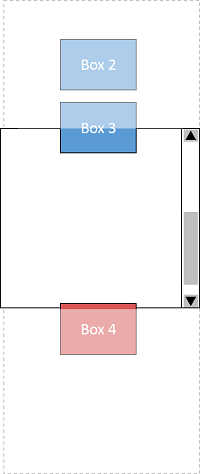
This example shows the [[UI-EVENTS#event-order]] when pressing the ArrowDown
key in the situation like the following figure.
For the sake of keeping the description simple,
this example assumes a UA where spatial navigation is triggered using arrow keys.
"Box 2" gains the focus and there isn't any candidate in a downward direction
in the scrollport.
Event type
Event target
relatedTarget
Notes
1
keydown
#box2
N/A
MUST be a key which can activate spatial navigation,
such as the arrow keys,
otherwise spatial navigation is not triggered.
2
navbeforescroll
#box2
#scrollContainer
Sent if #scrollContainer doesn't contain any candidate in the scrollport,
otherwise this would not be generated.
After navbeforescroll is fired, pressing the ArrowDown key triggers scrolling
down the scrollbar like in the figure below:
The result of moving focus when there isn't any candidate in the scrollport.
This example uses the markup as follows:
The navnotarget event occurs before going up the tree to search candidates in the
nearest ancestor spatial navigation container when spatial navigation has failed to find any candidate
within the current spatial navigation container.
If the spatial navigation container is scrollable, the event occurs when there isn't any candidate in it
and it cannot be scrolled at the same time.
The direction of the navigation as requested by the user
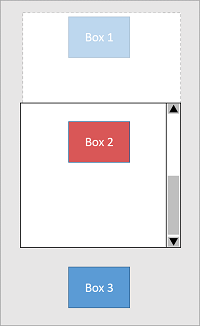
This example shows the [[UI-EVENTS#event-order]] when pressing the ArrowDown
key in the situation like the following figure.
For the sake of keeping the description simple,
this example assumes a UA where spatial navigation is triggered using arrow keys.
Moving focus when there isn't any candidate in the
scroll container.
Event type
Event target
relatedTarget
Notes
1
keydown
#box2
N/A
MUST be a key which can activate spatial navigation,
such as the arrow keys,
otherwise spatial navigation is not triggered.
2
navnotarget
#box2
#scrollContainer
Sent if #scrollContainer doesn't contain any candidate and
cannot be scrolled,
otherwise this would not be generated.
3
navbeforefocus
#box2
#box3
Sent if the candidates in #container is not null,
otherwise this would not be fired.
4
focusin
#box3
N/A
Sent before the target element receives focus.
5
focus
#box3
N/A
Sent after the target element receives focus.
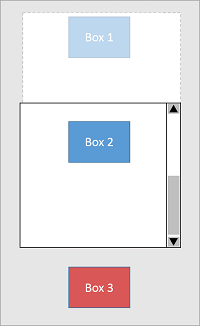
The result of this example is the figure as follows:
The result of moving focus when there isn't any candidate in the scrollport
and scroll container cannot be scrolled.
This example uses the markup as follows:
The navigation-override [=policy-controlled feature=] controls
the availability of mechanisms that enables page authors
to take control over the behavior of spatial navigation,
or to cancel it outright.
* The feature name is "navigation-override"
* The [=default allowlist=] for navigation-override is "self"
As defined in further details in [[#nav]],
if navigation-override is disabled in a document,
the navigation events (see [[#events-navigationevent]]) will not be fired.
Note: This is to prevent a hostile iframe from using these events
in order to highjack the focus.
We recognize that there exists other mechanisms predating spatial navigation
that malicious authors could use
to interfere with the user's ability to control where the focus goes.
Despite that, it seems worthwile to attempt not to increase this attack surface,
although it is possible that such attacks are already sufficiently easy to perform
that this is a lost cause.
Further feedback on this topic,
based on experience with implementation or with mitigating such attacks,
is very welcome.
Processing Model
The [[#overview]] section gives a high level idea of how spatial navigation works,
to help readers of this specification build a general mental model.
It uses intuitive but imprecise terminology,
and glosses over many details
for the sake of readability.
This section defines the corresponding normative behavior
and aims for as much detail as necessary
to fully define the behavior.
While the general model for spatial navigation
is to work from the layout of the document
and the relative position of focusable elements,
the User Agent is required to prioritize finding elements
from a local logical grouping,
only looking for focusable elements outside of the grouping
if a suitable one cannot be found inside it (see [[#nav]] for details).
Such groupings are called spatial navigation focus containers.
By default, spatial navigation containers are established by:
* The viewport of a browsing context
(not limited to the top-level browsing context)
* scroll containers
Additional spatial navigation containers can be created using the 'spatial-navigation-contain' property (see [[#container]]).
Navigation
This figure is not normative. It gives an overview of the processing model further defined in this section.
There can be a spatial navigation starting point. It is initially unset.
The user agent may set it when the user indicates that it should be moved.
Note: For example, the user agent could set it to the position of the user's click if the user clicks on the document contents,
and unset when the focus is moved (by spatial navigation or any other means).
If the UA sets both a spatial navigation starting point and a sequential focus navigation starting point,
they must not be set differently.
To run the spatial navigation steps in direction, do the following:
1. Let searchOrigin be the DOM anchor of the currently focused area of a top-level browsing context.
2. If the spatial navigation starting point is not null
and it is inside searchOrigin
then set searchOrigin to the spatial navigation starting point
3.
* If searchOrigin is an node,
let eventTarget be searchOrigin
* else (assert: searchOrigin is a position)
let eventTarget be the node which contains searchOrigin
4. If eventTarget is the Document or the document element,
set eventTarget be the body element if it is not null
or to the document element otherwise.
5. If searchOrigin is either a scroll container or the document
1. Let candidates be the result of finding focusable areas
within searchOrigin
2.
* If candidates contains at least 1 item:
1. Let bestCandidate be the result of selecting the best candidate
within candidates in direction starting from searchOrigin
2. If navigation-overrideis enabled in the [=node document=] of eventTarget for the origin of the [=active document=] of the [=top-level browsing context=], then
fire an event named navbeforefocus at eventTarget using {{NavigationEvent}}
with its {{NavigationEvent/dir}} set to direction and {{NavigationEvent/relatedTarget}} set to bestCandidate
and with it's bubbles and cancelable attributes set to true,
and return if the result is false
3. Run the focusing steps for bestCandidate and return
* Else if eventTargetcan be manually scrolled:
1. If navigation-overrideis enabled in the [=node document=] of eventTarget for the origin of the [=active document=] of the [=top-level browsing context=], then
fire an event named navbeforescroll at eventTarget using {{NavigationEvent}}
with its {{NavigationEvent/dir}} set to direction
and {{NavigationEvent/relatedTarget}} set to eventTarget
and with it's bubbles and cancelable attributes set to true,
and return if the result is false
2. Directionally scroll the elementeventTarget in direction and return.
* Else, fallback to the next step
6. Let container be the nearest ancestor of eventTarget that is a spatial navigation container.
7. Loop: Let candidates be the result of finding focusable areas
within container, excluding searchOrigin
8. If candidates is empty:
* If container is a scroll container that can be manually scrolled:
1. If navigation-overrideis enabled in the [=node document=] of eventTarget for the origin of the [=active document=] of the [=top-level browsing context=], then
fire an event named navbeforescroll at eventTarget using {{NavigationEvent}}
with its {{NavigationEvent/dir}} set to direction
and {{NavigationEvent/relatedTarget}} set to container
and with it's bubbles and cancelable attributes set to true,
and return if the result is false
2. Directionally scroll the elementcontainer in direction and return.
* Else,
1. If navigation-overrideis enabled in the [=node document=] of eventTarget for the origin of the [=active document=] of the [=top-level browsing context=], then
fire an event named navnotarget at eventTarget using {{NavigationEvent}}
with its {{NavigationEvent/dir}} set to direction and {{NavigationEvent/relatedTarget}} set to container
and with it's bubbles and cancelable attributes set to true,
and return if the result is false.
2.
* If container is the document element of the top-level browsing context,
then return.
The User Agent may transfer focus to its own controls (if any) honouring direction.
* Else, if container is the document element of a nested browsing context then:
1. Set searchOrigin to container's browsing context container
2. Set eventTarget be searchOrigin
3. Set container to the nearest ancestor of searchOrigin that is a spatial navigation container.
4. Return to the step labeled loop.
* Else, set container to its closest ancestor that is itself a spatial navigation container
and return to the step labeled loop.
9. Let bestCandidate be the result of selecting the best candidate
within candidates in direction starting from searchOrigin
10. If navigation-overrideis enabled in the [=node document=] of eventTarget for the origin of the [=active document=] of the [=top-level browsing context=], then
fire an event named navbeforefocus at eventTarget using {{NavigationEvent}}
with its {{NavigationEvent/dir}} set to direction and {{NavigationEvent/relatedTarget}} set to bestCandidate
and with it's bubbles and cancelable attributes set to true,
and return if the result is false
11. Run the focusing steps for bestCandidate and return
Focus Navigation Heuristics
Note: The following algorithms are inspired from Chrome's implementation
as well as from the old WICD Spec.
Implementors who find better approaches or refinements to these approaches are strongly
encouraged to provide feedback and help improve this specification
in order to maximize interoperability.
In particular, divergences in how User Agents find focusable areas
may cause some elements to be focusable in some User Agents but not in others,
which would be bad for users.
All geometrical operations in this section are defined to work on the result of CSS layout,
including all graphical transformations, such as relative positioning or [[CSS-TRANSFORMS-1]].
The boundary box of an object is defined as follows:
* if the object is a point, the boundary box is that point
* if the object is a [=box=] or [=box fragment=], the boundary box is the border box of that box or fragment.
* if the object is a focusable area which is not an element, the boundary box is the axis-aligned the bounding box of that focusable area
Issue(w3c/csswg-drafts#2324): CSS should have a term for “border box taking into account corner shaping properties like border-radius”.
To find focusable areas within a containing element C,
with an optional visibleOnly argument that defaults to true,
follow the following steps:
1. Let focusables be the set of all the focusable areas whose [=DOM anchor=] are descendants of C.
In the case of [=boxes=] with several [=box fragments=], each [=box fragment=] is considered separately.
2. The UA should remove from focusables items that have a [=DOM anchor=] whose tabindex attribute is set to a negative value.
Note: This is a "SHOULD" in order to mirror the exclusion of elements with negative tabindex
from the sequential focus navigation order as defined in [[HTML#the-tabindex-attribute]].
3. If visibleOnly is false,
return focusables.
Note: focusables may be empty
4. Let insideArea be
* the optimal viewing region of C if C is a scroll container,
* the viewport of C's browsing context if C is a Document,
* the border box of C otherwise.
5. Let visibles be the subset of items in focusables
whose boundary box
is at least partly within insideArea.
Except for elements that are in the currently non visible part of a scroller,
spatial navigation does not automatically exclude
elements which cannot be clicked on,
for example due to being obscured by some other element.
To avoid breaking assumptions in
the application logic if a user actually focuses and activates such an element,
and to avoid confusing users by focusing invisible or apparently unreachable elements,
authors should use make these elements unreachable to spatial navigation
using the same best practices as for making elements unreachable to sequential navigation,
such as using tab-index="-1"
or the inert attribute.
6. Return visibles.
Note: visibles may be empty
To select the best candidate
within a set of candidates
in a direction dir,
starting from searchOrigin,
follow the following steps:
1. If candidates is empty, return null
2. If candidates contains a single item, return that item
3. Let insideArea be
* the optimal viewing region of searchOrigin if searchOrigin is a scroll container,
* the viewport if searchOrigin is a Document,
* the border box of searchOrigin otherwise.
4. Let insiders be the subset of candidates items
whose [=DOM anchor=] are descendants of searchOrigin
and whose boundary box's
* top edge is below the top edge of insideArea if D is down
* bottom edge is above the bottom edge of insideArea if D is up
* right edge is left of the right edge of insideArea if D is left
* left edge is right of the left edge of insideArea if D is right
Note: this sub-setting is necessary to avoid going in the opposite direction than the one requested.
5.
* If insiders is non empty
1. Let closest subset be the subset of insiders whose boundary box's
* top edge is closest to the top edge of insideArea if D is down
* bottom edge is closest to the bottom edge of insideArea if D is up
* right edge is closest to the right edge of insideArea if D is left
* left edge is closest to the left edge of insideArea if D is right
2. If closest subset contains a single item,
return that item,
else return the first item of closest subset in document order,
unless its [=boundary box=] overlaps with the [=boundary box=] of an other item
and that item is higher in the CSS [=painting order=].
In that case, return that item instead,
unless it too is overlapped with another higher item, recursively.
* Else
1. Set candidates be the subset of its items
whose boundary box's geometric center is within the closed half plane
whose boundary goes through the geometric center of the searchOrigin
and is perpendicular to D.
2. For each candidate in candidates,
find the points P1 inside the boundary box of searchOrigin
and P2 inside the boundary box of candidate
that minimize the distance between these two points,
when distance is defined as follows:
distance:
A + B + C - D
A:
The euclidian distance between P1 and P2
B:
The absolute distance in the dir direction between P1 and P2
C:
The absolute distance in the direction which is orthogonal to dir between P1 and P2
D:
The square root of the area of intersection between the boundary boxes of candidate and searchOrigin
3. Return the item of the candidates set that has the smallest distance.
If several have the same distance,
return the first one in document order,
unless its [=boundary box=] overlaps with the [=boundary box=] of an other item at the same distance,
and that item is higher in the CSS [=painting order=].
In that case, return that item instead,
unless it too is overlapped with another higher item at the same distance, recursively.
Controlling spatial navigation through declarative means
Creating additional spatial navigation containers: the 'spatial-navigation-contain' property
Name: spatial-navigation-contain
Value: auto | contain
Initial: auto
Inherited: no
The following example shows a simplified TV program schedule or calendar.
It has a grid of elements representing TV shows or calendar entries,
and some UI buttons around it.
In this case, the grid is quite sparse,
so if the user tries to move down from "Foo",
focus would be moved to "Next Week",
as it is objectively closer in the down direction.
The same is true for going down from "Bar":
the focus would be moved to "Previous Week".
Because the elements in the table are semantically related to eachother,
the author may want to provide a different navigation experience
giving priority to movements inside the grid once you have focused one of its items.
Adding table { spatial-navigation-contain: contain; } to the stylesheet
would result it this behavior.
It would still be possible to move the focus out of the table,
for example by going right from "Foo".
Since there is nothing in the grid that is to the right,
the focus would move to "Next week".
However, if the user navigates down from "Foo",
there is something inside the grid,
so focus will move there without considering things that are outside.
Note: the 'spatial-navigation-contain' property is at-risk.
Appendix A. Scroll extensions
This section proposes a few extensions to CSS
that should be integrated in upstream specifications,
but are hosted here until then.
Issue(w3c/csswg-drafts#2322): Terminology like this should be in [[CSSOM-VIEW-1]], [[CSS-OVERFLOW-3]], [[CSS-SCROLL-SNAP-1]].
An element e can be manually scrolled in a given direction d if:
* The principal box established by e is a scroll container, and
* if d is up or down, the computed value of the 'overflow-y' property is not ''overflow/hidden'', and
* if d is left or right, the computed value of the 'overflow-x' property is not ''overflow/hidden'', and
* e is not at the scroll boundary in the direction d
* e is not snapped to the last ''mandatory'' snap point in direction d
Issue(w3c/csswg-drafts#2323): [[CSSOM-VIEW-1]] should probably define
how to perform a scroll in a given direction without an explicit position.
Until then, we roll our own.
To directionally scroll an element e in direction dir:
1. Let d be a User Agent defined distance.
2. Let x be e’s current scroll position on the x axis.
3. Let y be e’s current scroll position on the y axis.
4. Use the scroll an element algorithm from [[!CSSOM-VIEW-1]] on e to
* (x, y - d) if dir is up
* (x, y + d) if dir is down
* (x - d, y) if dir is left
* (x + d, y) if dir is right
Appendix B. Privacy and Security Considerations
The specification contributors believe that
all known potential security risks associated with this specification
have been adequately addressed.
Further details are provided below.
The TAG has developed a self-review questionaire
to help editors and Working Groups evaluate the risks introduced by their specifications.
Answers are provided below.
Does this specification deal with personally-identifiable information?
No.
Does this specification deal with high-value data?
No.
Does this specification introduce new state for an origin that persists across browsing sessions?
No.
Does this specification expose persistent, cross-origin state to the web?
No.
Does this specification expose any other data to an origin that it doesn’t currently have access to?
Mostly, no.
The one exception identified would be in the following scenario:
if the author uses `window.navigate` while the focus is in a cross origin iframe,
if they don't get an event at all it means that either there was something scrollable or focusable within the iframe,
as the only case where they'd get an event is when the search didn't find anything at all goes up the tree.
This is so limited information that it does not seem it would introduces real a security risk,
but it is as far as the editors can tell information that the author could not get could not get otherwise.
Does this specification enable new script execution/loading mechanisms?
No.
Does this specification allow an origin access to a user’s location?
No.
Does this specification allow an origin access to sensors on a user’s device?
No.
Does this specification allow an origin access to aspects of a user’s local computing environment?
No.
Does this specification allow an origin access to other devices?
No.
Does this specification allow an origin some measure of control over a user agent’s native UI?
No control is given over the appearance of the User Agent's UI.
Some control is given over how the User Agent performs spatial navigation,
which may be considered part of its user interface.
This is intentional, to let authors tailor the behavior of spatial navigation to their pages.
To prevent malicious authors to interefere with the users' desire to control focus and navigate the document,
this overriding mechanism is disabled by default for cross-origin iframes.
See [[#policy-feature]].
Does this specification expose temporary identifiers to the web?
No.
Does this specification distinguish between behavior in first-party and third-party contexts?
No.
How should this specification work in the context of a user agent’s "incognito" mode?
No Difference is expected.
Does this specification persist data to a user’s local device?
No.
Does this specification have a "Security Considerations" and "Privacy Considerations" section?
Yes, this is the section you are reading now.
Does this specification allow downgrading default security characteristics?
It does not allow downgrading any unrelated security mechanism.
It **does** allow authors to opt into allowing
the events needed to override the default behavior of spatial navigation
in cross origin iframes they trust
using [[feature-policy]].
See [[#policy-feature]].
Acknowledgements
The editors of this specification would like to thank the following individuals for their feedback and contributions (in alphabetical order):
* Alice Boxhall
* Brian Kardell
* Elika Etemad
* Hugo Holgersson
* Hyojin Song
* Junho Seo
* Rob Dodson
* Seungcheon Baek