Title: CSS Easing Functions Level 1
Status: ED
Work Status: Refining
Shortname: css-easing
Level: 1
Group: csswg
ED: https://drafts.csswg.org/css-easing/
TR: https://www.w3.org/TR/css-easing-1/
Previous version: https://www.w3.org/TR/2018/WD-css-timing-1-20180926/
Previous version: https://www.w3.org/TR/2017/WD-css-timing-1-20170221/
Editor: Brian Birtles, Mozilla https://www.mozilla.org/, bbirtles@mozilla.com, w3cid 43194
Editor: Dean Jackson, Apple Inc https://www.apple.com/, dino@apple.com, w3cid 42080
Editor: Matt Rakow, Microsoft, w3cid 62267
Former Editor: Shane Stephens, Google Inc, shans@google.com, w3cid 47691

Abstract: This CSS module describes a way for authors to define a transformation
    to be applied to the time of an animation. This can be used to produce
    animations that mimic physical phenomena such as momentum or to
    cause the animation to move in discrete steps producing robot-like
    movement.

!Participate: IRC: #css on W3C's IRC
Repository: w3c/csswg-drafts
!Tests: web-platform-tests css/css-timing
{
  "FUND-COMP-GRAPHICS": {
    "title": "Fundamentals of Computer Graphics",
    "authors": [
      "Peter Shirley",
      "Michael Ashikhmin",
      "Steve Marschner"
    ],
    "date": "2009",
    "publisher": "A K Peters Limited"
  }
}
Introduction {#introduction}
============================
This section is not normative.
It is often desirable to control the rate at which an animation progresses.
For example, gradually increasing the speed at which an element moves can
give the element a sense of weight as it appears to gather momentum.
This can be used to produce user intuitive interface elements or convincing
cartoon props that behave like their physical counterparts.
Alternatively, it is sometimes desirable for animation to move forwards in
distinct steps such as a segmented wheel that rotates such that the segments
always appear in the same position.
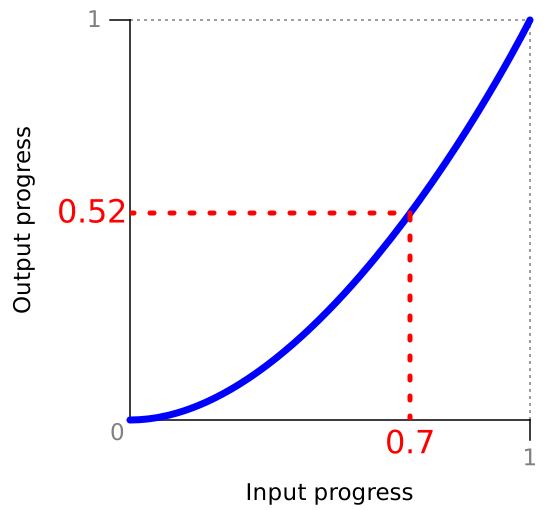
[=Timing functions=] provide a means to transform animation time by taking an
input progress value and producing a corresponding transformed output progress
value.
Example of a timing function that produces an ease-in effect.
Given an input progress of 0.7, the timing function scales the
value to produce an output progress of 0.52.
By applying this timing function, the animation will progress more
slowly at first but then gradually progress more quickly.
Timing functions {#timing-functions}
====================================
A timing function takes an [=input progress value=] and
produces an [=output progress value=].
A [=timing function=] must be a pure function meaning that for a given set of
inputs, it always produces the same [=output progress value=].
The input progress value is a real number in the range [-∞,
∞].
Typically, the [=input progress value=] is in the range [0, 1] but this may
not be the case when [=timing functions=] are chained together.
The output progress value is a real number in the
range [-∞, ∞].
Some types of timing function also take an additional boolean [=before flag=]
input which is defined subsequently.
This specification defines four types of timing functions whose definitions
follow.
The syntax for specifying a [=timing function=] is as follows:
<timing-function> =
''linear'' |
<> |
<>
The linear timing function: ''linear'' {#linear-timing-function-section}
------------------------------------------------------------------------
The linear timing function is an identity function
meaning that its [=output progress value=] is equal to the
[=input progress value=] for all inputs.
The syntax for the [=linear timing function=] is simply the
linear keyword.
Cubic Bézier timing functions: ''ease'', ''ease-in'', ''ease-out'', ''ease-in-out'', ''cubic-bezier()'' {#cubic-bezier-timing-functions}
---------------------------------------------------------------------
A cubic Bézier timing function is a type of [=timing
function=] defined by four real numbers that specify the two control
points, P1 and P2, of a cubic Bézier curve whose
end points P0 and P3 are fixed at (0, 0) and
(1, 1) respectively.
The x coordinates of P1 and P2 are
restricted to the range [0, 1].
A cubic Bézier curve used as a timing function.
The shape of the curve is determined by the location of the control
points P1 and P2.
Input progress values serve as x values of the curve,
whilst the y values are the output progress values.
A cubic Bézier timing function has the following syntax
(using notation from [[!CSS3VAL]]):
: ease
:: Equivalent to ''cubic-bezier(0.25, 0.1, 0.25, 1)''.
: ease-in
:: Equivalent to ''cubic-bezier(0.42, 0, 1, 1)''.
: ease-out
:: Equivalent to ''cubic-bezier(0, 0, 0.58, 1)''.
: ease-in-out
:: Equivalent to ''cubic-bezier(0.42, 0, 0.58, 1)''.
:
cubic-bezier(<>, <>, <>, <>)
:: Specifies a cubic Bézier timing function.
The four numbers specify points P1 and P2 of
the curve as (x1, y1, x2, y2).
Both x values must be in the range [0, 1] or the definition is
invalid.
The keyword values listed above are illustrated below.
The timing functions produced by each of cubic Bézier timing
function keyword values.
### Output of a cubic bézier timing function ### {#cubic-bezier-algo}
The mapping from input progress to output progress is performed by
determining the corresponding y value ([=output progress value=]) for
a given x value ([=input progress value=]).
The evaluation of this curve is covered in many sources such as
[[FUND-COMP-GRAPHICS]].
For [=input progress values=] outside the range [0, 1], the curve is extended
infinitely using tangent of the curve at the closest endpoint as follows:
* For [=input progress values=] less than zero,
1. If the x value of P1 is greater than zero, use
a straight line that passes through P1 and P0 as the tangent.
1. Otherwise, if the x value of P2 is greater than
zero, use a straight line that passes through P2 and P0 as the tangent.
1. Otherwise, let the [=output progress value=] be zero for all
[=input progress values=] in the range [-∞, 0).
* For [=input progress values=] greater than one,
1. If the x value of P2 is less than one, use
a straight line that passes through P2 and P3 as the tangent.
1. Otherwise, if the x value of P1 is less than
one, use a straight line that passes through P1 and P3 as the tangent.
1. Otherwise, let the [=output progress value=] be one for all
[=input progress values=] in the range (1, ∞].
Step timing functions: ''step-start'', ''step-end'', ''steps()'' {#step-timing-functions}
----------------------------------------------------------------
A step timing function is a type of timing function
that divides the input time into a specified number of intervals that
are equal in length.
It is defined by a number of steps, and a step position.
It has following syntax:
: step-start
:: Computes to ''steps(1, start)''
: step-end
:: Computes to ''steps(1, end)''
Example step timing function keyword values.
: steps(<integer>[, <step-position> ]?)
:: The first parameter specifies the number of intervals in the function.
It must be a positive integer greater than 0
unless the second parameter is jump-none
in which case it must be a positive integer greater than 1.
The second parameter, which is optional, specifies the [=step position=]
using one of the following values:
: jump-start
:: The first rise occurs at [=input progress value=] of 0.
: jump-end
:: The last rise occurs at [=input progress value=] of 1.
: jump-none
:: All rises occur within the range (0, 1).
: jump-both
:: The first rise occurs at [=input progress value=] of 0
and the last rise occurs at [=input progress value=] of 1.
: start
:: Behaves as jump-start.
: end
:: Behaves as jump-end.
If the second parameter is omitted, the value ''end'' is assumed.
These values are illustrated below:
Example step timing functions.
### Output of a step timing function ### {#step-timing-function-algo}
At the exact point where a step occurs, the result of the function is
conceptually the top of the step. However, an additional before flag
passed as input to the [=step timing function=], if true, will cause the
result of the function to correspond to the bottom of the step at the step
point.
As an example of how the [=before flag=] affects the behavior of this function,
consider an animation with a [=step timing function=] whose [=step
position=] is start and which has a positive
delay and backwards fill.
For example, using CSS animation:
animation: moveRight 5s 1s steps(5, start);
During the delay phase, the [=input progress value=] will be zero but if the
[=before flag=] is set to indicate that the animation has yet to reach its
animation interval, the timing function will produce zero as its [=output
progress value=], i.e. the bottom of the first step.
At the exact moment when the animation interval begins, the [=input progress
value=] will still be zero, but the [=before flag=] will not be set and hence
the result of the timing function will correspond to the top of the first step.
For the purposes of calculating the [=output progress value=], the
[=step position=] start is considered equivalent to
jump-start.
Likewise end is considered equivalent to jump-end.
As a result, the following algorithm does not make explicit reference to
start or end.
Note: User agents must still differentiate between
jump-start and start for
the purpose of serialization (see [[#serializing-a-timing-function]]).
The [=output progress value=] is calculated from the [=input progress value=]
and [=before flag=] as follows:
1. Calculate the current step as
floor([=input progress value=] × [=steps=]).
1. If the [=step position=] property is one of:
* jump-start,
* jump-both,
increment current step by one.
1. If both of the following conditions are true:
* the [=before flag=] is set, and
* [=input progress value=] × [=steps=] mod 1 equals zero
(that is, if [=input progress value=] × [=steps=] is
integral), then
decrement current step by one.
1. If [=input progress value=] ≥ 0 and current step < 0,
let current step be zero.
1. Calculate |jumps| based on the [=step position=] as follows:
: jump-start or
jump-end
:: [=steps=]
: jump-none
:: [=steps=] - 1
: jump-both
:: [=steps=] + 1
1. If [=input progress value=] ≤ 1 and current step >
|jumps|, let current step be |jumps|.
Steps 4 and 6 in this procedure ensure that given an [=input progress
value=] in the range [0, 1], a step timing function does not produce an
[=output progress value=] outside that range.
For example, although mathematically we might expect that a step timing
function with a [=step position=] of jump-start
would step up (i.e. beyond 1) when the [=input progress value=] is 1,
intuitively,
when we apply such a timing function to a forwards-filling animation,
we expect it to produce an [=output progress value=] of 1
as the animation fills forwards.
A similar situation arises for a step timing function with
a [=step position=] of jump-end
when applied to an animation during its delay phase.
1. The [=output progress value=] is current step /
|jumps|.
Serialization {#serializing-a-timing-function}
-------------
Timing functions are serialized using the common serialization patterns
defined in [[CSSOM]] with the following additional requirements:
* The keyword values ''ease'', ''linear'', ''ease-in'', ''ease-out'',
and ''ease-in-out'' are serialized as-is, that is, they are
not converted to the equivalent ''cubic-bezier()''
function before serializing.
* Step timing functions, whether they are specified using the
''steps()'' function or either of the ''step-start'' or ''step-end''
keywords, are serialized as follows:
1. If the [=step position=] is ''jump-end'' or ''end'', serialize
as steps(<integer>).
2. Otherwise, serialize as steps(<integer>, <step-position>).
Changes since last publication {#changes}
==============================
The following changes have been made since the 21 February
2017 Working Draft:
* Removed `frames()` timing function.
* Added ''steps()/jump-start'', ''steps()/jump-end'',
''steps()/jump-none'', and ''steps()/jump-both'' keywords to
''steps()'' timing function.
Acknowledgements {#acknowledgements}
================
This specification is based on the CSS Transitions specification
edited by L. David Baron, Dean Jackson, David Hyatt, and Chris Marrin.
The editors would also like to thank Douglas Stockwell, Steve Block, Tab Atkins,
Rachel Nabors, Martin Pitt, and the Animation at Work slack
community for their feedback and contributions.