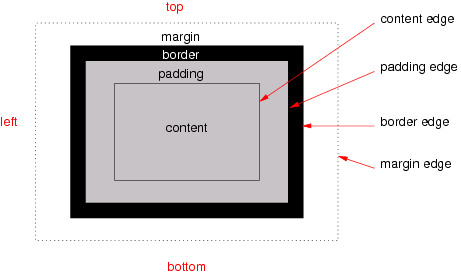
The various areas and edges of a typical box.
Title: CSS Box Model Module Level 3
Shortname: css-box
Level: 3
Status: WD
Work Status: Refining
Group: csswg
ED: https://drafts.csswg.org/css-box-3/
Date: 2018-08-02
TR: https://www.w3.org/TR/css-box-3/
Previous Version: https://www.w3.org/TR/2018/WD-css3-box-20180731/
Abstract: This specification describes the margin and padding properties, which create spacing in and around a CSS box. It may later be extended to include borders (currently described in [[css-backgrounds-3]]).
Editor: Elika J. Etemad / fantasai, Invited Expert, http://fantasai.inkedblade.net/contact, w3cid 35400
WPT Path Prefix: css/css-box/
Ignored Terms: internal table elements, block layout
Introduction {#intro} ============
This subsection is not normative.
CSS describes how each element and each string of text in a source document is laid out by transforming the document tree into a set of boxes, whose size, position, and stacking level on the canvas depend on the values of their CSS properties. Note: CSS Cascading and Inheritance describes how properties are assigned to elements in the box tree, while [[css-display-3#intro]] describes how the document tree is transformed into the box tree.
Each CSS box has a rectangular content area, a band of padding around the content, a border around the padding, and a margin outside the border. The sizing properties [[css-sizing-3]], together with various other properties that control layout, define the size of the content area. The box styling properties-- 'padding' and its longhands, 'border' and its longhands, and 'margin' and its longhands-- define the sizes of these other areas. Margins and padding are defined in this module; borders are defined in [[css-backgrounds-3]]. Note: This module originally contained the CSS Level 3 specification prose relating to box generation (now defined in [[css-display-3]), the box model (defined here), as well as block layout (now only defined in [[CSS2]] Chapters 9 and 10). Since its maintenance was put aside during the development of CSS2.1, its prose was severely outdated by the time CSS2 Revision 1 was finally completed. Therefore, the block layout portion of the prose has been retired, to be re-synched to CSS2 and updated as input to a new Block Layout module at some point in the future. It is being split apart from this module and from the CSS Display Module both because of the practical concern that it would be a huge amount of work and also in recognition that CSS now has multiple layout models (Flex Layout, Grid Layout, Positioned Layout, and Table Layout, in addition to Block Layout) which each deserve their own parallel module.
This module replaces the definitions of the margin and padding properties defined in [[!CSS2]] sections 8.1, 8.2, 8.3 (but not 8.3.1), and 8.4.
All properties in this module apply to the ''::first-line'' and ''::first-letter'' pseudo-elements. The CSS Box Model =================
Each box has a content area (which contains its content-- text, descendant boxes, an image or other replaced element content, etc.) and optional surrounding padding, border, and margin areas; the size of each area is specified by corresponding properties, and can be zero (or in the case of margins, negative). The following diagram shows how these areas relate and the terminology used to refer to the various parts of the box:
The various areas and edges of a typical box.
Name: margin-top, margin-right, margin-bottom, margin-left Value: <These properties set the top, right, bottom, and left margin of a box, respectively. Negative values for margin properties are allowed, but there may be implementation-specific limits. Margin Shorthand: the 'margin' property {#margin-shorthand} -----------------> | auto Initial: 0 Applies to: all elements except internal table elements Inherited: no Percentages: refer to logical width of containing block Computed value: absolute length
		Name: margin
		Value: <<'margin-top'>>{1,4}
		Initial: 0
		Applies to: all elements except internal table elements
		Inherited: no
		Percentages: refer to logical width of containing block
		Computed value: absolute length
The 'margin' property is a shorthand property for setting
'margin-top', 'margin-right', 'margin-bottom', and 'margin-left'
in a single declaration.
If there is only one component value,
it applies to all sides.
If there are two values,
the top and bottom margins are set to the first value
and the right and left margins are set to the second.
If there are three values,
the top is set to the first value,
the left and right are set to the second,
and the bottom is set to the third.
If there are four values
they apply to the top, right, bottom, and left, respectively.
			body { margin: 2em }         /* all margins set to 2em */
			body { margin: 1em 2em }     /* top & bottom = 1em, right & left = 2em */
			body { margin: 1em 2em 3em } /* top=1em, right=2em, bottom=3em, left=2em */
The last rule of the example above is equivalent to the example below:
			body {
			  margin-top: 1em;
			  margin-right: 2em;
			  margin-bottom: 3em;
			  margin-left: 2em; /* copied from opposite side (right) */
			}
Name: padding-top, padding-right, padding-bottom, padding-left Value: <These properties set the top, right, bottom, and left padding of a box, respectively. Negative values for padding properties are invalid. Padding Shorthand: the 'padding' property {#padding-shorthand} -----------------> Initial: 0 Applies to: all elements except internal table elements Inherited: no Percentages: refer to logical width of containing block Computed value: absolute length
		Name: padding
		Value: <<'padding-top'>>{1,4}
		Initial: 0
		Applies to: all elements except internal table elements
		Inherited: no
		Percentages: refer to logical width of containing block
		Computed value: absolute length
The 'padding' property is a shorthand property for setting
'padding-top', 'padding-right', 'padding-bottom', and 'padding-left'
in a single declaration.
If there is only one component value,
it applies to all sides.
If there are two values,
the top and bottom padding are set to the first value
and the right and left padding are set to the second.
If there are three values,
the top is set to the first value,
the left and right are set to the second,
and the bottom is set to the third.
			body { padding: 2em }         /* all padding set to 2em */
			body { padding: 1em 2em }     /* top & bottom = 1em, right & left = 2em */
			body { padding: 1em 2em 3em } /* top=1em, right=2em, bottom=3em, left=2em */
The last rule of the example above is equivalent to the example below:
			body {
			  padding-top: 1em;
			  padding-right: 2em;
			  padding-bottom: 3em;
			  padding-left: 2em; /* copied from opposite side (right) */
			}