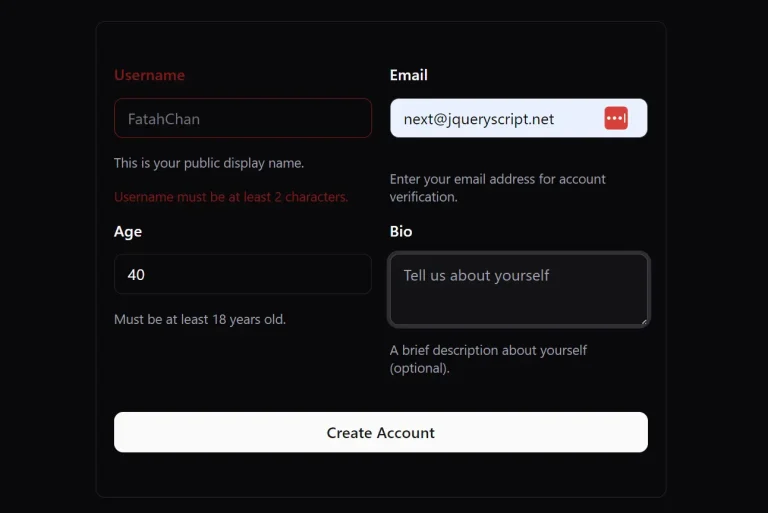
TANCN is a form and table builder application that generates type-safe React components through a visual drag-and-drop interface. Powered by the TanStack ecosystem.
The application provides a real-time preview to see changes instantly and offers features to save, share, and export your configurations for direct use in your projects.
You can use it to create intricate multi-step forms, dynamic field arrays, and data grids with advanced filtering capabilities.
Features
🖱️ Drag and Drop Builder: Arrange form fields and table columns through visual manipulation.
🎨 Shadcn/ui Components: Create accessible form elements using the shadcn/ui component library.
📑 Multi Step and Field Arrays: Build forms that span multiple sections or contain repeating field groups.
📊 Data Grid and Advanced Filters: Implement tables with sorting, pagination, and custom filter controls.
💾 Save, Share and Export: Store form configurations for later editing or team collaboration.
👁️ Real Time Preview: Observe form modifications immediately during the construction process.
How to Use It
1. Clone the repository and install dependencies.
git clone https://github.com/Vijayabaskar56/tancn.git
cd tancn
bun install
2. Launch the development server to access the builder interface. The application runs on http://localhost:3001 by default. You’ll see two main sections in the interface for forms and tables.
bun run dev:web3. Navigate to the Form Builder to start creating your form. The left panel contains form field components like text inputs, select dropdowns, checkboxes, and date pickers. Click fields from the panel into the canvas area to add them to your form.

4. Click any field to open its configuration panel on the right side. Here you can set field properties like labels, placeholder text, default values, and validation rules.

5. The app supports Zod, Valibot, and ArkType for validation schemas. Select your preferred validation library and define rules like required fields, string patterns, or number ranges.
6. For multi-step forms, add form steps from the builder menu. Each step can contain its own set of fields and validation rules. Users will progress through the steps sequentially when the form renders.

7. Add field arrays when you need repeatable field groups. This works for scenarios like adding multiple addresses or contact entries. The generated code includes add and remove functionality for array items.
8. The real-time preview panel shows exactly how your form will render. Test input interactions and validation behavior before exporting code. The preview updates automatically as you modify fields.
9. When you finish building, click the Code button to generate your React component code. TANCN produces a TypeScript file with the complete form component, including imports, validation schema, type definitions, and form handling logic. Copy this code directly into your project.

10. For tables, switch to the Table Builder section. Start by defining your data structure through column configuration. Add columns and specify their data types, header text, and cell rendering behavior.

11. Configure table features like sorting, filtering, and pagination through the settings panel. Set default sort orders, enable column-specific filters, and define page sizes. The generated table component uses TanStack Table for performance with large datasets.

12. Add custom cell renderers for columns that need special formatting. You can create cells with badges, action buttons, or custom content layouts. The code generator includes these cell definitions in the exported component.
13. Save your form and table configurations using the save button. This creates a JSON file that stores all your settings. Load this file later to continue editing or share it with team members. Saved configurations work across different machines when your team uses the same TANCN instance.

Related Resources
- TanStack Form provides the underlying form state management and validation logic that TANCN uses for code generation.
- TanStack Table powers the table functionality with its headless UI approach for building complex data grids.
- Shadcn/UI offers the component library that TANCN generates code for, including form inputs and table elements.
FAQs
Q: Can I customize the generated component styles?
A: Yes. The exported components use Tailwind CSS classes that you can modify directly in the generated code or override with your own styles.
Q: Which validation libraries work with TANCN?
A: TANCN supports Zod, Valibot, and ArkType for form validation. You select your preferred library in the builder interface.
Q: Does TANCN support form submission handling?
A: The generated code includes form submission setup, but you need to add your own submission logic like API calls or state updates.
Q: What technologies does TANCN use?
A: The tech stack includes React 19, TypeScript, TanStack Router for routing, TanStack Form for form state management, and ShadCN UI for the component library. It supports Zod, Valibot, and ArkType for data validation.