I could probably write a small book on the virtues of jQuery and how it’s changed my JavaScript programming life and actually made it enjoyable…. however, let’s cut the crap and talk plugins!
I’m still fairly new to developing jQuery plugins but already the benefits are obvious. The bottom line is you can encapsulate your code in reusable modules and make these plugins highly configurable.
The Example
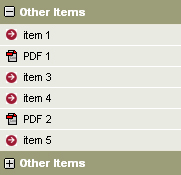
Expanding and collapsing sections! We’ve all seen them, those areas on a web site that contain additional data you want available but not immediately visible. You click on a + icon and hey presto, the content appears and the + icon changes to a – icon to close it back up.
It looks a bit like this:
The Implementation
The particular XHTML that Mark funished me with to develop this plugin had each collapsable section in a div and then within that is an H3 header (this is what we’ll make clickable to expand) and a UL unordered list (which is what we’re going to hide and show).
The good thing about jQuery is we can easily make this unobtrusive. What I mean by that is, we want it to degrade well with javascript turned off. When javascript is turned off we want it to simply show the original mark-up, to do this we’re going to make sure our plugin hides the content on load, puts in the icons to indicate it’s an expanding section and then attaches the relevant event handler to manage the expand/collapse. When javascript it turned off, the user will be none the wiser!
Here’s the pseudo code for the entire plugin:
Main Plugin Code
- Set some default settings for the elements we’re looking for (the header and content).
- Loop through each of the jQuery objects found (this is our divs containing our header and content).
- Find the header element and prepend our plus icon.
- Attach a click event to the header (See header click).
- Hide the content.
Header Click
- Set the path of our icon image according to if the content is currently collapsed or expanded.
- Change the icon in the header.
- Toggle the content’s visibility.
The Code
//This simple jQuery plugin is for collapsing and expanding sections of content.
(function() {
jQuery.fn.collapse = function(settings) {
var cContainers = this; //The jquery objects that contain our collapsable items.
// define defaults and override with options, if available
// by extending the default settings, we don’t modify the argument
settings = jQuery.extend({
header: “h3″,
content: “ul”,
expandIcon: “images/plus_icon.gif”,
collapseIcon: “images/minus_icon.gif”
}, settings);
//Loop through the jquery objects (these are the elements that contain our items to collapse).
return cContainers.each(function(){
//This current dom element.
var jDomElem = this;
var headerDomElem = jQuery(settings.header, jDomElem);
var contentDomElem = jQuery(settings.content, jDomElem);
//Put the plus/minus icon in to the header.
var expandIconDomElem = headerDomElem.prepend(‘<img src=”‘ + settings.expandIcon + ‘” alt=”" />’);
//When the header element is clicked.
headerDomElem.click(function() {
//Determine the correct expand/collapse icon src.
var iconImgSrc = settings.expandIcon;
if(contentDomElem.css(“display”)==”none”) {
iconImgSrc = settings.collapseIcon;
}
//Take the header (the clicked item) and change the icon in it. We know this is the first element inside it because we put it there.
jQuery(this.firstChild).attr(“src”, iconImgSrc);
//Show/hide the content.
contentDomElem.toggle();
});
//Hide the content area.
contentDomElem.hide();
});
};
})(jQuery);
Naming The Plugin
There’s a nice simple naming convention for jquery plugins. Call it jquery.plugin.js – so I have called mine jquery.collapse.js
I’ve also taken to appending .pack to the end of the filename to indicate a compressed JS file. e.g. jquery.collapse.pack.js.
Using The Plugin
Now we have the plugin we use it in our page in the following way:
$(document).ready(function(){
$(“div.collapse”).collapse();
});
The div.collapse just means that we’re going to apply our plugin code to any div tag that has a class of collapse on it. I just used this collapse class to easily identify the collapsing/expanding sections. If for any reason I want to change the elements that are used within these divs for my header and content, or change the plus/minus icons, I can call the plugin like so:
$(“div.collapse”).collapse({header: “h2″, content: “p”, exapandIcon: “images/plus.gif”, collapseIcon: “images/minus.gif”});
The Result
You can download the code for the jquery.collapse plugin here.
{ 12 comments… read them below or add one }
Nice! It will sure make things simple if all you want is to have many collapsible columns on a page.
One suggestion, if you could integrate cookie so that one knows which column is open on a page even when a user navigates to another page then it would make it even more useful. I am using something like this on my page here
http://www.joomlaprodigy.com.
Well done!
another suggestion, you should add a really working example on this page,cuz it will more clear:)
Jquery is beautiful.
Just out of curiosity, what is the purpose of the primary closure?
(function() {
// …
})(jQuery);
That’s a good question Dustin… I lifted it from a previous plugin I’d written. I think it was so I could scope functions locally to the plugin. If you search the jQuery group on google groups you’ll probably find my post about it.
See the following for more:
“http://docs.jquery.com/Plugins/Authoring#Custom_Alias_in_plugin_code”:http://docs.jquery.com/Plugins/Authoring#Custom_Alias_in_plugin_code
Good tutorial! It’s fun to see the jQuery community starting to grow…
@Dustin Diaz
In the particular plugin above, it doesn’t really do much. If $ had been passed into the function, then it would make $ a conflict safe alias for jQuery.
Example:
(function($) {
// …
})(jQuery);
I actually just finished writing my first jQuery tutorial where I happen to address this. I would love to get some feedback: http://jmar777.blogspot.com/2008/02/building-your-first-jquery-plugin-that.html
Thanks for the tutorial – save me a lot of time!
Just wanted to add a link (for my own reference really) to this great plugin tutorial:
http://www.learningjquery.com/2007/10/a-plugin-development-pattern
Thanks a lot! It's a nice article! I like such amazing stories!
gjkgjk
gjkgjk
{ 1 trackback }