Title: CSS Fonts Module Level 4
Shortname: css-fonts
Level: 4
Status: ED
Work Status: Exploring
Group: CSSWG
ED: https://drafts.csswg.org/css-fonts-4/
TR: https://www.w3.org/TR/css-fonts-4/
Previous Version: https://www.w3.org/TR/2017/WD-css-fonts-4-20170711/
Editor: John Daggett, Invited Expert, https://twitter.com/nattokirai, w3cid 41498
Editor: Myles C. Maxfield, Apple Inc., mmaxfield@apple.com, w3cid 77180
Editor: Chris Lilley, W3C, http://svgees.us, w3cid 1438
Abstract: This specification defines modifications to the existing CSS Fonts 3 specification along with additional experimental features.
At Risk: Synthesis of the 'font-variant-position' property
At Risk: The 'font-language-override!!property' property
At Risk: The 'font-language-override!!descriptor' descriptor
Ignored Terms: font-palette,
The CSS3 Fonts specification ([[!CSS-FONTS-3]]) describes the basic
controls CSS provides for selecting and using fonts within documents.
The ideas here are additions or modifications to the properties and
rules defined in CSS3 Fonts.
Issue: Please note that OpenType/TrueType variable font support
is still in intial stages of specification and implementation. Please
comment on any bugs in this spec at
https://github.com/w3c/csswg-drafts/issues. Also, please note that this
spec is incomplete and only includes some of the text from
https://www.w3.org/TR/css-fonts-3/.
Basic Font Properties
The particular font face used to render a character is determined by
the font family and other font properties that apply to a given element.
This structure allows settings to be varied independent of each
other.
Font family: the 'font-family!!property' property
    Name: font-family
    Value: [ <> | <> ] #
    Initial: depends on user agent
    Applies to: all elements
    Inherited: yes
    Percentages: n/a
    Computed value: a list of strings and/or <> keywords
    Media: visual
    Animatable: no
This property specifies a prioritized list of font family names or generic family names.
A font family defines a set of faces that vary in weight, width or slope.
CSS uses the combination of a family name with other font properties to select an individual face.
Using this selection mechanism,
rather than selecting a face via the style name as is often done in design applications,
allows some degree of regularity in textual display when fallback occurs.
Component values are a comma-separated list indicating alternatives.
A user agent iterates through the list of family names
until it matches an available font
that contains a glyph for the character to be rendered.
(See [[#cluster-matching]].)
This allows for differences in available fonts across platforms and
for differences in the range of characters supported by individual fonts.
        body {
            font-family: Helvetica, Verdana, sans-serif;
        }
If Helvetica is available, it will be used when rendering.
If neither Helvetica nor Verdana is present,
then the generic font-family ''sans-serif'' font will be used.
There are two types of font family names:
<>
The name of a font family, such as Helvetica or Verdana in the previous example.
<>
Each <> keyword represents
a generic font choice,
and behaves as an alias for one or more locally-installed fonts
belonging to the specified generic font category.
A <> can thus be used as a reliable fallback
for when an author's more specific font choices are not available.
Authors are encouraged to append a generic font family as a last alternative
for improved robustness.
Note that <> keywords cannot be quoted
(otherwise they are interpreted as a <>).
The following generic family keywords are defined:
''serif'', ''sans-serif'', ''cursive'', ''fantasy'', ''monospace'', ''system-ui'', ''emoji'', ''math'' and ''fangsong''.
See [[#generic-font-families]].
Syntax of <>
Font family names other than generic families must either be given quoted as <>s,
or unquoted as a sequence of one or more identifiers.
Note: This means most punctuation characters and digits at the start of
each token must be escaped in unquoted font family names.
To illustrate this, the following declarations are invalid:
If a sequence of identifiers is given as a <>,
the computed value is the name
converted to a string
by joining all the identifiers in the sequence by single spaces.
To avoid mistakes in escaping,
it is recommended to quote font family names
that contain white space, digits,
or punctuation characters other than hyphens:
Quoting font families prevents escaping mistakes.
        body { font-family: "New Century Schoolbook", serif }

        <body style="font-family: '21st Century', fantasy">
Font family names that happen to be the same as
a 'font-family!!property' keyword value
(e.g. CSS-wide keywords such as ''inherit'', or
<> keywords such as ''serif'')
must be quoted to prevent confusion
with the keywords of the same names.
UAs must not consider these keywords as matching the <> type.
Relationship Between Faces and Families
A font family name only specifies a name given to a set of font faces;
it does not specify an individual face.
For example, given the availability of the fonts below,
Futura would match but Futura Medium would not:
Family and individual face names
Note: The CSS definition of font attributes used for selection
are explicitly not intended to define a font taxonomy.
A type designer's idea of a family can often extend
to a set of faces that vary along axes other than just
the standard axes of
weight ('font-weight!!property'),
width ('font-stretch!!property'),
and slant ('font-style!!property').
A family can vary along axes that are unique to that family.
The CSS font selection mechanism merely
provides a way to determine the “closest” match
when substitution is necessary.
Note: The precise way a set of fonts are grouped into font families
varies depending upon the platform font management APIs.
For example, the Windows GDI API only allows four faces to be grouped into a family,
while the DirectWrite API,
Core Text API,
and other platforms support
font families with a variety of weights, widths, and slopes
(see [[#platform-props-to-css]] for more details).
See [[#localized-name-matching]] below for information on how
font-family names are matched.
Generic font families
Each generic font family must always map to at least one matched font face.
However, a single generic font family may be a composite face
combining different typefaces based on such things as
the Unicode range of the character,
the content language of the containing element,
user preferences, system settings, etc.
Different generic font families may map to the same used font.
User agents should provide reasonable default choices for the generic font families,
that express the characteristics of each family as well as possible,
within the limits allowed by the underlying technology.
User agents are encouraged to allow users to select alternative faces for the generic font families.
serif
Serif fonts represent the formal text style for a script.
This often means, but is not limited to,
glyphs that have finishing strokes,
flared or tapering ends,
or have actual serifed endings (including slab serifs).
Serif fonts are typically proportionately-spaced.
They often display a greater variation between thick and thin strokes
than fonts from the ''sans-serif'' generic font family.
CSS uses the term "serif" to apply to a font for any script,
although other names might be more familiar for particular scripts,
such as Mincho (Japanese),
Sung or Song (Chinese),
Batang (Korean).
For Arabic, the Naskh style would correspond to ''serif''.
This is due to its typographic role, rather than its design style.
Any font that fits this typographic role
may be used to represent the generic ''serif'' family.
Sample serif fonts
sans-serif
Glyphs in sans-serif fonts,
as the term is used in CSS,
are generally low contrast
(vertical and horizontal stems have the close to the same thickness)
and have stroke endings that are plain
(without any flaring, cross stroke, or other ornamentation).
Sans-serif fonts are typically proportionately-spaced.
They often have little variation between thick and thin strokes,
compared to fonts from the ''serif'' family.
CSS uses the term "sans-serif" to apply to a font for any script,
although other names might be more familiar for particular scripts,
such as Gothic (Japanese),
Hei (Chinese),
or Gulim (Korean).
Any font that fits this typographic role
may be used to represent the generic ''sans-serif'' family.
Sample sans-serif fonts
cursive
Glyphs in cursive fonts generally use a more informal script style,
and the result looks more like handwritten pen or brush writing than printed letterwork.
For example, Kaiti (Chinese), which uses a brush-based style,
would be classified as a CSS ''cursive'' font family.
CSS uses the term "cursive" to apply to a font for any script,
although other names such as Chancery, Brush, Swing and Script are also used in font names.
Sample cursive fonts
fantasy
Fantasy fonts are primarily decorative or expressive fonts
that contain decorative or expressive representations of characters.
These do not include Pi or Picture fonts which do not represent actual characters.
Sample fantasy fonts
monospace
The sole criterion of a monospace font is that all glyphs have the same fixed width.
This is often used to render samples of computer code.
Sample monospace fonts
system-ui
This generic font family lets text render with the default user interface font
on the platform on which the UA is running.
A cross-platform UA should use different fonts on its different supported platforms.
The purpose of ''system-ui'' is to allow web content
to integrate with the look and feel of the native OS.
On platforms which have a collection of system user interface fonts
(e.g. for different languages),
user agents may treat ''system-ui'' as a virtual font
which encompasses all the relevant platform user interface fonts.
As with other generic font families,
the substitution of specific installed fonts for ''system-ui''
does not affect the computed style.
The script above should not have any knowledge of how ''system-ui''
is expanded to include a collection of system user interface fonts.
In particular, the above script should yield a result of "system-ui" on every platform.
emoji
This font family is intended for use with emoji characters.
Issue: Add more description
math
This font family is intended for use with mathematical expressions.
Issue: Add more description
fangsong
This font family is used for Fang Song (仿宋) typefaces in Chinese.
Fang Song is a relaxed, indermediate form
between Song (''serif'') and Kai (''cursive'').
Typically, the horizontal lines are tilted,
the endpoint flourishes are smaller,
and there is less variation in stroke width,
compared to a Song style.
Fang Song is often used for official Chinese Government documents.
Font weight: the 'font-weight!!property' property
    Name: font-weight
    Value: <> | bolder | lighter
    Initial: normal
    Applies to: all elements
    Inherited: yes
    Percentages: n/a
    Computed value: numeric weight value (see description)
    Media: visual
    Animatable: As <>
The 'font-weight!!property' property specifies the weight of glyphs in the font,
their degree of blackness, or stroke thickness.
This property accepts values of the following:
<font-weight-absolute> = [normal | bold | <>]
Values have the following meanings:
<>
Each number indicates a weight that is at least as dark as its predecessor.
Only values greater than or equal to 1, and less than or equal to 1000, are valid,
and all other values are invalid.
Numeric values typically correspond to the commonly used weight names below.
100 - Thin
200 - Extra Light (Ultra Light)
300 - Light
400 - Normal
500 - Medium
600 - Semi Bold (Demi Bold)
700 - Bold
800 - Extra Bold (Ultra Bold)
900 - Black (Heavy)
Note: A font might internally provide its own weight name mappings,
but those mappings within the font are disregarded in CSS.
normal
Same as ''400''.
bold
Same as ''700''.
bolder
Specifies a bolder weight than the inherited value.
See [[#relative-weights]].
lighter
Specifies a lighter weight than the inherited value.
See [[#relative-weights]].
Font formats that use a scale other than a nine-step scale
should map their scale onto the CSS scale
so that 400 roughly corresponds with a face that would be labeled as Regular, Book, Roman
and 700 roughly matches a face that would be labeled as Bold.
Alternately, weights may be inferred from style names
that correspond roughly with the scale above.
The scale is relative,
so a face with a larger weight value must never appear lighter.
If style names are used to infer weights,
care should be taken to handle variations in style names across locales.
Relative Weights
Specified values of ''bolder'' and ''lighter'' indicate weights
relative to the weight of the parent element.
The computed weight is calculated based on the inherited 'font-weight!!property' value
using the chart below.
Inherited value (w)
bolder
lighter
w < 100
400
No change
100 ≤ w < 350
400
100
350 ≤ w < 550
700
100
550 ≤ w < 750
900
400
750 ≤ w < 900
900
700
900 ≤ w
No change
700
Note: The table above is equivalent to selecting the next relative bolder or lighter face,
given a font family containing normal and bold faces
along with a thin and a heavy face.
Authors who desire finer control over the exact weight values used for a given element
can use numerical values instead of relative weights.
Missing weights
Quite often there are only a few weights available for a particular font family.
When a weight is specified for which no face exists, a face with a nearby weight is used.
In general, bold weights map to faces with heavier weights and light weights map to faces with lighter weights.
(See the [[#font-matching-algorithm]] for a precise definition.)
The examples here illustrate which face is used for different weights.
Grey indicates that a face for the desired weight does not exist, so a face with a nearby weight is used.
Weight mappings for a font family with 400, 700 and 900 weight facesWeight mappings for a font family with 300 and 600 weight faces
Most user agents model a font as having a particular weight
which often corresponds to one of the numbers in the nine-step scale
described above.
While this is true of most fonts, some fonts might be configurable so as to support a range of weights.
In this situation, the user agent uses a face with a weight as close as possible to the weight requested
(see [[#font-matching-algorithm]] for the precise algorithm).
In particular, a user agent using a font which supports a range of weights
should behave the same as if a font is present at each individual weight in the range.
For TrueType / OpenType fonts that use variations,
the wght variation is used to implement varying weights.
Fractional weights are valid.
Although the practice is not well-loved by typographers,
bold faces are often synthesized by user agents for families that lack actual bold faces.
For the purposes of font matching,
these faces must be treated as if they exist within the family.
Authors can explicitly avoid this behavior by using the 'font-synthesis' property.
Font width: the 'font-stretch!!property' property
    Name: font-stretch
    Value: normal | <> | ultra-condensed | extra-condensed | condensed | semi-condensed | semi-expanded | expanded | extra-expanded | ultra-expanded
    Initial: normal
    Applies to: all elements
    Inherited: yes
    Percentages: Not resolved
    Computed value: percentage
    Media: visual
    Animatable: As <>
The 'font-stretch!!property' property selects a normal,
condensed, or expanded face from a font family.
Values are specified either as percentages
or as keywords which map to a percentage
as defined in the following table:
Absolute keyword value
Numeric value
ultra-condensed
50%
extra-condensed
62.5%
condensed
75%
semi-condensed
87.5%
normal
100%
semi-expanded
112.5%
expanded
125%
extra-expanded
150%
ultra-expanded
200%
<>
values represent the fractional width of the glyphs,
with 100% representing “normal” glyph widths
(as defined by the font designer).
Values less than 0% are invalid.
When a face does not exist for a given width,
values less than 100% map to a narrower face if one exists, otherwise a wider face.
Conversely, values greater than or equal to 100% map to a wider face if one exists, otherwise a narrower face.
Some fonts might support a range of stretch values;
if the requested stretch value is not available in the font,
the closest supported value is used, using the same mapping rules
(see the [[#font-matching-algorithm]] for the precise algorithm).
For TrueType / OpenType fonts that support variations,
the wdth variation is used to implement varying widths.
The figure below shows how nine font-stretch property settings
affect font matching for a font family containing a variety of discrete widths.
Grey indicates a width for which no face exists and a different width is substituted:
Width mappings for a font family with condensed, normal and expanded width faces
User Agents must not sythesize stretched faces for font families which lack actual stretched faces.
For compatibility with [[CSS-FONTS-3]],
{{getComputedStyle()}} serializes values
that correspond to one of the 'font-stretch!!property' keywords
as that keyword
(instead of as a <>).
Font style: the 'font-style!!property' property
    Name: font-style
    Value: normal | italic | oblique <>?
    Initial: normal
    Applies to: all elements
    Inherited: yes
    Percentages: n/a
    Computed value: As specified
    Media: visual
    Animatable: If both "from" and "to" values are "oblique", then yes, as an <>. Otherwise, no.
The 'font-style!!property' property allows italic or oblique faces to be selected.
Italic forms are generally cursive in nature while oblique faces are typically sloped versions of the regular face.
Compare the artificially sloped renderings of Palatino "a" and Baskerville "N" in grey
with the actual italic versions:
Artificial sloping versus real italics
Values have the following meanings:
normal
Matches against a face that is classified as a normal face,
one that is neither italic or obliqued.
This represents an oblique value of "0".
italic
Matches against a font that is labeled as an italic face,
or an oblique face if one does not exist.
oblique <>?
Controls matching against an oblique face.
Positive angles represent a clockwise slant;
negative angles represent a counter-clockwise slant.
The lack of an <> represents ''14deg''.
(Note that a font might internally provide its own mapping for "oblique",
but the mapping within the font is disregarded.)
Fractional and negative values are accepted; however,
values less than -90deg or values greater than 90deg are invalid.
If no oblique faces exist, this value can match an italic face.
A font family might contain no italic or oblique faces,
only an italic face and no oblique,
only an oblique face and no italic,
both an oblique and an italic,
multiple oblique faces at various angles,
or various combinations thereof.
The font matching routine will select a font to use which is closest to the requested angle.
In general, for a requested angle greater or equal to 20deg,
larger angles are prefered;
otherwise, smaller angles are preferred.
(See [[#font-matching-algorithm]].)
For TrueType / OpenType fonts that use variations,
the slnt variation is used to implement oblique values,
and the ital variation with a value of 1 is used to implement the italic values.
ISSUE: The threshold for preferring oblique over normal
should be lower than the average angle.
Issue: What direction should positive and negative obliques skew in vertical writing mode?
How do we achieve skews in the opposite dimension
(needed for vertical writing)?
If no italic or oblique face is available,
oblique faces may be synthesized by rendering non-obliqued faces
with an artificial obliquing operation.
The use of these artificially obliqued faces
can be disabled using the 'font-synthesis' property.
Note: While oblique faces can be simulated by artificially sloping the glyphs of the regular face,
this is not equivalent to a true oblique,
in which optical stroke thicknesses are properly preserved despite the slant.
It is always better to use an actual oblique font rather than rely on a synthetic version.
For the purposes of font matching,
User Agents may treat ''italic'' as a synonym for ''oblique''.
For User Agents that treat these values distinctly,
synthesis must not be performed for ''italic''.
Note: Authors should also be aware that synthesized approaches might not be suitable
for scripts like Cyrillic, where italic forms are very different in shape.
It is always better to use an actual italic font rather than rely on a synthetic version.
Note: Many scripts lack the tradition of mixing a cursive form within text rendered with a normal face.
Chinese, Japanese and Korean fonts almost always lack italic or oblique faces.
Fonts that support a mixture of scripts
will sometimes omit specific scripts, such as Arabic,
from the set of glyphs supported in the italic face.
User agents should be careful about making character map assumptions across faces
when implementing synthesis across fonts,
as italic faces in a family can have different character maps than Roman faces.
Font size: the 'font-size' property
    Name: font-size
    Value: <> | <> | <>
    Initial: medium
    Applies to: all elements
    Inherited: yes
    Percentages: refer to parent element's font size
    Computed value: an absolute length, as clamped by 'font-min-size' and 'font-max-size'
    Media: visual
    Animatable: As <>
This property indicates the desired height of glyphs from the font.
For scalable fonts, the font-size is a scale factor applied to the EM unit of the font.
For non-scalable fonts, the font-size is converted into absolute units
and matched against the declared font-size of the font,
using the same absolute coordinate space for both of the matched values.
Note: There is no requirement on how closely a glyph should fit its EM box.
Individual fonts can have a different apparent visual size
when rendered at the same 'font-size'.
Additionally, glyphs might render arbitrarily far outside their EM box;
and if they overflow their containing block
can induce ink overflow.
Values have the following meanings:
<>
An <> keyword refers to an entry in a table of font sizes
computed and kept by the user agent.
See [[#absolute-size-mapping]].
Possible values are:
[ xx-small | x-small | small | medium | large | x-large | xx-large ]
<>
A <> keyword is interpreted
relative to the computed 'font-size' of the parent element
and possibly the table of font sizes. Possible values are:
[ larger | smaller ]
If the parent element has a keyword font size in the absolute size keyword mapping table,
''larger'' may compute the font size to the next entry in the table,
and ''smaller'' may compute the font size to the previous entry in the table.
For example, if the parent element has a font size of ''medium'',
specifying a value of ''larger'' may make the font size of the child element ''large''.
Instead of using next and previous items in the previous keyword table,
User Agents may instead use a simple ratio
to increase or decrease the font size
relative to the parent element.
The specific ratio is unspecified,
but should be around 1.2–1.5.
This ratio may vary across different elements.
Note: A sight-impared user may request a User Agent use a higher ratio than default,
in order to aid readability.
In addition, a User Agent may choose to use different ratios
when it detects paragraph text as opposed to title text.
<>
A length value specifies an absolute font size
(independent of the user agent's font table).
Negative lengths are invalid.
A percentage value specifies an absolute font size relative
to the parent element's computed 'font-size'.
Negative percentages are invalid.
Note: Use of percentage values or font-relative lengths
such as ''em''s and ''rem''s
leads to more robust and cascadable style sheets.
The following style sheet demonstrates
various ways of specifying the font size.
        p { font-size: 12pt; }
        blockquote { font-size: larger }
        em { font-size: 150% }
        em { font-size: 1.5em }
Note: The computed value of this property is clamped by
the computed values of 'font-min-size' and 'font-max-size'.
Furthermore,
the used value of this property can differ from its computed value
due to 'font-size-adjust'.
However, child elements inherit the computed 'font-size' value,
which is not affected by 'font-size-adjust'
(otherwise, the effect of 'font-size-adjust' would compound).
The actual value of this property can differ from the used value
due to the unavailability of certain font sizes.
Absolute Size Keyword Mapping Table
The following table provides user agent guidelines for the absolute-size scaling factor
and their mapping to HTML heading and absolute font-sizes.
The ''font-size/medium'' value is used as the reference middle value.
The user agent may fine-tune these values for different fonts or different types of display devices.
CSS absolute-size values
xx-small
x-small
small
medium
large
x-large
xx-large
scaling factor
3/5
3/4
8/9
1
6/5
3/2
2/1
3/1
HTML headings
h6
h5
h4
h3
h2
h1
HTML <{font}> sizes
1
2
3
4
5
6
7
Note: In CSS1, the suggested scaling factor between adjacent indexes was 1.5,
which user experience proved to be too large.
In CSS2, the suggested scaling factor for computer screen between adjacent indexes was 1.2
which still created issues for the small sizes.
The new scaling factor varies between each index to provide a better readability.
To preserve readability, an UA applying these guidelines
should nevertheless avoid creating font sizes
of less than 9 device pixels per EM unit.
Minimum and maximum font size: the 'font-min-size' and 'font-max-size' properties
    Name: font-min-size
    Value: <> | <> | <>
    Initial: 0
    Applies to: all elements
    Inherited: yes
    Percentages: refer to parent element's font size
    Computed value: absolute length
    Media: visual
    Animatable: As <>
    Name: font-max-size
    Value: <> | <> | <> | infinity
    Initial: infinity
    Applies to: all elements
    Inherited: yes
    Percentages: refer to parent element's font size
    Computed value: absolute length
    Media: visual
    Animatable: As <>
These two properties allow an author or user to require that an element's font size be clamped
within the specified range.
If the specified value 'font-size' is outside the bounds created by
the used 'font-min-size' and 'font-max-size',
the computed value of 'font-size' is clamped to the values specified in these two properties.
If the computed 'font-min-size' is larger than the computed 'font-max-size',
then the used 'font-max-size' is increased to match the 'font-min-size'.
Some user agents provide a non-standard mapping between the computed value of 'font-size' and the used value of 'font-size'.
The interaction of those nonstandard algorithms with 'font-min-size' or 'font-max-size' is explicitly undefined.
Note: Users with accessibility preferences can set these properties
as ''!important'' rules in a user style sheet
to force websites‘ text to become larger or smaller.
Relative sizing: the 'font-size-adjust' property
	Name: font-size-adjust
	Value: none | <>
	Initial: none
	Applies to: all elements
	Inherited: yes
	Percentages: N/A
	Computed value: as specified
	Media: visual
	Animatable: as <>
For any given font size, the apparent size and effective legibility of text
varies across fonts.
For scripts such as Latin or Cyrillic that
distinguish between upper and lowercase letters,
the relative height of lowercase letters
compared to their uppercase counterparts
is a determining factor of legibility.
This is commonly referred to as the aspect value
and is equal to the x-height of a font
divided by the font size.
In situations where font fallback occurs,
fallback fonts might not share the same aspect value as the desired font family
and will thus be less readable.
The 'font-size-adjust' property is a way
to preserve the readability of text when font fallback occurs.
It does this by adjusting the font-size
so that the x-height is the same
regardless of the font used.
The style defined below defines Verdana as the desired font family,
but if Verdana is not available Futura or Times will be used.
			p {
				font-family: Verdana, Futura, Times;
			}

			<p>Lorem ipsum dolor sit amet, ...</p>
Verdana has a relatively high aspect value,
lowercase letters are relatively tall compared to uppercase letters,
so at small sizes text appears legible.
Times has a lower aspect value and so if fallback occurs,
the text will be less legible at small sizes than Verdana.
How text rendered in each of these fonts compares is shown below,
the columns show text rendered in Verdana, Futura and Times.
The same font-size value is used across cells
within each row and red lines are included to show the differences in x-height.
In the upper half each row is rendered in the same font-size value.
The same is true for the lower half
but in this half the 'font-size-adjust' property is also set
so that the actual font size is adjusted
to preserve the x-height across each row.
Note how small text remains relatively legible across each row in the lower half.
Text with and without the use of 'font-size-adjust'
This property allows authors to specify an aspect value for an element
that will effectively preserve the x-height of the first choice font,
whether it is substituted or not.
Values have the following meanings:
none
Do not preserve the font's x-height.
<>
Specifies the aspect value used in the calculation below
to calculate the adjusted font size:
c = ( a / a' ) s
where:
			s  =  font-size value
			a  =  aspect value as specified by the 'font-size-adjust' property
			a' =  aspect value of actual font
			c  =  adjusted font-size to use
Negative values are invalid.
This value applies to any font that is selected
but in typical usage it should be based on the aspect value
of the first font in the font-family list.
If this is specified accurately,
the (a/a') term in the formula above
is effectively 1 for the first font
and no adjustment occurs.
If the value is specified inaccurately,
text rendered using the first font in the family list
will display differently in older user agents
that don't support 'font-size-adjust'.
The value of 'font-size-adjust' affects the used value of 'font-size'
but does not affect the computed value.
It affects the size of relative units
that are based on font metrics of the first available font
such as ex and ch
but does not affect the size of em units.
Since numeric values of 'line-height'
refer to the computed size of 'font-size',
'font-size-adjust' does not affect the used value of 'line-height'.
Note: In CSS, authors often specify 'line-height'
as a multiple of the 'font-size'.
Since the 'font-size-adjust' property affects the used value of 'font-size',
authors should take care setting the line height
when 'font-size-adjust' is used.
Setting the line height too tightly can result in
overlapping lines of text in this situation.
Issue(2859): replace with an example of actually using font-size-adjust
rather than how to measure it
Authors can calculate the aspect value for a given font
by comparing spans with the same content
but different 'font-size-adjust' properties.
If the same font-size is used, the spans will match
when the 'font-size-adjust' value is accurate for the given font.
Two spans with borders are used to determine the aspect value of a font.
The 'font-size' is the same for both spans
but the 'font-size-adjust' property is specified only for the right span.
Starting with a value of 0.5,
the aspect value can be adjusted
until the borders around the two letters line up.
Futura with an aspect value of 0.5
The box on the right is a bit bigger than the one on the left, so the aspect value of this font is something less than 0.5.
Adjust the value until the boxes align.
Shorthand font property: the 'font' property
	Name: font
	Value: [ [ <<'font-style'>> ||
		<> ||
		<<'font-weight'>> ||
		<> ]? <<'font-size'>> [ / <<'line-height'>> ]? <<'font-family'>> ] |
		caption | icon | menu | message-box | small-caption | status-bar
	Initial: see individual properties
	Applies to: all elements
	Inherited: yes
	Percentages: see individual properties
	Computed value: see individual properties
	Media: visual
	Animatable: see individual properties
The 'font!!property' property is,
except as described below,
a shorthand property for setting
'font-style!!property', 'font-variant!!property',
'font-weight!!property', 'font-stretch!!property',
'font-size!!property', 'line-height', 'font-family!!property'
at the same place in the stylesheet.
Values for the 'font-variant!!property' property can also be included
but only those supported in CSS 2.1;
none of the 'font-variant!!property' values added in
CSS Fonts Levels 3 or 4
can be used in the
'font!!property' shorthand:
<>
		= [normal | small-caps]
Values for the 'font-stretch!!property' property can also be included
but only those supported in CSS Fonts level 3,
none of the 'font-stretch!!property' values added in this specification
can be used in the 'font' shorthand:
The syntax of this property is based on a traditional
typographical shorthand notation
to set multiple properties related to fonts.
All subproperties of the 'font!!property' property are first reset
to their initial values,
including those listed above
plus 'font-size-adjust', 'font-kerning',
all subproperties of 'font-variant!!property',
'font-feature-settings!!property',
'font-language-override!!property',
'font-min-size',
'font-max-size',
'font-optical-sizing',
'font-variation-settings!!property',
and 'font-palette'.
Then, those properties that are given explicit values
in the 'font!!property' shorthand
are set to those values.
For a definition of allowed and initial values,
see the previously defined properties.
For reasons of backwards compatibility,
it is not possible to set 'font-size-adjust'
to anything other than its initial value
using the 'font' shorthand property;
instead, use the individual property.
		p { font: 12pt/14pt sans-serif }
		p { font: 80% sans-serif }
		p { font: x-large/110% "new century schoolbook", serif }
		p { font: bold italic large Palatino, serif }
		p { font: normal small-caps 120%/120% fantasy }
		p { font: condensed oblique 12pt "Helvetica Neue", serif; }
		p { font: condensed oblique 25deg 753 12pt "Helvetica Neue", serif; }
In the second rule, the font size percentage value ("80%")
refers to the computed 'font-size' of the parent element.
In the third rule, the line height percentage ("110%")
refers to the font size of the element itself.
The first three rules do not specify
the 'font-variant!!property' and
'font-weight!!property' explicitly,
so these properties
receive their initial values (''font-variant/normal'').
Notice that the font family name ''"new century schoolbook"'',
which contains spaces,
is enclosed in quotes.
The fourth rule sets the 'font-weight!!property' to ''bold'',
the 'font-style!!property' to ''italic'',
and implicitly sets 'font-variant!!property' to ''font-variant/normal''.
The fifth rule sets the 'font-variant!!property' (''small-caps''),
the 'font-size!!property' (120% of the parent's font size),
the 'line-height!!property' (120% of the font size) and
the 'font-family!!property' (''fantasy'').
It follows that the keyword normal
applies to the two remaining properties:
'font-style!!property' and 'font-weight!!property'.
The sixth rule sets the 'font-style!!property',
'font-stretch!!property',
'font-size!!property', and
'font-family!!property',
the other font properties being set to their initial values.
The seventh rule sets 'font-style!!property' to ''oblique 25deg'',
'font-weight!!property' to ''753'', and
'font-stretch!!property' to ''condensed''.
Note that the ''25deg'' in this rule must be
immediately following the "oblique" keyword.
Since the 'font-stretch!!property' property was not defined in CSS 2.1,
when using 'font-stretch!!property' values within 'font' rules,
authors should include a extra version compatible with older user agents:
		p {
			font: 80% sans-serif;   /* for older user agents */
			font: condensed 80% sans-serif;
		}
The following values refer to system fonts:
caption
The font used for captioned controls (e.g., buttons, drop-downs, etc.).
icon
The font used to label icons.
menu
The font used in menus (e.g., dropdown menus and menu lists).
message-box
The font used in dialog boxes.
small-caption
The font used for labeling small controls.
status-bar
The font used in window status bars.
System fonts can only be set as a whole;
that is, the font family, size, weight, style, etc.
are all set at the same time.
These values can then be altered individually if desired.
If no font with the indicated characteristics exists
on a given platform,
the user agent should either intelligently substitute
(e.g., a smaller version of the ''caption'' font might be used
for the ''small-caption'' font),
or substitute a user agent default font.
As for regular fonts,
if, for a system font, any of the individual properties
are not part of the operating system's available user preferences,
those properties
should be set to their initial values.
That is why this property is "almost" a shorthand property:
system fonts can only be specified with this property,
not with 'font-family!!property' itself,
so 'font!!property'
allows authors to do more than the
sum of its subproperties.
However, the individual properties
such as 'font-weight!!property'
are still given values
taken from the system font,
which can be independently varied.
Note that the keywords used for the system fonts listed above
are only treated as keywords
when they occur in the initial position,
in other positions the same string is treated
as part of the font family name:
		font: menu;        /* use the font settings for system menus */
		font: large menu;  /* use a font family named "menu" */
		button { font: 300 italic 1.3em/1.7em "FB Armada", sans-serif }
		button p { font: menu }
		button p em { font-weight: bolder }
If the font used for dropdown menus
on a particular system
happened to be, for example,
9-point Charcoal, with a weight of 600,
then P elements that were descendants of BUTTON
would be displayed as if
this rule were in effect:
button p { font: 600 9pt Charcoal }
Because the 'font!!property' shorthand
resets to its initial value
any property not explicitly given a value,
this has the same effect as
this declaration:
Controlling synthetic faces: the 'font-synthesis' property
	Name: font-synthesis
	Value: none | [ weight || style || small-caps ]
	Initial: weight style small-caps
	Applies to: all elements
	Inherited: yes
	Percentages: N/A
	Computed value: as specified
	Media: visual
	Animatable: no
This property controls whether user agents are allowed
to synthesize bold, oblique or small-cap font faces
when a font family lacks bold, italic or small-cap faces.
The initial value allows all types of synthesis.
If ''weight'' is not specified,
user agents must not synthesize bold faces.
If ''style'' is not specified,
user agents must not synthesize italic faces.
If ''small-caps'' is not specified,
user agents must not synthesize small-caps faces
nor all-small-caps faces.
A value of ''font-synthesis/none'' disallows all synthetic faces.
The style rule below disables the use of synthetically obliqued Arabic:
*:lang(ar) { font-synthesis: none; }
Font Rendering Controls
Introduction to Font Rendering Controls
When using downloadable Web Fonts via ''@font-face'',
the user agent needs to know what to do while the font is actively loading.
Most web browsers have adopted some form of timeout:
Browser
Timeout
Fallback
Swap
Chrome 35+
3 seconds
yes
yes
Opera
3 seconds
yes
yes
Firefox
3 seconds
yes
yes
Internet Explorer
0 seconds
yes
yes
Safari
3 seconds
yes
yes
* Chrome and Firefox have a 3 second timeout after which the text is shown with the fallback font.
Eventually, a swap occurs:
the text is re-rendered with the intended font once it becomes available.
* Internet Explorer has a 0 second timeout which results in immediate text rendering:
if the requested font is not yet available,
fallback is used,
and text is rerendered later once the requested font becomes available.
While these default behaviors are reasonable,
they're unfortunately inconsistent across browsers.
Worse, no single approach is sufficient to cover the range of use-cases
required by modern user-experience– and performance–conscious applications.
The Font Loading API [[CSS-FONT-LOADING-3]] allows a developer to override some of the above behaviors,
but that requires scripting,
a non-trivial amount of effort,
and ultimately doesn't provide sufficient hooks to cover all reasonable cases.
Additionally,
the developer needs to either inline the loading script into their page
or load an external library,
introducing additional network latency before the fonts can be loaded
and delaying text rendering.
Design/performance-conscious web developers have a good sense
for the relative importance of a given Web Font
for the intended user experience.
This specification provides them the ability to control
font timeout and rendering behavior.
Specifically, it lets developers:
* Define the font display policy when
text is ready to be painted:
block, or paint with fallback.
* Define the font display policy once
the desired font is available:
rerender text with the new font,
or leave it with the fallback.
* Define custom timeout values for each font.
* Define custom display and timeout policies per element.
The Font Display Timeline
At the moment the user agent first attempts
to use a given downloaded font face on a page,
the font face's font download timer is started.
This timer advances through three periods of time
associated with the font face--
the block period,
the swap period, and
the failure period--
which dictate the rendering behavior of any elements using the font face:
* The first period is the font block period.
During this period,
if the font face is not loaded,
any element attempting to use it must instead
render with an invisible fallback font face.
If the font face successfully loads during the block period,
the font face is then used normally.
* The second period, occuring immediately after the block period,
is the font swap period.
During this period,
if the font face is not loaded,
any element attempting to use it must instead
render with a fallback font face.
If the font face successfully loads during the swap period,
the font face is then used normally.
* The third period, occuring immediately after the swap period,
is the font failure period.
If the font face is not yet loaded when this period starts,
it's marked as a failed load,
causing normal font fallback.
Otherwise, the font face is used normally.
To render with a fallback font face for a given element,
the user agent must find the first font face
specified in the element's 'font-family!!property' list
which is already loaded,
and use that for rendering text.
Doing this must not trigger loads of any of the fallback fonts.
To render with an invisible fallback font face
for a given element,
find a font face as per "render with a fallback font face".
Create an anonymous font face
with the same metrics as the selected font face
but with all glyphs "invisible" (containing no "ink"),
and use that for rendering text.
Doing this must not trigger loads of any of the fallback fonts.
Issue: ''fallback'' and ''optional'' can result in some faces in a family being used
while others are required to fallback,
giving a "ransom note" look.
Perhaps require that all fonts in a family have the same behavior (all swapped in, or all fallback)?
See also the @font-feature-values for controlling the behavior on a font family basis.
Font Resources
The ''@font-face'' rule
The ''@font-face'' rule allows for linking to fonts
that are automatically fetched and activated when needed.
This allows authors to select a font
that closely matches the design goals for a given page
rather than limiting the font choice
to a set of fonts available on a given platform.
A set of font descriptors define the location of a font resource,
either locally or externally,
along with the style characteristics of an individual face.
Multiple ''@font-face'' rules can be used to construct font families with a variety of faces.
Using CSS font matching rules,
a user agent can selectively download
only those faces that are needed for a given piece of text.
Its syntax is:
	@font-face {
		<>
	}
The ''@font-face'' rule accepts the descriptors defined in this specification.
Each ''@font-face''rule specifies a value for every font descriptor,
either implicitly or explicitly.
Those not given explicit values in the rule
take the initial value listed with each descriptor in this specification.
These descriptors apply solely within the context of the ''@font-face'' rule
in which they are defined,
and do not apply to document language elements.
There is no notion of which elements the descriptors apply to
or whether the values are inherited by child elements.
When a given descriptor occurs multiple times in a given ''@font-face'' rule,
only the last descriptor declaration is used
and all prior declarations for that descriptor are ignored.
The user agent will download Gentium and use it when rendering text
within paragraph elements. If for some reason the site serving the font
is unavailable, the default serif font will be used.
A given set of ''@font-face'' rules define a set of fonts
available for use within the documents that contain these rules.
When font matching is done, fonts defined using these rules
are considered before other available fonts on a system.
Downloaded fonts are only available to documents that reference them.
The process of activating these fonts must not
make them available to other applications
or to documents that don't directly link to the same font.
User agent implementers might consider it convenient
to use downloaded fonts when rendering characters
in other documents for which
no other available font exists
as part of the system font fallback procedure.
However, this would cause a security leak
since the contents of one page would be able to affect other pages,
something an attacker could use as an attack vector.
These restrictions do not affect caching behavior,
fonts are cached the same way other web resources are cached.
This at-rule follows the forward-compatible parsing rules of CSS.
Like properties in a declaration block,
declarations of any descriptors that are not supported by the user agent
must be ignored.
''@font-face'' rules require a font-family
and src descriptor;
if either of these are missing,
the ''@font-face'' rule must not be considered
when performing the font matching algorithm.
In cases where user agents have limited platform resources
or implement the ability to disable downloadable font resources,
''@font-face'' rules must simply be ignored;
the behavior of individual descriptors
as defined in this specification
should not be altered.
Font family: the '@font-face/font-family' descriptor
This descriptor defines the font family name
that will be used in all CSS font family name matching.
It is required for the ''@font-face'' rule to be valid.
It overrides the font family names
contained in the underlying font data.
If the font family name is the same
as a font family available in a given user's environment,
it effectively hides the underlying font
for documents that use the stylesheet.
This permits a web author to freely choose font-family names
without worrying about conflicts with font family names
present in a given user's environment.
Likewise, platform substitutions
for a given font family name
must not be used.
Font reference: the 'src' descriptor
	Name: src
	Value: see prose
	For: @font-face
	Initial: N/A
This descriptor specifies the resource containing font data.
It is required for the ''@font-face'' rule to be valid.
Its value is
a prioritized,
comma-separated list
of external references
or locally-installed font face names.
When a font is needed
the user agent iterates over the set of references listed,
using the first one it can successfully parse and activate.
Parsing this descriptor is more complicated than parsing other descriptors;
see [[#font-face-src-parsing]] for the parsing rules.
Activation of a font involves downloading the file
or reading it from disk,
parsing it,
and perhaps additional user-agent-dependent steps.
Fonts containing invalid data
or local font faces
that are not found
are ignored
and the user agent loads the next font in the list.
Parsing the 'src!!descriptor' descriptor
The value of the 'src!!descriptor' descriptor is parsed piecewise.
First, opening and closing parentheses are matched.
If these parentheses cannot be matched,
the value is a parse error.
Matching the parentheses has the effect of
partitioning the value into multiple regions,
each of which is either
inside outermost parentheses
or outside outermost parentheses.
Once the value is partitioned,
all the commas outside outermost parentheses
are located.
The value is then split at these comma locations.
Each item in the split value is then parsed against this grammar:
If parsing a particular item in the split value results in a parse error,
that item is thrown out.
Issue: Define what "thrown out" means
If no item in the split value survives, then the descriptor is a parse error.
These parsing rules allow for graceful fallback of fonts
for user agents which don't support a particular font technology.
Loading an individual item in the 'src!!descriptor' descriptor
As with other URLs in CSS,
the URL can be relative,
in which case
it is resolved relative to the location of the style sheet
containing the ''@font-face'' rule.
In the case of SVG fonts,
the URL points to an element within a document
containing SVG font definitions.
If the element reference is omitted,
a reference to the first defined font is implied.
Similarly, font container formats
that can contain more than one font
must load one and only one of the fonts
for a given ''@font-face'' rule.
Fragment identifiers are used to indicate which font to load;
these use the PostScript name of the font
as defined in [[!RFC8081]].
Conformant user agents
must skip downloading a font resource
if the fragment identifier is unknown
or unsupported.
For example, older user agents
which do not support OpenType collections
will skip to the next url in the list.
	src: url(fonts/simple.woff);       /* load simple.woff relative to stylesheet location */
	src: url(/fonts/simple.woff);      /* load simple.woff from absolute location */
	src: url(fonts/coll.otc#foo);      /* load font foo from collection coll.otc
	src: url(fonts/coll.woff2#foo);    /* load font foo from woff2 collection coll.woff2
	src: url(fonts.svg#simple);        /* load SVG font with id 'simple' */
Selecting items in the 'src!!descriptor'
External references consist of a URL,
followed by an optional hint
describing the format of the font resource referenced by that URL.
Conformant user agents
must skip downloading a font resource
if the format hint indicates an unsupported or unknown font format,
or if any of the font technologies are unsupported by the user agent.
If no format hint is supplied,
the user agent should download the font resource.
For example, the following shows how to load a WOFF font if possible, otherwise use an OpenType font
Given the overlap in common usage between TrueType and OpenType,
the format hints "truetype" and "opentype"
must be considered as synonymous;
a format hint of "opentype" does not imply
that the font contains Postscript CFF style glyph data
or that it contains OpenType layout information
(see Appendix A for more background on this).
''@font-face'' requirements
The 'features' requirement refers to support for font features,
commonly implemented in [[!OPENTYPE]] with the GSUB and the GPOS tables,
as well as in [[!AAT]] using the morx table.
The section on [[#font-rend-props]] describes properties that interact with these facilities.
The 'variations' requirement refers to the support of font variations,
commonly implemented in [[!OPENTYPE]] with the
avar, cvar, fvar, gvar, HVAR, MVAR, STAT, and VVAR tables,
as well as in [[!AAT]] using the avar, cvar, fvar, and gvar tables.
The section on [[#basic-font-props]] as well as the section on [[#font-variation-props]]
describe properties that interact with these facilities.
The 'color' requirement lists various types of color font file technologies.
Each of the arguments to the 'color' function represents a table
inside [[!OPENTYPE]] or [[!AAT]] fonts which must be supported
to satisfy this requirement.
The 'palettes' requirement refers to support for font palettes,
commonly implemented in the [[!OPENTYPE]] and [[!AAT]]
with the CPAL table.
The section on [[#color-font-support]] describes properties that interact with these facilities.
Web authors can specify the 'format' function
to indicate that support is
required for correct rendering of a font.
This mechanism can be used for gracefully falling back
to an ancillary font
when variation support is not present.
This ''@font-face'' block shows how to use a color font if support is present on the user agent,
and falls back to a non-color-font if support is not present.
When authors would prefer to use
a locally available copy of a given font
and download it if it's not,
local() can be used.
The locally-installed <> argument to local()
is a format-specific string
that uniquely identifies a single font face
within a larger family.
The name can optionally be enclosed in quotes.
If unquoted,
the unquoted font family name processing conventions apply;
the name must be a sequence of identifiers
separated by whitespace
which is converted to a string
by joining the identifiers together
separated by a single space.
		/* regular face of Gentium */
		@font-face {
		font-family: MyGentium;
		src: local(Gentium),    /* prefer locally available Gentium */
			url(Gentium.woff);  /* otherwise, download it */
		}
For OpenType and TrueType fonts,
this string is used to match only the Postscript name
or the full font name
in the name table of locally available fonts.
Which type of name is used varies by platform
and font,
so authors should include both of these names
to assure proper matching across platforms.
Platform substitutions for a given font name must not be used.
		/* bold face of Gentium */
		@font-face {
		font-family: MyGentium;
		src: local(Gentium Bold),    /* full font name */
			local(Gentium-Bold),    /* Postscript name */
			url(GentiumBold.woff);  /* otherwise, download it */
		font-weight: bold;
		}
Just as an ''@font-face'' rule specifies
the characteristics of a single font
within a family,
the unique name used with local()
specifies a single font,
not an entire font family.
Defined in terms of OpenType font data,
the Postscript name is found in
the font's
name table,
in the name record with nameID = 6
(see [[!OPENTYPE]] for more details).
The Postscript name is the commonly used key for all fonts on OSX
and for Postscript CFF fonts under Windows.
The full font name (nameID = 4) is used as a unique key
for fonts with TrueType glyphs on Windows.
For OpenType fonts with multiple localizations of the full font name,
the US English version must be used
(language ID = 0x409 for Windows and language ID = 0 for Macintosh)
or the first localization
when a US English full font name is not available
(the OpenType specification recommends that
all fonts
minimally include US English names).
User agents that also match other full font names,
e.g. matching the Dutch name when the current system locale is set to Dutch,
are considered non-conformant.
Note: This is done,
not to prefer English,
but to avoid matching inconsistencies
across font versions and OS localizations,
since font style names (e.g. "Bold")
are frequently localized into many languages
and the set of localizations available
varies widely across platform and font version.
User agents that match a concatenation of
family name (nameID = 1) with
style name (nameID = 2)
are considered non-conformant.
Note: This also allows for referencing faces
that belong to larger families
that cannot otherwise be referenced.
Use a local font or reference an SVG font in another document:
Reference a font face that cannot be matched within a larger family:
		@font-face {
		font-family: Hoefler Text Ornaments;
		/* has the same font properties as Hoefler Text Regular */
		src: local(HoeflerText-Ornaments);
		}
Since localized fullnames never match,
a document with the header style rules below
would always render using the default serif font,
regardless whether a particular system locale parameter is set to Finnish or not:
A conformant user agent would never load the font 'gentium.eot'
in the example below,
since it is included in the first definition of the 'src' descriptor
which is overridden by the second definition in the same ''@font-face'' rule:
		@font-face {
		font-family: MainText;
		src: url(gentium.eot);                     /* for use with older user agents */
		src: local("Gentium"), url(gentium.woff);  /* Overrides src definition */
		}
Font property descriptors: the 'font-style!!descriptor', 'font-weight!!descriptor', and
'font-stretch!!descriptor' descriptors
	Name: font-style
	Value: auto | normal | italic | oblique [ <> | <> <> ] ?
	For: @font-face
	Initial: normal
	Name: font-weight
	Value: auto | <> <>?
	For: @font-face
	Initial: normal
	Name: font-stretch
	Value: auto | <<'font-stretch'>> <<'font-stretch'>>?
	For: @font-face
	Initial: normal
These descriptors define the characteristics of a font face
and are used in the process of matching styles to specific faces.
For a font family defined with several ''@font-face'' rules,
user agents can either download all faces in the family
or use these descriptors to selectively download font faces that match actual styles used in document.
The meaning of the values for these descriptors
are the same as those for the corresponding font properties
except that relative keywords are not allowed,
''bolder'' and ''lighter''.
If these descriptors are omitted,
initial values are assumed.
If specified values are out of range
of the accepted values of the property of the same name,
the descriptor is treated as a parse error.
Ranges are accepted in these three descriptors in place of a single value.
Where a single value is specified,
it has the same meaning as a range with identical startpoint and endpoint.
User agents must swap the computed value of the startpoint and endpoint of the range
in order to forbid decreasing ranges.
Both endpoints are inclusive.
The ranges are used in the Font Matching Algorithm below.
The auto values for these three descriptors have the following effects:
- For font selection purposes, the font is selected as if the appropriate initial value is chosen
- For variation axis clamping, clamping does not occur
The value for these font face style attributes
is used in place of the style implied by the underlying font data.
This allows authors to combine faces in flexible combinations,
even in situations where the original font data was arranged differently.
User agents that implement synthetic bolding and obliquing
must only apply synthetic styling in cases
where the font descriptors imply this is needed,
rather than based on the style attributes implied by the font data.
However, variation values applied to fonts defined with '@font-face'
will be clamped to both the values specified in these descriptors
as well as the values supported by the font file itself.
The font descriptors defined in this section
are used for selecting a font
from within the set of fonts defined by ''@font-face'' rules for a given family.
Consider a family containing a single, regular face:
Unstyled text would display using the regular face
defined in the ''@font-face'' rule:
However, italic text would display in most user agents
using synthetically obliqued glyphs from the regular face,
since a separate italic face is not defined:
Now consider a family for which an actual italic face is defined:
The second ''@font-face'' rule
defines the font resource baskerville-italic.woff
to have style attributes of normal weight, normal stretch and italic style.
When displaying italic text,
the user agent will use this font,
since it's the closest match for italic text.
Thus, the text will display using glyphs designed by a type designer
rather than using synthetically obliqued glyphs from the regular face:
See the section on font matching
for more complete details of the process used
to select a particular face within a font family.
This descriptor defines the set of Unicode codepoints that may be
supported by the font face for which it is declared. The descriptor
value is a comma-delimited list of Unicode range (<>)
values. The union of these ranges defines the set of codepoints that
serves as a hint for user agents when deciding whether or not to
download a font resource for a given text run.
Each <> value is a
UNICODE-RANGE
token made up of a "U+" or "u+" prefix
followed by a codepoint range in one of the three forms listed below.
Ranges that do not fit one of the these forms are invalid
and cause the declaration to be ignored.
single codepoint (e.g. U+416)
a Unicode codepoint, represented as one to six hexadecimal digits
interval range (e.g. U+400-4ff)
represented as two hyphen-separated Unicode codepoints
indicating the inclusive start and end codepoints of a range
wildcard range (e.g. U+4??)
defined by the set of codepoints implied when
trailing '?' characters signify any hexadeximal digit
Individual codepoints are written using hexadecimal values that correspond to
Unicode character codepoints.
Unicode codepoint values must be between 0 and 10FFFF inclusive. Digit
values of codepoints are ASCII case-insensitive. For interval ranges,
the start and end codepoints must be within the range noted above and
the end codepoint must be greater than or equal to the start
codepoint.
Wildcard ranges specified with ‘?’ that lack an
initial digit (e.g. "U+???") are valid and equivalent
to a wildcard range with an initial zero digit (e.g. "U+0???" = "U+0000-0FFF").
Wildcard ranges that extend beyond the range of
Unicode codepoints are invalid. Because of this, the maximum
number of trailing '?' wildcard characters is five, even though the
UNICODE-RANGE
token accepts six.
Within the comma-delimited list of Unicode ranges in a
'unicode-range' descriptor declaration, ranges may overlap. The union
of these ranges defines the set of codepoints for which the
corresponding font may be used. User agents must not download or use
the font for codepoints outside this set. User agents may normalize
the list of ranges into a list that is different but represents the
same set of codepoints.
The associated font might not contain glyphs for the entire set of
codepoints defined by the 'unicode-range' descriptor. When the font
is used, the effective character map is the intersection of the
codepoints defined by 'unicode-range' with the font's character map.
This allows authors to define supported ranges in terms of broad
ranges without worrying about the precise codepoint ranges supported
by the underlying font.
Using character ranges to define composite fonts
Multiple ''@font-face'' rules with different unicode ranges for the same
family and style descriptor values can be used to create composite fonts
that mix the glyphs from different fonts for different scripts. This
can be used to combine fonts that only contain glyphs for a single
script (e.g. Latin, Greek, Cyrillic) or it can be used by authors as a
way of segmenting a font into fonts for commonly used characters and
less frequently used characters. Since the user agent will only pull
down the fonts it needs this helps reduce page bandwidth.
If the unicode ranges overlap for a set of ''@font-face'' rules with the
same family and style descriptor values, the rules are ordered in the
reverse order they were defined; the last rule defined is the first to
be checked for a given character.
Example ranges for specific languages or characters:
code range for Japanese kanji, hiragana and katakana characters plus yen/yuan symbol
The BBC provides news services in a wide variety of languages, many
that are not well supported across all platforms. Using an ''@font-face''
rule, the BBC could provide a font for any of these languages, as it
already does via a manual font download.
Technical documents often require a wide range of symbols. The STIX
Fonts project is one project aimed at providing fonts to support a wide
range of technical typesetting in a standardized way. The example below
shows the use of a font that provides glyphs for many of the
mathematical and technical symbol ranges within Unicode:
This example shows how an author can override the glyphs used for
Latin characters in a Japanese font with glyphs from a different font.
The first rule specifies no range so it defaults to the entire range.
The range specified in the second rule overlaps but takes precedence
because it is defined later.
@font-face {
  font-family: JapaneseWithGentium;
  src: local(MSMincho);
  /* no range specified, defaults to entire range */
}

@font-face {
  font-family: JapaneseWithGentium;
  src: url(../fonts/Gentium.woff);
  unicode-range: U+0-2FF;
}
Consider a family constructed to optimize bandwidth by separating out
Latin, Japanese and other characters into different font files:
/* fallback font - size: 4.5MB */
@font-face {
  font-family: DroidSans;
  src: url(DroidSansFallback.woff);
  /* no range specified, defaults to entire range */
}

/* Japanese glyphs - size: 1.2MB */
@font-face {
  font-family: DroidSans;
  src: url(DroidSansJapanese.woff);
  unicode-range: U+3000-9FFF, U+ff??;
}

/* Latin, Greek, Cyrillic along with some
   punctuation and symbols - size: 190KB */
@font-face {
  font-family: DroidSans;
  src: url(DroidSans.woff);
  unicode-range: U+000-5FF, U+1e00-1fff, U+2000-2300;
}
For simple Latin text, only the font for Latin characters is downloaded:
body { font-family: DroidSans; }

<p>This is that</p>
In this case the user agent first checks the unicode-range for the
font containing Latin characters (DroidSans.woff). Since all the
characters above are in the range U+0-5FF, the user agent downloads the
font and renders the text with that font.
Next, consider text that makes use of an arrow character (⇨):
<p>This ⇨ that<p>
The user agent again first checks the unicode-range of the font
containing Latin characters. Since U+2000-2300 includes the arrow
code point (U+21E8), the user agent downloads the font. For this
character however the Latin font does not have a matching glyph, so the
effective unicode-range used for font matching excludes this code point.
Next, the user agent evaluates the Japanese font. The unicode-range for
the Japanese font, U+3000-9FFF and U+ff??, does not include U+21E8, so
the user agent does not download the Japanese font.
Next the fallback font is considered. The ''@font-face'' rule for the
fallback font does not define unicode-range so its value defaults to
the range of all Unicode code points. The fallback font is downloaded and
used to render the arrow character.
Font features and variations: the 'font-variant!!descriptor', 'font-feature-settings!!descriptor', and 'font-variation-settings!!descriptor' descriptors
Name: font-feature-settings
Value: normal | <> #
Initial: normal
For: @font-face
Name: font-variation-settings
Value: normal | [ <> <>] #
Initial: normal
For: @font-face
These descriptors define initial settings that apply when the font defined by
an ''@font-face'' rule is rendered. They do not affect font selection.
Values are identical to those defined for the corresponding
'font-variant!!property', 'font-feature-settings!!property', and
'font-variation-settings!!property' properties defined below
except that the CSS-wide keywords are omitted. When multiple font
feature descriptors, properties, or variations are used, optionally along with a named instance,
the cumulative effect on
text rendering is detailed in the section
[[#font-feature-variation-resolution]] below.
In cases where specific values define synthesized fallback for certain
'font-variant!!property' subproperties, the same synthesized fallback
applies when used within those values are used with the
'font-variant!!descriptor' descriptor.
These descriptors set features and variation values
on the font object which the ''@font-face'' rule represents,
rather than on an entire element.
Therefore, when using these descriptors,
only some glyphs in an element may be rendered with that feature,
due to [[#cluster-matching]].
Using named instances from variable fonts: the 'font-named-instance!!descriptor' descriptor
Name: font-named-instance
Value: auto |
Initial: auto
For: @font-face
If the 'font-named-instance!!descriptor' descriptor is set
to a value other than 'font-named-instance/auto',
then the appropriate stage in the [[#font-feature-variation-resolution]]
will inspect the font file to find the first named instance in
the font which has a localized name equal to the given
according to the rules given in [[#localized-name-matching]].
If no such named instance exists,
this descriptor is treated as if it has a value of 'font-named-instance/auto'.
Otherwise, this named instance's variation axis values
are applied a this position in the [[#font-feature-variation-resolution]].
For example, the following ''@font-face'' block will
apply the instance named "Grotesque"
but will override the "XHGT" axis to have a value of 0.7.
Note: Because the variation axis values supplied in the
'font-weight!!property', 'font-stretch!!property', and 'font-style!!property' properties
are applied before
the value in the 'font-named-instance!!descriptor' descriptor,
there is no need to change the value of those properties
when a named instance is desired.
Font request guidelines
Font loading guidelines
The ''@font-face'' rule is designed to allow lazy loading
of font resources that are only downloaded when used within a
document. A stylesheet can include ''@font-face'' rules for
a library of fonts of which only a select set are used; user agents
must only download those fonts that are referred to within the style
rules applicable to a given page. User agents that download all fonts
defined in ''@font-face'' rules without considering whether
those fonts are in fact used within a page are considered
non-conformant. In cases where a font might be downloaded in character
fallback cases, user agents may download a font if it's contained within
the computed value of 'font-family!!property'
for a given text run.
@font-face {
  font-family: GeometricModern;
  src: url(font.woff);
}

p {
  /* font will be downloaded for pages with p elements */
  font-family: GeometricModern, sans-serif;
}

h2 {
  /* font may be downloaded for pages with h2 elements, even if Futura is available locally */
  font-family: Futura, GeometricModern, sans-serif;
}
In cases where textual content is loaded before downloadable fonts are available,
user agents must render text according to the 'font-display!!descriptor' descriptor of that ''@font-face'' block.
In cases where the font download fails, user agents must
display the text visibly. Authors are advised to use fallback fonts in
their font lists that closely match the metrics of the
downloadable fonts to avoid large page reflows where possible.
Font fetching requirements
For font loads, user agents must use the
potentially CORS-enabled fetch
method defined by the [[!HTML5]] specification for URL's defined
within @font-face rules. When fetching, user agents must use
"Anonymous" mode, set the referrer source to the stylesheet's URL and
set the origin to the URL of the containing document.
Note: The implications of this for authors are that fonts
will typically not be loaded cross-origin unless authors specifically
takes steps to permit cross-origin loads. Sites can explicitly allow
cross-site loading of font data using the Access-Control-Allow-Origin
HTTP header. For other schemes, no explicit mechanism to allow
cross-origin loading, beyond what is permitted by the
potentially CORS-enabled fetch
method, is defined or required.
For the examples given below, assume that a document is located at
https://example.com/page.html and all URL's link to valid
font resources supported by the user agent.
Fonts defined with the 'src' descriptor values below will be loaded:
/* same origin (i.e. domain, scheme, port match document) */
src: url(fonts/simple.woff);

/* data url's with no redirects are treated as same origin */
src: url("data:application/font-woff;base64,...");

/* cross origin, different domain */
/* Access-Control-Allow-Origin response header set to '*' */
src: url(http://another.example.com/fonts/simple.woff);
Fonts defined with the 'src' descriptor values below will fail to load:
/* cross origin, different scheme */
/* no Access-Control-xxx headers in response */
src: url(https://example.com/fonts/simple.woff);

/* cross origin, different domain */
/* no Access-Control-xxx headers in response */
src: url(http://another.example.com/fonts/simple.woff);
Controlling Font Display Per Font-Face: the 'font-display!!descriptor' descriptor
The '@font-face/font-display' descriptor for ''@font-face''
determines how a font face is displayed,
based on whether and when it is downloaded and ready to use.
Name: font-display
Value: auto | block | swap | fallback | optional
Initial: auto
For: @font-face
Note: For all of these values,
user agents may use slightly different durations,
or more sophisticated behaviors that can't be directly expressed in the 'font-display!!descriptor' syntax,
in order to provide more useful behavior for their users.
They may also provide the ability for users to override author-chosen behavior
with something more desirable;
for example, forcing all fonts to have a ''0s'' block period.
auto
The font display policy is user-agent-defined.
Note: Many browsers have a default policy similar to that specified by ''display/block''.
block
Gives the font face a short block period
(''3s'' is recommended in most cases)
and an infinite swap period.
Note: In other words, the browser draws "invisible" text at first if it's not loaded,
but swaps the font face in as soon as it loads.
This value must only be used when rendering text in a particular font is required for the page to be usable.
It must only be used for small pieces of text.
For example, badly designed "icon fonts" might associate a "⎙" (print) icon
with an unrelated character like "C",
so if the text is displayed with a fallback font instead
there will be confusing letters scattered around the page
rather than the desired icon.
In this case, temporary blank spots are better than using a fallback font.
(However, the fallback font is used eventually,
as having confusing letters scattered around the page
is better than having links and such never show up at all.)
swap
Gives the font face an extremely small block period
(''100ms'' or less is recommended in most cases)
and an infinite swap period.
Note: In other words, the browser draws the text immediately with a fallback if the font face isn't loaded,
but swaps the font face in as soon as it loads.
This value should only be used when rendering text in a particular font is very important for the page,
but rendering in any font will still get a correct message across.
It should only be used for small pieces of text.
For example,
if a website has a custom font for rendering their logo,
rendering that logo correctly is fairly important for branding purposes,
but displaying the logo in any font will at least get the point across without confusion.
fallback
Gives the font face an extremely small block period
(''100ms'' or less is recommended in most cases)
and a short swap period
(''3s'' is recommended in most cases).
Note: In other words, the font face is rendered with a fallback at first if it's not loaded,
but it's swapped in as soon as it loads.
However, if too much time passes,
the fallback will be used for the rest of the page's lifetime instead.
This value should be used for body text,
or any other text where the use of the chosen font is useful and desired,
but it's acceptable for the user to see the text in a fallback font.
This value is appropriate to use for large pieces of text.
For example,
in large pieces of body text,
it's most important just to get the text rendered quickly,
so the user can begin to read as quickly as possible.
Further, once the user has started reading,
they shouldn't be disturbed by the text suddenly "shifting"
as a new font is swapped in,
as that's distracting and annoying to re-find where one was in the text.
optional
Gives the font face an extremely small block period
(''100ms'' or less is recommended in most cases)
and a ''0s'' swap period.
If the font is not retrieved before the two durations expire,
the user agent may choose to abort the font download,
or download it with a very low priority.
If the user agent believes it would be useful for the user,
it may avoid even starting the font download,
and proceed immediately to using a fallback font.
Note: In other words, the font is used if it's already downloaded and available,
but otherwise a fallback is used for the rest of the page's lifetime instead.
The font might download in the background and be available to future page loads,
but if the user-agent detects that the user has very limited bandwidth,
it might choose to simply never download and use the font.
This value should be used for body text,
or any other text where the chosen font is purely a decorative "nice-to-have".
It should be used anytime it is more important that the web page render quickly on first visit,
than it is that the user wait a longer time to see everything perfect immediately.
For example, body text is perfectly readable in one of the browser default fonts,
though a downloadable font face might be more attractive
and mesh with the site's aesthetics better.
First time visitors to a site generally care far more about the site being quickly usable
than they do about the finer points of its display,
and ''optional'' provides a good behavior for them.
If they return later,
the desired font faces might have finished downloading,
giving them the "intended" experience without slowing down
either their first or subsequent visits.
Users on very slow connections might not ever receive the "intended" experience,
but ''optional'' ensures they can actually use the site,
rather than quitting and going elsewhere because the site takes too long to load.
Controlling Font Display Per Font-Family via ''@font-feature-values''
The '@font-feature-values/font-display' descriptor for ''@font-feature-values''
determines how a font family is displayed,
by setting the "default" font-display value
for ''@font-face'' rules targeting the same font family.
When '@font-face/font-display' is omitted in an ''@font-face'' rule,
the user agent uses the '@font-feature-values/font-display' value
set via ''@font-feature-values'' for the relevant font-family if one is set,
and otherwise defaults to ''font-display: auto''.
This mechanism can be used to set a default display policy for an entire font-family,
and enables developers to set a display policy for ''@font-face'' rules
that are not directly under their control.
For example, when a font is served by a third-party font foundry,
the developer does not control the ''@font-face'' rules
but is still able to set a default font-display policy for the provided font-family.
The ability to set a default policy for an entire font-family
is also useful to avoid the ransom note effect
(i.e. mismatched font faces)
because the display policy is then applied to the entire font family.
Name: font-display
Value: auto | block | swap | fallback | optional
Initial: auto
For: @font-feature-values
Default font language overriding: the 'font-language-override' descriptor
Name: font-language-override
Value: normal | <>
For: @font-face
Initial: normal
This descriptor defines initial settings that apply when the font defined by an @font-face rule is rendered. It does not affect font selection. Values are identical to those defined for the 'font-language-override!!property' property defined below except that the value inherit is omitted. When multiple font feature descriptors, properties, or variations are used, the cumulative effect on text rendering is detailed in the section [[#font-feature-variation-resolution]] below.
Font Matching Algorithm
The algorithm below describes how fonts are associated with individual runs of text.
For each character in the run
a font family is chosen
and a particular font face is selected
containing a glyph for that character.
Localized name matching
Some font file formats allow
font faces to carry multiple localizations
of a particular string
(e.g. family name or named instance).
User agents must recognize and correctly match all of these names
independent of the underlying platform localization,
system API used, or document encoding.
For example,
for each of the fonts listed below,
the author can use either the Latin name
or the localized name
in the 'font-family!!property' property,
and the results will be identical on all systems:
Localized family names
User agents must match these names case insensitively,
using the "Default Caseless Matching" algorithm outlined in the Unicode specification [[!UNICODE]].
This algorithm is detailed in section 3.13 entitled "Default Case Algorithms".
Specifically, the algorithm must be applied
without normalizing the strings involved
and without applying any language-specific tailorings.
The case folding method specified by this algorithm
uses the case mappings with status field "C" or "F"
in the CaseFolding.txt file of the Unicode Character Database.
Note: For authors this means that font family names are matched case insensitively,
whether those names exist in a platform font
or in the ''@font-face'' rules contained in a stylesheet.
Authors should take care to ensure that names
use a character sequence consistent with the actual font family name,
particularly when using combining characters such as diacritical marks.
For example, a family name that contains a lowercase a (U+0061)
followed by a combining ring (U+030A)
will not match a name that looks identical
but which uses the precomposed lowercase a-ring character (U+00E5)
instead of the combining sequence.
Note: Implementors should take care to verify that a given caseless string comparison implementation
uses this precise algorithm
and not assume that a given platform string matching routine follows it,
as many of these have locale-specific behavior
or use some level of string normalization.
Matching font styles
The procedure for choosing a font
for a given character in a run of text
consists of iterating over the font families named by the 'font-family!!property' property,
selecting a font face with the appropriate style
based on other font properties
and then determining whether a glyph exists for the given character.
This is done using the character map of the font,
data which maps characters to the default glyph for that character.
A font is considered to support a given character if
(1) the character is contained in the font's character map and
(2) if required by the containing script, shaping information is available for that character.
Some legacy fonts might include a given character in the character map
but lack the shaping information
(e.g. OpenType layout tables
or Graphite tables)
necessary for correctly rendering text runs containing that character.
Codepoint sequences consisting of a base character
followed by a sequence of combining characters
are treated slightly differently,
see the section on cluster matching below.
For this procedure,
the default face for a given font family
is defined to be the face that would be selected
if all font style properties were set to their initial value.
1. Using the computed font property values for a given element,
the user agent starts with the first family name
specified by the 'font-family!!property' property.
2. If the family name is a generic family keyword, the user agent
looks up the appropriate font family name to be used. User
agents may choose the generic font family to use based on the
language of the containing element or the Unicode range of the
character.
3. For other family names, the user agent attempts to find the
family name among fonts defined via ''@font-face'' rules and then
among available installed fonts, matching names with a
[[#localized-name-matching]] as outlined
in the section above.
If the font
resources defined for a given face in an ''@font-face'' rule are either
not available or contain invalid font data, then the face should be
treated as not present in the family. If no faces are present for a
family defined via ''@font-face'' rules, the family should be treated as
missing; matching a platform font with the same name must not occur
in this case.
4. If a font family match occurs, the user agent assembles the set
of font faces in that family and then narrows the set to a single
face using other font properties in the order given below. Fonts might be
present in this group which can support a range of
'font-stretch!!property', 'font-style!!property', or 'font-weight!!property' properties. In
this case, the algorithm proceeds as if each supported combination of
values are a unique font in the set. If such a font is ultimately
selected by this algorithm, particular values for
'font-stretch!!property', 'font-style!!property', and 'font-weight!!property' must be applied
before any layout or rendering occurs. The application of these values
must be applied in the Apply
font matching variations step detailed in
[[#font-feature-variation-resolution]].
A group
of faces defined via ''@font-face'' rules with identical font
descriptor values but differing 'unicode-range' values are considered to be
a single composite face for this step:
1. 'font-stretch!!property' is tried first. If a font
does not have any concept of varying strengths of stretch values, its stretch value
is mapped according table in the property definition.
If the matching set includes faces with width values
containing the 'font-stretch!!property' desired value, faces with width values which do not include the desired width value
are removed from the matching set. If there is no face
which contains the desired value, a stretch value is chosen using the rules below:
* If the desired stretch value is less than or equal to 100, stretch values below the
desired stretch value are checked in descending order followed by
stretch values above the desired stretch value in ascending order until a
match is found.
* Otherwise, stretch values above the
desired stretch value are checked in ascending order followed by
stretch values below the desired stretch value in descending order until a
match is found.
Once the
closest matching width has been determined by this process,
faces with widths which do not include this determined width are removed from the matching set.
This search algorithm can be thought of as a distance function, where the lowest-distance value present in the font family is selected, and all fonts not including that value are eliminated.
Consider a font family with three fonts, named A, B, and C, each with associated supported ranges for the 'font-stretch!!property' descriptor. If an element is styled with "font-stretch: 125", the search algorithm can be visualized as follows:
The font stretch ranges supported by fonts A, B, and C are shown in the graph above. As you can see, because font B contains the minimum stretch value across the entire family, font B would be selected by this algorithm. However, if font B were somehow eliminated from the family, font C would then contain the lowest distance in the family, so it would be selected.
Similar to the previous example, here is the conceptual distance graph for an element styled with "font-stretch: 75":
As you can see, because font B contains the minimum stretch value across the entire family, font B would be selected by this algorithm. However, if font B were somehow eliminated from the family, font A would then contain the lowest distance in the family, so it would be selected.
2. 'font-style!!property' is tried next
(see [[#font-style-matching]]).
If a font does not have any concept of varying strengths of italics or oblique angles, its style
is mapped according to the description in the 'font-style!!property' property definition.
If the value of 'font-style!!property' is ''italic'':
1. If the matching set includes faces with italic values containing the mapped value of ''italic'',
faces, then faces with italic values which do not include the desired italic mapped value are removed from the matching set.
2. Otherwise, italic values above the desired italic value are checked in ascending order followed by
italic values below the desired italic value, until 0 is hit. Only positive values of italic values are checked
in this stage.
3. If no match is found, oblique values greater than or equal to 20deg are checked in ascending order
followed by oblique values below 20deg in descending order, until 0 is hit. Only positive values of oblique values
are checked in this stage.
ISSUE: The threshold for preferring oblique over normal should be lower than the average angle.
4. If no match is found, italic values less than or equal to 0 are checked in descending order until a match is found.
5. If no match is found, oblique values less than or equal to 0deg are checked in descending order until a match is found.
Similar to the previous example, here is the conceptual distance graph for an element styled with "font-style: italic":
As you can see, because font D contains the minimum italic value across the entire family, font D would be selected by this algorithm. However, if font D were somehow eliminated from the family, font E would then contain the lowest distance in the family, so it would be selected. If E were eliminated, C would be selected. If C were eliminated, font B would not be chosen immediately; instead, oblique values would be consulted and an oblique value might be chosen. However, if no oblique value is chosen, font B would then be selected, followed by font A.
If the value of 'font-style!!property' is ''oblique'' and the requested angle is greater than or equal to 20deg,
1. If the matching set includes faces with oblique values containing the value of ''oblique'',
faces with oblique values which do not include the desired oblique value are removed from the matching set.
2. Otherwise, oblique values above the desired oblique value are checked in ascending order followed by
oblique values below the desired oblique value, until 0 is hit. Only positive values of oblique values are checked in this stage.
3. If no match is found, italic values greater than or equal to 1 are checked in ascending order
followed by italic values below 1 in descending order, until 0 is hit. Only positive values of italic values are checked in this stage.
4. If no match is found, oblique values less than or equal to 0deg are checked in descending order until a match is found.
5. If no match is found, italic values less than or equal to 0 are checked in descending order until a match is found.
Similar to the previous example, here is the conceptual distance graph for an element styled with "font-style: oblique 40deg":
As you can see, because font D contains the minimum oblique value across the entire family, font D would be selected by this algorithm. However, if font D were somehow eliminated from the family, font E would then contain the lowest distance in the family, so it would be selected. If E were eliminated, C would be selected. If C were eliminated, font B would not be chosen immediately; instead, italic values would be consulted and an italic value might be chosen. However, if no italic value is chosen, font B would then be selected, followed by font A.
If the value of 'font-style!!property' is ''oblique'' and the requested angle is greater than or equal to 0deg and less than 20deg,
1. If the matching set includes faces with oblique values containing the value of ''oblique'',
faces with oblique values which do not include the desired oblique value are removed from the matching
set.
2. Otherwise, oblique values below the desired oblique value are checked in descending order until 0 is hit, followed by
oblique values above the desired oblique value. Only positive values of oblique values are checked
in this stage.
3. If no match is found, italic values less than 1 are checked in descending order until 0 is hit,
followed by italic values above 1 in ascending order. Only positive values of italic values
are checked in this stage.
4. If no match is found, oblique values less than or equal to 0deg are checked in descending order until a match is found.
5. If no match is found, italic values less than or equal to 0 are checked in descending order until a match is found.
Similar to the previous example, here is the conceptual distance graph for an element styled with "font-style: oblique 13deg":
As you can see, because font D contains the minimum oblique value across the entire family, font D would be selected by this algorithm. However, if font D were somehow eliminated from the family, font C would then contain the lowest distance in the family, so it would be selected. If C were eliminated, E would be selected. If E were eliminated, font B would not be chosen immediately; instead, italic values would be consulted and an italic value might be chosen. However, if no italic value is chosen, font B would then be selected, followed by font A.
If the value of 'font-style!!property' is ''oblique'' and the requested angle is less than 0deg and greater than -20deg, follow the steps above, except with the negated values and opposite directions. If the value of 'font-style!!property' is ''oblique'' and the requested angle is less than or equal to -20deg, follow the steps above, except with the negated values and opposite directions.
If the value of 'font-style!!property' is ''font-style/normal'',
1. Oblique values greater than or equal to 0 are checked in ascending order.
2. If no match is found, italic values greater than or equal to 0 are checked in ascending
3. If no match is found, oblique values less than 0deg are checked in descending order until a match is found.
4. If no match is found, italic values less than 0 are checked in descending order until a match is found.
Similar to the previous example, here is the conceptual distance graph for an element styled with "font-style: normal":
As you can see, because font C contains the minimum oblique value across the entire family, font C would be selected by this algorithm. However, if font C were somehow eliminated from the family, font B would not be chosen immediately; instead, italic values would be consulted and an italic value might be chosen. However, if no italic value is chosen, font B would then be selected, followed by font A.
If an oblique angle was found in the above search, all faces which don't include that oblique angle are excluded from the matching set. Otherwise, if an italic value was found in the above search, all faces which don't include that italic value are excluded from the matching set.
User Agents are not required to distinguish between italic and oblique fonts. In such User Agents, the 'font-style!!property' matching steps above are performed by mapping both italic values and oblique angles onto a common scale. The exact nature of this mapping is undefined, however, an italic value of 1 must map to the same value that an oblique angle of 20deg maps to. Within font
families defined via ''@font-face'' rules, italic and oblique
faces must be distinguished using the value of the
'font-style!!descriptor' descriptor.
For families that lack any italic or oblique faces, user agents
may create artificial oblique faces, if this is permitted by the
value of the 'font-synthesis' property.
3. 'font-weight!!property' is matched next. If a font does not have any concept of varying strengths of weights, its weight is mapped according list in the property definition. If bolder/lighter relative weights are used, the effective weight is calculated based on the inherited weight value, as described in the definition of the 'font-weight!!property' property. If the matching set after performing the steps above includes faces with weight values containing the font-weight desired value, faces with weight values which do not include the desired font-weight value are removed from the matching set. If there is no face which contains the desired value, a weight value is chosen using the rules below:
* If the desired weight is inclusively between 400 and 500, weights greater than or equal to the target weight are checked in ascending order until 500 is hit and checked, followed by weights less than the target weight in descending order, followed by weights greater than 500, until a match is found.
* If the desired weight is less than 400, weights less than or equal to the
desired weight are checked in descending order followed by
weights above the desired weight in ascending order until a
match is found.
* If the desired weight is greater than 500, weights greater than or equal to the
desired weight are checked in ascending order followed by
weights below the desired weight in descending order until a
match is found.
Similar to the previous example, here is the conceptual distance graph for an element styled with "font-weight: 400":
As you can see, because font B contains the minimum distance across the entire family, font B would be selected by this algorithm. However, if font B were somehow eliminated from the family, font D would then contain the lowest distance in the family, so it would be selected. If D were eliminated, A would be selected, followed by fonts C and then E.
Similar to the previous example, here is the conceptual distance graph for an element styled with "font-weight: 450":
As you can see, because font C contains the minimum distance across the entire family, font C would be selected by this algorithm. However, if font C were somehow eliminated from the family, font D would then contain the lowest distance in the family, so it would be selected. If D were also eliminated, B would be selected, followed by fonts A and then E.
Similar to the previous example, here is the conceptual distance graph for an element styled with "font-weight: 500":
As you can see, because font D contains the minimum distance across the entire family, font D would be selected by this algorithm. However, if font D were somehow eliminated from the family, font B would then contain the lowest distance in the family, so it would be selected. If B were eliminated, C would be selected, followed by fonts A and then E.
Similar to the previous example, here is the conceptual distance graph for an element styled with "font-weight: 300":
As you can see, because font B contains the minimum distance across the entire family, font B would be selected by this algorithm. However, if font B were somehow eliminated from the family, font A would then contain the lowest distance in the family, so it would be selected. If A were eliminated, C would be selected.
Once the closest matching weight has been determined by this process,
faces with weights which do not include this determined weight are removed from the matching set.
Note: There is a small behavior change between [[CSS-FONTS-3]] and this specification
with the animation of the 'font-weight!!property' property.
Previously, interpolated values of font-weight were rounded to their closest multiple of 100,
and the font-matching algorithm was run on these rounded values.
In this specification, the font-matching algorithm is able to accept any value,
so no rounding occurs.
The small behavior change is due to the discontinuous nature of the font-matching algorithm.
4. 'font-size' must be
matched within a UA-dependent margin of tolerance. (Typically, sizes
for scalable fonts are rounded to the nearest whole pixel, while the
tolerance for bitmapped fonts could be as large as 20%.) Further
computations, e.g., by ''em'' values in other properties, are based on
the 'font-size' value that
is used, not the one that is specified.
Note that more than one font might be remaining in the matching set after performing
the above steps. If so, the user agent must choose a single font from
the matching set and continue these steps with it. The choice of which
font to choose can differ between multiple user agents and multiple operating
system platforms; however, it must not differ between two elements in the same document.
5. If the matched face is defined via ''@font-face''
rules, user agents must use the procedure below to select a single
font:
1. If the font resource has not been loaded and the range of
characters defined by the 'unicode-range' descriptor value
includes the character in question, load the font.
2. After downloading, if the effective character map
supports the character in question, select that font.
When the matched face is a composite face, user agents must use
the procedure above on each of the faces in the composite face in
reverse order of ''@font-face'' rule definition.
While the download occurs, user agents must either wait until the
font is downloaded or render once with substituted font metrics and
render again once the font is downloaded.
6. If no matching face exists or the matched face does not contain
a glyph for the character to be rendered, the next family name is
selected and the previous three steps repeated. Glyphs from other
faces in the family are not considered. The only exception is that
user agents may optionally substitute a synthetically obliqued version of the
default face if that face supports a given glyph and synthesis
of these faces is permitted by the value of the 'font-synthesis' property.
For example, a synthetic italic version of the regular face might be used if the
italic face doesn't support glyphs for Arabic.
7. If there are no more font families to be evaluated and no matching
face has been found, then the user agent performs a installed font
fallback procedure to find the best match for the character to be
rendered. The result of this procedure can vary across user agents.
8. If a particular character cannot be displayed using any
font, the user agent should indicate by some means that a
character is not being displayed, displaying either a
symbolic representation of the missing glyph (e.g. using a Last
Resort Font) or using the missing character glyph from
a default font.
Optimizations of this process are allowed
provided that an implementation behaves as if the algorithm had been followed exactly.
Matching occurs in a well-defined order
to ensure that the results are as consistent as possible across user agents,
given an identical set of available fonts and rendering technology.
The first available font,
used for example in the definition of font-relative lengths such as ''ex'' and ''ch''
or in the definition of the 'line-height' property
is defined to be the first available font
that would match the U+0020 (space) character
given font families in the 'font-family!!property' list
(or a user agent's default font if none are available).
Cluster matching
When text contains characters such as combining marks,
ideally
the base character should be rendered
using the same font as the mark,
this assures proper placement of the mark.
For this reason,
the font matching algorithm for clusters
is more specialized
than the general case of matching a single character by itself.
For sequences containing variation selectors,
which indicate the precise glyph to be used for a given character,
user agents always attempt system font fallback
to find the appropriate glyph
before using the default glyph of the base character.
A sequence of codepoints containing combining mark
or other modifiers
is termed a grapheme cluster
(see [[CSS3TEXT]] and [[UAX29]] for a more complete description).
For a given cluster containing a base character,
b and a sequence of combining characters
c1, c2…, the entire cluster is matched using these steps:
For each family in the font list,
a face is chosen using the style selection rules
defined in the previous section.
If all characters in the sequence b + c1 + c2 …
are completely supported by the font,
select this font for the sequence.
If a sequence of multiple codepoints
is canonically equivalent to a single character
and the font supports that character,
select this font for the sequence
and use the glyph associated with
the canonically equiavlent character
for the entire cluster.
If no font was found in the font list in step 1:
If c1 is a variation selector,
system fallback must be used
to find a font that supports
the full sequence of b + c1.
If no font on the system supports the full sequence,
match the single character b
using the normal procedure for matching
single characters
and ignore the variation selector.
Note: a sequence with more than one variation selector
must be treated as an encoding error
and the trailing selectors must be ignored. [[!UNICODE]]
Otherwise, the user agent may optionally use
system font fallback
to match a font that supports
the entire cluster.
If no font is found in step 2,
use the matching sequence
from step 1 to determine the longest sequence
that is completely supported
by a font in the font list
and attempt to match the remaining combining characters
separately using the rules for single characters.
Character handling issues
CSS font matching is always performed on
text runs containing Unicode characters [[!UNICODE]],
so documents using legacy encodings are assumed
to have been transcoded before matching fonts.
For fonts containing character maps
for both legacy encodings and Unicode,
the contents of the legacy encoding character map
must have no effect on the results
of the font matching process.
The font matching process does not assume
that text runs are in either normalized or denormalized form
(see [[CHARMOD-NORM]] for more details).
Fonts may only support precomposed forms
and not the decomposed sequence of base character plus combining marks.
Authors should always tailor their choice of fonts to their content,
including whether that content contains
normalized or denormalized character streams.
If a given character is a Private-Use Area Unicode codepoint,
user agents must only
match font families named in the 'font-family' list
that are not generic families.
If none of the families
named in the 'font-family' list
contain a glyph for that codepoint,
user agents must display some form of missing glyph symbol
for that character
rather than attempting system font fallback
for that codepoint.
When matching the replacement character U+FFFD,
user agents may skip the font matching process
and immediately display
some form of missing glyph symbol,
they are not required to display
the glyph from the font
that would be selected
by the font matching process.
In general,
the fonts for a given family
will all have the same
or similar character maps.
The process outlined here
is designed to handle even font families
containing faces with widely variant character maps.
However,
authors are cautioned that
the use of such families
can lead to unexpected results.
Font Feature Properties
Modern font technologies support a variety of
advanced typographic and language-specific font features.
Using these features,
a single font can provide glyphs
for a wide range of
ligatures,
contextual and stylistic alternates,
tabular and old-style figures,
small capitals,
automatic fractions,
swashes,
and alternates specific to a given language.
To allow authors control over these font capabilities,
the 'font-variant!!property' property has been expanded.
It now functions as a shorthand
for a set of properties
that provide control over
stylistic font features.
Issue: Import these sections from level 3, once it goes to Proposed Rec;
stubs added as link targets for font tests moved to Level 4
Glyph selection and positioning
This section is non-normative
Simple fonts used for displaying Latin text
use a very basic processing model.
Fonts contain a character map
which maps each character
to a glyph for that character.
Glyphs for subsequent characters
are simply placed one after the other along a run of text.
Modern font formats
such as OpenType
and AAT (Apple Advanced Typography)
use a richer processing model.
The glyph for a given character can be
chosen and positioned
not just based on the codepoint of the character itself,
but also on adjacent characters
as well as the language,
script,
and features enabled for the text.
Font features may be
required for specific scripts,
or recommended as enabled by default
or they might be stylistic features
meant to be used under author control.
The point at which font selection and positioning happens
in the overall order of text processing operations
(such as text transformation, text orientation and text alignment)
is described in [[css-text-3#order]].
For a good visual overview of these features,
see the [[OPENTYPE-FONT-GUIDE]].
For a detailed description of glyph processing
for OpenType fonts,
see [[WINDOWS-GLYPH-PROC]].
Stylistic font features can be classified
into two broad categories:
ones that affect the harmonization of glyph shapes
with the surrounding context,
such as kerning and ligature features,
and ones such as the small-caps,
subscript/superscript and alternate features
that affect shape selection.
The subproperties of 'font-variant!!property' listed below
are used to control these stylistic font features.
They do not control features
that are required for displaying certain scripts,
such as the OpenType features used when displaying Arabic or Indic language text.
They affect glyph selection and positioning,
but do not affect font selection
as described in the font matching section
(except in cases required for compatibility with CSS 2.1).
To assure consistent behavior across user agents,
the equivalent OpenType property settings
are listed for individual properties
and are normative.
When using other font formats
these should be used as a guideline
to map CSS font feature property values
to specific font features.
Language-specific display
OpenType also supports language-specific glyph selection and
positioning, so that text can be displayed correctly in cases where
the language dictates a specific display behavior. Many languages
share a common script, but the shape of certain letters can vary
across those languages. For example, certain Cyrillic letters have
different shapes in Russian text than in Bulgarian. In Latin text,
it's common to render "fi" with an explicit fi-ligature that lacks a
dot on the "i". However, in languages such as Turkish which uses both
a dotted-i and a dotless-i, it's important to not use this ligature or
use a specialized version that contains a dot over the "i". The
example below shows language-specific variations based on stylistic
traditions found in Spanish, Italian and French orthography:
If the content language of the element is known according to the
rules of the document language,
user agents are required to infer the OpenType language system from
the content language and use that when selecting and positioning
glyphs using an OpenType font.
For OpenType fonts, in some cases it may be necessary to explicitly
declare the OpenType language to be used, for example when displaying
text in a given language that uses the typographic conventions of
another language or when the font does not explicitly support a given
language but supports a language that shares common typographic
conventions. The 'font-language-override!!property' property is used for this
purpose.
Kerning: the 'font-kerning' property
Ligatures: the 'font-variant-ligatures' property
Subscript and superscript forms: the 'font-variant-position' property
Capitalization: the 'font-variant-caps' property
Numerical formatting: the 'font-variant-numeric' property
Alternates and swashes: the 'font-variant-alternates' property
Name: font-variant-alternates

Value: normal | [ stylistic(<>) ||
                  historical-forms ||
                  styleset(<>#) ||
                  character-variant(<>#) ||
                  swash(<>) ||
                  ornaments(<>) ||
                  annotation(<>) ]
Initial: normal
Applies to: all elements
Inherited: yes
Percentages: n/a
Computed value: as specified
Media: visual
Animatable: no
<feature-value-name> = <>
For any given character, fonts can provide a variety of alternate
glyphs in addition to the default glyph for that character. This
property provides control over the selection of these alternate
glyphs.
For many of the property values listed below, several different
alternate glyphs are available. How many alternates are available
and what they represent is font-specific, so these are each marked
font specific in the value definitions below. Because the nature
of these alternates is font-specific, the
''@font-feature-values'' rule is used to define values for a
specific font family or set of families that associate a font-specific
numeric <> with a custom
<>, which is then used in this
property to select specific alternates:
When a particular <> has not
been defined for a given family or for a particular feature type, the
computed value must be the same as if it had been defined. However,
property values that contain these undefined <>
identifiers must be ignored when choosing glyphs.
/* these two style rules are effectively the same */

p { font-variant-alternates: swash(unknown-value); } /* not a defined value, ignored */
p { font-variant-alternates: normal; }
This allows values to be defined and used for a given set of font
families but ignored if fallback occurs, since the font family name
would be different. If a given value is outside the range supported by
a given font, the value is ignored. These values never apply to
generic font families.
Individual values have the following meanings:
normal
None of the features listed below are enabled.
historical-forms
Enables display of historical forms (OpenType feature: hist).
stylistic(<>)
Enables display of stylistic alternates (font specific, OpenType feature: salt <>).
styleset(<>#)
Enables display with stylistic sets (font specific, OpenType feature: ss<>
OpenType currently defines ss01 through ss20).
character-variant(<>#)
Enables display of specific character variants (font specific, OpenType feature: cv<>
OpenType currently defines cv01 through cv99).
Enables replacement of default glyphs with ornaments, if provided in the font (font specific, OpenType feature: ornm <>).
Some fonts may offer ornament glyphs as alternates for a wide collection of characters; however, displaying arbitrary
characters (e.g., alphanumerics) as ornaments is poor practice as it distorts the semantics of the data. Font designers
are encouraged to encode all ornaments (except those explicitly encoded in the Unicode Dingbats blocks, etc.) as
alternates for the bullet character (U+2022) to allow authors to select the desired glyph using ''ornaments()''.
annotation(<>)
Enables display of alternate annotation forms (font specific, OpenType feature: nalt <>).
Defining font specific alternates: the ''@font-feature-values'' rule
Several of the possible values of 'font-variant-alternates' listed
above are labeled as font specific. For these features fonts may define
not just a single glyph but a set of alternate glyphs with an index to
select a given alternate. Since these are font family specific, the
''@font-feature-values'' rule is used to define named values for these indices
for a given family.
In the case of the swash Q in the example shown above, the swash could
be specified using these style rules:
	@font-feature-values Jupiter Sans {
	  @swash {
		delicate: 1;
		flowing: 2;
	  }
	}

	h2 { font-family: Jupiter Sans, sans-serif; }

	/* show the second swash variant in h2 headings */
	h2:first-letter { font-variant-alternates: swash(flowing); }

	<h2>Quick</h2>
When Jupiter Sans is present, the second alternate swash alternate will
be displayed. When not present, no swash character will be shown, since the
specific named value "flowing" is only defined for the Jupiter Sans family.
The @-mark indicates the name of the property value for which a named value
can be used. The name "flowing" is chosen by the author. The index that
represents each alternate is defined within a given font's data.
Basic syntax
An ''@font-feature-values'' rule is composed of a list of
font families followed by a block containing individual
''feature value blocks'' that take the
form of @-rules. Each block defines a set of named values for a specific font feature
when a given set of font families is used. Effectively, they define a mapping
of ⟨family, feature, ident⟩ → ⟨values⟩
where ⟨values⟩ are the numeric indices used for specific
features defined for a given font.
Feature value blocks are handled as
at-rules,
they consist of everything up to the next block or
semi-colon, whichever comes first.
The font family list is a comma-delimited list of
font family names that match the definition of <>
for the 'font-family!!property' property.
This means that only named font families are allowed, rules that
include generic or system fonts in the list of font families are
syntax errors. However, if a user agent defines a generic font to be a
specific named font (e.g. Helvetica), the settings associated with
that family name will be used. If syntax errors occur within the font
family list, the entire rule must be ignored.
Within feature value blocks,
the feature type is '@' followed by the
name of one of the font specific property values
of 'font-variant-alternates' (e.g. ''@swash''). The
identifiers used within feature value definitions follow the rules of
CSS user identifiers and are case-sensitive. They are unique only for
a given set of font families and feature type.
The same identifier used with a different feature type
is treated as a separate and distinct value. If the same identifier is defined
multiple times for a given feature type and font family,
the last defined value is used. Values associated
with a given identifier are limited to integer values 0 or greater.
When syntax errors occur within a feature value
definition, such as invalid identifiers or values, the entire feature value
definition must be omitted, just as syntax errors in
style declarations are handled. When the feature type
is invalid, the entire associated
feature value block must be ignored.
Rules that are equivalent given syntax error handling:
If multiple ''@font-feature-values'' rules are defined for
a given family, the resulting values definitions are the union of the
definitions contained within these rules. This allows a set of named
values to be defined for a given font family globally for a site and
specific additions made per-page.
Using both site-wide and per-page feature values:
	site.css:

	  @font-feature-values Mercury Serif {
		@styleset {
		  stacked-g: 3; /* "two-storey" versions of g, a */
		  stacked-a: 4;
		}
	  }

	page.css:

	  @font-feature-values Mercury Serif {
		@styleset {
		  geometric-m: 7; /* alternate version of m */
		}
	  }

	  body {
		font-family: Mercury Serif, serif;

		/* enable both the use of stacked g and alternate m */
		font-variant-alternates: styleset(stacked-g, geometric-m);
	  }
Using a commonly named value allows authors to use a single style rule
to cover a set of fonts for which the underlying selector is different for
each font. If either font in the example below is found, a circled number
glyph will be used:
Most font specific functional values of the 'font-variant-alternates' property
take a single value (e.g. ''swash()'').
The ''character-variant()'' property value allows two values
and ''styleset()'' allows an unlimited number.
For the styleset property value, multiple values indicate the style
sets to be enabled. Values between 1 and 99 enable OpenType features
ss01 through ss99.
However, the OpenType standard only officially defines
ss01 through ss20.
For OpenType fonts, values greater than 99 or equal to 0 do not
generate a syntax error when parsed but enable no OpenType features.
For character-variant, a single value between 1 and 99 indicates
the enabling of OpenType feature cv01 through
cv99. For OpenType fonts, values greater than
99 or equal to 0 are ignored but do not generate a syntax error when parsed
but enable no OpenType features. When two values are listed, the first
value indicates the feature used and the second the value passed for
that feature. If more than two values are assigned to a given name, a
syntax error occurs and the entire
feature value definition is
ignored.
Byzantine seal text displayed with character variants
In the figure above, the text in red is rendered using a font containing
character variants that mimic the character forms found on a Byzantine seal
from the 8th century A.D. Two lines below is the same text displayed in
a font without variants. Note the two variants for U and N used on the
seal.
East Asian text rendering: the 'font-variant-east-asian' property
Overall shorthand for font rendering: the 'font-variant!!property' property
Low-level font feature settings control: the 'font-feature-settings' property
Font language override: the 'font-language-override' property
Name: font-language-override
Value: normal | <>
Initial: normal
Applies to: all elements
Inherited: yes
Percentages: N/A
Computed value: as specified
Media: visual
Animatable: no
Normally, authors can control the use of language-specific glyph substitutions and positioning
by setting the content language of an element, as described
above:
<!-- Display text using S'gaw Karen specific features -->
<p lang="ksw">...</p>
In some cases, authors may need to specify a language system
that differs from the content language, for example due to the need to mimic another language's
typographic traditions. The 'font-language-override!!property' property allows authors to explicitly specify
the language system of the font, overriding the language system implied by the content language.
Values have the following meanings:
normal
specifies that when rendering with OpenType fonts,
the content language of the element is used to infer the OpenType language system
<>
single three-letter case-sensitive OpenType language system tag,
specifies the OpenType language system to be used instead of the language system implied by the language of the element
Unknown OpenType language system tags are silently ignored, and do not affect
glyph selection and placement.
The Universal Declaration of
Human Rights has been translated into a wide variety of languages. In Turkish,
Article 9 of this document might be marked up as below:
<body lang="tr">

<h4>Madde 9</h4>
<p>Hiç kimse keyfi olarak tutuklanamaz, alıkonulanamaz veya sürülemez.</p>
Here the user agent uses the value of the 'lang' attribute when rendering text and
appropriately renders this text without 'fi' ligatures. There is no need
to use the 'font-language-override!!property' property.
However, a given font may lack support for a specific language. In this
situation authors may need to use the typographic conventions of a related language
that are supported by that font:
<body lang="mk">     <!-- Macedonian lang code -->

body { font-language-override: "SRB"; /* Serbian OpenType language tag */ }

<h4>Члeн 9</h4>
<p>Никoj чoвeк нeмa дa бидe пoдлoжeн нa прoизвoлнo aпсeњe, притвoр или прoгoнувaњe.</p>
As the content creator knows that font specified supports Serbian, the Macedonian text
here will be rendered using Serbian typographic conventions.
Font Feature and Variation Resolution
As described in the previous section,
font features and variations can be enabled in a variety of ways,
either via the use of 'font-variant!!property',
'font-feature-settings!!property',
'font''font-variation-settings!!property' in a style rule
or within an ''@font-face'' rule.
The resolution order for the union of these settings is defined below.
Features defined via CSS properties are applied on top of layout engine default features.
Default features
For OpenType fonts,
user agents must enable the default features
defined in the OpenType documentation
for a given script and writing mode.
Required ligatures, common ligatures and contextual forms
must be enabled by default
(OpenType features: rlig, liga, clig, calt),
along with localized forms
(OpenType feature: locl),
and features required for proper display of composed characters and marks
(OpenType features: ccmp, mark, mkmk).
These features must always be enabled,
even when the value of the 'font-variant!!property' and 'font-feature-settings!!property' properties is normal.
Individual features are only disabled when explicitly overridden by the author,
as when 'font-variant-ligatures!!property' is set to 'no-common-ligatures'.
For handling complex scripts such as
Arabic,
Mongolian or
Devanagari
additional features are required.
For upright text within vertical text runs,
vertical alternates (OpenType feature: vert) must be enabled.
Feature and variation precedence
General and font specific font feature property settings are
resolved in the order below, in ascending order of precedence. This ordering is
used to construct a combined list of font features that affect a given
text run.
1. Font features enabled by default are applied, including features required for a given script.
2. Font variations as enabled by the 'font-weight!!property',
'font-stretch!!property', and 'font-style!!property' properties are applied.
The application of the value enabled by
'font-style!!property' is affected by font selection, because this property might select an
italic or an oblique font. The value applied is the closest matching value as determined
by the font matching algorithm. User Agents must apply
at most one value due to the 'font-style!!property' property; both "ital" and "slnt" values must
not be set together.
If the selected font is defined in an ''@font-face'' rule, then the values applied at this step
should be clamped to the value of the 'font-weight!!descriptor', 'font-stretch!!descriptor',
and 'font-style!!descriptor'
descriptors in that ''@font-face'' rule.
Then, the values applied in this step should be clamped (possibly again) to the values
that are supported by the font.
3. The language specified by the inherited value of lang/xml:lang is applied.
4. If the font is defined via an ''@font-face'' rule, the font language override
implied by the 'font-language-override!!descriptor' descriptor in the ''@font-face'' rule are applied.
5. If the font is defined via an ''@font-face'' rule, that ''@font-face'' rule includes
at least one valid 'font-named-instance' descriptor
with a value other than 'font-named-instance/none',
and the loaded font resource includes a named instance with that name
according to the [[#localized-name-matching]] rules,
then all the variation values represented by that named instance are applied.
These values are clamped to the values that are supported by the font.
6. If the font is defined via an ''@font-face'' rule, the font variations
implied by the 'font-variation-settings!!descriptor' descriptor in the ''@font-face'' rule are applied.
7. If the font is defined via an ''@font-face'' rule, the font features
implied by the 'font-feature-settings!!descriptor' descriptor in the ''@font-face'' rule are applied.
8. The font language override implied by the value of the 'font-language-override!!property' property is applied.
9. Font variations implied by the value of the 'font-optical-sizing!!property' property are applied.
10. Font features implied by the value of the 'font-variant!!property' property,
the related 'font-variant!!property' subproperties and any other CSS property
that uses OpenType features (e.g. the 'font-kerning!!property' property) are applied.
11. Feature settings determined by properties other than 'font-variant!!property' or
'font-feature-settings!!property' are applied. For example, setting a
non-default value for the 'letter-spacing' property disables common ligatures.
12. Font variations implied by the value of the 'font-variation-settings!!property' property are applied.
These values should be clamped to the values that are supported by the font.
13. Font features implied by the value of 'font-feature-settings!!property' property are applied.
This ordering allows authors to set up a general set of defaults
for fonts within their ''@font-face'' rules, then override them with
property settings for specific elements. General property settings
override the settings in ''@font-face'' rules and low-level font feature
settings override 'font-variant!!property' property settings.
For situations where the combined list of font feature settings
contains more than one value for the same feature, the last value is
used. When a font lacks support for a given underlying font feature,
text is simply rendered as if that font feature was not enabled; font
fallback does not occur and no attempt is made to synthesize the
feature except where explicitly defined for specific properties.
Feature precedence examples
With the styles below, numbers are rendered proportionally when used within
a paragraph but are shown in tabular form within tables of prices:
In this case, old-style numerals will be used throughout but only
where the font "MainText" is used. Just as in the previous example,
tabular values will be used in price tables since ''tabular-nums''
appears in a general style rule and its use is mutually exclusive with
''proportional-nums''. Stylistic alternate sets will only be used where
MainText is used.
The ''@font-face'' rule can also be used to access font features in locally available
fonts via the use of local() in the 'src' descriptor of the ''@font-face'' definition:
	@font-face {
	  font-family: BodyText;
	  src: local("HiraMaruPro-W4");
	  font-variant: proportional-width;
	  font-feature-settings: "ital"; /* Latin italics within CJK text feature */
	}

	body { font-family: BodyText, serif; }
If available, a Japanese font "Hiragino Maru Gothic" will be used. When text
rendering occurs, Japanese kana will be proportionally spaced and Latin text will
be italicised. Text rendered with the fallback serif font will use default
rendering properties.
In the example below, discretionary ligatures are enabled only for a downloadable font
but are disabled within spans of class "special":
In this case, discretionary ligatures will be rendered
within spans of class "special".
This is because both the 'font-feature-settings' and 'font-variant-ligatures' properties
apply to these spans.
Although the ''no-discretionary-ligatures'' setting of 'font-variant-ligatures'
effectively disables the OpenType "dlig" feature,
because the 'font-feature-settings' is resolved after that,
the "dlig" value reenables discretionary ligatures.
Font Variation Properties
Note: The technology in use in this section is named "font variations."
An instance of one such font as a "variable font."
Optical sizing control: the 'font-optical-sizing' property
Name: font-optical-sizing
Value: auto | none
Initial: auto
Applies to: all elements
Inherited: yes
Percentages: n/a
Computed value: as specified
Media: visual
Animatable: no
Typographically,
text rendered at different sizes
often benefits from slightly different visual representations.
For example, to aid reading at small text sizes,
strokes are often thicker with larger serifs.
Larger text often has a more delicate figure
with more contrast between thicker and thinner strokes.
auto
The user agent may modify the shape of glyphs
based on the font-size and the pixel density of the screen.
For OpenType and TrueType fonts using font variations,
this is often done by using the "opsz" font variation.
none
The user agent must not modify the shape of glyphs for optical size.
Each size of Century Expanded as it existed in analog metal form.
The different optical sizes,
normalized here to the same physical size,
have design variations to maintain stylistic traits and improve readability.
'font-size' must be considered when selecting a variation value for the "opsz" axis,
but other signals may also be considered.
Note: User Agents are expected to supply a value for the "opsz" axis
which is close to the used value for 'font-size'.
However, User Agents might wish to consider other factors
such as pixel density of the screen,
or the solid angle the text subtends in the viewer's retina.
Experiments have shown,
however, that disregarding these other ancillary factors
and using only 'font-size' might be the best way for a User Agent to select this value.
Pixel density as well as visual size of the text
may influence the variation value chosen for 'font-optical-sizing'.
When either pixel density or visual size of the text
changes in response to a user operation or style change,
user agents must not choose a new value for this variation value
unless the change is layout-causing.
User agents are free to determine which changes are layout-causing.
Note: Some user operations,
such as pinch-zoom,
can be considered not-layout-causing
if they do not cause text to reflow.
However, other user operations,
such as increasing text size for accessiblity purposes,
can be considered layout-causing because they cause text to reflow.
Similarly, the 'transform' property can be considered not-layout-causing
because transforms generally do not cause text to reflow.
Each user-agent is free to decide
whether or not each operation is layout-changing or not.
User Agents must not synthesize optical sizing
when it is not performed by the font directly.
User Agents must not select a value for the "opsz" axis
which is not supported by the font used for rendering the text.
This can be accomplished by clamping a chosen value to the range supported by the font.
Low-level font variation settings control: the 'font-variation-settings' property
Name: font-variation-settings
Value: normal | [ <> <>] #
Initial: normal
Applies to: all elements
Inherited: yes
Percentages: n/a
Computed value: as specified
Media: visual
Animatable: yes (see description)
This property provides low-level control
over OpenType or TrueType font variations.
It is intended as a way of providing access to font variations
that are not widely used but are needed for a particular use case.
When possible,
authors should generally use the other properties related to font variations
(such as 'font-optical-sizing')
whenever possible
and only use this property for special cases
where its use is the only way of accessing a particular infrequently used font variation.
A value of ''font-variation-settings/normal'' means that no change in glyph shape, matching, or positioning occurs due to this property.
The <> is a case-sensitive OpenType or TrueType variation axis name.
As specified in the OpenType / TrueType specifications,
axis names contain four ASCII characters.
Axis name strings longer or shorter than four characters,
or containing characters outside the U+20–7E codepoint range
are invalid.
Axis names need only match an axis tag defined in the font,
so they are not limited to explicitly registered OpenType / TrueType variation axes.
Fonts defining custom axis names
should follow the name rules defined in the OpenType specification.
Axis values not present in the font
are ignored and therefore have no effect;
a user agent must not attempt to synthesize fallback behavior based on these axis tags.
Other axis values within the same CSS 'font-variation-settings' statement are not ignored.
Axis values greater or less than the range supported by the font
are clamped to the closest value supported by the font.
Values are allowed to be fractional or negative.
If the same axis name appears more than once, the value associated with the last appearance supersedes any previous value for that axis. This deduplication is observable by accessing the computed value of this property.
Although specifically defined for OpenType / TrueType variations,
variation axes for other modern font formats that support font variations
might be added in the future.
Where possible,
variations defined for other font formats
should attempt to follow the pattern of registered variation axes.
Animating font-variation-settings is possible
using the following mechanism. Two declarations of font-feature-settings can be animated between if they are "like".
"Like" declarations are ones where the same set of properties appear (in any order). Because succesive duplicate properties are applied instead of prior duplicate properties, two declarations can be "like" even if they have differing number of properties.
If two declarations are "like"
then animation occurs pairwise between corresponding values in the declarations.
Otherwise, animation is not possible.
In this situation,
the "from" values of the animation are swapped to the "to" values
at an unspecified time during the animation.
Color Font Support
Color fonts allow for font files to describe
not just the contours describing the edges of glyphs,
but also the colors present inside the glyphs.
Issue: Add a picture.
Controlling Color Font Palettes: The 'font-palette' property
Many color font file formats allow colors within glyphs to be parameterized.
In these fonts, colors are referenced by index when describing the geometry of each glyph.
These indices are resolved within a current active palette
using a lookup table present inside the font.
However, many fonts contain multiple palettes,
each containing a set of complimentary colors
chosen by the font designer to provide pleasing visual results.
Name: font-palette
Value: normal | light | dark | <>
Initial: normal
Applies to: all elements
Inherited: yes
Percentages: N/a
Computed value: As specified
Media: visual
Animatable: No (see below)
normal
User-Agents attempt to treat the color font
as closely as possible to a non-color font.
In particular, user-agents use a palette which will yield the best default result for reading.
User-agents may take the computed value of the 'color' property into consideration
when making this decision.
User agents may also construct and use a palette not defined in the font.
light
Some color font formats include metadata
marking certain palettes as applicable on a light (close to white) background.
This keyword causes the user-agent
to use the first available palette in the font file marked this way.
If the font file format does not account for this metadata,
or no palette in the font is marked this way,
this value behaves as ''font-palette/normal''.
dark
Some color font formats include metadata
marking certain palettes as applicable on a dark (close to black) background.
This keyword causes the user-agent
to use the first available palette in the font file marked this way.
If the font file format does not account for this metadata,
or no palette in the font is marked this way,
this value behaves as ''font-palette/normal''.
<>
This value identifies an author-define palette to use.
Users can define a palette by using the ''@font-palette-values'' rule.
If no applicable ''@font-palette-values'' rule is present,
this value behaves as ''font-palette/normal''.
Issue: Add examples and pictures.
User-defined font color palettes: The ''@font-palette-values'' rule
The @font-palette-values rule defines a color palette
and associates that color palette with a specific font.
This allows a web author to select arbitrary colors to use inside a color font
rather than being limited to the preexisting palettes inside font files.
In addition, this rule's association with a specific font
allows a name of a palette to apply differently to different fonts,
which allows similar colors to be used across multiple fonts
when multiple fonts are used in an element
(i.e. for font fallback).
Note: A web author might wish to create multiple palettes for a single font
in order to create multiple themes for their web content.
A web author might also wish to create matching palettes for multiple fonts
to achieve a consistent design across a collection of different fonts.
A ''@font-palette-values'' rule represents a palette of colors used in a font.
A palette consists of an ordered collection of colors.
Using the ''@font-palette-values'' allows a web author
to reference a palette existing within a font
as well as creating a palette populated with author-defined colors.
In addition, it allows overriding a set of colors from a palette in the font
with colors described by the web author.
The ''@font-palette-values'' rule consists of the ''@font-palette-values'' at-keyword
followed by a block of descriptor declarations.
It has the following syntax:
        @font-palette-values <> {
            <>
        }
The ''@font-palette-values'' rule accepts the descriptors defined in this specification.
These descriptors apply solely within the context of the ''@font-palette-values'' rule in which they are defined,
and do not apply to document language elements.
When a given descriptor occurs multiple times in a given ''@font-palette-values'' rule,
only the last descriptor declaration is used
and all prior declarations for that descriptor are ignored.
A given set of ''@font-palette-values'' rules
define which author-defined palettes are available for use
within the documents that contain these rules.
An author-defined font color palette
is only available to the documents that reference it.
Using an author-defined color palette outside of the documents that reference it
would constitute a security leak
since the contents of one page would be able to affect other pages,
something an attacker could use as an attack vector.
This at-rule follows the forward-compatible parsing rules of CSS.
Like properties in a declaration block,
declarations of any descriptors that are not supported by the user agent
must be ignored.
''@font-palette-values'' rules require a '@font-palette-values/font-family' descriptor;
if it is missing,
the ''@font-palette-values'' rule is invalid and must be ignored entirely.
In cases where user agents have limited platform resources,
do not implement support for color fonts,
or implement the ability to disable color fonts,
''@font-palette-values'' rules must simply be ignored;
the behavior of individual descriptors as defined in this specification should not be altered.
Font family: the 'font-family!!descriptor' descriptor
This descriptor defines the font family name that this palette applies to.
This palette will only ever be applied to the font with this name.
The value of this descriptor matches the definition of the <>
for the 'font-family!!property' property.
This means that only named font families are allowed
and rules that including generic or installed fonts in the list of font families
are syntax errors.
If syntax errors occur within the font family list, the entire rule must be ignored.
Specifying the base palette: the 'base-palette' descriptor
The ''@font-palette-values/base-palette'' descriptor accepts either
a (zero-based) numerical palette index, or
a string, which corresponds to a named palette.
This descriptor specifies a palette in the font
which the containing ''@font-palette-values'' rule uses as an initial value.
If no <> key is present in the ''@font-palette-values'' rule,
then the ''@font-palette-values'' rule represents the palette in the font
with the same index as the value of this descriptor.
If a <> key is present in the ''@font-palette-values'' rule,
each item in the value of thatz descriptor overrides a single color
in the color palette represented by this ''@font-palette-values'' block.
Rename Handover Sans's 3rd color palette
        @font-palette-values Augusta {
            font-family: Handover Sans;
            base-palette: 3;
        }
If this descriptor is not present in the ''@font-palette-values'',
or if the font does not contain a palette at the index of the value of 'base-palette',
it behaves as if ''0'' were specified.
If a font does not contain any color palettes,
no colors are included in the initial color palette
represented by this ''@font-palette-values'' rule.
Colors can be added to the color palette
by using the <> descriptor in the ''@font-palette-values'' rule.
Strings specified in the value of this descriptor
are matched
according to [[#localized-name-matching]].
Overriding a color from a palette: The 'override-color!!descriptor' descriptor
This descriptor overrides or adds a color
to the initial color palette represented by this ''@font-palette-values'' rule.
If the initial color palette represented by the ''@font-palette-values'' rule
(i.e. by using the 'base-palette' descriptor)
already includes a color at the index of this descriptor's key,
that color is overwritten by the color specified in this descriptor's value.
Otherwise, a new color is added to this color palette at the index of this descriptor's key.
Each item in the comma-separated list represents
a tuple of
an entry into the palette
an a color to replace it with.
The '@font-palette-values/override-color' descriptor takes
a comma-separated list
of palette index entries and colors.
Palette index entries
in the ''@font-palette-values/override-color'' descriptor
are either a (zero-based) palette index entry, or
a string, which corresponds to a named palette entry
in the selected palette.
Strings specified in the value of this descriptor
are matched
according to [[#localized-name-matching]].
Integer values are zero-indexed.
Using CSS Variables is explicitly expected to be valid in the value of this descriptor.
Using CSS Variables is disallowed in the key of this descriptor.
CSS Variables are resolved in the context of the element to which the 'font-palette' property applies.
This means that using 'font-palette' with the same value on two different elements
might result in different used palettes
because the value of variables inside the ''@font-palette-values'' rule
might apply differently in the context of those two elements.
Selecting the text presentation style: The 'font-variant-emoji' property
Name: font-variant-emoji
Value: auto | text | emoji
Initial: auto
Applies to: all elements
Inherited: yes
Percentages: N/a
Computed value: As specified
Media: visual
Animatable: No (see below)
Issue: Bikeshed the values.
This property allows web authors to select
whether emoji presentation or text presentation is used
for certain emoji code points.
Traditionally, these presentation styles were selected
by appending Variation Selector 15 (U+FE0E) or Variation Selector 16 (U+FE0F)
to certain code points.
However, 'font-variant-emoji' allows web authors to set a default presentation style
which can replace the variation selectors.
Only the code points listed by Unicode
as contributing to a Unicode Presentation Sequence
are affected by this property.
Within this CSS specification,
these characters are referred to as Presentation Participating Code Points.
This property has no effect on any other characters.
This property is expected to affect font fallback;
however, the exact nature of the interaction of font fallback with 'font-variant-emoji'
is explicitly unspecified.
However, a variation selector must be included in a previous cluster
as defined by the cluster matching section above.
Therefore, the presence of a variation selector
is treated as ancillary data to inform the font fallback routine.
A natural result of this behavior
is that a variation selector must not be rendered in a different font than the previous character.
Even when 'font-variant-emoji' is used,
the presence of Variation Selector 15 (U+FE0E) or Variation Selector 16 (U+FE0F)
in the contents of an element
override the rendering specified in 'font-variant-emoji'.
Therefore, 'font-variant-emoji' sets a default presentation
which the text being rendered can opt out of.
Note: Different platforms have different conventions about how to handle emoji presentation sequences.
A cross-platform UA might wish to follow the conventions of each inividual platform,
or it might wish to use the same approach on all platforms.
When tasked with a request for an emoji style rendering,
a UA might wish to disregard fonts which do not include color tables.
A different UA might wish instead to use the same mechanical cluster fallback algorithm
that it would use for any arbitrary cluster.
Variation selectors other than FE0E VARIATION SELECTOR-15 and U+FE0F VARIATION SELECTOR-16
must not have any affect on font selection.
If one of these variation selectors is present,
but unsupported by the font previously selected,
the variation selector is ignored.
BCP47's -u- extension to the language tag accepted by lang or xml:lang should not be
considered when the user-agent decides whether to use emoji presentation or text presentation for a particular character.
auto
User Agents can choose to draw a Presentation Participating Code Point
in either emoji style or text style.
User Agents may wish to follow
the guidance of the Unicode Consortium
when performing this decision.
User agents also may wish to follow platform conventions when performing this decision.
To show the emoji form of U+1F6CB COUCH AND LAMP,
let CustomEmoji.ttf obey the User Agent's notion
of supporting the emoji form of this character,
and use the following:
A given font may belong in one or more of the following categories:
Installed Fonts
A font may be installed globally on a device. Such fonts are generally accessible in any application, even applications which have no concept of CSS. The file or files backing the font object exist on the user's device, not as a remote resource.
Installed Fonts must not be Web Fonts, and Web Fonts must not be Installed Fonts.
Web Fonts
A font may be backed by a remote resource, which must be requested using the User Agent's resource fetching infrastructure. Web Fonts are represented by one of two mechanisms:
- ''@font-face'' rules
- A ''FontFace'' member of the Document's ''FontFaceSet''
A Web Font must not be accessible in any other Document from the one which either is associated with the ''@font-face'' rule or owns the ''FontFaceSet''. Other applications on the device must not be able to access Web Fonts.
Installed Fonts must not be Web Fonts, and Web Fonts must not be Installed Fonts.
Web Fonts shadow Installed Fonts, so if an Installed Font has the same family name as a Web Font, the Installed Font is not accessible.
Preinstalled Fonts and User-Installed Fonts
Users may choose to install fonts on their devices. User-Installed Fonts are installed by an explicit action by the user, such as clicking an "Install" button or copying a file into a particular directory on their device. Such fonts are User-Installed Fonts and also are Installed Fonts. Web content authors should not expect the presence of user-installed fonts, because there is no guarantee any user will have performed the action to install a specific font. User Agents may choose to ignore User-Installed Fonts for the purpose of the Font Matching Algorithm.
Any Installed Font which is not a User-Installed font is a Preinstalled Font. It is likely that all users of a particular version of a particular Operating System will have the same set of Preinstalled Fonts installed. As such, Web content authors targetting these Operating Systems may wish to use these fonts' family names inside 'font-family!!property' properties.
System Font
The System Font is the font which is used by the ''system-ui'' generic font family name. It is an example of a Preinstalled Font.
Object Model
The contents of ''@font-face'' and ''@font-feature-values'' rules
can be accessed via the following extensions to the CSS Object Model.
The CSSFontFaceRule interface
The CSSFontFaceRule interface represents a <<@font-face>> rule.
The list of one or more font families for which a given set of feature values is defined.
value maps of type CSSFontFeatureValuesMap, readonly
Maps of feature values associated with feature value names for a given 'font-variant-alternates' value type
Each value map attribute of CSSFontFeatureValuesRule reflects the values
defined via a corresponding feature value block.
Thus, the annotation attribute
contains the values contained within a @annotationfeature value block, the
ornaments attribute contains the
values contained with a @ornamentsfeature value block and so forth.
The CSSFontFeatureValuesMap interface uses the
default map class methods
but the set method has different behavior. It takes a sequence of unsigned integers and
associates it with a given featureValueName. The method
behaves the same as the default map class method
except that a single unsigned long value is treated as a sequence of a
single value. The method throws an exception if an invalid number of
values is passed in. If the associated
feature value block
only allows a limited number of values, the set method
throws an InvalidAccessError exception when the input
sequence to set contains more than the limited number of
values. See the
description of multi-valued feature value definitions
for details on the maximum number of values allowed for a given type
of feature value block. The get
method always returns a sequence of values, even if the sequence only contains
a single value.
If the value of the 'setlike' functions is a CSSOMString, it is parsed as a solid color (e.g. using the rgb() syntax). If it refers to anything other than a solid color, the call is ignored or returns undefined.
The fontFamily and basePalette interfaces are parsed according to the appropriate CSS property syntax.
Appendix A: Mapping platform font properties to CSS properties
This appendix is included as background for some of the problems and
situations that are described in other sections. It should be viewed as
informative only.
Font properties in CSS are designed to be
independent of the underlying font formats used;
they can be used to specify bitmap fonts,
Type1 fonts,
SVG fonts
in addition to the common TrueType and OpenType fonts.
But there are facets of the TrueType and OpenType formats
that often cause confusion for authors
and present challenges to implementers
on different platforms.
Originally developed at Apple,
TrueType [[TRUETYPE]] was designed as an outline font format
for both screen and print.
Microsoft joined Apple
in developing the TrueType format
and both platforms have supported
TrueType fonts since then.
Font data in the TrueType format consists of
a set of tables distinguished with common four-letter tag names,
each containing a specific type of data.
For example,
naming information,
including copyright and license information,
is stored in the 'name' table.
The character map ('cmap') table
contains a mapping
of character encodings to glyphs.
Apple later added additional tables
for supporting enhanced typographic functionality;
these are now called Apple Advanced Typography, or AAT, fonts.
Microsoft and Adobe developed
a separate set of tables for advanced typography
and called their format OpenType [[OPENTYPE]].
The OpenType specification is standardized at ISO as the
Open Font Format [[OPEN-FONT-FORMAT]].
In many cases the font data used under Microsoft Windows
or Linux
is slightly different from the data used under Apple's Mac OS X
because the TrueType format allowed for
explicit variation across platforms.
This includes font metrics,
names and
character map data.
Specifically,
font family name data is handled differently
across platforms.
For TrueType and OpenType fonts
these names are contained in the 'name' table,
in name records with name ID 1.
Multiple names can be stored for different locales,
but Microsoft recommends fonts
always include at least a US English version of the name.
On Windows,
Microsoft made the decision for backwards compatibility
to limit this family name to a maximum of four faces;
for larger groupings the
"preferred family" (name ID 16) or
"WWS family" (name ID 21)
can be used.
Other platforms such as OSX don't have this limitation,
so the family name is used to define all possible groupings.
Other name table data provides names used
to uniquely identify a specific face within a family.
The full font name (name ID 4) and
the Postscript name (name ID 6)
describe a single face uniquely.
For example,
the bold face of the Gill Sans family
has a fullname of "Gill Sans Bold" and
a Postscript name of "GillSans-Bold".
There can be multiple localized versions of the fullname for a given face,
but the Postscript name is always a unique name
made from a limited set of ASCII characters.
On various platforms,
different names are used to search for a font.
For example,
with the Windows GDI CreateIndirectFont API,
either a family or fullname can be used to lookup a face,
while on Mac OS X the CTFontCreateWithName API call is used
to lookup a given face
using the fullname and Postscript name.
Under Linux,
the fontconfig API allows
fonts to be searched using any of these names.
In situations where platform API's
automatically substitute other font choices,
it may be necessary to
verify a returned font matches a given name.
The weight of a given face can be determined
via the usWeightClass field of the OS/2 table
or inferred from the style name (name ID 2).
Likewise, the width can be determined
via the usWidthClass of the OS/2 table
or inferred from the style name.
For historical reasons
related to synthetic bolding at weights 200 or lower with the Windows GDI API,
font designers have sometimes skewed values in the OS/2 table
to avoid these weights.
Rendering complex scripts that use contextual shaping
such as Thai,
Arabic
and Devanagari
requires features present only in OpenType or AAT fonts.
Currently,
complex script rendering is supported
on Windows and Linux using OpenType font features
while both OpenType and AAT font features are used
under Mac OS X.
Security and Privacy Considerations
The ''system-ui'' keyword exposes the operating system's default system UI font to fingerprinting mechanisms.
Acknowledgments
The CSS Working group would like to thank:
Peter Constable for assorted language fixes.
Optical sizing image prepared by Nick Sherman.
Special thanks to Tab Atkins Jr.
for providing the text for the section on Font Rendering Controls
as well as the section on the 'font-display!!descriptor' descriptor.
Special thanks to Ilya Grigorik and David Kuettel for their help in developing these sections.





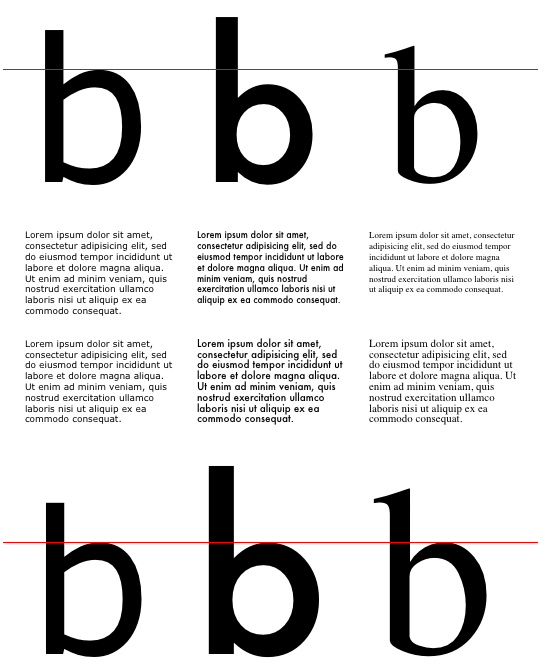





 The font stretch ranges supported by fonts A, B, and C are shown in the graph above. As you can see, because font B contains the minimum stretch value across the entire family, font B would be selected by this algorithm. However, if font B were somehow eliminated from the family, font C would then contain the lowest distance in the family, so it would be selected.
 As you can see, because font B contains the minimum stretch value across the entire family, font B would be selected by this algorithm. However, if font B were somehow eliminated from the family, font A would then contain the lowest distance in the family, so it would be selected.
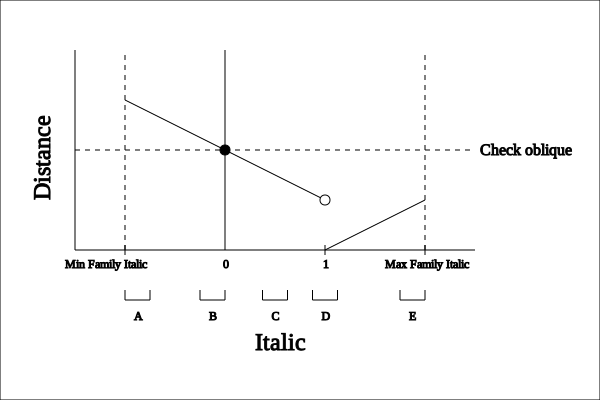 As you can see, because font D contains the minimum italic value across the entire family, font D would be selected by this algorithm. However, if font D were somehow eliminated from the family, font E would then contain the lowest distance in the family, so it would be selected. If E were eliminated, C would be selected. If C were eliminated, font B would not be chosen immediately; instead, oblique values would be consulted and an oblique value might be chosen. However, if no oblique value is chosen, font B would then be selected, followed by font A.
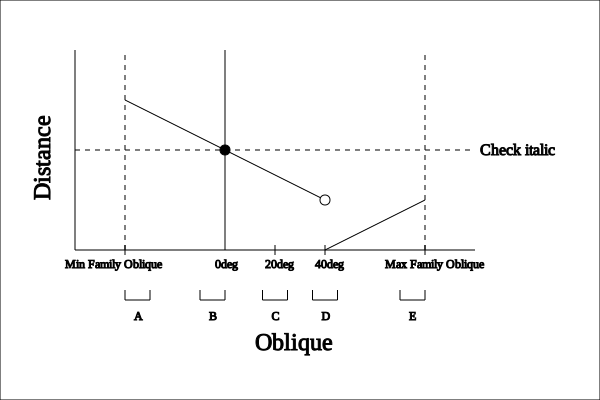 As you can see, because font D contains the minimum oblique value across the entire family, font D would be selected by this algorithm. However, if font D were somehow eliminated from the family, font E would then contain the lowest distance in the family, so it would be selected. If E were eliminated, C would be selected. If C were eliminated, font B would not be chosen immediately; instead, italic values would be consulted and an italic value might be chosen. However, if no italic value is chosen, font B would then be selected, followed by font A.
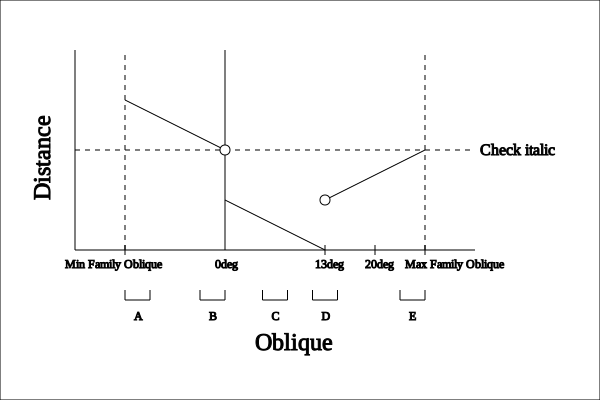 As you can see, because font D contains the minimum oblique value across the entire family, font D would be selected by this algorithm. However, if font D were somehow eliminated from the family, font C would then contain the lowest distance in the family, so it would be selected. If C were eliminated, E would be selected. If E were eliminated, font B would not be chosen immediately; instead, italic values would be consulted and an italic value might be chosen. However, if no italic value is chosen, font B would then be selected, followed by font A.
 As you can see, because font C contains the minimum oblique value across the entire family, font C would be selected by this algorithm. However, if font C were somehow eliminated from the family, font B would not be chosen immediately; instead, italic values would be consulted and an italic value might be chosen. However, if no italic value is chosen, font B would then be selected, followed by font A.
 As you can see, because font B contains the minimum distance across the entire family, font B would be selected by this algorithm. However, if font B were somehow eliminated from the family, font D would then contain the lowest distance in the family, so it would be selected. If D were eliminated, A would be selected, followed by fonts C and then E.
 As you can see, because font C contains the minimum distance across the entire family, font C would be selected by this algorithm. However, if font C were somehow eliminated from the family, font D would then contain the lowest distance in the family, so it would be selected. If D were also eliminated, B would be selected, followed by fonts A and then E.
 As you can see, because font D contains the minimum distance across the entire family, font D would be selected by this algorithm. However, if font D were somehow eliminated from the family, font B would then contain the lowest distance in the family, so it would be selected. If B were eliminated, C would be selected, followed by fonts A and then E.
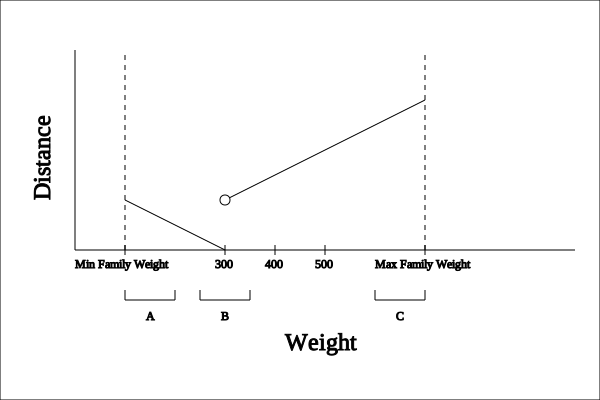 As you can see, because font B contains the minimum distance across the entire family, font B would be selected by this algorithm. However, if font B were somehow eliminated from the family, font A would then contain the lowest distance in the family, so it would be selected. If A were eliminated, C would be selected.


