(Fast) Introduction to HTML & CSSDave Kelly ( @davkell  )for @091Labs
What are HTML & CSS?HTML structures documents on the webTells browser what content is (not what it means)CSS = presentation (how things look)JavaScript adds interaction / behavioursPeanut lifted from http://www.alistapart.com/articles/understandingprogressiveenhancement/Why separate?http://www.ambientage.com/blog/091labs : 1
Standards.... define the mark-up you use tell the browser what to do with itHTML 4.01 (Don’t use)xHTML1.0Frameset  (nope)Transitional  (nope)Strict	*HTML5 (New. Not fully supported / implemented. It’s the future.)All those defined standards....do all browsers work the same?
ToolsFirefox (wide support for standards)Firebug (Firefox add-on, Chrome also, but weak). Your best friend with front-end web dev.Web Developer Toolbar (Firefox add-on)ValidatorsHTML: http://validator.w3.orgCSS: http://jigsaw.w3.orgDevelopment environmentNetbeans / Aptana for me.... Your choice (not WYSIWYG!!)(My) Development processFirefox -> Webkit (chrome / safari) -> IE8 -> IE7 -> (IE6?)Browsershots.orghttp://www.ambientage.com/blog/091labs : 2
HTMLMade up of “tags”  (elements)<h1>I’m an important heading</h1> (Heading level 1)  <img src=”images/myprofilepic.jpg” alt=”It’s a picture of me!!” /> (Image tag)Elements can contain plain text, other elements, or bothNo state / no logic (Mark-up content only, not programming)xHTML Strict elements...must be properly nestedmust be closedmust be lower caseattributes must have a value
HTML TagsTags are usually paired (e.g..., <h1> and </h1>) Some elements are “self-closing” e.g. <br /> <img … />Some elements may include attributes, (additional information that is included inside the start tag).Every HTML document contains standard tags. Each document consists of a head and body The head contains the title (and more…), and The body contains the actual text that is made up of paragraphs, lists, images, and other elements
Simple HTML Examplehttp://www.ambientage.com/blog/091labs : 3
Some HTML tag examplesHeadings
 <h1></h1>  , <h2> </h2> ……  <h6> </h6>
Paragraph: <p>Some text </p>
Lists
 Ordered List <ol> <li>I’m a list item</li></ol>
 Unordered list <ul>  <li>I’m a list item</li> </ul>
Document Section <div></div>   (Important for page layouts!)
Image <img src=“../images/mypic.jpg” alt=“My Picture” title=“It’s me!” />
Links <a href=“http://www.google.com”>Google</a>
Table  <table><tr><td>table cell</td></tr>                          <tr><td>second row cell</td></tr>             </table>http://www.ambientage.com/blog/091labs : 4 & 5
Some HTML attribute examplesHTML tags can have attributes => give some more info about the tag
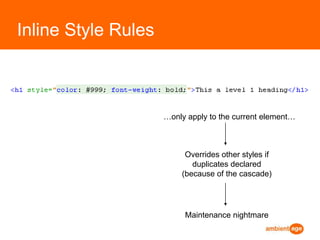
Most can have:<h1 id=“mainHeading” class=“myHeadingClass” title=“Website title” style=“color: #000000;”>My Heading</h1>
HTML FormsForms are used to accept information from the Web page userForms can use text boxes, password boxes, check boxes, radio buttons, text areas, drop-down lists, hidden fields, as well as Submit and Clear buttons.To create a form, the <form></form> element is used.Forms have 2 basic attributes: action & method, e.g., <form name=“myForm” action=“processPage.php” method=“post”>action = “where’s the data going?”method = “how’s it getting there? (post vs get)”
HTML Forms
HTML Forms
CSS (Cascading Style Sheets)Handles presentation of web page

(Fast) Introduction to HTML & CSS

  • 1.
    (Fast) Introduction toHTML & CSSDave Kelly ( @davkell )for @091Labs
  • 2.
    What are HTML& CSS?HTML structures documents on the webTells browser what content is (not what it means)CSS = presentation (how things look)JavaScript adds interaction / behavioursPeanut lifted from http://www.alistapart.com/articles/understandingprogressiveenhancement/Why separate?http://www.ambientage.com/blog/091labs : 1
  • 3.
    Standards.... define themark-up you use tell the browser what to do with itHTML 4.01 (Don’t use)xHTML1.0Frameset (nope)Transitional (nope)Strict *HTML5 (New. Not fully supported / implemented. It’s the future.)All those defined standards....do all browsers work the same?
  • 4.
    ToolsFirefox (wide supportfor standards)Firebug (Firefox add-on, Chrome also, but weak). Your best friend with front-end web dev.Web Developer Toolbar (Firefox add-on)ValidatorsHTML: http://validator.w3.orgCSS: http://jigsaw.w3.orgDevelopment environmentNetbeans / Aptana for me.... Your choice (not WYSIWYG!!)(My) Development processFirefox -> Webkit (chrome / safari) -> IE8 -> IE7 -> (IE6?)Browsershots.orghttp://www.ambientage.com/blog/091labs : 2
  • 5.
    HTMLMade up of“tags”  (elements)<h1>I’m an important heading</h1> (Heading level 1)  <img src=”images/myprofilepic.jpg” alt=”It’s a picture of me!!” /> (Image tag)Elements can contain plain text, other elements, or bothNo state / no logic (Mark-up content only, not programming)xHTML Strict elements...must be properly nestedmust be closedmust be lower caseattributes must have a value
  • 6.
    HTML TagsTags areusually paired (e.g..., <h1> and </h1>) Some elements are “self-closing” e.g. <br /> <img … />Some elements may include attributes, (additional information that is included inside the start tag).Every HTML document contains standard tags. Each document consists of a head and body The head contains the title (and more…), and The body contains the actual text that is made up of paragraphs, lists, images, and other elements
  • 7.
  • 8.
    Some HTML tagexamplesHeadings
  • 9.
    <h1></h1> , <h2> </h2> …… <h6> </h6>
  • 10.
  • 11.
  • 12.
    Ordered List<ol> <li>I’m a list item</li></ol>
  • 13.
    Unordered list<ul> <li>I’m a list item</li> </ul>
  • 14.
    Document Section <div></div> (Important for page layouts!)
  • 15.
    Image <img src=“../images/mypic.jpg”alt=“My Picture” title=“It’s me!” />
  • 16.
  • 17.
    Table <table><tr><td>tablecell</td></tr> <tr><td>second row cell</td></tr> </table>http://www.ambientage.com/blog/091labs : 4 & 5
  • 18.
    Some HTML attributeexamplesHTML tags can have attributes => give some more info about the tag
  • 19.
    Most can have:<h1id=“mainHeading” class=“myHeadingClass” title=“Website title” style=“color: #000000;”>My Heading</h1>
  • 20.
    HTML FormsForms areused to accept information from the Web page userForms can use text boxes, password boxes, check boxes, radio buttons, text areas, drop-down lists, hidden fields, as well as Submit and Clear buttons.To create a form, the <form></form> element is used.Forms have 2 basic attributes: action & method, e.g., <form name=“myForm” action=“processPage.php” method=“post”>action = “where’s the data going?”method = “how’s it getting there? (post vs get)”
  • 21.
  • 22.
  • 23.
    CSS (Cascading StyleSheets)Handles presentation of web page